Klaviyo vs another email platform is a choice about what you pay for and what you send, not a feature count. Decide which of the two you are really comparing, then read the one guide that answers it.
This page is the starting point for every Klaviyo vs search. It sorts the rivals by the question that matters, shows what each platform counts as a billable unit, and lists the order to switch in. We set up and migrate Klaviyo accounts for online stores, so we say plainly where a rival fits better.
Which Klaviyo vs comparison fits your store?
The one that matches the question you are stuck on. Google Autocomplete offers 10 rivals after “klaviyo vs” as of November 2026, and each pairing turns on a different question.
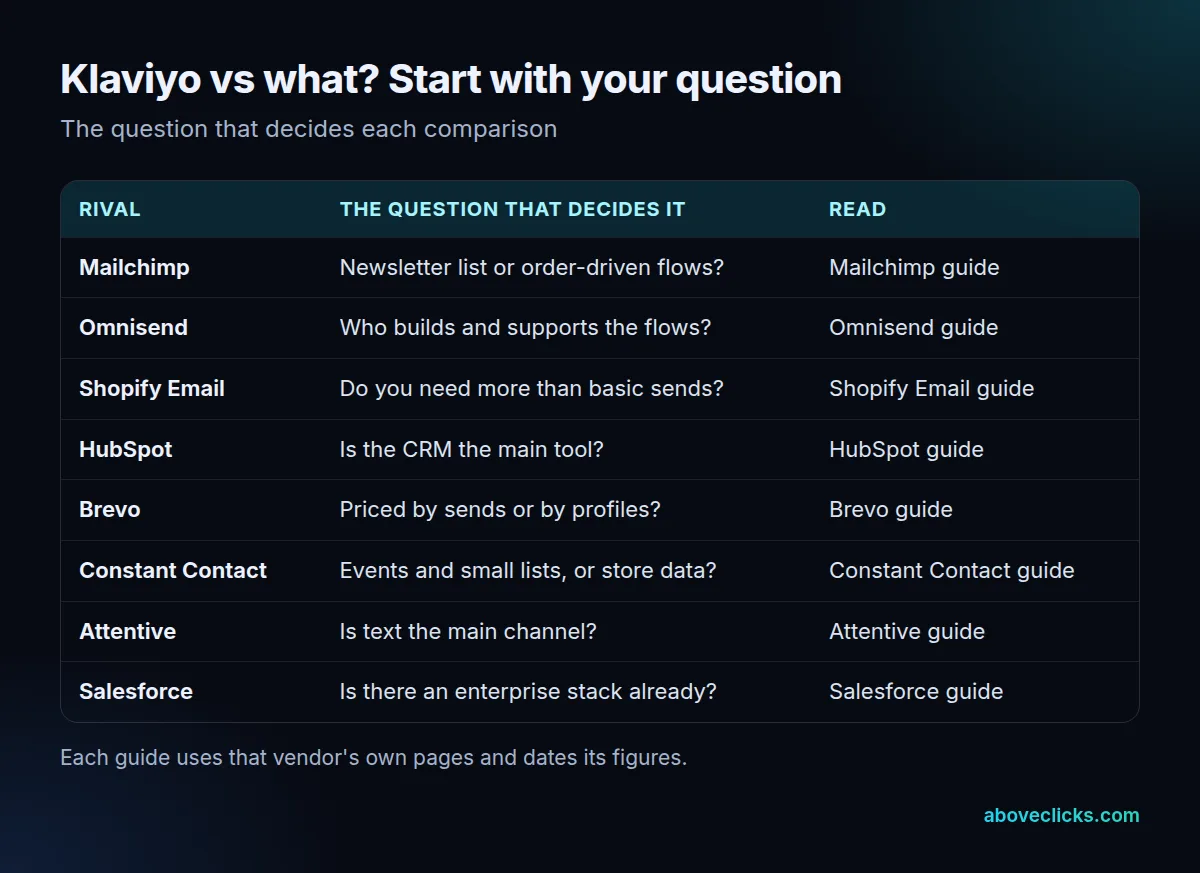
Here is where to read next for each pairing. Klaviyo vs Mailchimp is for stores deciding between a newsletter tool and order-driven flows, so open the Mailchimp comparison. Klaviyo vs Omnisend usually comes down to support and who builds the flows, which the Omnisend comparison covers.
If you are asking whether Shopify’s own tool is enough, read Shopify Email vs Klaviyo. Teams whose contacts already live in a CRM should read Klaviyo vs HubSpot, and cost-led readers Brevo vs Klaviyo.
The other pairings follow the same pattern. Klaviyo vs Constant Contact suits small lists and events, Klaviyo vs Attentive suits text-first stores, and Klaviyo vs Salesforce suits larger companies with an enterprise stack already in place. Each of those guides uses the vendor’s own pages and dates its figures, so this page does not repeat their plan prices.
Is Klaviyo better than Mailchimp, Omnisend or Shopify Email?
Better for some stores and worse for others. Klaviyo is built around store data, so it tends to win when flows and segments come from orders; a simpler tool can win on a small list or a tight budget.
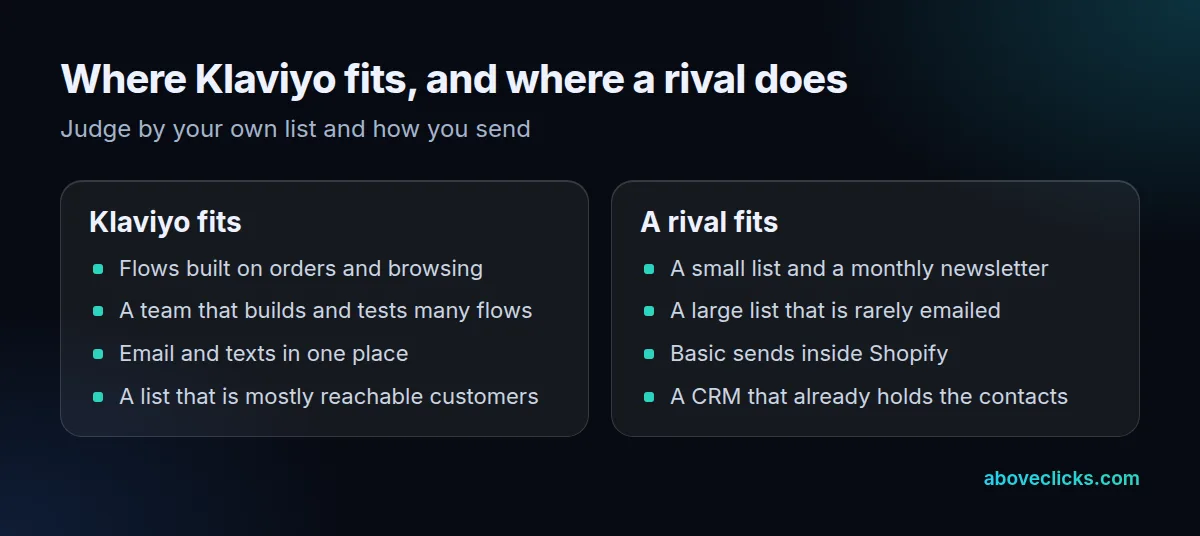
The left-hand list is the pattern we see when we set up accounts: Klaviyo pays back where someone builds and tests flows. If nobody will do that, its depth goes unused, and a simpler tool does the job at lower cost. In a Klaviyo vs Shopify Email decision that matters a lot, because Shopify Messaging comes with the Basic, Grow, Advanced and Plus plans and includes 10,000 free emails a month, as of November 2026, per Shopify’s pricing rules.
The right-hand list is just as real in any Klaviyo vs rival choice. A store that mails a large list a few times a year pays for every reachable profile on Klaviyo, so a send-based tool can cost less. A store whose customers already sit in a CRM may not need a second system.
Three checks settle most Klaviyo vs rival decisions before you open a pricing page:
- How many of your contacts can actually be emailed today?
- How many campaigns and flows do you send each month?
- Will you text customers in the next 12 months?
Write the three answers down before you read any vendor page. Most disagreements about Klaviyo vs a cheaper tool come from comparing different list sizes: one person counts every contact in the store’s customer export, another counts only subscribers, and the two figures can differ by thousands. Settle the number first, then compare.
Also decide who will own the tool after launch. A platform with deep segmentation rewards a person who reviews flow reports every month; a lighter tool suits an owner who sends a campaign when there is news. Matching the tool to that person matters more than any single feature in a Klaviyo vs rival grid.
How does each platform count what you pay for?
By different units, and that matters more than the headline plan price. Klaviyo’s plan is based on active profiles; Shopify Messaging counts each email sent.
Klaviyo’s billing page defines an active profile as any profile with an email address that can be emailed through Klaviyo, whatever its consent status, as of November 2026. Email-suppressed profiles are left out once suppression is processed, and a phone number alone does not count. After a big cleanup, the displayed count can take up to 72 hours to refresh.
Shopify Messaging works the other way. Its pricing rules charge $1 per 1,000 emails after the free 10,000, up to 300,000, and each address in each send counts as one email, as of November 2026.
A worked example shows the gap. This is an invented store, not a client. It has 12,000 emailable profiles and sends 4 campaigns a month:
- Shopify Messaging counts 12,000 x 4 = 48,000 emails.
- The first 10,000 are free, which leaves 38,000 billable emails.
- At Shopify’s rate of $1 per 1,000 (as of November 2026, from the pricing rules), that is $38 for the month.
- Klaviyo ignores the number of sends in that comparison. The plan must cover the 12,000 active profiles, so the bill moves with list size, not volume.
Change either input and the answer flips. Double the sends and the Shopify figure rises, while the Klaviyo figure stays tied to profiles. Run your own list size and sends through each vendor’s rule before you read any plan table; that is the step most Klaviyo vs comparisons skip.
The same logic applies to other platforms. Some count every contact in the account, including people who have unsubscribed; others bill by emails sent; others by profiles that can be reached. Ask each vendor one question in writing: which of my contacts would you count, and when? The answer should name unsubscribed, bounced and suppressed contacts separately. The linked comparison guides above spell out the answer for each rival as of their publication dates.
A quick way to test any quote is to price three versions of your own list: today’s size, the size after you remove contacts nobody has opened in a year, and the size you expect in 12 months. If the bill only looks reasonable at the smallest of the three, the plan will not stay cheap as you grow.
What is better than Klaviyo?
Nothing is better for every store; a Klaviyo vs rival ranking depends on what you have to optimize. A cheaper tool wins on bill size, a CRM wins on contact history, and a text-first tool wins when most revenue comes from SMS.
Growth is the cost trap on the Klaviyo side. Klaviyo’s billing page says your plan must cover your active profile count at the end of each billing cycle: with 7,000 active profiles, the plan must allow at least 7,000, and a plan that allows 50,000 covers exactly 50,000. Go over and you are moved up to the next plan automatically. A list you never clean therefore costs you every month.
Our Klaviyo alternatives guide compares six options by what they charge for and where their free plans stop. Be wary of one mistake: picking a rival because its entry plan looks lower. Compare at your own list size and send count, as in the worked example above, and count only the add-ons you will really use.
The second mistake is comparing features you will never switch on. A grid with 40 rows looks thorough, but most stores run five or six flows: a welcome series, an abandoned cart, a browse reminder, a post-purchase thank-you and a win-back. Check that the rival builds those five well, with order data, before you weigh anything else.
The third mistake is ignoring what you already have. If the store’s checkout, reviews app and loyalty tool all connect to Klaviyo, moving costs hours of rebuilding on top of the monthly fee. That is not a reason to stay, but it is a cost that belongs in the comparison.
How do you switch without losing subscribers?
Move the consent data before the flows, and disconnect the old app from Shopify before you connect the new one. Done out of order, existing subscribers can get a second opt-in email.
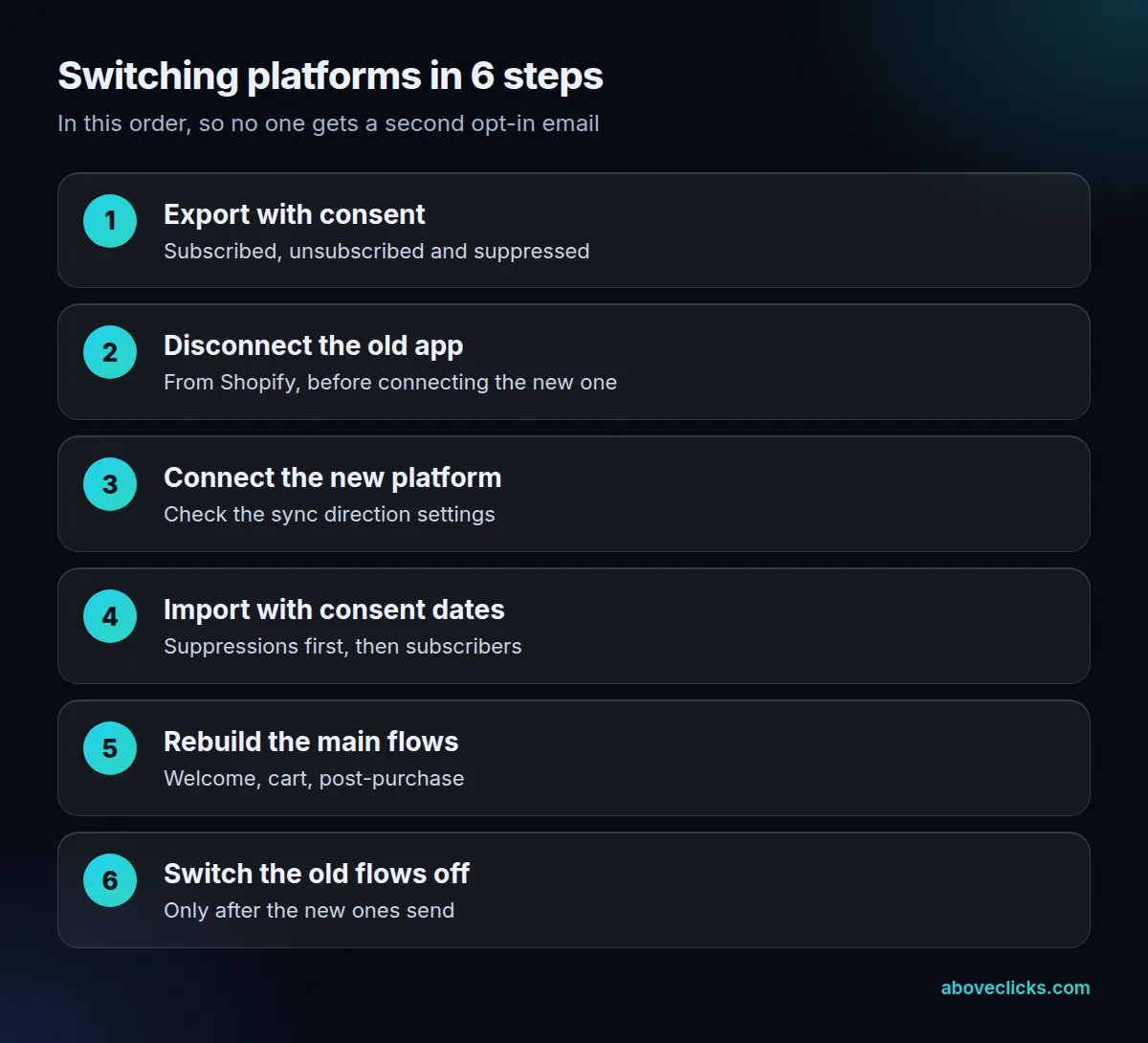
Klaviyo’s Shopify setup guide says to disconnect your prior email service from Shopify first, because failing to do so could send double opt-in emails to your existing list. It also warns that choosing “All profiles” for the sync to Shopify creates Shopify customers for every Klaviyo profile, including imported ones.
For the contacts themselves, Klaviyo’s import guide lists built-in integrations for Mailchimp, Campaign Monitor and Salesforce Marketing Cloud, which also sync unsubscribes. Constant Contact moves by CSV export. Load unsubscribes and bounces as suppressions before you send anything.
Plan for the quiet week after any Klaviyo vs rival move. Keep sending volume close to what your list is used to, because a sudden jump from a new sending setup can look unusual to mailbox providers. Check that your sending domain is authenticated in the new platform before the first campaign, and send the first few messages to your most engaged customers. If something looks wrong, you will see it in a small send rather than a full one.
For subscribers who already consented, set historical_import to true and give each profile a consented_at timestamp at least 5 minutes in the past. That skips double opt-in messages and list-triggered flows. Our Klaviyo migration service follows this order, and the Klaviyo email marketing page shows what gets rebuilt after it.
Is Klaviyo worth it?
It is when automated flows earn more than the platform costs, and your list is mostly people you can actually email. Test that against last quarter’s flow revenue before you settle a Klaviyo vs rival question.
Whichever platform wins your Klaviyo vs comparison, the sending rules are the same. Google’s sender guidelines require senders of more than 5,000 messages a day to Gmail to support one-click unsubscribe and keep their spam rate below 0.30%. In the US, the FTC’s CAN-SPAM guide says each separate email in violation can carry penalties of up to $53,088, so consent records matter more than the logo on the tool.
A platform will not fix a list that nobody wants to read, and no Klaviyo vs result changes that. If you are unsure whether your current setup is working, our free audit reviews it and tells you whether to stay, switch or fix what you have. More guides are in buying guides.