E-commerce SEO
Shopify vs WooCommerce SEO: what each platform lets you control
Is Shopify good for SEO? Yes, and so is WooCommerce: both platforms can rank. This comparison shows what you control on Shopify…
Tracking & analytics · Tag Manager
We do Google Tag Manager setup and clean-up for online stores: a container audit, an e-commerce data layer, duplicate tags removed, and every tag named, documented and tested. Purchases are counted once, and your team can see what each tag does.
200+ clients served 500+ projects delivered
Free GTM review
Three fields and you are done. We check containers, tags and triggers, then send what to clean up.
Your PDF report comes by email. If you want to discuss going ahead after reading it, we’ll set up a video meeting. We use your details only for this audit.
Fit
Not the right fit if you only need one tag added. A small change is quicker as a one-off task; this service is for setting up or cleaning up the whole container.
Problems we fix
GA4 installed by an app, by the theme and by GTM, so every page view and purchase is counted two or three times.
Triggers scrape prices and product names from the page, so a theme change breaks them silently.
Tags called “New Tag 14” with no description, so nobody knows which ones still matter.
Pixels for tools you stopped paying for years ago still load on every page.
Anyone with access can publish, with no version notes, so a bad change goes live untested.
GTM can’t run in Shopify’s checkout pages the way it used to, so purchase tags stopped and nobody noticed.
In 1:10 · animated
A short animated walk-through of the first checks in our audit. No sound needed: everything is on screen, and the transcript is below.
What we check first in a GTM container, an animated explainer of 1:10 with on-screen captions and controls to pause.
Our approach
Google Tag Manager setup starts with an audit of what already runs. We export the container, list every tag, trigger and variable, and compare it with what loads on the live store: tags in the theme, tags added by apps and tags in GTM. Tag Assistant and the browser’s network panel show which fire on each page, so duplicate tags show up straight away.
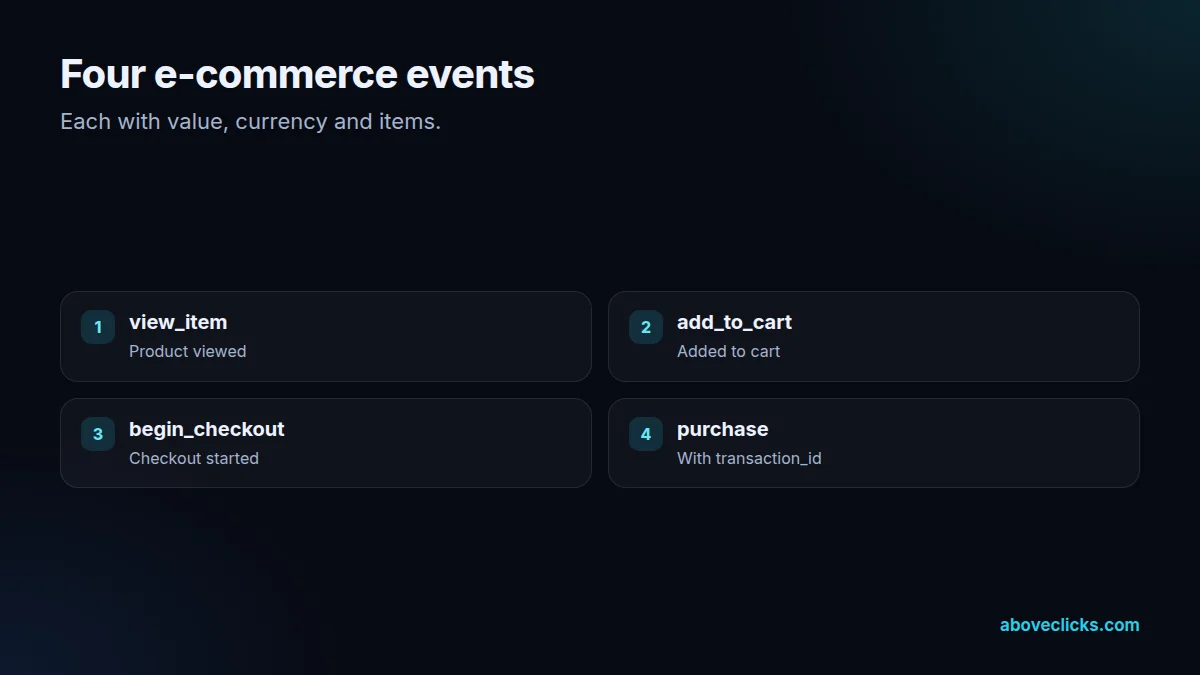
The data layer comes next. Google’s data layer guide describes it as the object that passes information from the site to Tag Manager. We push e-commerce events into it with the item data that GA4’s e-commerce measurement expects: view_item, add_to_cart, begin_checkout and purchase with transaction_id, value, currency and items. Tags then read clean data instead of scraping the page.
Every purchase gets a transaction_id, and every tag reads the same one. That lets GA4 drop duplicate purchase events, and lets ad platforms deduplicate the browser event against the server event if you also use a Conversions API. When a purchase is counted twice, the cause is almost always two tags without a shared ID, or the same tag installed in two places.
On Shopify, the checkout works differently. Shopify retired the old checkout code, and tracking on checkout and thank-you pages now runs through custom pixels in a sandbox, using customer events. We load GTM inside a custom pixel where that suits, map Shopify’s events to the data layer, and test the purchase on a real order. Our checkout tracking page covers that repair in detail.
The container gets a structure. Tags are named by platform, type and event (“GA4 · Event · add_to_cart”), triggers and variables follow the same pattern, and folders group them by platform. Each tag has a note saying what it does and who asked for it. Old tags are paused for a few weeks, then removed once nothing is missing.
Variables get the same care. Built-in variables are switched on only when a tag uses them, data layer variables use the exact key names from the agreed plan, and lookup tables replace long chains of near-identical triggers, so the container stays small enough for your team to read.
Consent is part of the build. Each tag gets the consent checks it needs, and the default consent state is set on the Consent Initialization trigger before any tag runs. If you sell to the EU or UK, our consent mode setup service covers the banner side in full.
Publishing follows a routine. Changes are made in a workspace, checked in Preview mode against the live store, and published with a version name and notes. Google’s user permissions let you limit who can publish, so we keep publish rights to one or two people and give the rest edit or read access.
Kashif builds the tracking for this site and for the stores on our tracking and analytics pages, including GA4 audits, server-side setups and Shopify checkout repairs. After the Google Tag Manager setup is done, we compare purchases in GA4 and each ad platform with real store orders for two weeks, and hand over the container document.

What’s included
Every tag, trigger and variable listed and compared with what actually loads.
Tags installed twice (theme, app and GTM) found and reduced to one.
view_item, add_to_cart, begin_checkout and purchase with full item data.
Checkout and purchase events through Shopify customer events where needed.
A naming pattern, folders by platform and a note on every tag.
Consent settings per tag and the default set before anything fires.
Publish rights limited, every version named and noted.
Purchases in GA4 and ad platforms compared with store orders for two weeks.
How we run it
Every Google Tag Manager setup runs in four steps, ending with a check against real orders. Typical timing: the audit within 2 workdays, the build in about a week, and testing and handover within 2 weeks.
Step 1
Container exported, live tags listed, duplicates and gaps found.
Step 2
Data layer, naming and the tags to keep or remove agreed with you.
Step 3
Data layer added, tags rebuilt, every event checked in Preview.
Step 4
Two weeks of order checks, then the container document.

Pricing
The audit is free. Paid work starts at these prices, and your exact cost is fixed in writing before any work begins.
Free no obligation
Tell us your container setup and we will review it within 2 workdays.
Get my free auditFixed scope
From $400 one-off
A clean container with core tags.
From $150 monthly
New tags added correctly each month.
All prices are starting prices in US dollars. Custom work beyond these options is quoted after the audit.
By industry
GTM in the theme for store pages, a custom pixel for checkout events, and apps that add their own tags to check for duplicates.
A data layer from a plugin or custom code, with care for caching plugins that can serve stale data.
A data layer written into the front end, with events fired on route changes rather than page loads.
Sources
Platform rules change. These are the official pages we check the work against, so you can check it too.
FAQ
Can’t find yours? Ask on WhatsApp or by email and we’ll answer it.
Not always. A small store with one or two tags can use the Google tag directly. GTM helps once you run several platforms, need an e-commerce data layer, or want changes without editing the theme.
Usually because the purchase tag is installed twice, for example by an app and by GTM, or fires again when the thank-you page is reloaded. A shared transaction_id and one source of truth fix it.
Not as it used to. Checkout and thank-you tracking now runs through Shopify’s custom pixels and customer events, and GTM can be loaded inside a custom pixel for those pages.
It’s an object on the page that passes structured information, such as the product, price and order ID, to Tag Manager. Tags read it instead of scraping the page, so theme changes don’t break them.
No. Tags we think are unused are paused first, for a few weeks, and only removed when you and the reports confirm nothing is missing.
No. Standard GTM runs in the browser. Server-side tagging runs a separate container on a server, which we cover on our server-side tracking page. Many stores use both.
Latest guides
E-commerce SEO
Is Shopify good for SEO? Yes, and so is WooCommerce: both platforms can rank. This comparison shows what you control on Shopify…
Buying guides
21 questions for your intro calls, grouped by topic, each with what a good answer sounds like and what should worry you.…
Buying guides
Percentage of ad spend, flat retainer, performance fee, hourly or a hybrid: what each model rewards, how it behaves as your spend…
Free growth audit
Tell us about your store. We’ll review your tracking, campaigns and SEO and send you a written audit with the top fixes, ranked by impact.