Google Ads · Search, Shopping, Performance Max

Google Ads for e-commerce: Search, Shopping and Performance Max.

We run Google Ads for online stores from the feed up: Search, Shopping and Performance Max on a Merchant Center feed written for search. Tracking with enhanced conversions comes first, and budgets follow your margins, so your best products get the spend.

200+ clients served 500+ projects delivered

Free Google Ads audit

We’ll check your Google Ads account, feed and conversion tracking and send a PDF report within 2 workdays.

Three fields and you’re done. The PDF report shows what we found on your own pages and accounts, and the order we’d fix it in. It covers the problems we see most often:

  • Performance Max spends, but on what?
  • Disapproved products or a suspended account
  • Conversions that don’t match orders
Chat on WhatsApp Prefer to talk first? Send us your URL on WhatsApp.

Your PDF report comes by email. If you want to discuss going ahead after reading it, we’ll set up a video meeting. We use your details only for this audit.

A relevant result

Real numbers, or none at all.

We only publish results from our own reports and platform exports, with the timeframe and data source.

Case study

From a sprawling custom CMS to a focused Shopify store

  • 3,847 → 206,849Search Console clicks in 28 days
  • 2.41 → 8.76Meta Ads ROAS, Dec 2025 vs Sep 2026
  • 1.21 → 8.33Google Ads ROAS, Dec 2025 vs Sep 2026
  • 240 of 240tracked keywords in Google’s top 10, 86 in positions 1–3
Industry
Jewelry e-commerce: rings, necklaces, earrings and personalized gifts
Market
United States
Channels
SEO, Meta Ads, Google Ads
Platform
Custom CMS → Shopify (launched May 12, 2026, same domain)
Timeframe
January–December 2026 engagement, three quarters complete

The challenge

The store’s custom CMS exposed 52,684 discovered URLs, and 47,948 of them were unwanted variants: faceted URLs, tag indexes and duplicate pagination. Google Ads held 19 legacy campaigns (4 delivering in the baseline month) with incomplete purchase tracking, and Meta’s purchase values were incomplete too.

What we did

  • Repaired purchase measurement first: one USD order-value specification, Meta Pixel and Conversions API deduplicated, and one primary Google Ads purchase action with transaction IDs.
  • Moved the store from the custom CMS to Shopify on May 12, 2026, on the same domain, with 4,736 canonical URLs and permanent redirects for equivalent old pages.
  • Rebuilt Google Ads around two Performance Max campaigns, Shopping and branded Search, reorganized Meta around prospecting, catalogue, new collections and returning shoppers, and grew SEO content against 240 fixed keywords.

Results

  • Search Console clicks 3,847 → 206,849 and impressions 447,913 → 10,247,981 (28 days: Dec 4–31, 2025 vs Sep 20–Oct 17, 2026); CTR 0.9% → 2%, average position 22.8 → 7.9.
  • All 240 tracked keywords in Google’s top 10, 86 in positions 1–3 (Ahrefs Rank Tracker, Google US desktop, October 17, 2026).
  • Meta Ads ROAS 2.41 → 8.76 (spend $9,847.63 → $48,736.29, purchases 102 → 1,897) and Google Ads ROAS 1.21 → 8.33 (spend $11,483.79 → $39,847.63, purchases 62 → 1,473), Dec 2–31, 2025 vs Sep 1–30, 2026.
  • 52,684 discovered URLs → 4,736 canonical Shopify URLs, about 91% smaller.

Data source

Google Search Console (Performance report, web search), Ahrefs Rank Tracker, Google Ads and Meta Ads Manager campaign reports. Money in USD; ROAS is attributed merchandise value divided by ad spend, not profit.

Screenshot (redacted)

Six report screenshots, before and after: Search Console, Google Ads and Meta Ads.

What’s next

The fourth and final quarter of the January–December 2026 engagement.

The December baseline had incomplete purchase reporting, so the ROAS change is reported attributed performance, not a like-for-like profit comparison. Meta and Google can both count the same order, and the two Search Console periods differ in season and catalogue.
See a sample report

Fit

Who it’s for

  • Stores with a product catalog on Shopify, WooCommerce or BigCommerce
  • Brands already on Google Ads whose results have gone flat, or whose Performance Max feels like a black box
  • Stores with disapproved products or a suspended Merchant Center account
  • Brands selling internationally

Not the right fit for local service businesses or lead generation. We only run e-commerce accounts, so this is ecommerce PPC management and nothing else.

Problems we fix

Where Google Ads accounts lose money.

  • 01

    Performance Max spends, but on what?

    Budget drifts to branded searches and a handful of products, and the standard reports don’t show why.

  • 02

    Disapproved products or a suspended account

    Missing attributes, price and availability mismatches or policy flags keep products out of Shopping.

  • 03

    Conversions that don’t match orders

    Duplicate or missing purchase tags, or page views counted as conversions, so smart bidding learns from the wrong signal.

  • 04

    Search terms nobody checks

    Broad match and Performance Max pick up irrelevant searches that take a share of the budget every day.

  • 05

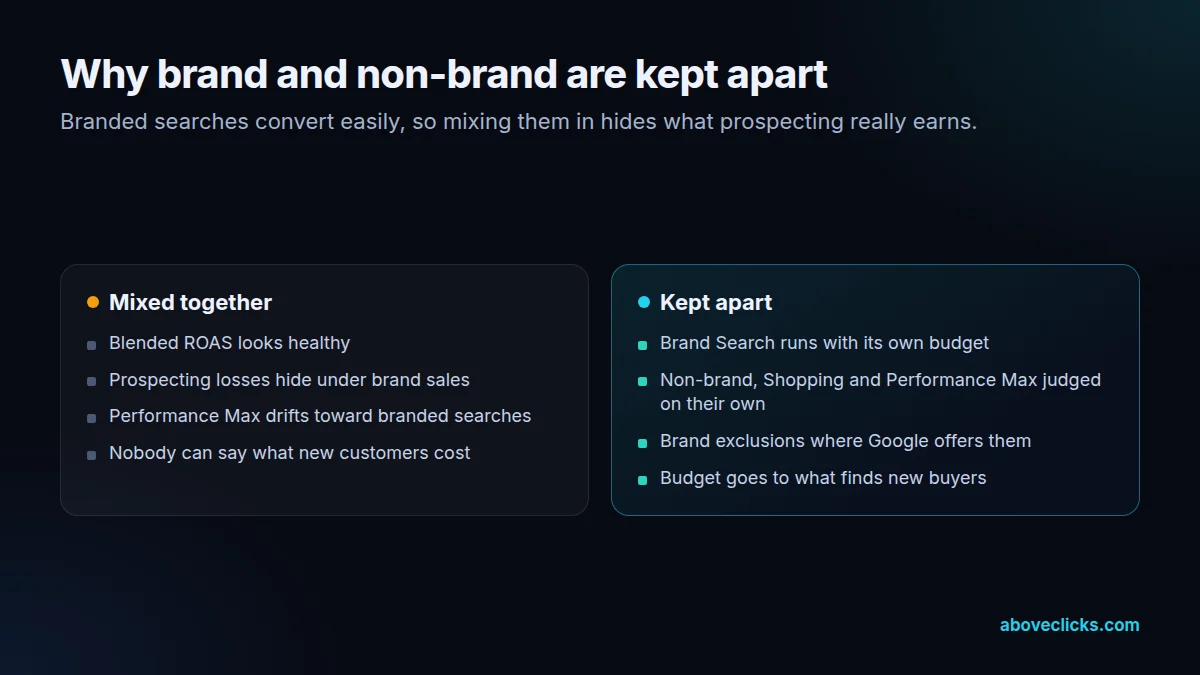
    Brand and non-brand mixed together

    Branded searches make the blended ROAS look healthy while prospecting loses money underneath.

  • 06

    A thin product feed

    Titles copied from the store, missing GTINs, no custom labels. Google has little to match searches against.

Comparison of a Google Ads account with branded and non-branded searches mixed together and one where they run in separate campaigns
Separate budgets show what non-brand campaigns earn on their own.

In 1:10 · animated

Before we change anything, we check five things.

A short animated walk-through of the first checks in our audit. No sound needed: everything is on screen, and the transcript is below.

What we check first in a Google Ads account, an animated explainer of 1:10 with on-screen captions and controls to pause.

Read the transcript
  1. What we check first in a Google Ads account Five checks, from the product feed up.
  2. 1. Is the product feed healthy? In Merchant Center we look for disapproved products, missing GTINs and attributes, and titles that don’t match how people search.
  3. 2. Is purchase the conversion that counts? Purchase should be the primary conversion, with real order values and enhanced conversions on. Page views or add-to-carts as primary teach bidding to chase browsers.
  4. 3. Brand and non-brand, kept apart? Branded searches make the blended ROAS look healthy. Split out, prospecting often tells a different story. (Example account.)
  5. 4. Who reads the search terms? Broad match and Performance Max pick up searches that don’t sell. We review the search terms regularly and add negative keywords. (Example search terms for a jewelry store.)
  6. 5. Are targets set from your margins? Target ROAS comes from your break-even ROAS, once the account has the conversion data to support it, not from a benchmark. (Example: break-even plus the profit you want on each order.)
  7. Then we fix them, in that order. Want this checked on your Google Ads account? The free growth audit covers all five, in writing.

Our approach

Google Ads that start with the feed.

For a store, most Google Ads results are decided before a bid is set, in the Merchant Center feed. Shopping ads and Performance Max match searches against your product titles, descriptions, product types and GTINs, so a thin feed means the right searches never see your products. We rewrite titles the way buyers search (brand, product type, material, size, color) and fill the attributes in Google’s product data specification.

Then we add custom labels for margin, price band and best sellers. Labels let us split Shopping and Performance Max campaigns, so a product with a 70% margin and one with a 20% margin aren’t bid the same way. Each group gets its own target from break-even ROAS, which is 1 divided by the margin: a product with a 40% margin breaks even at a ROAS of 2.5.

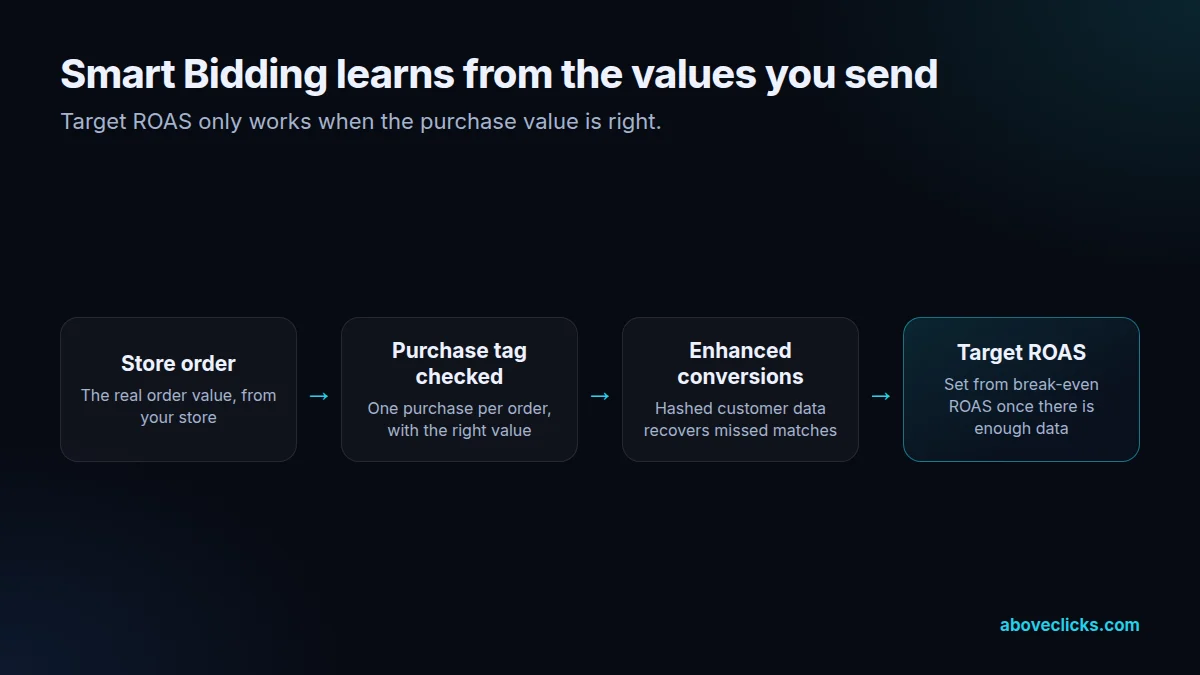
Smart bidding is only as good as the conversion it learns from. Purchase is the primary conversion with the real order value, everything else is secondary, and enhanced conversions send hashed customer data with each order to recover sales that cookies miss. Where you have visitors from the EEA or the UK, consent mode is checked too, so the account stays within the consent rules.

Branded searches are kept apart from everything else. A shopper typing your store name was going to find you anyway, and mixing those cheap sales into a generic campaign hides the products that lose money. We report brand and non-brand separately, judge the whole account on MER with tracking we check against your orders, and plan it next to Meta ads and e-commerce SEO.

How we use AI here

How we use AI in Google Ads.

Google moved Search toward AI Max and automated bidding. As a Google Ads agency for ecommerce, we treat those features as tools to set up and watch, not switches to leave on by default.

  • AI Max, campaign by campaign

    Search term matching, text customization and final URL expansion are each decided per campaign, with brand and URL exclusions where they’re needed. Our AI Max migration audit covers this in detail.

  • Smart Bidding with real values

    Target ROAS only works if conversion values are right. We check the purchase tag against store orders and, where you share margins, send values closer to profit.

  • Ad copy variants

    AI drafts headline and description options for responsive search ads by angle and audience. A person checks each one against Google’s ad policies and your product facts.

  • Search term reviews at scale

    Scripts and AI clustering group thousands of search terms by intent, so negatives and new keywords come from patterns, not a skim of the top rows.

Where it doesn’t help: Google’s bidder already sets bids, so we don’t sell “AI bid management” on top. Deciding which products deserve budget, and which queries you never want to pay for, stays a human call.

Flow from store order to Target ROAS: the purchase tag checked against orders, enhanced conversions on, and the target set from break-even ROAS
We check the purchase tag against store orders before any target ROAS is set.

What’s included

What our Google Ads service includes.

  • Account, feed and tracking audit

    A written review of campaign structure, search terms, bidding, the Merchant Center feed and conversion tracking.

  • Merchant Center setup and feed optimization

    Titles and descriptions written for search, GTINs and product types, custom labels for margin and best sellers, supplemental feeds, and diagnostics fixed.

  • Conversion tracking and enhanced conversions

    Purchase as the primary conversion with real order values, other actions as secondary, enhanced conversions on, and consent mode checked.

  • Search campaigns

    Brand and non-brand separated, match types chosen on purpose, shared negative keyword lists and regular search-terms reviews.

  • Shopping and Performance Max

    Campaigns split by margin, category or performance using custom labels, with asset groups and brand exclusions where available.

  • Bidding from your numbers

    Target ROAS set from your break-even ROAS and margins, once the account has enough conversion data to support it.

  • Plain-English monthly report

    Spend, revenue, ROAS and MER, what we changed and why, and what happens next.

Flow from store catalog to Google Merchant Center feed optimization, custom labels for margin and best sellers, and campaigns split by those labels
Custom labels let budget follow margin and best sellers instead of spreading evenly across the catalog.

How we run it

Four steps, in this order.

Campaigns are only rebuilt once the feed and tracking are right. Typical timing: the audit within 2 workdays, setup and fixes in about a week, the first optimization cycle within 2 weeks, and the first monthly report after 30 days.

  1. Step 1

    Audit and targets

    We review the account, feed and tracking, and work out your break-even ROAS from real margins.

  2. Step 2

    Fix the feed and tracking

    Merchant Center diagnostics, feed quality and purchase tracking are fixed before campaigns are rebuilt.

  3. Step 3

    Rebuild and launch

    Brand, non-brand, Shopping and Performance Max get clear jobs and separate budgets, so you can see what each one does.

  4. Step 4

    Scale by margin

    Budget shifts toward the products and campaigns that pay back, and search terms and the feed are reviewed as spend grows.

Pricing

Starting prices, in US dollars.

The audit is free. Paid work starts at these prices, and your exact cost is fixed in writing before any work begins.

  • Free audit

    Free no obligation

    Get your free audit.

    Get my free audit
  • After the audit

    Account setup

    From $400 one-off

    Conversion tracking, feed and campaign structure built or rebuilt.

    • Account, feed and tracking audit
    • Merchant Center setup and feed optimization
    • Conversion tracking and enhanced conversions
    • Search campaigns
    Start with the free audit
  • Monthly Google Ads management

    From $500 monthly, plus ad spend

    Search, Shopping and Performance Max run against your margins.

    • Ongoing search-terms reviews, negative keywords and bid adjustments
    • Feed improvements: titles, attributes and custom labels
    • A plain-English monthly report
    Ask about this option

All prices are starting prices in US dollars. Custom work beyond these options is quoted after the audit.

Every month

What you get each month

  • Ongoing search-terms reviews, negative keywords and bid adjustments
  • Feed improvements: titles, attributes and custom labels
  • A plain-English monthly report: spend, revenue, ROAS and MER by campaign type, what changed and what’s next
  • Updates by email and WhatsApp, and a video call when you want one

We optimize every week, and your report arrives in the first week of each month.

Pricing

How pricing works

Pricing depends on your ad spend, the channels involved and how much setup work your account needs. We quote after the audit, once we’ve seen the account, so the number is based on real work rather than a guess. Google Ads management is one flat monthly amount, starting at $500, plus a one-off account setup from $400 when the account needs it. There’s no percentage of ad spend, no minimum ad spend and no minimum term: plans run month to month. Your ad spend is paid straight to Google from your own account.

Start with the free audit to get a quote for your store.

By industry

What changes for your category.

  • Jewelry

    Shoppers search by metal, stone and style. We put those words at the front of product titles, and plan budgets around Valentine’s Day, Mother’s Day and the holidays.

  • Fashion and apparel

    Every size and color is its own product in the feed. We group variants correctly, keep sold-out sizes out of Shopping and give new arrivals their own campaign while they’re fresh.

  • Luxury and high-ticket

    Few, large orders give smart bidding little data. We keep targets loose for longer, judge results over weeks and track enquiries as secondary conversions.

Sources

The documentation we work from.

Platform rules change. These are the official pages we check the work against, so you can check it too.

FAQ

Straight answers.

Can’t find yours? Ask on WhatsApp or by email and we’ll answer it.

How much should we spend on Google Ads?

Start from your break-even ROAS and the searches you can win, not a round number. A budget that leaves campaigns limited by budget every day hides what works. We set a test range in the audit and adjust it once a month of data is in.

Should we use Standard Shopping or Performance Max?

Often both. Performance Max can find demand across Google’s networks, while Standard Shopping gives more control and clearer search-term data. We decide per account, based on your data, margins and catalog size.

Does Performance Max take credit for branded searches?

It can, because it is allowed to show ads on your brand name unless you exclude it. We add brand exclusions where available and run brand Search on its own, so you can see what Performance Max adds.

Can you fix a Merchant Center suspension?

We find the cause (often misrepresentation flags, missing store policies, or price and availability mismatches), fix it on the site and in the feed, and request a review. Google makes the final call, so nobody can promise reinstatement.

Do you set target ROAS on day one?

No. Target ROAS needs enough conversion data to work. We start with a bidding strategy that suits the data available, then set the target from your break-even ROAS.

Do you work with Shopify and WooCommerce stores?

Yes, and BigCommerce. We connect the feed through the platform’s Google integration or a feed tool, and set up purchase tracking and enhanced conversions on each.

Who owns the Google Ads account?

You do. We work through user access you grant, and the Google Ads and Merchant Center accounts, feeds and data stay with your business if we stop working together.

What access do you need?

Admin access to Google Ads, Merchant Center and GA4, plus store access for tag and feed work. Read-only access or screenshots are enough for the free audit.

Related guides

Read before you decide.

All Google Ads guides

Free growth audit

Find out what’s holding your store back.

Tell us about your store. We’ll review your tracking, campaigns and SEO and send you a written audit with the top fixes, ranked by impact.

  • Written audit as a PDF, delivered within 2 workdays (see a sample)
  • A video meeting to go through it, if you want to discuss next steps
  • Free and no obligation
  • Read-only access or screenshots are enough

Free audit
Chat on WhatsApp