Tracking & analytics · GA4

A GA4 audit for online stores: 25 checks, then the fixes.

Most stores have GA4 installed and few trust it. Our GA4 audit runs 25 checks across property settings, e-commerce events, data quality, attribution and privacy, compares GA4 with your store orders, and then fixes what’s wrong, so your reports answer the questions you actually ask.

200+ clients served 500+ projects delivered

Free GA4 check

We will check your GA4 setup and send the issues within 2 workdays.

Three fields and you are done. We review properties, events and conversions, then send what to fix.

  • Properties and data streams checked
  • Events and conversions reviewed
  • A short list of fixes
Chat on WhatsApp Prefer to talk first? Send us your store URL on WhatsApp.

Your PDF report comes by email. If you want to discuss going ahead after reading it, we’ll set up a video meeting. We use your details only for this audit.

Results

A clean GA4 setup, screen by screen.

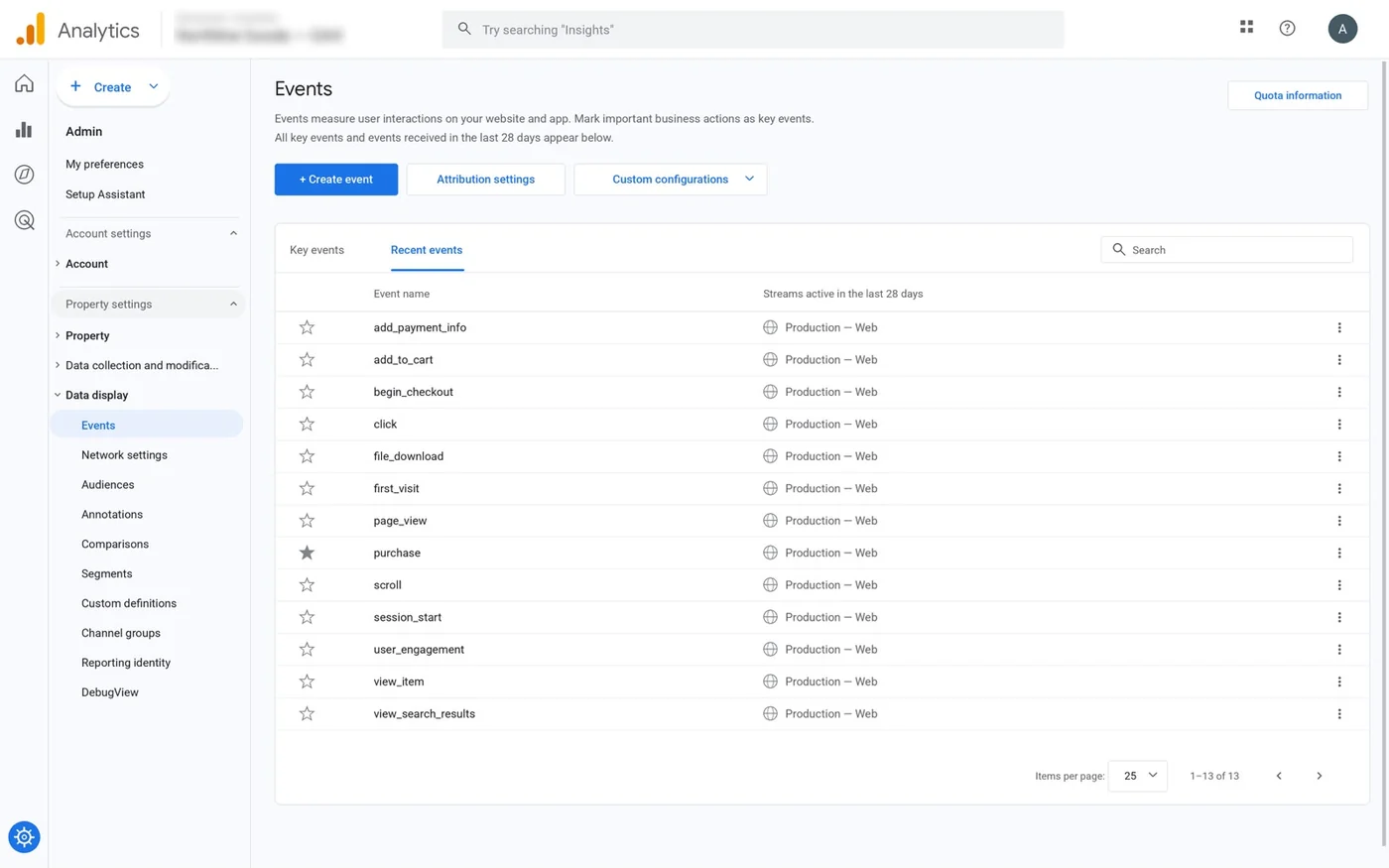
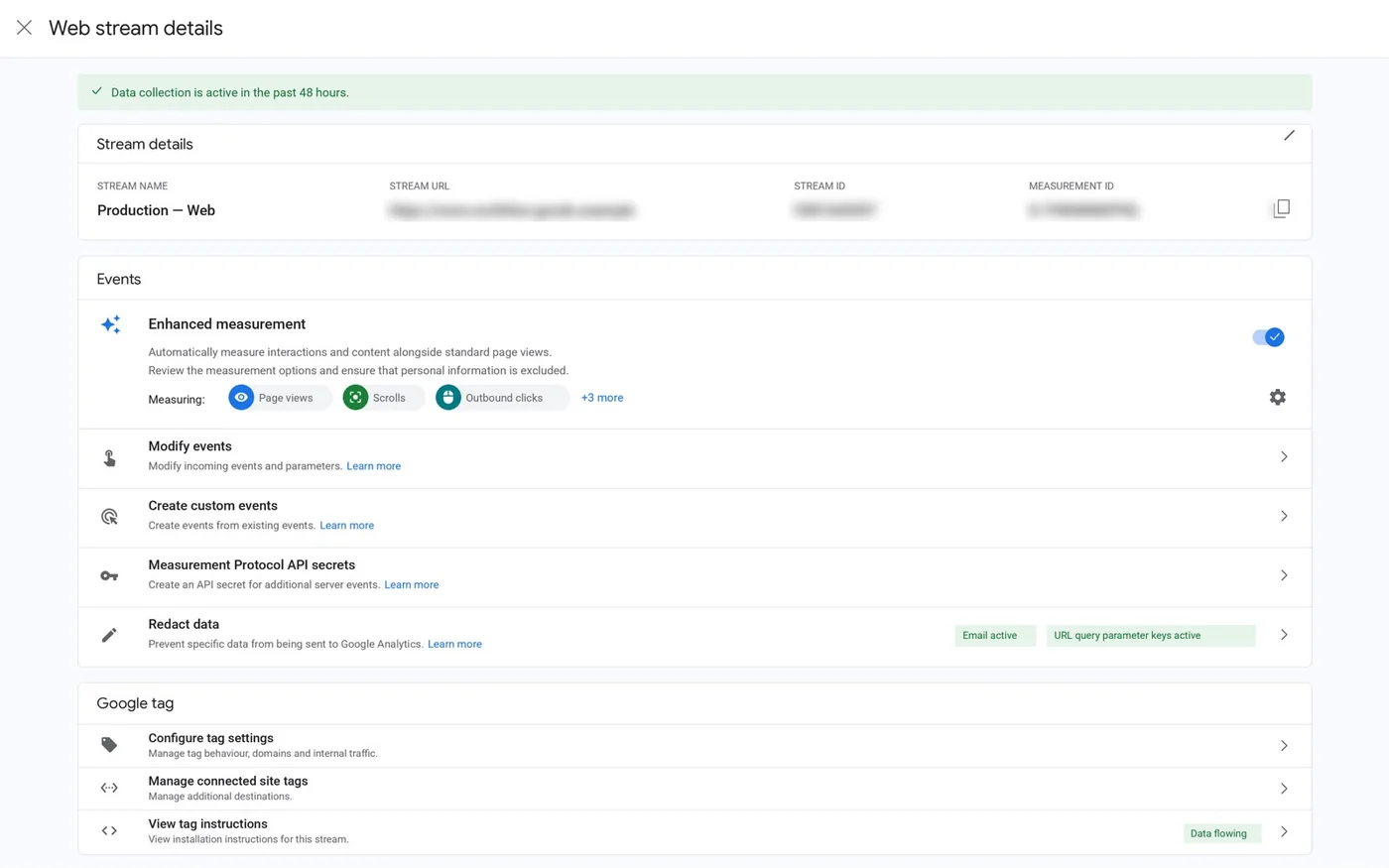
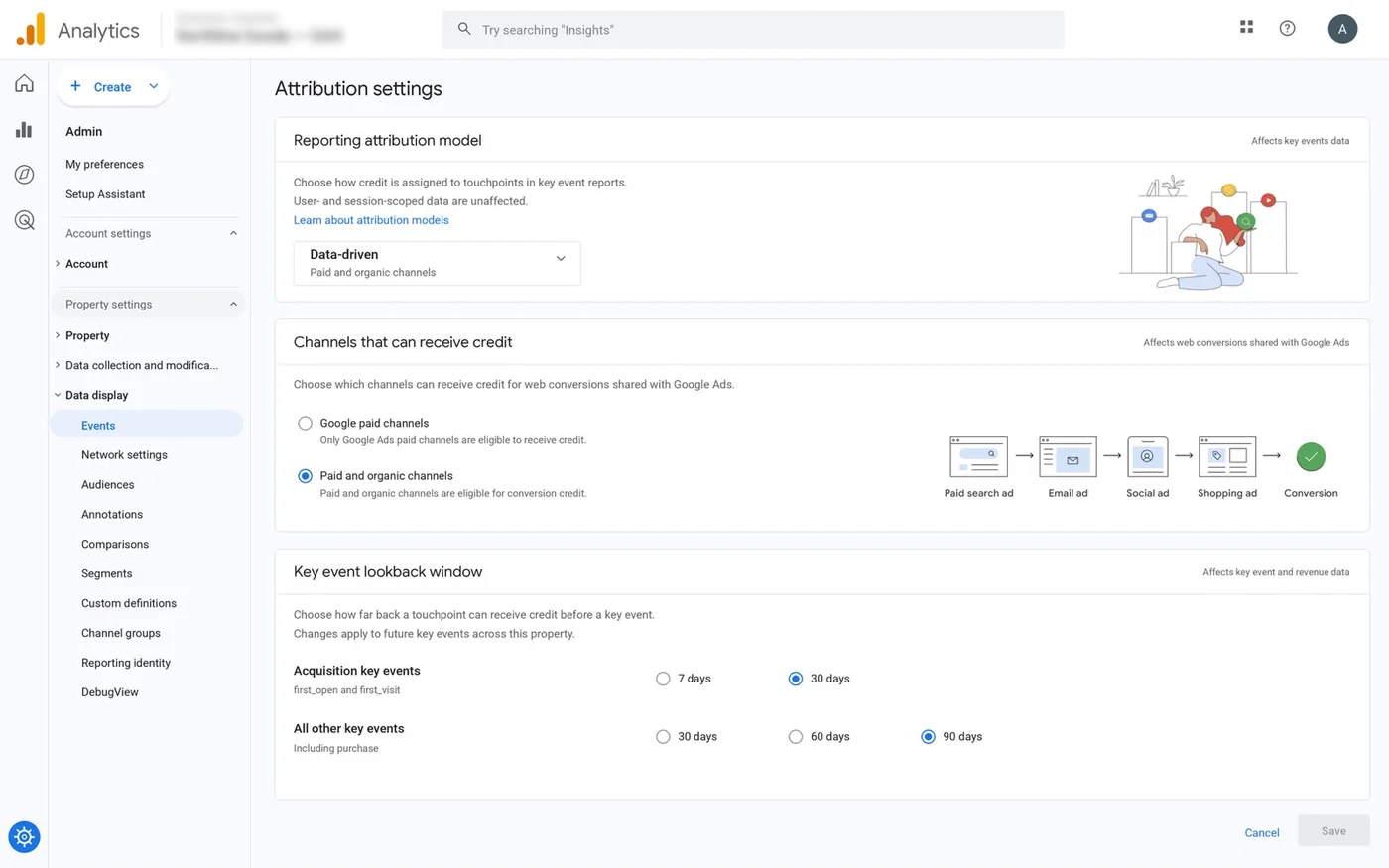
One online store’s GA4 property, shown in GA4 itself: the event list, stream and attribution settings our checks look at, and the September 1–30, 2026 report they feed. The account name is hidden.

GA4 events list for the property, 13 events on the production web stream: add_payment_info, add_to_cart, begin_checkout, click, file_download, first_visit, page_view, purchase (marked as key event), scroll, session_start, user_engagement, view_item and view_search_results.
Events: the full e-commerce event set live, with purchase marked as the key event.
GA4 web stream details for the production web stream: data collection active in the past 48 hours, enhanced measurement on (page views, scrolls, outbound clicks and 3 more), data redaction active for email and URL query parameter keys, Google tag status Data flowing.
Web stream: data collection active, enhanced measurement on, email and URL query redaction active, Google tag data flowing.
GA4 attribution settings for an online store’s property: data-driven reporting attribution model, paid and organic channels eligible for conversion credit, 30-day lookback for acquisition key events and 90-day lookback for all other key events, including purchase.
Attribution settings: data-driven model, paid and organic channels eligible for credit, 30- and 90-day lookback windows.
GA4 reports snapshot, September 1–30, 2026: 28K active users, 24K new users, 1m 24s average engagement time, $112K total revenue; Organic Search brought the most new users (8,498) and 39,819 sessions were split across seven channel groups.
Reports snapshot, September 2026: 28K active users, 1m 24s average engagement, $112K revenue, Organic Search the top new-user channel.

A relevant result

Real numbers, or none at all.

We only publish results from our own reports and platform exports, with the timeframe and data source.

Case study · four-store composite

Smaller stores, focused fixes and clearer numbers

  • 117 of 156Store A: unique ad-attributed orders of its unique paid orders, closing 28 days
  • 153 of 203Store B: unique ad-attributed orders of its unique paid orders, closing 28 days
  • 134 of 184Store C: unique ad-attributed orders of its unique paid orders, closing 28 days
  • 87 of 127Store D: unique ad-attributed orders of its unique paid orders, closing 28 days
Format
Anonymous composite of four independent stores; each store’s results stay separate
Stores
Store A home storage, Store B personal care, Store C pet accessories, Store D specialty tea
Market
United States
Channels
Technical SEO, product feeds, purchase tracking, owner training
Timeframe
10–12-week projects between June 29 and September 30, 2026

The challenge

Focused e-commerce fixes for smaller stores. Across four short projects, we diagnosed search visibility problems, repaired important SEO and product-data issues, and rebuilt purchase measurement. Featured tracked keywords moved into Google’s top 3, top 5 or top 10, depending on the store. Owners left with cleaner tracking, clearer reporting and practical instructions for maintaining their own numbers.

What we did

  • Four independent US stores (home storage, personal care, pet accessories, specialty tea), 10–12-week projects in 2026. The measurement fixes: purchase reporting deduplicated (Store A), dynamic order values and currency in place of a fixed purchase value (Store B), browser/server purchase deduplication checked (Store C) and checkout referral handling fixed (Store D).
  • Each store finishes with GA4 e-commerce events, purchase marked as a key event, dynamic transaction IDs, USD currency and values, and matching item identifiers. The native Google purchase action stays primary and the GA4 import secondary; Meta browser and server Purchase events share an order-based event ID.
  • Each owner learned to compare equal periods, check feed issues, investigate a purchase event and tell sales, attribution and profit apart.

Results

  • Store A (August 24–September 20, 2026): Google Ads 73 purchases and Meta 61, with 17 orders ($1,084.79) credited by both, so 117 unique ad-attributed orders ($7,341.32); 39 other orders ($2,423.51) reconcile the ledger to 156 orders and $9,764.83 in net merchandise sales.
  • Store B (September 1–28, 2026): Google Ads 81 and Meta 93, 21 shared ($814.79), so 153 unique ad-attributed orders ($5,748.94); 50 other orders ($1,876.04) make 203 orders and $7,624.98.
  • Store C (August 31–September 27, 2026): Google Ads 89 and Meta 64, 19 shared ($1,526.48), so 134 unique ad-attributed orders ($10,477.62); 50 other orders ($3,890.23) make 184 orders and $14,367.85.
  • Store D (September 3–30, 2026): Google Ads 52 and Meta 48, 13 shared ($654.78), so 87 unique ad-attributed orders ($4,266.52); 40 other orders ($1,881.41) make 127 orders and $6,147.93.

Data source

Google Search Console (Performance report, web search, property level), Ahrefs Rank Tracker (Google US desktop, a fixed keyword list per store), Google Ads and Meta Ads Manager campaign reports, Google Merchant Center product status, GA4 event settings and each store’s order ledger. Money in USD; ROAS is attributed purchase value divided by ad spend, not profit.

Screenshot (redacted)

Twenty-four report screenshots, six per store: Search Console, Google Ads, Meta Ads, Merchant Center and GA4.

What’s next

The projects are complete. Each owner keeps a prioritized maintenance list, and the follow-up list covers the remaining limited and newly reviewed products.

A composite of four separate stores: each store’s figures stand alone and are never added together. These are closing-period results; no paid before/after improvement is claimed, and ad values exclude tax and shipping.
See a sample report

Fit

Who it’s for

  • Stores whose GA4 revenue doesn’t match the store’s orders
  • Teams that can’t see a funnel, product performance or revenue by channel in GA4
  • Stores that moved theme, platform or checkout and never re-checked analytics
  • Brands about to scale ads who need GA4 to judge channels fairly

Need the whole tracking stack, including ad platforms and server events? Our tracking and analytics service covers it; this page is GA4 on its own.

Problems we fix

What a GA4 audit usually finds.

  • 01

    Revenue that doesn’t match

    GA4 shows noticeably more or less revenue than the store, because purchases are missing, duplicated or sent without values.

  • 02

    Payment gateways stealing credit

    Visitors returning from PayPal or a payment page start a new session, so the gateway gets credit for the sale.

  • 03

    Two months of history

    Data retention left at the default 2 months limits how far back explorations can go.

  • 04

    Empty e-commerce reports

    Events fire without item data, so product and funnel reports stay empty.

  • 05

    Wrong key events

    Page views or add-to-carts marked as key events and imported to Google Ads, so bidding chases the wrong thing.

  • 06

    Channels in “Unassigned”

    Inconsistent UTMs push traffic into Unassigned or the wrong channel, and channel reports stop making sense.

In 1:10 · animated

Before we change anything, we check five things.

A short animated walk-through of the first checks in our audit. No sound needed: everything is on screen, and the transcript is below.

What we check first in a GA4 audit, an animated explainer of 1:10 with on-screen captions and controls to pause.

Read the transcript
  1. What we check first in a GA4 audit Five checks, starting with revenue that doesn’t match.
  2. 1. Does GA4 revenue match the store? Missing, duplicated or valueless purchase events make GA4 revenue drift from the store’s own numbers. (Example month.)
  3. 2. Who gets credit for sales? Visitors returning from PayPal or a payment page start a new session, so the gateway takes the credit unless it’s excluded as a referral. (Example property.)
  4. 3. How long is data kept? GA4 keeps event-level data for 2 months by default; standard properties can raise it to 14 months. (Source: Google Analytics Help, data retention.)
  5. 4. Do events carry item data? Events without items leave product and funnel reports empty. (Example store.)
  6. 5. Are the right key events imported? Page views or add-to-carts imported to Google Ads as key events make bidding chase the wrong thing. (Example property.)
  7. Then we fix them, in that order. Want this checked on your GA4 property? The free growth audit covers all five, in writing.

Our approach

A GA4 audit in five groups of checks.

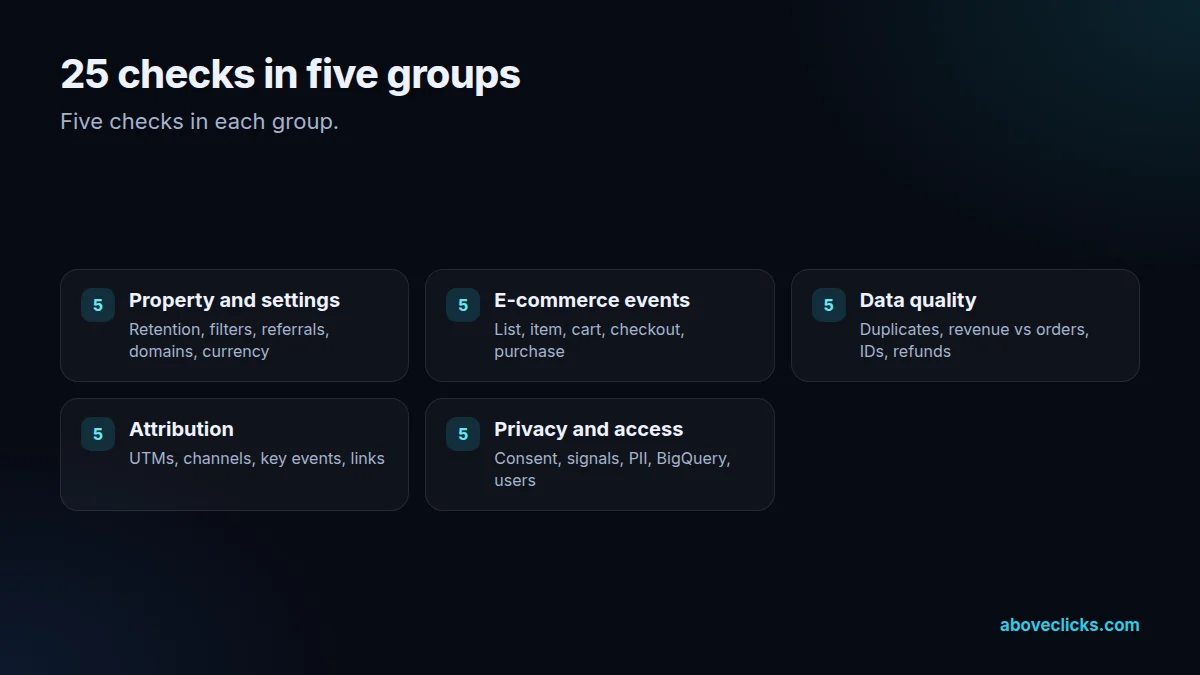
The 25 checks fall into five groups, listed in full below. We run them against your property, then compare GA4 purchases and revenue with your store’s orders for the same period, because that comparison tells you how far you can trust everything else.

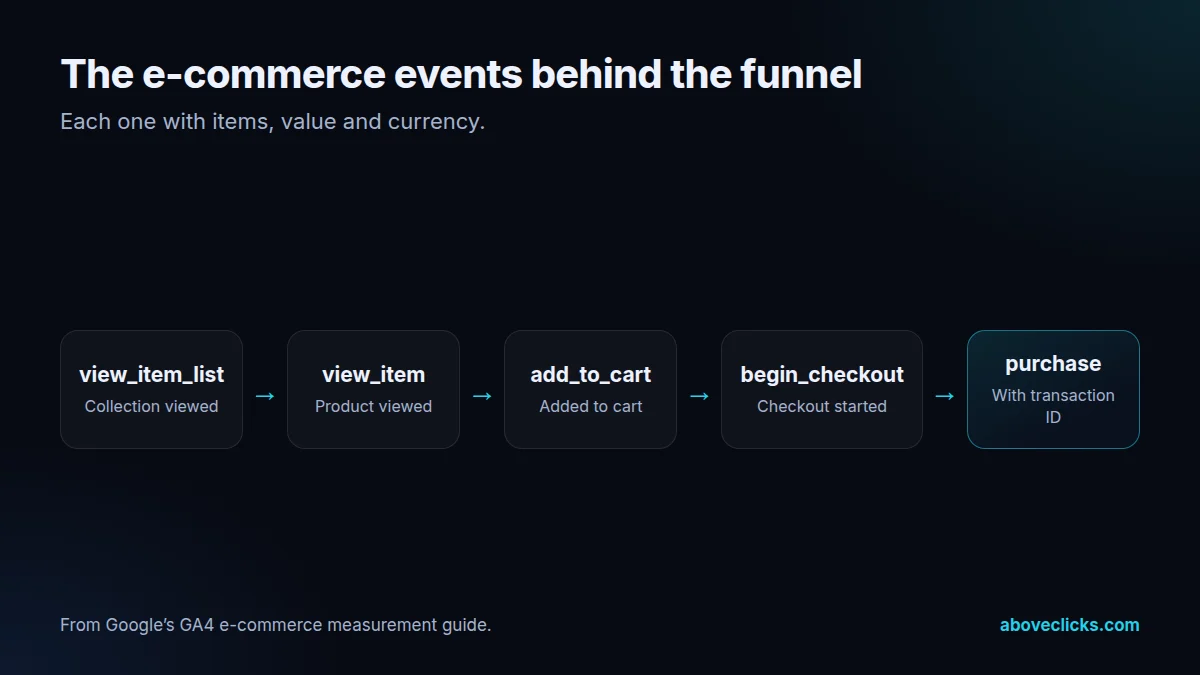
E-commerce events follow Google’s e-commerce measurement guide: view_item_list, view_item, add_to_cart, begin_checkout and purchase, with items and values, so funnel and product reports fill in. On Shopify after the 2026 checkout change, the purchase event often needs our checkout tracking repair first.

Settings matter more than people expect. Data retention can be set to 2 or 14 months on a standard property, and the default is the shorter one. Payment gateways belong on the unwanted referrals list, and stores that check out on another domain need cross-domain measurement.

Attribution depends on clean inputs. We write a UTM convention your team and agencies can follow, check traffic lands in the right default channel group, and set purchase as the key event that Google Ads imports.

Privacy runs through all of it: consent mode wired to your banner, no personal data in URLs or events, and a decision on Google signals. Where you need raw data, we set up BigQuery export, noting that, as of October 2026, standard properties have a daily export limit of 1 million events.

Reports are part of the handover. We set up a small set of explorations and comparisons for the questions store owners ask every week: revenue by channel against store orders, the checkout funnel by device, product performance and new versus returning customers.

Shared access gets tidied up as well. We review who has access to the property, remove old agency and freelancer accounts you don’t recognize, and make sure your business owns the property rather than a former provider.

The fixes are made, not just listed. We change settings, rebuild events in Google Tag Manager or your platform’s integration, test with real orders and re-run the checks, so the audit ends with a GA4 property you can use.

GA4 audit: 25 checks in five groups, from property settings to privacy
Five groups of five checks.

How we use AI here

How we use AI in a GA4 audit.

A GA4 audit produces a lot of exports. AI helps sort them; the findings are written by a person.

  • Export comparison

    GA4 transactions are compared with store orders by day and channel with scripts, so gaps show up quickly.

  • AI referral check

    We check whether visits from AI assistants are grouped properly or lost in “referral”.

  • Plain-English findings

    AI helps draft the summary of each issue; the priority and fix are ours.

Where it doesn’t help: GA4’s predictive audiences need enough purchasers and non-purchasers to qualify, and many stores don’t. We say when they won’t apply.

What’s included

The 25 checks, in five groups.

  • Property and settings (5)

    Data retention, internal traffic filter, unwanted referrals for payment gateways, cross-domain measurement where needed, and time zone and currency matching the store.

  • E-commerce events (5)

    view_item_list, view_item, add_to_cart, begin_checkout and purchase, each with items, value and currency.

  • Data quality (5)

    Duplicate purchases, GA4 revenue against store orders, item IDs matching your SKUs, refunds, and “(not set)” landing pages and sources.

  • Attribution and channels (5)

    UTM conventions, default channel group results, key events, the Google Ads link and the Search Console link.

  • Privacy and access (5)

    Consent mode, the Google signals decision, no personal data in URLs or events, BigQuery export and user access.

  • Fixes and testing

    Settings changed, events rebuilt and tested with real orders, then the 25 checks run again.

  • Written report and walkthrough

    Every check with its result, what we fixed and what to watch, plus a recorded walkthrough of the reports that matter.

GA4 e-commerce events for a store funnel: view_item_list, view_item, add_to_cart, begin_checkout, purchase
The events that fill GA4’s funnel and product reports.

How we run it

Four steps, in this order.

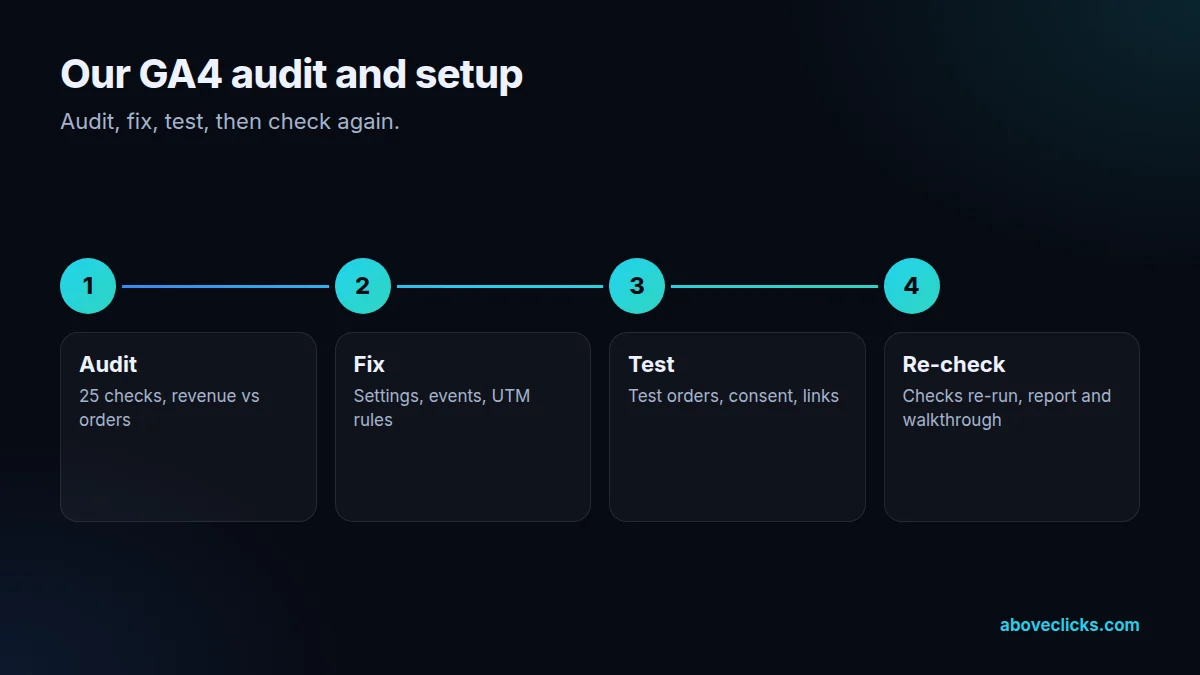
Audit, fix, test, then check again. Typical timing: the audit within 2 workdays, fixes in about a week, testing in the days after, and a re-check after 30 days of data.

  1. Step 1

    Audit

    The 25 checks, plus GA4 purchases and revenue compared with store orders.

  2. Step 2

    Fix

    Settings changed, events rebuilt in Tag Manager or the platform integration, UTM rules written.

  3. Step 3

    Test

    Real test orders traced, consent checked, Google Ads and Search Console links confirmed.

  4. Step 4

    Re-check and hand over

    The checks run again, and a written report and walkthrough handed over.

Four steps of our GA4 audit and setup
Audit, fix, test, re-check.

Pricing

Starting prices, in US dollars.

The audit is free. Paid work starts at these prices, and your exact cost is fixed in writing before any work begins.

  • Free audit

    Free no obligation

    We will check your GA4 setup and send the issues within 2 workdays.

    Get my free audit
  • Fixed scope

    GA4 audit

    From $300 one-off

    A clean, correct GA4 setup audit.

    • Full property review
    • Event and conversion check
    • Fix list with steps
    Start with the free audit
  • GA4 care

    From $200 monthly

    Monthly checks and reports.

    • Monthly data check
    • New events added
    • A monthly report
    Ask about this option

All prices are starting prices in US dollars. Custom work beyond these options is quoted after the audit.

By industry

What changes for your category.

  • Jewelry

    High order values make revenue accuracy matter. We check purchase values, currencies and discounts carefully, and set up reports for gift seasons.

  • Fashion & apparel

    Fashion stores need item-level data: size and color variants, categories and refunds, so product reports show what really sells and what comes back.

  • Luxury & high-ticket

    Long buying cycles span many sessions. We make sure attribution settings and channel groups give earlier visits fair credit.

Sources

The documentation we work from.

Platform rules change. These are the official pages we check the work against, so you can check it too.

FAQ

Straight answers.

Can’t find yours? Ask on WhatsApp or by email and we’ll answer it.

Why doesn’t GA4 revenue match our store?

Usually missing or duplicated purchase events, purchases without values, refunds not sent, or consent choices limiting data. Some gap is normal; a large one means something is broken.

Should data retention be 14 months?

For most stores, yes. The default is 2 months on standard properties, which limits explorations to recent data. Standard reports aren’t affected.

Do we need BigQuery export?

If you want raw event data for your own analysis or long-term storage, it helps. As of October 2026, standard properties have a daily export limit of 1 million events (Google’s BigQuery Export help).

What should be a key event for a store?

Purchase, first. Other actions such as sign-ups can be key events for reporting, but the one imported into Google Ads for bidding should usually be purchase with its value.

Can you do the GA4 setup from scratch?

Yes. If GA4 isn’t installed or is beyond repair, we set it up from the start using the same 25 checks as the blueprint.

Do you work in Google Tag Manager?

Yes, where the store uses it. On Shopify, we also use customer events and the official Google app. We pick whichever gives complete events with the least to maintain.

Will consent mode reduce what GA4 shows?

It can, because visitors who decline analytics aren’t tracked the same way. That’s the trade-off for respecting their choice, and we explain what the numbers do and don’t include.

Our GA4 was set up by an app. Is that enough?

Sometimes. Apps often send the main events, but miss item data, values, refunds or consent handling. The audit shows exactly what yours sends and what’s missing.

How long does the GA4 audit take?

The checks themselves are quick; the fixes and testing take longer, depending on how much needs rebuilding. We agree the timeline once the audit shows the scope.

Is the GA4 audit a one-off?

Yes, it’s a fixed project. Ongoing checks are part of our tracking and analytics service if you want them.

Related guides

Read before you decide.

Measurement

MER vs ROAS: which number to manage to

MER vs ROAS comes down to scope: MER judges all ad spend against all revenue, while ROAS judges one channel's spend against…

All Measurement guides

Free growth audit

Find out what’s holding your store back.

Tell us about your store. We’ll review your tracking, campaigns and SEO and send you a written audit with the top fixes, ranked by impact.

  • Written audit as a PDF, delivered within 2 workdays (see a sample)
  • A video meeting to go through it, if you want to discuss next steps
  • Free and no obligation
  • Read-only access or screenshots are enough

Free audit
Chat on WhatsApp