E-commerce SEO
Affordable SEO services for small business: 5 best proven
Affordable SEO is a scoping decision, not a shopping decision. This guide shows what a small budget actually buys, what to buy…
Web development · Next.js
Our Next.js development builds what a platform theme can’t: a headless storefront on Shopify, a frontend for headless WordPress, a fast marketing site or a custom web app. AI coding tools write the first draft; a developer designs the architecture, reviews every change and owns the result. That developer has worked in WordPress and PHP since 2021, writes the tests and says plainly that Next.js is newer work for us.
200+ clients served 500+ projects delivered
Free Next.js development review, no obligation. Your site URL or plan is all we need to start.
Free Next.js development audit
Three fields and you’re done. The PDF report shows what we found on your own pages and accounts, and the order we’d fix it in. It covers the problems we see most often:
Your PDF report comes by email. If you want to discuss going ahead after reading it, we’ll set up a video meeting. We use your details only for this audit.
Fit
Not the right fit when a Shopify theme or a WordPress site would do the job. Shopify itself warns that a headless storefront costs more to build and run than a theme, so we check that first.
Problems we fix
A store rebuilt as a headless storefront because it sounded modern, and now needs developers for changes the theme editor used to handle.
Private API tokens shipped in client code, a mistake Shopify’s own docs warn about by name.
Every page rendered on every request, large client bundles and unoptimized images, so the site is slower than the theme it replaced.
Missing redirects, metadata, sitemaps and structured data after a migration to a new frontend.
Analytics and ad pixels that worked on the theme and silently stopped on the new storefront.
An app generated quickly with AI tools, launched without tests, error handling or anyone who understands it.
In 1:10 · animated
A short animated walk-through of the first checks in our audit. No sound needed: everything is on screen, and the transcript is below.
What we check first in a Next.js project, an animated explainer of 1:10 with on-screen captions and controls to pause.
Our approach
We start by asking whether you need Next.js at all. Shopify’s guide to headless commerce lists the good reasons: an experience themes can’t support, a frontend stack that doesn’t use Liquid, existing infrastructure, extra sales channels or a CMS integrated with the storefront. It also says plainly that a headless storefront costs more to build and run than a theme, and needs developers after launch. If none of those reasons apply, we recommend Shopify development on a theme instead.
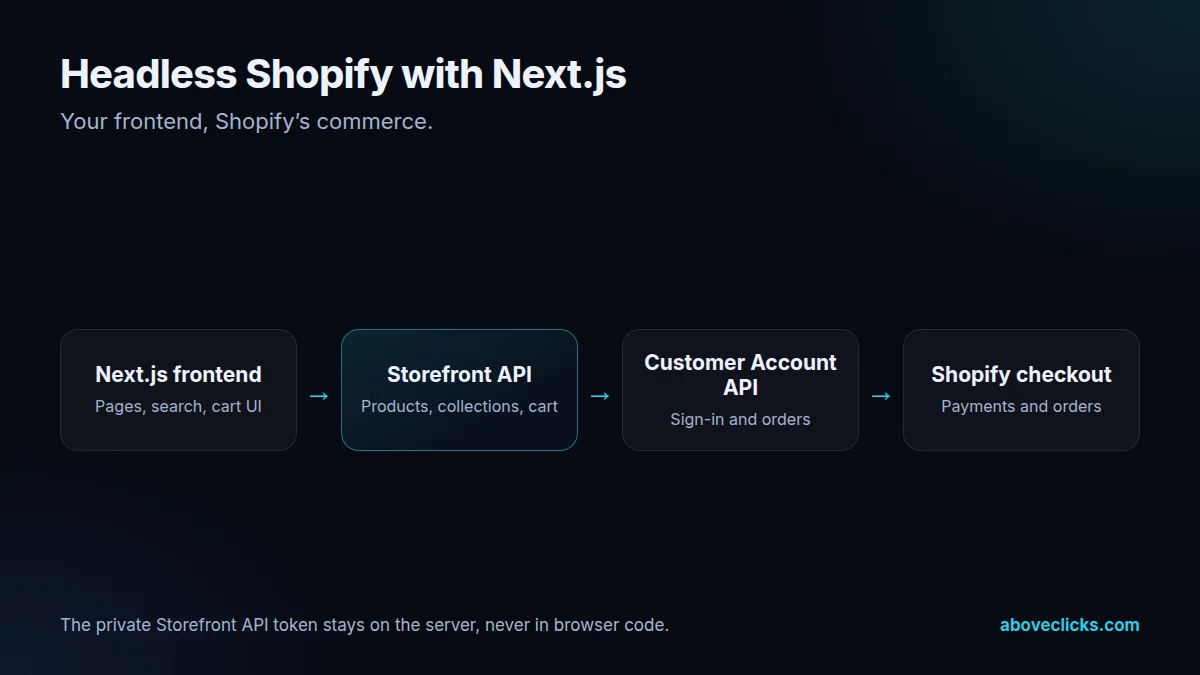
Project one is the headless Shopify storefront. Shopify’s Storefront API serves products, collections, search and the cart and hands customers to Shopify’s checkout; the Customer Account API handles sign-in and orders. Shopify offers Hydrogen, its own toolkit, or any framework such as Next.js with the APIs called directly. We use Next.js when your team or your other systems already work in it, and we keep the private Storefront token on the server, never in browser code, as Shopify’s docs insist.
Project two is a frontend for headless WordPress or another CMS. Content stays where editors already work, and Next.js reads it through the WordPress REST API or the CMS’s API. With Incremental Static Regeneration, Next.js serves prerendered pages and updates them without rebuilding the whole site, so content-heavy sites stay fast without long builds. Our custom WordPress page covers the backend side.
Project three is a fast marketing or landing site: a few templates, its own content source and very little JavaScript, built for speed and for the campaigns that send traffic to it. Project four is a custom web app, such as a customer portal, a product configurator, a quote or booking flow, or an internal tool on top of your store’s data, with a Node.js backend where it needs one.
AI-assisted development is how we make Next.js development affordable. Kashif’s view is that a developer who knows the fundamentals can now build what used to need a team, because AI tools write the routine code. In practice that means AI drafts components, data fetching and tests, and a developer decides the structure, reads every change, checks the security-sensitive parts by hand and keeps the codebase small enough to maintain. The time saved goes into testing and documentation, not into cutting corners.
Speed and SEO are built into every Next.js development plan. Pages that don’t change per visitor are prerendered; images use Next.js’s image handling; client JavaScript is kept to what the page needs. Every route gets its metadata, canonical URL and structured data, the sitemap is generated, and when an existing site moves to Next.js, every old URL is mapped and redirected. We measure Core Web Vitals in the field, not only in a lab test.
Tracking moves with the site. A headless storefront doesn’t get Shopify’s theme-based pixels automatically, so analytics and ad platform events are rebuilt and tested against real orders, with server-side events where they help. That ties into our tracking service, so the new headless storefront reports sales at least as well as the old one.
Hosting is your choice. React’s own documentation notes that a Next.js app can be deployed to any host that supports Node.js or Docker containers, or exported as a static site. We set up hosting in your account, with preview deployments for every change, error monitoring and a rollback plan, and a Next.js developer on our side watches the first weeks after launch. Speed is judged against Google’s Core Web Vitals thresholds: main content within 2.5 seconds, a response to input within 200 milliseconds and layout shift of 0.1 or less.
How we use AI here
A clickable first version of a page or flow in days, so you can react to something real before the full build.
Components, data fetching, forms and tests drafted by AI tools, then reviewed line by line.
Architecture, rendering strategy, security and data handling decided and checked by a person.
What we don’t do: ship AI-generated code nobody has read, put API keys or customer data into AI tools, or launch an app without tests for checkout, sign-in and anything else that handles money or personal data.
What’s included
Whether Next.js and headless commerce are worth it for your case, compared with a theme or WordPress.
Pages, data sources, rendering strategy, hosting and what runs on the server.
Built in Next.js and TypeScript, AI-assisted and reviewed, in your repository.
Shopify, WordPress or your own APIs, with private tokens kept on the server.
Metadata, canonical URLs, structured data, sitemap and redirects from old URLs.
Analytics and ad platform events tested against real orders or leads.
Tests for the critical flows, error monitoring and preview deployments.
Documentation, access in your name and a walkthrough for your team or next developer.

How we run it
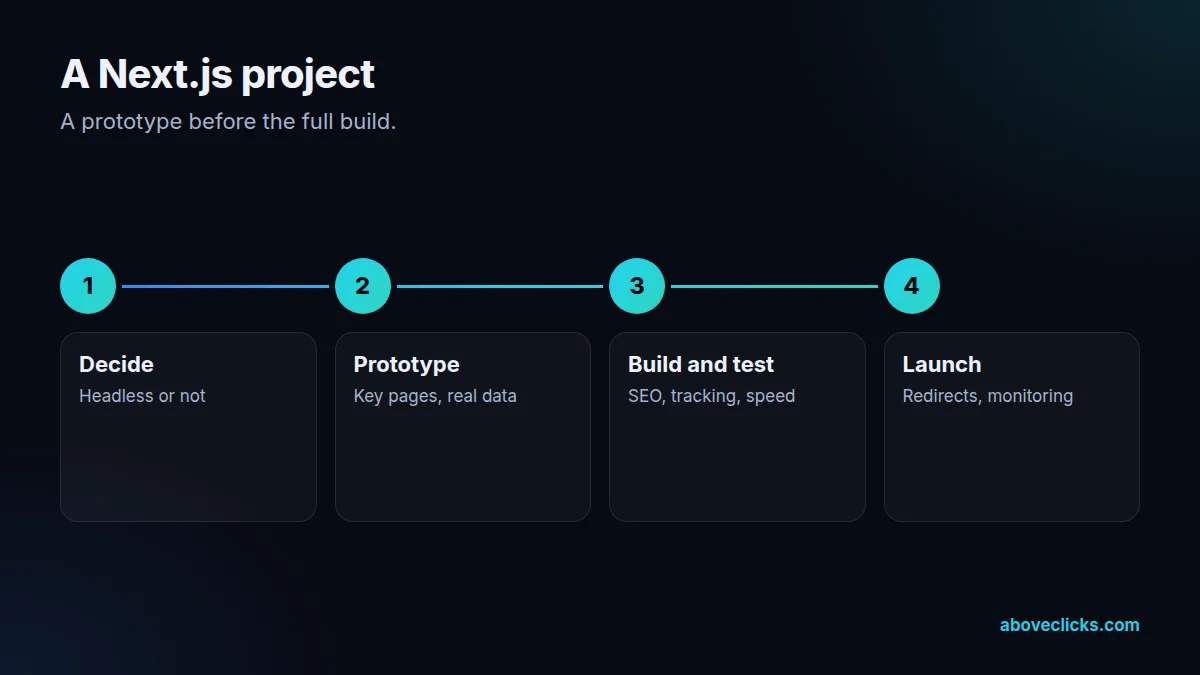
A prototype before the full build, so decisions are made on something real. Typical timing for Next.js development: the scope within 2 workdays, the build in 2 to 4 weeks depending on size, then testing, launch and handover in the final week.
Step 1
Headless or not, which framework, which data sources, and what it will cost to run.
Step 2
A working first version of the key pages or flows, for your feedback.
Step 3
The full build with tests, SEO, tracking and speed checks, on preview deployments.
Step 4
Redirects, monitoring and rollback ready at launch; documentation handed over.
Pricing
The audit is free. Paid work starts at these prices, and your exact cost is fixed in writing before any work begins.
Free no obligation
We’ll check your site or the build you’re planning and send a PDF report within 2 workdays.
Get my free auditAfter the audit
From $1,500 one-off, fixed scope
A Next.js site or headless storefront built to a written spec.
From $200 monthly
Updates, monitoring and fixes.
All prices are starting prices in US dollars. Custom work beyond these options is quoted after the audit.
Per project
Pricing
We quote after a short audit, once we’ve seen the account or the store, so the number is based on the real work. Each project is a fixed one-off cost, agreed before work starts: from $1,500. Ongoing development and hosting support can move to a monthly plan.
Start with the free audit to get a quote for your store.
Sources
Platform rules change. These are the official pages we check the work against, so you can check it too.
FAQ
Can’t find yours? Ask on WhatsApp or by email and we’ll answer it.
Only if themes, sections and apps can’t deliver what you need. Shopify says headless costs more to build and run than a theme and needs developers after launch, so we compare both for your case first.
Hydrogen is Shopify’s own headless toolkit; Next.js works with the same Storefront API. We pick Next.js when your team or other systems already use it, and Hydrogen when you want to stay closest to Shopify’s tooling.
Yes, when it’s built properly: prerendered pages, metadata on every route, structured data, a sitemap and redirects from old URLs. A badly built Next.js site can be worse for SEO than a theme.
AI tools draft routine code and tests. A developer designs the architecture, reviews every change, checks security-sensitive code by hand and owns the result.
Only after a person has reviewed and tested it. Our process treats AI output like a junior developer’s draft: useful, fast, and never shipped unread.
In your own account, on a host that supports Next.js, with preview deployments, monitoring and a rollback plan. A static export is possible for simple sites.
It’s newer for us than WordPress and Shopify. Kashif has been a developer since 2021, and our Next.js development is AI-assisted and reviewed the way a software team reviews code.
We can, through a monthly Next.js development plan, or your team can, using the documentation and tests we hand over.
Related guides
E-commerce SEO
Affordable SEO is a scoping decision, not a shopping decision. This guide shows what a small budget actually buys, what to buy…
E-commerce SEO
Email marketing cost is five bills in one: the tool, the list, the sends, the flows and the people. This guide prices…
E-commerce SEO
PPC pricing has two parts: money paid to the platform for clicks, and money paid to the person or agency managing the…
Free growth audit
Tell us about your store. We’ll review your tracking, campaigns and SEO and send you a written audit with the top fixes, ranked by impact.