E-commerce SEO
Affordable SEO services for small business: 5 best proven
Affordable SEO is a scoping decision, not a shopping decision. This guide shows what a small budget actually buys, what to buy…
Shopify development · Care plans
Stores change every week: new apps, new campaigns, theme updates, platform changes. That is why Shopify maintenance and support services exist. Our Shopify maintenance packages (care plans) give you a set block of development time each month for fixes, updates and small features, plus the checks that catch problems before customers do. The same team runs your marketing, so requests don’t get lost between agencies.
200+ clients served 500+ projects delivered
Free store health check
Three fields and you are done. We check updates, backups, broken links and checkout, then send what needs attention first.
Your PDF report comes by email. If you want to discuss going ahead after reading it, we’ll set up a video meeting. We use your details only for this audit.
Fit
Not the right fit for one large project, such as a migration or redesign; those are scoped separately in Shopify development. A care plan covers the steady stream of smaller work.
Problems we fix
A broken link, a layout glitch on mobile or a missing size guide sits in a queue because nobody owns it.
Updates that fix bugs and add features are skipped because custom code makes them risky.
Apps get installed for a campaign and never removed, each one adding scripts and a monthly fee.
An app update or theme change stops a purchase event, and nobody notices until a report looks wrong.
Each new app, image and script adds a little, until Core Web Vitals fail.
When something breaks, nobody knows what changed last or who changed it.
In 1:10 · animated
A short animated walk-through of the first checks in our audit. No sound needed: everything is on screen, and the transcript is below.
What we check first in Shopify maintenance, an animated explainer of 1:10 with on-screen captions and controls to pause.
Our approach
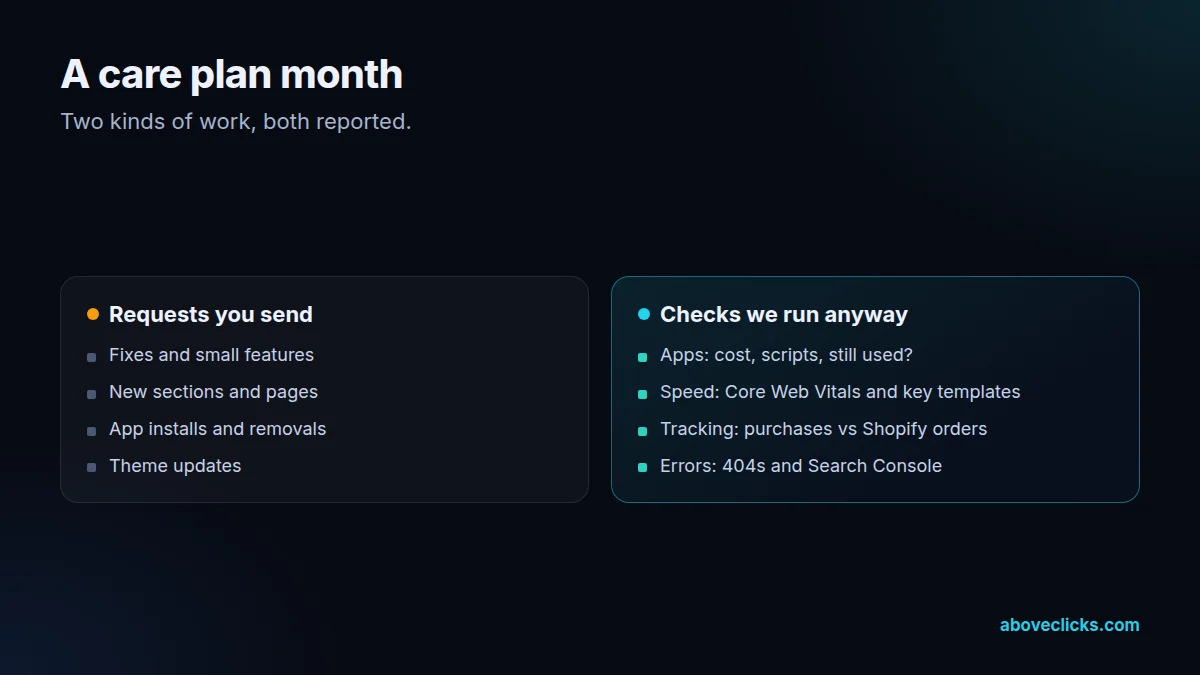
A care plan has two parts: a block of development hours for the requests you send, and a set of checks we run every month whether you ask or not. The checks catch the problems that don’t announce themselves, such as a tracking event that stopped or a page that got slower.
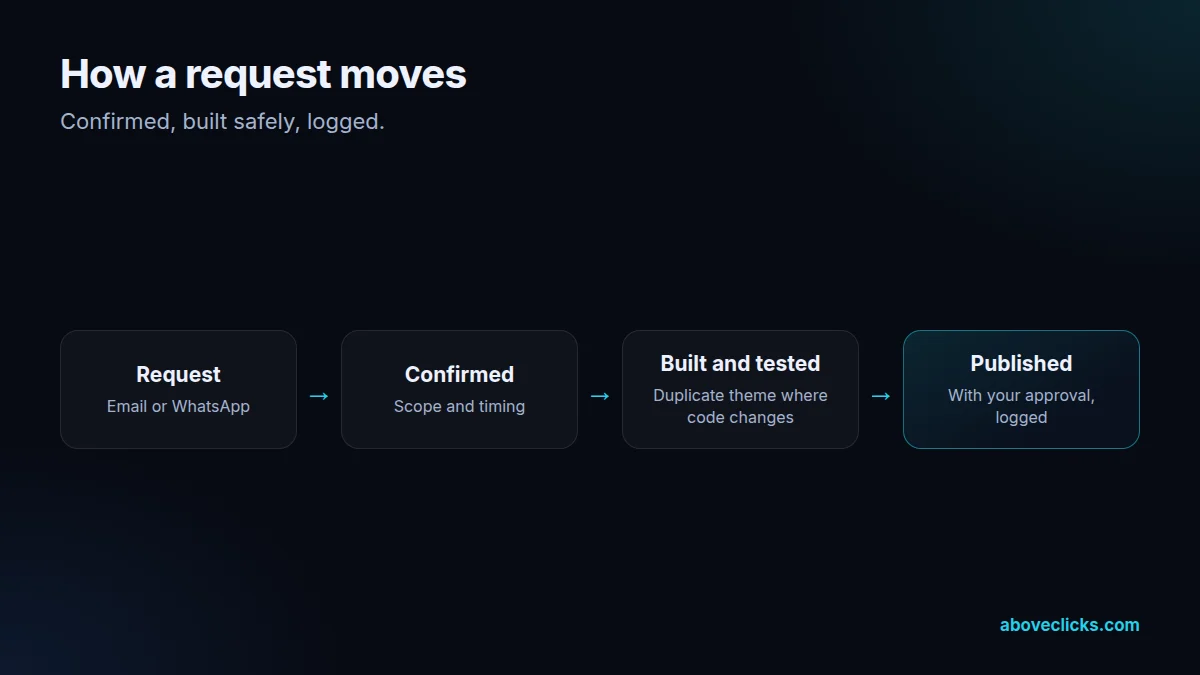
Requests come in by email or WhatsApp. Each one gets a short reply confirming what we’ll do and when, then the work is done on a duplicate theme where it touches code, tested and published with your approval. A change log records every edit, so if something breaks later, the cause is easy to find.
Theme updates are planned rather than avoided. Shopify’s guide to updating themes explains how theme updates work; we keep custom code documented so updates can be applied with a clear list of what to carry over, and we test the updated theme before publishing.
Apps are reviewed every month: what’s installed, what it costs, what it loads and whether it’s still used. Unused apps are removed with their leftover code, which keeps the store fast and the bill shorter. Speed is checked against Core Web Vitals, and bigger speed problems become a site speed project.
Tracking is checked against orders. We compare purchases in GA4 and the ad platforms with Shopify orders each month, so a broken pixel after an app update is found within weeks, not at the end of a quarter. That’s the same check our tracking service relies on.
Seasonal peaks get planned. Before your busiest weeks we check speed, tracking, apps and checkout paths, prepare collection pages and banners, and agree a change freeze for the days when nothing should move. After the peak, the backlog of non-urgent requests is picked up again.
Shopify itself changes too. When platform updates affect themes, checkout, apps or tracking, we check what applies to your Shopify store and plan the work, so changes like the 2026 checkout tracking update are handled before they cause problems.
Access stays tidy throughout. We work through a collaborator or staff account with only the permissions the work needs, document every app and integration that has access to the store, and flag old accounts or apps that no longer need it, so your Shopify maintenance includes the security basics.
Unused hours don’t vanish into a black box: the monthly report shows what was done, how long it took and what’s planned next, and larger requests are quoted separately before any work starts. Shopify releases new API versions on a quarterly schedule, and Shopify CLI blocks deploys that target versions older than 12 months, so we keep custom code on a supported version. Speed is judged against Google’s Core Web Vitals thresholds: main content within 2.5 seconds, a response to input within 200 milliseconds and layout shift of 0.1 or less.
How we use AI here
A care plan is many small jobs. AI makes each one quicker, so more fits into your monthly hours.
Theme fixes and small features are written with AI coding tools and reviewed before release.
Automated checks for broken pages, tracking and speed after app or theme updates.
AI drafts the monthly summary of what changed; we check it so you know exactly what was done.
Where it doesn’t help: decisions about your store. Which apps to keep and what to build next stay your call, with our advice.
What’s included
A set block of time each month for fixes, small features, sections and page changes.
Installed apps, their cost, what they load and whether they’re still needed.
Theme updates checked, tested on a duplicate and applied with custom code carried over.
Core Web Vitals and key templates checked, with regressions flagged.
GA4 and ad platform purchases compared with Shopify orders.
404s, broken links and Search Console errors reviewed and fixed.
Every edit recorded with what changed, when and why.
Work done, hours used, checks run and what’s planned next.
How we run it
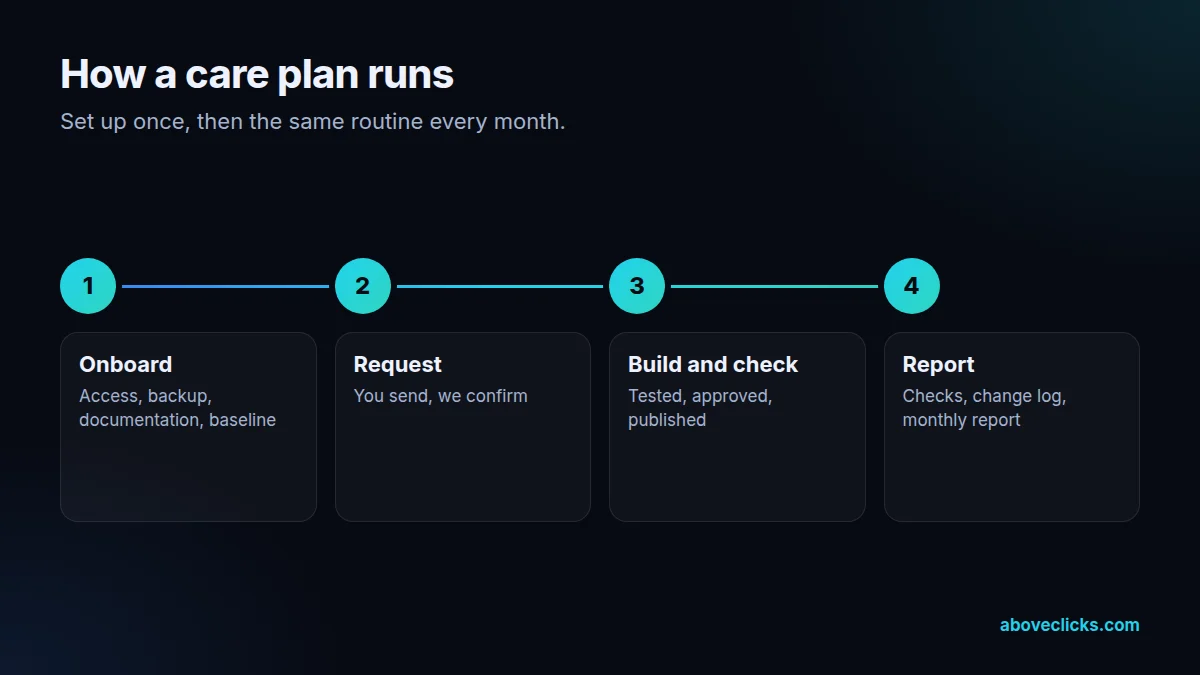
Set up once, then the same routine every month. Typical timing: onboarding in the first week, most requests done within 2 workdays, and a short report every month.
Step 1
Access set up, the theme backed up, apps and custom code documented, and baseline checks run.
Step 2
You send requests by email or WhatsApp; we confirm scope and timing.
Step 3
Work done on a duplicate theme where needed, tested, then published with your approval.
Step 4
Monthly checks run, the change log updated and the report sent.
Pricing
The audit is free. Paid work starts at these prices, and your exact cost is fixed in writing before any work begins.
Free no obligation
We will check your store health and send the findings within 2 workdays.
Get my free auditMost stores start here
From $150 monthly
Updates, backups and small fixes, handled every month.
From $200 one-off
A batch of known issues fixed in one go, from the health check list.
All prices are starting prices in US dollars. Custom work beyond these options is quoted after the audit.
By industry
Jewelry stores update collections for every season and occasion. A care plan covers new collection pages, banners and gift guides without a new project each time.
Fashion stores launch drops often. We prepare sections, collection pages and size guides ahead of each launch and check speed and tracking after it.
High-ticket stores add unique items constantly. We keep product templates, inquiry forms and redirects for sold pieces working smoothly.
Sources
Platform rules change. These are the official pages we check the work against, so you can check it too.
FAQ
Can’t find yours? Ask on WhatsApp or by email and we’ll answer it.
Fixes, small features, new sections, page changes, app installs and removals, and theme updates. Larger projects, such as a migration or a new theme, are quoted separately.
We confirm every request and give a timing. Response and turnaround times depend on the plan you choose, and urgent problems, like a broken checkout path, go first.
We tell you before starting, with an estimate, and you decide whether to use next month’s hours, add hours or split the work.
No. We use a collaborator or staff account with only the permissions the work needs, and you can remove it at any time.
The plan covers development. Ads, SEO and email are separate services, but because we run both, requests from marketing reach the same team.
Yes. We review every app on the store, whoever installed it, and include it in the monthly checks and the change log.
Problems that stop people buying, such as a broken add-to-cart or checkout path, go to the front of the queue, whatever else is in progress.
Plans can be paused or changed between months with notice, and the documentation and change log stay with you either way.
Yes. We can share the change log and documentation, agree who handles what, and review each other’s changes so the theme stays consistent.
Care plans run month to month or on a fixed term, depending on the plan. We confirm the terms in the proposal.
Related guides
E-commerce SEO
Affordable SEO is a scoping decision, not a shopping decision. This guide shows what a small budget actually buys, what to buy…
E-commerce SEO
Email marketing cost is five bills in one: the tool, the list, the sends, the flows and the people. This guide prices…
E-commerce SEO
PPC pricing has two parts: money paid to the platform for clicks, and money paid to the person or agency managing the…
Free growth audit
Tell us about your store. We’ll review your tracking, campaigns and SEO and send you a written audit with the top fixes, ranked by impact.