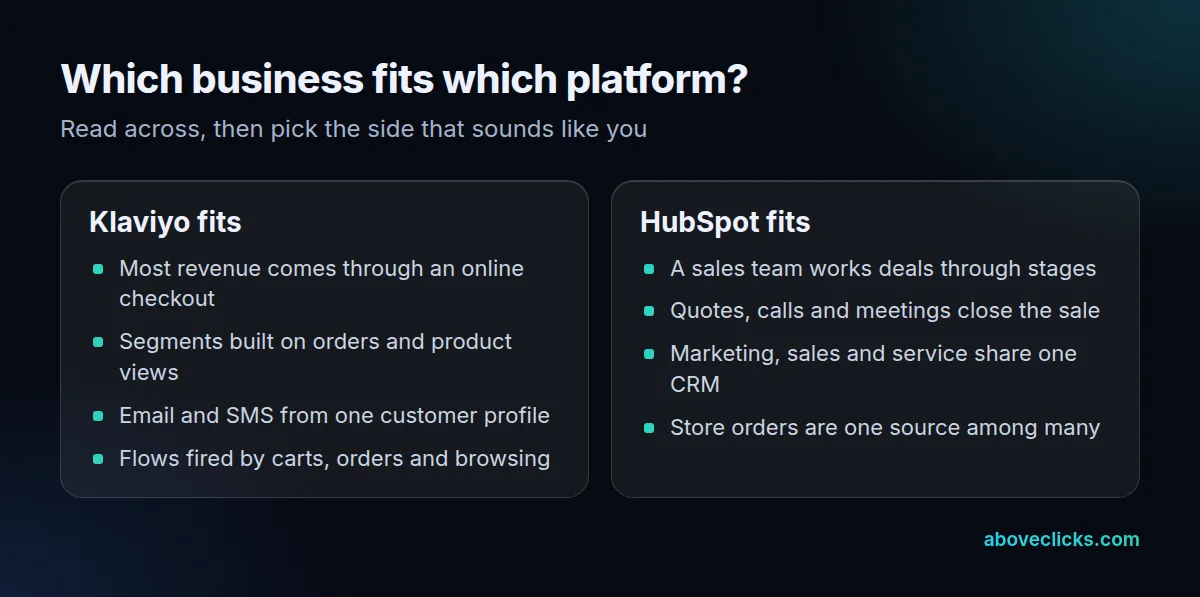
Klaviyo vs HubSpot comes down to who closes the sale. HubSpot is a CRM for marketing, sales and service teams, with email as one part; Klaviyo is built around store data such as orders, browsing and checkouts.
This guide compares the 6 differences that decide it, works through how far each plan’s sends go, and covers how to move to Klaviyo without emailing anyone twice.
What is the difference between Klaviyo and HubSpot?
The data at the centre. HubSpot centres on contacts, companies and deals that a team works by hand; Klaviyo centres on what shoppers do in your online store.
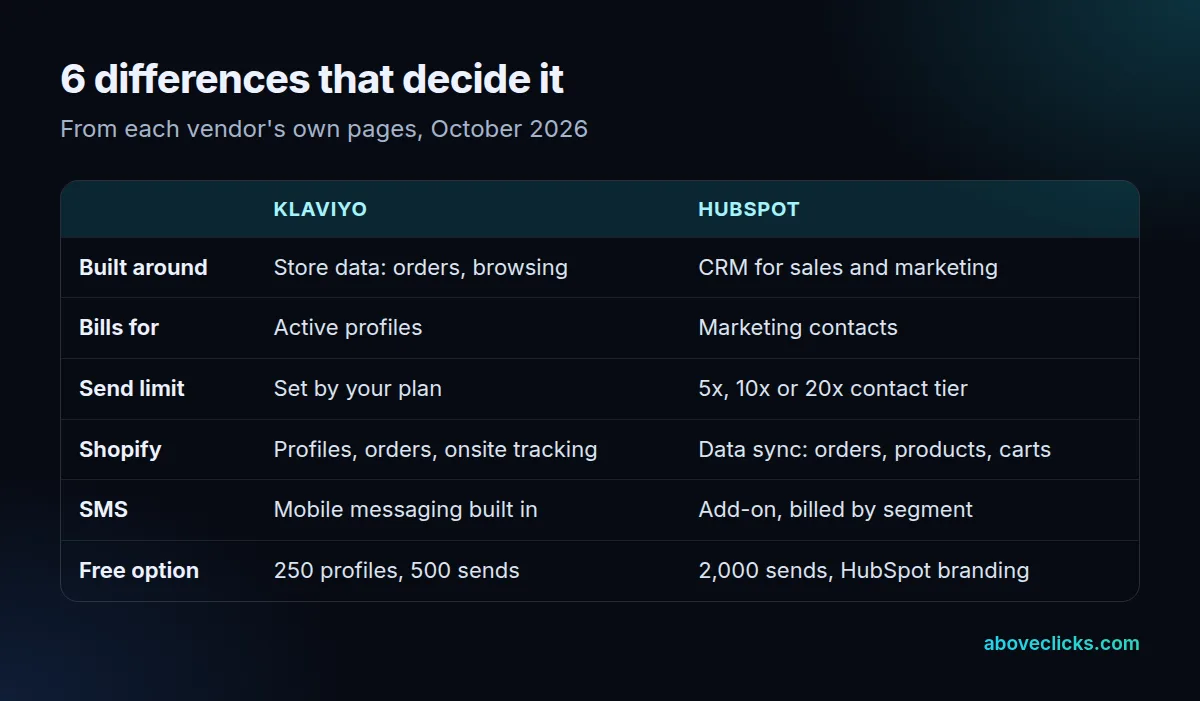
That one difference drives the rest of the table. In HubSpot, a contact record collects emails, calls, meetings and deal stages, so marketing hands a lead to sales and both see the same history. In Klaviyo, a profile fills up with orders, product views and started checkouts, and flows fire on those events without anyone touching them.
The team side shows in the limits. HubSpot’s Marketing Hub pricing lists up to 300 workflows for 10 teams on Professional, as of October 2026, because several teams share one account. A Klaviyo account is usually run by 1 marketing team around the store, so its limits follow profiles and sends instead.
So read the Klaviyo vs HubSpot question as a question about your business. If people buy after a quote or a call, the CRM side matters most. If nearly every order goes through the checkout with no human involved, store events matter most. Plenty of businesses sit in between, which is why the billing and send-limit rows below often settle it.
Is Klaviyo a CRM?
Klaviyo calls itself one: its home page describes the product as a B2C CRM, as of October 2026. It is a customer database for shoppers, not a sales CRM with deal stages.
The difference is in what a record holds. A Klaviyo profile holds orders, browsing, email and text history, and consent per channel, which is what a store needs to segment and automate. It has no deal pipeline, no quotes and no sales sequences. HubSpot’s CRM has those, plus service tickets, and its Marketing Hub sits on the same records.
Consent is kept per channel on that profile. Klaviyo’s billing guide notes, as of October 2026, that unsubscribing from SMS alone doesn’t remove an otherwise emailable profile from the active count, and its free plan holds up to 250 active profiles.
In the HubSpot vs Klaviyo comparison, that’s the clearest split. If someone on your team needs to see where a deal stands, HubSpot does it in one place. If no one sells by phone or meeting, you’d be paying for CRM features that never get used.
How does Klaviyo vs HubSpot pricing compare?
They count different people. HubSpot prices Marketing Hub by marketing contacts, the ones you choose to market to; Klaviyo prices by active profiles, which can include shoppers who never opted in.
On HubSpot’s Marketing Hub pricing page, as of October 2026, Starter is listed from $7 a month, Professional from $800 and Enterprise from $3,600, and the bill grows with your marketing contact tier. The free tools include 2,000 email sends a calendar month with HubSpot branding.
Klaviyo pricing works by active profile. Its help article on active profiles explains, as of October 2026, that a shopper who placed an order or abandoned a checkout may have given an email without opting in to marketing, and still be someone you can email. Suppressed profiles stop counting. The free plan allows 250 active profiles and 500 email sends a month. Paid plans are priced through a calculator on Klaviyo’s pricing page, so we don’t quote them here. One rule from the billing guide matters later: to move down a plan, the lower plan must cover your active profile count.
Klaviyo vs HubSpot: a worked send example
Send limits matter as much as the plan cost. Take an invented store with 1,000 marketing contacts that emails 3 times a week: 1,000 × 3 × 52 ÷ 12 is about 13,000 sends a month.
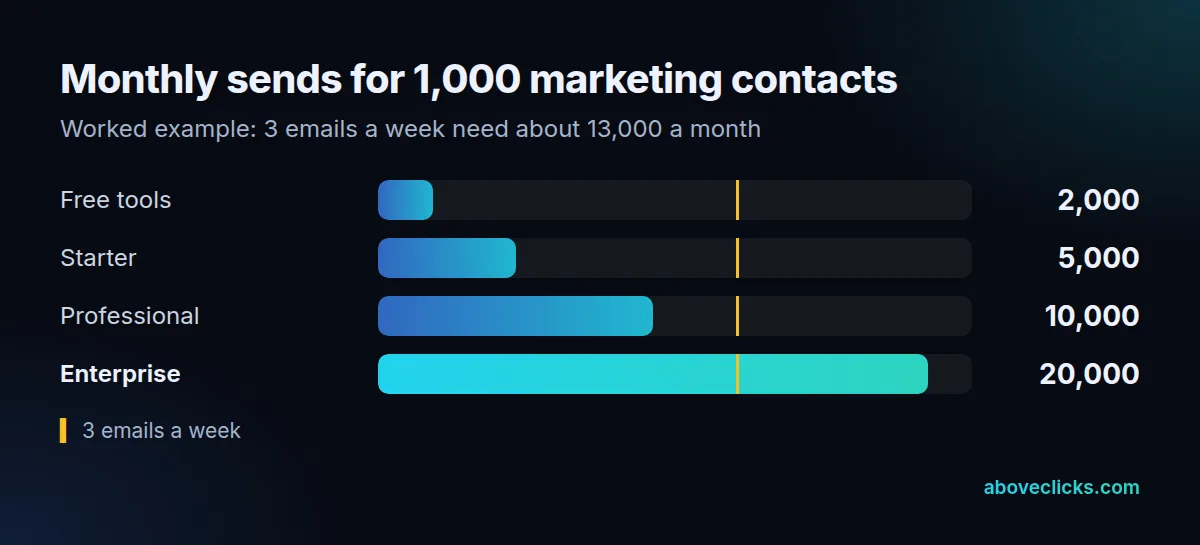
HubSpot’s product and services catalog sets the monthly send limit at 5 times the marketing contact tier on Starter, 10 times on Professional and 20 times on Enterprise, as of October 2026. For 1,000 contacts that’s 5,000, 10,000 and 20,000 sends, so this store outgrows Starter and Professional and only Enterprise covers its calendar without buying a bigger tier. On Klaviyo, the same question becomes how many of those 1,000 count as active profiles and what send allowance the plan for that count includes. Run both numbers on your own list; our guide to email marketing cost covers the rest of the bill.
What are HubSpot marketing contacts?
They’re the contacts you mark as people you’ll email or target with ads. You pay for those, and contacts you only keep for sales or service records stay free.
HubSpot’s Knowledge Base says, as of October 2026, that you choose which contacts are marketing contacts, and that once you set a contact as marketing it counts toward your billable tier at least until the next update date. The product catalog adds that you aren’t charged for non-marketing contacts, and that the contacts database itself can be raised to as many as 50 million contact records with a limit increase. That gives HubSpot marketing contacts a real advantage for a business with a large customer database it rarely emails.
It also hides a trap. Forms, chatflows and imports each have a default marketing status, and on Professional and Enterprise a workflow can set contacts as marketing automatically. If those defaults are loose, the tier grows without anyone deciding it should. Check the defaults before you import a store’s full customer list.
Does HubSpot integrate with Shopify?
Yes, through the Shopify Data Sync app. It syncs customers, companies, products, orders and carts, while Klaviyo’s Shopify integration brings in profiles, orders, onsite browsing and sign-up forms.
According to HubSpot’s Shopify data sync guide, as of October 2026, abandoned checkouts are supported, and after the first sync, records update within 10 minutes of a change. That’s enough to segment buyers, report on orders and hand big accounts to sales.
Klaviyo’s Shopify integration adds onsite tracking and sign-up forms on top of profiles and orders, and can sync data back to Shopify. Onsite tracking is what lets a segment say “viewed this collection twice in 30 days, never bought”. In Klaviyo vs HubSpot terms, both see your orders; Klaviyo sees more of what shoppers do before they order.
Consent starts in Shopify for both. In the Shopify admin, a customer profile has a “Customer agreed to receive marketing emails” box, and each profile holds only 1 email address. Whatever that box says is what either platform should treat as marketing consent.
Which one is better for SMS?
Klaviyo, for most stores, because email and text share one profile and one set of flows. In HubSpot, SMS is an add-on to Marketing or Service Hub, billed by message segment.
Klaviyo’s free plan includes $5 of mobile messages a month, as of October 2026, according to its pricing page, and paid texting is billed next to the email plan, with costs that depend on the channel and the recipient’s location. A cart flow can send an email, wait 4 hours, then send a text, with consent kept per channel on the same profile.
HubSpot’s product catalog explains that SMS is sold as add-ons and limit increases counted in message segments, as of October 2026: a text over 160 characters is split into parts of 153 characters, and each part counts. Keep store texts short on either platform, but on HubSpot a long message costs 2 or 3 segments.
Is HubSpot good for ecommerce?
It’s good for ecommerce businesses with a sales team, such as B2B or high-ticket stores. For a checkout-led store, Klaviyo’s segments and flows built on orders and browsing usually do more.
The automation rows show it. On HubSpot’s pricing page, as of October 2026, Starter has no workflows beyond 1 simple workflow per form with up to 10 actions; Professional allows up to 300 workflows and Enterprise up to 1,000. A store that wants cart, browse and win-back flows needs Professional. In Klaviyo, those flows are the core of the product.
List hygiene works differently too. Klaviyo’s active profile guide suggests leaving profiles that got at least 5 emails without an open or click in 90 days out of regular campaigns, and suppressing long-inactive ones so they stop counting. Our Klaviyo email marketing work starts from those segments. If neither platform fits, compare Klaviyo alternatives or read ActiveCampaign vs Klaviyo for another CRM-style option.
How do you move from HubSpot to Klaviyo?
By CSV, in a fixed order: unsubscribes first, then subscribers, then flows rebuilt and switched off, then the old tool disconnected from Shopify. Klaviyo has no built-in HubSpot importer.
Klaviyo’s migration article lists built-in importers for 3 tools, Mailchimp, Campaign Monitor and Salesforce Marketing Cloud, as of October 2026; any other platform comes in from a CSV file. Export unsubscribes separately from the people you can email, and bring them in as suppressions before the first send.
In practice, the move runs in 6 steps:
- Export marketing contacts from HubSpot with their subscription and consent fields.
- Export unsubscribed and bounced contacts in a second file.
- Import that second file into Klaviyo as suppressions.
- Import subscribers and map consent only where people actually gave it.
- Rebuild the welcome, cart and post-purchase flows in Klaviyo, switched off, and disconnect HubSpot’s email from Shopify.
- Connect Klaviyo to the store, then switch its flows on and HubSpot’s off on the same day.
Klaviyo’s Shopify guide gives the reason for step 5: an old email tool still connected to Shopify can send double opt-in emails to your list. HubSpot can stay as the sales CRM after the move if your team uses it; only the marketing email moves.
Your sender reputation comes with you either way. Google’s sender guidelines ask anyone sending more than 5,000 messages a day to Gmail accounts to keep the spam rate below 0.3% and to support one-click unsubscribe, as of October 2026, whichever side of the Klaviyo vs HubSpot move you’re on.
Our Klaviyo migration starts with a free audit: a PDF plan within 2 workdays of what moves, what gets rebuilt and what to leave behind, then the move and a cut-over with nothing sent twice. Whichever side of Klaviyo vs HubSpot you land on, more platform comparisons are in buying guides.