Meta Ads · Facebook and Instagram

Meta ads for e-commerce, built around profit.

As a Meta ads agency, we run Facebook and Instagram campaigns for Shopify, WooCommerce and BigCommerce stores, with a clean account structure and Pixel plus Conversions API data you can trust. Budget follows what pays back on MER and margin, not what looks good in Ads Manager.

200+ clients served 500+ projects delivered

Free Meta ads audit

We’ll check your Meta ads account and the store data behind it and send a PDF report within 2 workdays.

Three fields and you’re done. The PDF report shows what we found on your own pages and accounts, and the order we’d fix it in. It covers the problems we see most often:

  • Results break when you raise the budget
  • Ads Manager and your store disagree
  • Creative burns out in weeks
Chat on WhatsApp Prefer to talk first? Send us your URL on WhatsApp.

Your PDF report comes by email. If you want to discuss going ahead after reading it, we’ll set up a video meeting. We use your details only for this audit.

Client results

Meta Ads results, from Ads Manager.

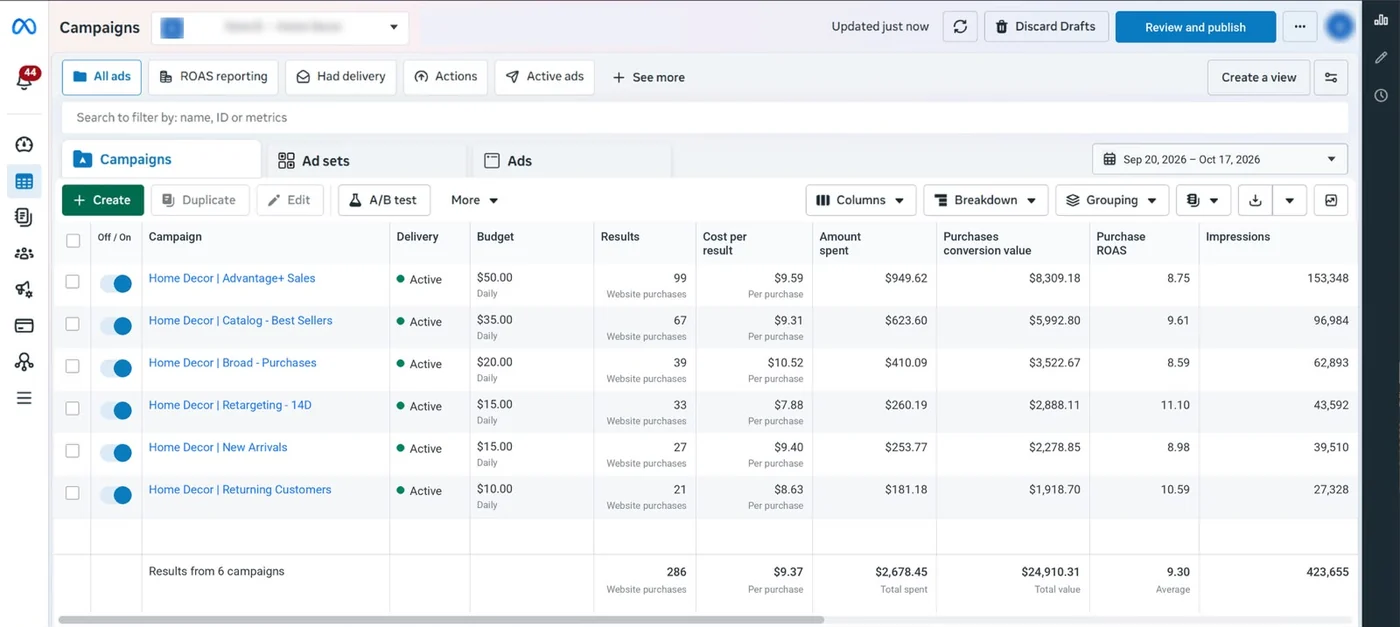
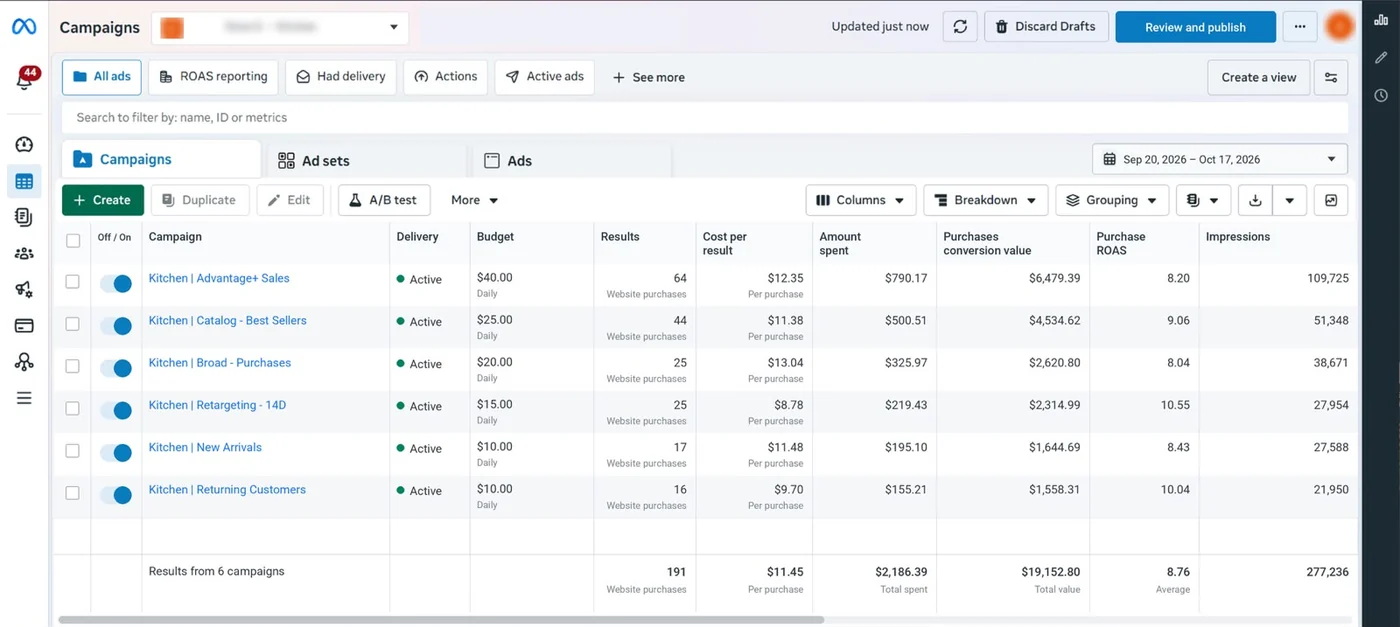
Five client stores over the same 28 days (20 Sep to 17 Oct 2026), straight from the Ads Manager campaigns report. Account names are hidden.

Meta Ads Manager campaign report for an anonymized Apparel store: 438 website purchases, 8.85 purchase ROAS, $3,846.72 spent and $34,045.56 purchase value over 20 September to 17 October 2026
Apparel: 438 purchases, 8.85 ROAS
Meta Ads Manager campaign report for an anonymized Home Decor store: 286 website purchases, 9.30 purchase ROAS, $2,678.45 spent and $24,910.31 purchase value over 20 September to 17 October 2026
Home Decor: 286 purchases, 9.30 ROAS
Meta Ads Manager campaign report for an anonymized Skincare store: 624 website purchases, 9.06 purchase ROAS, $4,295.18 spent and $38,896.39 purchase value over 20 September to 17 October 2026
Skincare: 624 purchases, 9.06 ROAS
Meta Ads Manager campaign report for an anonymized Kitchen store: 191 website purchases, 8.76 purchase ROAS, $2,186.39 spent and $19,152.80 purchase value over 20 September to 17 October 2026
Kitchen: 191 purchases, 8.76 ROAS
Meta Ads Manager campaign report for an anonymized Fitness store: 563 website purchases, 9.21 purchase ROAS, $6,942.57 spent and $63,929.95 purchase value over 20 September to 17 October 2026
Fitness: 563 purchases, 9.21 ROAS

A relevant result

Real numbers, or none at all.

We only publish results from our own reports and platform exports, with the timeframe and data source.

Case study

From a sprawling custom CMS to a focused Shopify store

  • 3,847 → 206,849Search Console clicks in 28 days
  • 2.41 → 8.76Meta Ads ROAS, Dec 2025 vs Sep 2026
  • 1.21 → 8.33Google Ads ROAS, Dec 2025 vs Sep 2026
  • 240 of 240tracked keywords in Google’s top 10, 86 in positions 1–3
Industry
Jewelry e-commerce: rings, necklaces, earrings and personalized gifts
Market
United States
Channels
SEO, Meta Ads, Google Ads
Platform
Custom CMS → Shopify (launched May 12, 2026, same domain)
Timeframe
January–December 2026 engagement, three quarters complete

The challenge

The store’s custom CMS exposed 52,684 discovered URLs, and 47,948 of them were unwanted variants: faceted URLs, tag indexes and duplicate pagination. Google Ads held 19 legacy campaigns (4 delivering in the baseline month) with incomplete purchase tracking, and Meta’s purchase values were incomplete too.

What we did

  • Repaired purchase measurement first: one USD order-value specification, Meta Pixel and Conversions API deduplicated, and one primary Google Ads purchase action with transaction IDs.
  • Moved the store from the custom CMS to Shopify on May 12, 2026, on the same domain, with 4,736 canonical URLs and permanent redirects for equivalent old pages.
  • Rebuilt Google Ads around two Performance Max campaigns, Shopping and branded Search, reorganized Meta around prospecting, catalogue, new collections and returning shoppers, and grew SEO content against 240 fixed keywords.

Results

  • Search Console clicks 3,847 → 206,849 and impressions 447,913 → 10,247,981 (28 days: Dec 4–31, 2025 vs Sep 20–Oct 17, 2026); CTR 0.9% → 2%, average position 22.8 → 7.9.
  • All 240 tracked keywords in Google’s top 10, 86 in positions 1–3 (Ahrefs Rank Tracker, Google US desktop, October 17, 2026).
  • Meta Ads ROAS 2.41 → 8.76 (spend $9,847.63 → $48,736.29, purchases 102 → 1,897) and Google Ads ROAS 1.21 → 8.33 (spend $11,483.79 → $39,847.63, purchases 62 → 1,473), Dec 2–31, 2025 vs Sep 1–30, 2026.
  • 52,684 discovered URLs → 4,736 canonical Shopify URLs, about 91% smaller.

Data source

Google Search Console (Performance report, web search), Ahrefs Rank Tracker, Google Ads and Meta Ads Manager campaign reports. Money in USD; ROAS is attributed merchandise value divided by ad spend, not profit.

Screenshot (redacted)

Six report screenshots, before and after: Search Console, Google Ads and Meta Ads.

What’s next

The fourth and final quarter of the January–December 2026 engagement.

The December baseline had incomplete purchase reporting, so the ROAS change is reported attributed performance, not a like-for-like profit comparison. Meta and Google can both count the same order, and the two Search Console periods differ in season and catalogue.

See a sample report

Fit

Who it’s for

  • Stores on Shopify, WooCommerce or BigCommerce that already sell online
  • Brands selling internationally
  • Teams whose Meta results stall, or fall apart when the budget goes up
  • Founders and e-commerce leads who want one clear report, not a dashboard dump

Not the right fit if you need leads for a service business. We only run e-commerce accounts.

Problems we fix

Where Meta ad accounts lose money.

  • 01

    Results break when you raise the budget

    A campaign holds at one budget and falls apart at the next. Usually the account is fragmented, audiences overlap and each ad set has too few conversions to learn from.

  • 02

    Ads Manager and your store disagree

    Meta reports more purchases than your store recorded, or far fewer. Without the Conversions API and deduplication, the algorithm optimizes on noise.

  • 03

    Creative burns out in weeks

    The same few ads run until frequency climbs and costs follow. There’s no steady pipeline of new concepts and no record of what was learned.

  • 04

    “Learning limited” everywhere

    Too many campaigns and ad sets split the budget so thin that none of them gets enough conversions to leave the learning phase.

  • 05

    Catalog ads show the wrong products

    A messy catalog means retargeting shows sold-out items, wrong prices or the products with the thinnest margins.

  • 06

    Nobody can say if ads made money

    You get screenshots every month, but no answer to the question that matters: after product costs, shipping and returns, did the spend pay back?

Comparison of a fragmented Meta ad account with overlapping ad sets and a consolidated account with prospecting, retargeting and Advantage+ campaigns
Fewer, larger campaigns give each ad set enough conversions to leave the learning phase.

In 1:11 · animated

Before we change anything, we check five things.

A short animated walk-through of the first checks in our audit. No sound needed: everything is on screen, and the transcript is below.

What we check first in a Meta Ads account, an animated explainer of 1:11 with on-screen captions and controls to pause.

Read the transcript
  1. What we check first in a Meta Ads account Five checks, in the order we run them before any budget changes.
  2. 1. Does Meta see the same sales as your store? We put Meta’s purchases next to your store’s orders for the same days. A big gap means the algorithm is learning from the wrong data. (Example account: Meta reports 31% more purchases than the store.)
  3. 2. Pixel and Conversions API, counted once Purchases reach Meta from the browser and from the server, with the same event ID, so each order counts once, even when a browser blocks the Pixel.
  4. 3. Is the budget spread too thin? Meta says an ad set needs about 50 optimization events in 7 days to leave the learning phase. Spread the budget too thin, and none of them gets there. (Example account. Source: Meta Business Help Center.)
  5. 4. Is creative tested, or just running? We look for a testing calendar: one question per test, a budget and a decision date, plus a written log of what was learned.
  6. 5. Does the spend pay back after costs? We work out your break-even ROAS from real margins, then judge results on MER (total revenue ÷ total ad spend), not only on ROAS in Ads Manager. (Example: a 40% contribution margin breaks even at 1 ÷ 0.40 = 2.5.)
  7. Then we fix them, in that order. Want this checked on your Meta account? The free growth audit covers all five, in writing.

Our approach

Meta ads judged on your margins.

Every account we take on starts with one number: break-even ROAS. It comes from your margin after product cost, shipping, payment fees and returns. A store with a 50% margin breaks even at a ROAS of 2, and a store with a 25% margin needs 4 just to stand still. Until that number is agreed, nobody can say whether a campaign works, so we set it with you in the audit, category by category.

Ads Manager only counts the orders Meta can attribute to an ad, by default within 7 days of a click or 1 day of a view. So we also track MER: total store revenue divided by total ad spend across every channel. When Meta ads report a strong ROAS while MER falls, the account is claiming sales that repeat buyers or other channels would have brought anyway. Scaling decisions use both numbers, plus new-customer revenue from your store.

Meta’s delivery system learns from the signals you send it. An ad set leaves the learning phase after about 50 optimization events in the week after its last significant edit, which is why we build fewer, larger campaigns instead of many small ones. The Conversions API sends each purchase from your server as well as the browser, and deduplication by event ID makes sure Meta counts it once.

Creative is now the main lever, because broad targeting and Advantage+ audiences leave Meta to find the buyers. We tag every ad by hook, format and angle, so a test result turns into the next brief instead of a screenshot. And because we also run Google Ads, e-commerce SEO and tracking and analytics for the same kind of store, we can see when Facebook ads create demand that shows up later as branded search.

How we use AI here

How we use AI in Facebook and Instagram ads.

Meta’s own AI now does most of the targeting and bidding. As a Facebook ads agency for ecommerce, our job is to feed it good signals, enough creative and sensible limits.

  • Advantage+ set up on purpose

    We choose which Advantage+ features stay on: audience expansion, placements, and each creative enhancement. Some enhancements, like automatic filters or generated backgrounds, can cheapen a premium product, so we switch those off per account.

  • Signals the algorithm can learn from

    Pixel plus Conversions API, purchase values that reflect margin where you share it, and new-customer data. Meta’s bidder optimizes for whatever you send, so we send what matters to your profit.

  • More creative, faster

    AI helps us draft copy angles and produce size and background variants of your real product photos. Every ad is checked by a person before it runs.

  • Creative analysis

    We tag every ad by hook, format and angle, and use AI to summarize which combinations win and which are tiring, so the next brief starts from data.

Where it doesn’t help: AI can’t decide what your brand should promise, and it shouldn’t invent customers. We never run AI-generated testimonials or synthetic “customers”. The FTC’s rule on consumer reviews and testimonials (16 CFR Part 465) bans fake ones, including reviews written by AI and passed off as real customers.

Four-step Meta creative testing loop: one question, budget and decision date, tagging by hook, format and angle, then decide and log the result
Tagging each ad by hook, format and angle turns test results into the next creative brief.

What’s included

What our Meta ads service includes.

  • Account and tracking audit

    A written review of structure, audiences, creative, attribution settings and Pixel and Conversions API health before anything changes.

  • Pixel and Conversions API setup

    Server-side events with deduplication and event match quality checks, so each purchase is counted once and still reaches Meta when browsers block the Pixel.

  • Account structure

    A simple build that concentrates budget: prospecting, retargeting and Advantage+ campaigns with clear jobs, each sized so it can exit learning.

  • Audience strategy

    Broad and Advantage+ audiences, custom audiences from your customer lists and site visitors, and exclusions so you stop paying to reach people who just bought.

  • Creative testing framework and ad copy

    A testing calendar where every test has one question, a budget and a date to decide. We write the ad copy and the creative briefs. We also make the ads themselves: static images, carousels and video edits.

  • Catalog and dynamic product ads

    Your product catalog connected and cleaned, product sets grouped by category and margin, and dynamic ads for retargeting and broad audiences.

  • Advantage+ campaigns

    Set up where your account has the conversion data to feed them, with settings checked so they find new customers rather than mostly retargeting existing ones.

  • Plain-English monthly report

    Spend, revenue, ROAS and MER, what we changed and why, and what happens next.

Diagram of a purchase sent to Meta by both the browser Pixel and the Conversions API with a shared event ID, which Meta deduplicates into one purchase
Without a shared event ID, Meta counts the same order twice and optimizes on the wrong number.

How we run it

Four steps, in this order.

New spend only goes into an account we can measure. Typical timing: the audit within 2 workdays, setup and fixes in about a week, the first optimization cycle within 2 weeks, and the first monthly report after 30 days.

  1. Step 1

    Audit and targets

    We review the account, the tracking and your margins, then agree on the numbers that decide everything else: break-even ROAS, target MER and the budget range to test.

  2. Step 2

    Fix tracking and structure

    Conversions API, deduplication and the catalog come first, then the account rebuild. New spend doesn’t go into an account we can’t measure.

  3. Step 3

    Launch and test

    New campaigns go live with a testing calendar. Each creative, audience or offer test answers one question and has a decision date.

  4. Step 4

    Scale what’s profitable

    Budget moves to the campaigns and creative that pay back on contribution margin, in steps small enough not to reset learning.

Pricing

Starting prices, in US dollars.

The audit is free. Paid work starts at these prices, and your exact cost is fixed in writing before any work begins.

  • Free audit

    Free no obligation

    Get your free audit.

    Get my free audit
  • After the audit

    Account setup

    From $400 one-off

    Tracking, structure and the first creative tests, set up before spend goes up.

    • Account and tracking audit
    • Pixel and Conversions API setup
    • Account structure
    • Audience strategy
    Start with the free audit
  • Monthly Meta ads management

    From $500 monthly, plus ad spend

    Budgets, audiences and creative testing run every week.

    • Ongoing optimization of budgets, audiences and creative rotation
    • New creative tests each month, with results and learnings logged
    • A plain-English monthly report
    Ask about this option

All prices are starting prices in US dollars. Custom work beyond these options is quoted after the audit.

Every month

What you get each month

  • Ongoing optimization of budgets, audiences and creative rotation
  • New creative tests each month, with results and learnings logged
  • A plain-English monthly report: spend, revenue, ROAS and MER, what changed and what’s next
  • Updates by email and WhatsApp, and a video call when you want one

We optimize every week, and your report arrives in the first week of each month.

Pricing

How pricing works

Pricing depends on your ad spend, the channels involved and how much setup work your account needs. We quote after the audit, once we’ve seen the account, so the number is based on real work rather than a guess. Meta ads management is one flat monthly amount, starting at $500, plus a one-off account setup from $400 when the account needs it. There’s no percentage of ad spend, no minimum ad spend and no minimum term: plans run month to month. Your ad spend is paid straight to Meta from your own account.

Start with the free audit to get a quote for your store.

By industry

What changes for your category.

  • Jewelry

    Buyers look closely and often buy for an occasion. We lead with close-up video, build gift catalog sets and plan budgets around Valentine’s Day, Mother’s Day and the holidays.

  • Fashion and apparel

    Sizes, colors and drops change the catalog every week. We keep sold-out variants out of catalog ads and give new arrivals their own tests in the first days after a drop.

  • Luxury and high-ticket

    Fewer, larger orders mean slower learning. Where purchases are too rare to optimize for, we optimize to an earlier event and judge results over weeks, not days.

Sources

The documentation we work from.

Platform rules change. These are the official pages we check the work against, so you can check it too.

FAQ

Straight answers.

Can’t find yours? Ask on WhatsApp or by email and we’ll answer it.

How much should we spend on Meta ads?

Enough for your main campaign to reach about 50 purchases a week, or it never settles. Multiply your expected cost per purchase by 50 to get a weekly floor. Below that, we optimize to an earlier event such as add to cart.

Which store platforms do you work with?

Shopify, WooCommerce and BigCommerce. The Conversions API setup is different on each, and we handle all three.

Do you make the ad creatives?

We write the ad copy and the creative briefs, plan every test and decide what runs next. When your team or a studio produces the images and video, we brief them from the test results.

How soon will we see results?

New campaigns need a few weeks to learn before results settle, and the first month is mostly spent fixing tracking and structure. We’ll tell you what to expect for your account in the audit. Nobody can promise Meta results in advance, so be wary of anyone who does.

Do you use Advantage+ campaigns?

Yes, where your account has enough conversion data to feed them. They work best on top of clean Conversions API data and a healthy catalog, so we check both first.

Why does Ads Manager show more sales than Shopify?

Meta credits a sale to any ad clicked or viewed inside its attribution window, while your store records each order once. Missing deduplication can double count as well. We reconcile the two every month.

Who owns the ad account and the data?

You do. We work through partner access to your business portfolio, and the ad account, Pixel, catalog and data stay with your business if we stop working together.

What do you need to get started?

Partner access to your Meta business portfolio, ad account, Pixel and catalog, plus store admin access for the Conversions API setup. For the free audit, read-only access or screenshots are enough.

Related guides

Read before you decide.

All Meta Ads guides

Free growth audit

Find out what’s holding your store back.

Tell us about your store. We’ll review your tracking, campaigns and SEO and send you a written audit with the top fixes, ranked by impact.

  • Written audit as a PDF, delivered within 2 workdays (see a sample)
  • A video meeting to go through it, if you want to discuss next steps
  • Free and no obligation
  • Read-only access or screenshots are enough

Free audit
Chat on WhatsApp