E-commerce SEO
Shopify vs WooCommerce SEO: what each platform lets you control
Is Shopify good for SEO? Yes, and so is WooCommerce: both platforms can rank. This comparison shows what you control on Shopify…
Web development · Squarespace
Squarespace is built for good-looking sites without code, and it limits what code can do on purpose. Our Squarespace development works within those rules: custom CSS, code blocks and code injection on the plans that allow them, SEO and speed fixes, and connections to the tools you use. We have also moved a client’s site off Squarespace when it needed more: from Squarespace to GoHighLevel.
200+ clients served 500+ projects delivered
Free Squarespace audit
Three fields and you’re done. The PDF report shows what we found on your own pages and accounts, and the order we’d fix it in. It covers the problems we see most often:
Your PDF report comes by email. If you want to discuss going ahead after reading it, we’ll set up a video meeting. We use your details only for this audit.
Fit
Not the right fit for features that need server-side code; Squarespace doesn’t run PHP, Ruby or SQL. Those belong on a platform that does, and we can help you choose one.
Problems we fix
Code injection and JavaScript in code blocks need the Core, Plus or Advanced plan, so snippets silently do nothing on others.
Custom styles copied from forums that look fine on desktop and break the mobile layout.
Checkout pages don’t run custom code, so purchase tracking copied from a tutorial doesn’t fire.
Missing page descriptions, unclear titles and renamed pages without redirects.
Chat widgets, pixels and embeds added over the years, some of them twice.
A business that needs funnels, member areas or complex logic, working around the platform every week.
In 1:10 · animated
A short animated walk-through of the first checks in our audit. No sound needed: everything is on screen, and the transcript is below.
What we check first in a Squarespace site, an animated explainer of 1:10 with on-screen captions and controls to pause.
Our approach
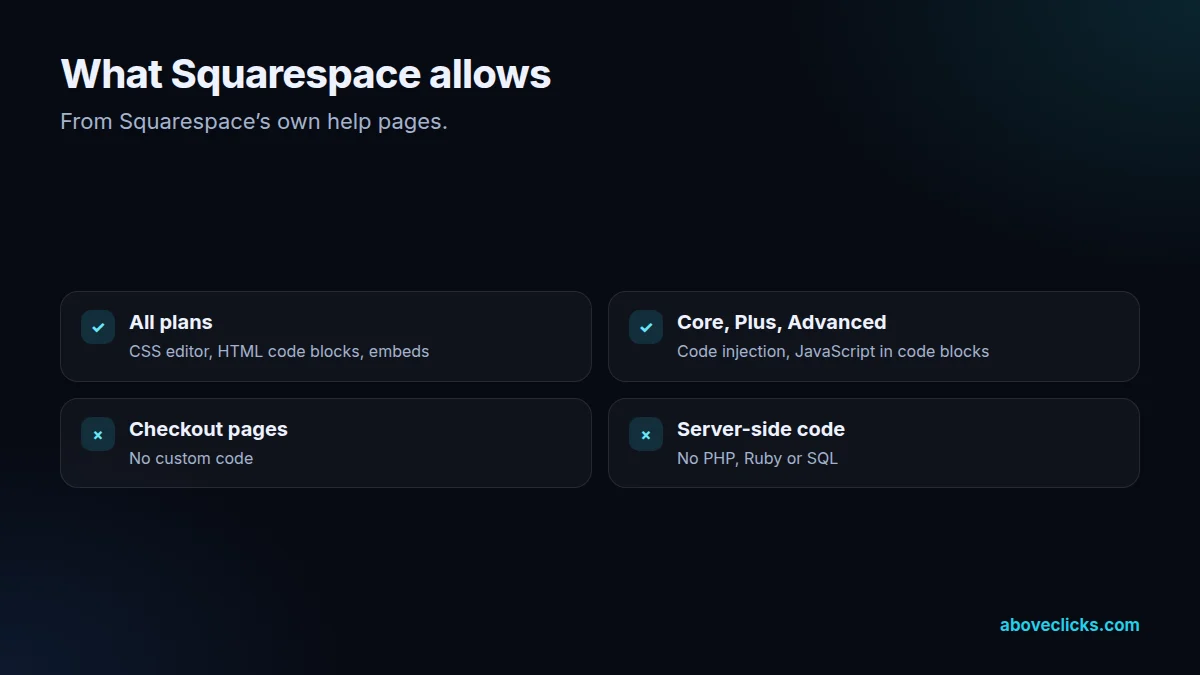
Part one is knowing the rules. Squarespace’s guide to adding custom code sets them: the CSS editor and plain HTML code blocks work on all plans; JavaScript and iframes in code blocks, and code injection, need the Core, Plus, Advanced or some legacy plans; checkout pages don’t support code; and server-side code such as PHP isn’t supported at all. We check your plan and version before writing a line.
Part two is design changes with CSS. The custom CSS editor handles fonts, colors and backgrounds, and Squarespace itself advises keeping CSS to those, because other changes can harm a site. We keep layout changes minimal, write small, commented CSS, test it on phones and desktops, and keep it in one place so it survives template updates as far as possible.
Part three is code injection and code blocks. Site-wide code injection adds scripts to the head or before the closing body tag of every page; page-level injection targets single pages. We use it for analytics, ad pixels, chat, verification tags and structured data, and code blocks for embedded tools such as calculators, booking widgets or listing searches. Each script is documented so nobody adds it twice.
Part four is SEO, speed and tracking. Page titles and descriptions are written for search, renamed pages get redirects in Squarespace’s URL mappings, images are sized before upload, and unneeded embeds are removed. Because checkout pages don’t run custom code, store purchase tracking uses Squarespace’s built-in analytics and pixel integrations rather than scripts copied from tutorials. That connects to our tracking service.
Part five is the honest platform check, and sometimes a move. When a business needs funnels, a CRM with automations, member areas or logic Squarespace can’t run, working around it costs more than moving. We moved one client’s site from Squarespace to GoHighLevel; stores usually move to Shopify and content-led businesses to WordPress. Each move follows Google’s guidance on site moves with URL changes.
For most Squarespace websites, a move isn’t needed. A clear site that brings in enquiries often just needs better page titles, a faster homepage, forms connected to the right inbox, and a couple of well-placed custom features. That is cheaper and less risky than a rebuild, and we say so, even when the rebuild would be the bigger project for us.
Squarespace’s own support team can’t help with custom code, and its help pages say so plainly, recommending the Squarespace forum or a Squarespace Expert instead. That is the gap we fill: custom work written and tested by a developer, documented for the next person, and checked again after Squarespace updates.
Squarespace work often sits next to marketing. New landing pages for campaigns, service pages for local SEO and form tracking for ads are built by the same team that runs them, so pages go live quickly and are measured from the first visit. Our local services marketing page shows how that fits together for service businesses. For any URL change we follow Google’s site move guide, which says to keep redirects in place for generally at least 1 year. Speed is judged against Google’s Core Web Vitals thresholds: main content within 2.5 seconds, a response to input within 200 milliseconds and layout shift of 0.1 or less.
How we use AI here
Small CSS changes and code block widgets drafted with AI tools, then tested on real devices.
Titles and descriptions drafted for many pages, then checked by a person for accuracy and tone.
Pages, products and URLs inventoried quickly before a move.
Where it doesn’t: we don’t paste AI-written code straight into code injection, where one broken script can affect every page. Everything is tested first, and nothing is published without your approval.
What’s included
What your plan and Squarespace version allow, before any code.
Small, commented style changes, tested on phones and desktops.
Widgets, scripts, structured data and tags placed properly and documented.
Titles, descriptions, URL mappings for redirects, and indexing checks.
Images, embeds and scripts reviewed and trimmed.
Analytics and conversions set up within Squarespace’s checkout limits.
Forms, bookings and orders connected to your CRM or email tool.
An honest comparison, and a planned migration when it’s needed.

How we run it
Plan check first, because the plan decides what code can do. Typical timing: the scope within 2 workdays, the build in 2 to 4 weeks depending on size, then testing, launch and handover in the final week.
Step 1
Your Squarespace website’s plan, version, existing code injection, SEO, speed and tracking reviewed.
Step 2
Improve within Squarespace or plan a move, in writing.
Step 3
CSS, code and fixes tested by a Squarespace developer on phones and desktops before publishing.
Step 4
Every custom snippet from the Squarespace development work documented, so your team knows what’s there.

Pricing
The audit is free. Paid Squarespace development work starts at these prices, and your exact cost is fixed in writing before any work begins.
Free no obligation
We’ll check your Squarespace site and send a PDF report within 2 workdays.
Get my free auditAfter the audit
From $400 one-off, fixed scope
A Squarespace site with custom code where needed.
From $100 monthly
Changes and checks each month.
All prices are starting prices in US dollars. Custom work beyond these options is quoted after the audit.
Per project
Pricing
We quote after a short audit, once we’ve seen the account or the store, so the number is based on the real work. Each project is a fixed one-off cost, agreed before work starts: from $400.
Start with the free audit to get a quote for your store.
Sources
Platform rules change. These are the official pages we check the work against, so you can check it too.
FAQ
Can’t find yours? Ask on WhatsApp or by email and we’ll answer it.
The CSS editor and plain HTML code blocks work on all plans. Code injection and JavaScript in code blocks need the Core, Plus, Advanced or some legacy plans.
No. Squarespace says checkout pages don’t support code, so purchase tracking has to use its built-in analytics and pixel integrations.
No. Squarespace doesn’t support server-side code such as PHP, Ruby or SQL. Features that need it belong on another platform or in a separate service.
It can rank well. Most issues we fix are settings and content: titles, descriptions, redirects for renamed pages and page speed.
Only if it’s holding you back: funnels, member areas, complex logic or a large store. We moved one client’s site from Squarespace to GoHighLevel, and we compare options before recommending a move.
Small, documented CSS and scripts usually do. We keep custom work minimal and check it after major Squarespace changes.
AI tools draft CSS, snippets and SEO fields; a person tests everything on real devices before it’s published.
By project, from a written scope after a quick check of your site and plan.
Related guides
E-commerce SEO
Is Shopify good for SEO? Yes, and so is WooCommerce: both platforms can rank. This comparison shows what you control on Shopify…
E-commerce SEO
Product schema markup tells Google a product's price, availability and identifiers. Here's what Google requires, an example annotated property by property, and…
E-commerce SEO
Most Shopify SEO checklists are 25 items in no order. This one has 21 checks in three tiers, says what Shopify already…
Free growth audit
Tell us about your store. We’ll review your tracking, campaigns and SEO and send you a written audit with the top fixes, ranked by impact.