E-commerce SEO
Shopify vs WooCommerce SEO: what each platform lets you control
Is Shopify good for SEO? Yes, and so is WooCommerce: both platforms can rank. This comparison shows what you control on Shopify…
Tracking & analytics · Consent mode
We do consent mode setup for online stores that sell to the EU and UK: Consent Mode v2 connected to your cookie banner, every Google tag set to respect the visitor’s choice, and modelled conversions checked. Your ads keep learning without breaking privacy rules.
200+ clients served 500+ projects delivered
Free consent review
Three fields and you are done. We check your banner, tags and consent signals, then send what to fix.
Your PDF report comes by email. If you want to discuss going ahead after reading it, we’ll set up a video meeting. We use your details only for this audit.
Fit
Not legal advice. We set up the technical side and follow your privacy policy; your lawyer or data protection officer decides the wording and which choices to offer.
Problems we fix
Visitors click accept or reject, but nothing tells Google tags, so they behave the same either way.
Google tags load before the default consent state is set, so the first hit ignores the choice.
ad_storage and analytics_storage are set, but ad_user_data and ad_personalization, added in v2, are missing.
Visitors outside the EU get the strict default too, or EU visitors get none, because region rules were never set.
Google tags respect the choice while the Meta, TikTok and Pinterest pixels keep firing regardless.
Advanced mode was chosen for modelling, but the store doesn’t meet the thresholds, so nothing is modelled.
In 1:10 · animated
A short animated walk-through of the first checks in our audit. No sound needed: everything is on screen, and the transcript is below.
What we check first in Consent Mode, an animated explainer of 1:10 with on-screen captions and controls to pause.
Our approach
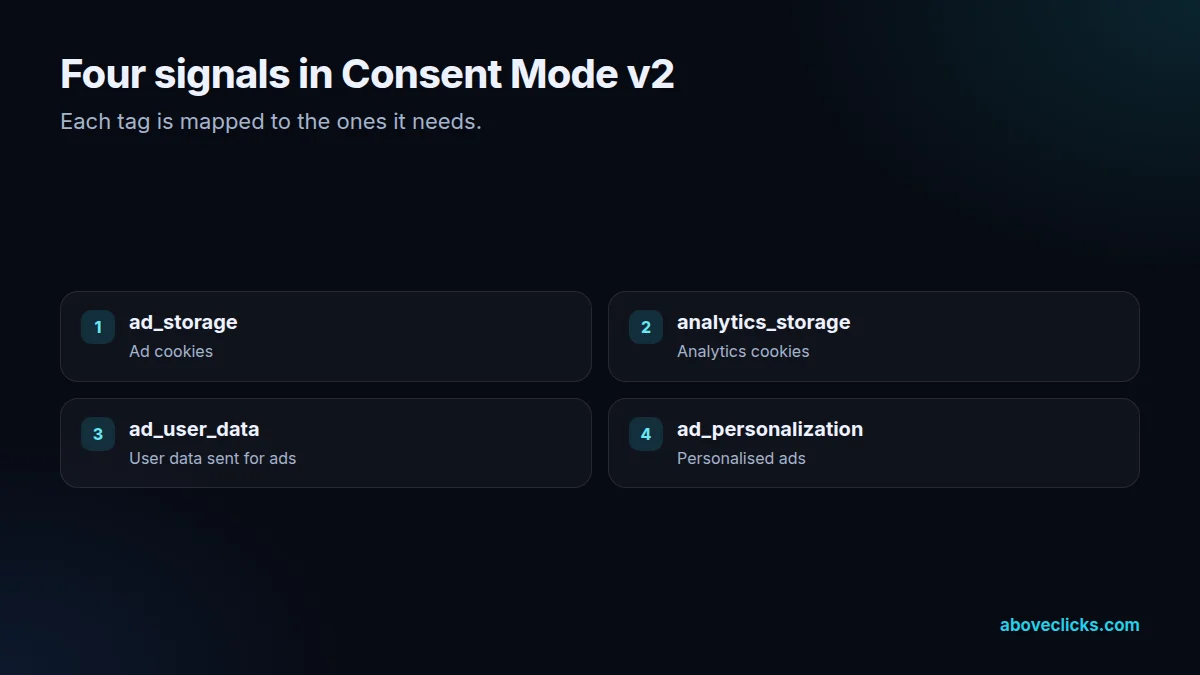
Consent mode setup starts with a list of every tag on the store and what it stores. Google’s consent mode guide describes four signals: ad_storage and analytics_storage control cookies, while ad_user_data and ad_personalization, added in Consent Mode v2, control whether user data is sent to Google for ads and whether it can be used for personalised ads. We map each tag on the store to the signals it needs.
Google’s EU user consent policy requires consent for cookies and personalised ads for visitors in the European Economic Area and the UK. Since March 2024, Google has needed consent signals from sites using its ad tools for EEA traffic to keep features such as remarketing audiences and conversion measurement working. So the setup decides which regions get a “denied” default.
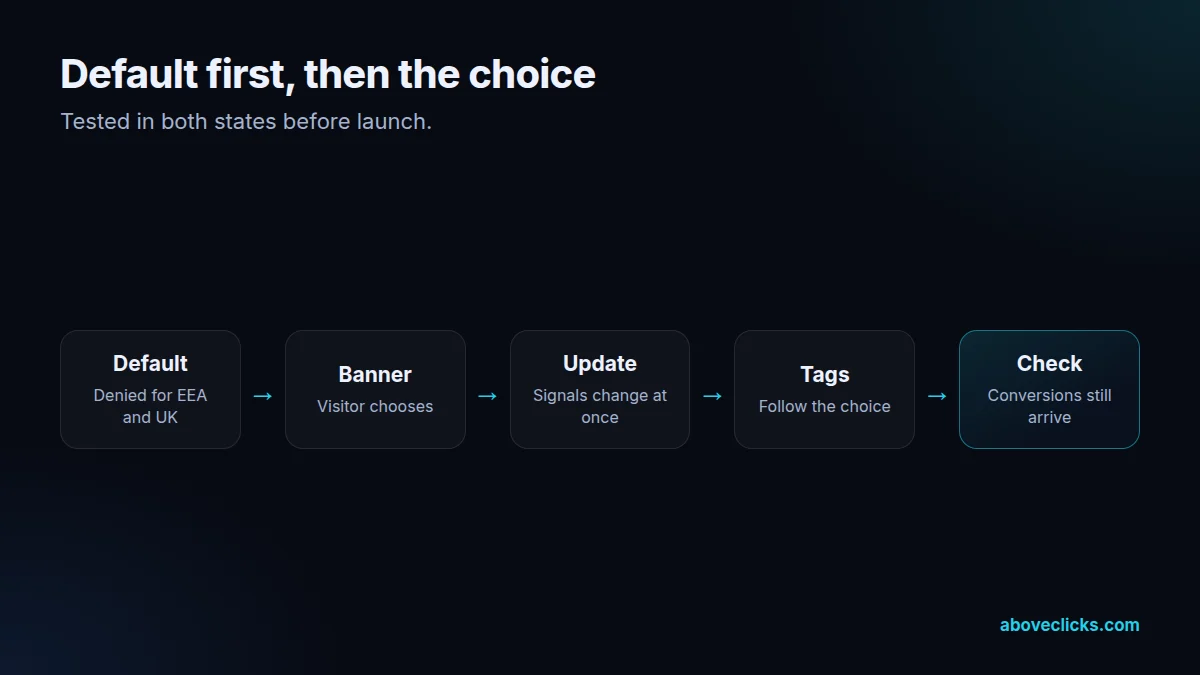
Order matters. The default state has to be set before any Google tag sends data, then updated the moment the visitor answers the cookie banner. In Google Tag Manager this runs on the Consent Initialization trigger; on a store without GTM it goes at the top of the page, before the Google tag. We test both states, accept and reject, and the update in between, with Tag Assistant.
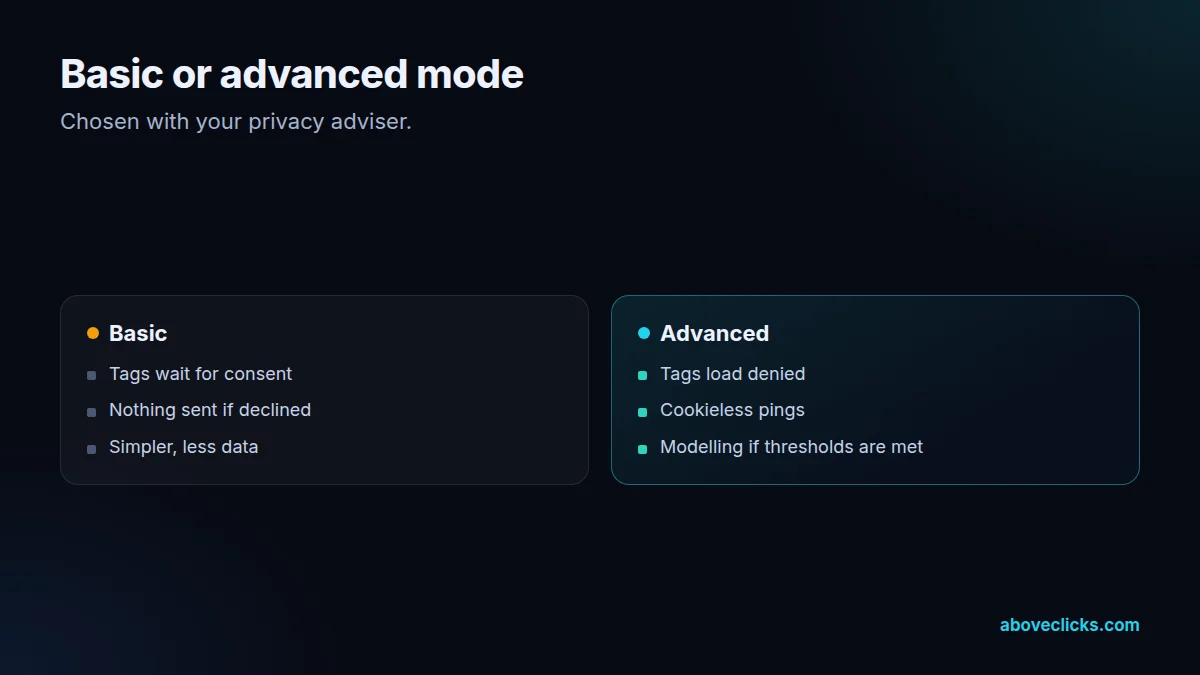
Google offers two modes, explained in its consent mode help page. In basic mode, Google tags don’t load at all until the visitor agrees. In advanced mode, tags load with consent denied and send cookieless pings, which Google can use to model conversions it can no longer observe. We explain the trade-off and set up the mode you and your privacy adviser choose.
Modelled conversions depend on volume. Google Analytics only turns on behavioural modelling when a property collects at least 1,000 events a day with analytics_storage denied for at least 7 days, and has at least 1,000 daily users with it granted on at least 7 of the previous 28 days. Smaller stores won’t get modelled data, and we say so before you pick a mode for that reason.
Shopify stores have their own route. Shopify’s Customer Privacy API stores the visitor’s choice and passes it to Shopify’s pixels and apps. We connect the banner you use (Shopify’s own or a consent management platform) to that API and to Google’s consent signals, so the theme, the checkout and the customer events sandbox all follow the same choice.
Other platforms need the same care. Meta, TikTok and Pinterest don’t read Google’s consent signals, so each pixel is held back or loaded based on the visitor’s choice, through the banner’s own rules or GTM triggers. Server-side events are checked too, since a server-side tracking setup has to pass consent on as well.
This site runs its own consent banner with consent defaults set before any tag loads, and our GA4 audit includes a privacy section. After the consent mode setup we check that conversions still reach Google Ads, look at the share of consented traffic, and leave you a short record of what each tag does in each state.
Testing covers all 3 banner outcomes: accept, reject and no choice yet. In Tag Assistant we check the default state on page load, then confirm that the 4 consent signals (ad_storage, analytics_storage, ad_user_data and ad_personalization) change the moment a visitor chooses, before any tag fires.
The handover is written down. You get a short record of the setup: which banner runs, which regions see it, the default state for each of the 4 consent signals, which tags wait for consent, which load in advanced mode, and how the Meta, TikTok and Pinterest pixels are held back. When your team adds an app or a tag later, the record says what it needs before it goes live. Run the same 3 banner checks in Tag Assistant after any theme or banner update, because either one can change the order in which scripts load and quietly undo the consent mode setup.
What’s included
Every tag and pixel listed with what it stores and sends.
Each tag matched to ad_storage, analytics_storage, ad_user_data or ad_personalization.
Your cookie banner wired to Google’s consent signals and, on Shopify, the Customer Privacy API.
A denied default for the EEA and UK, and the regions your adviser chooses.
Set up as chosen, with the modelling thresholds checked.
Meta, TikTok and Pinterest held until the visitor agrees.
Accept, reject and update tested in Tag Assistant and on real devices.
A plain document of each tag’s behaviour in each state.
How we run it
Consent mode setup follows four steps, and nothing goes live until both choices are tested. Typical timing: the audit within 2 workdays, the build in about a week, and testing and handover within 2 weeks.
Step 1
Every tag, pixel and app that stores or sends data, listed.
Step 2
Signals, regions and mode agreed with you and your adviser.
Step 3
Banner connected, defaults and updates set, other pixels gated.
Step 4
Both choices tested, conversions checked, document delivered.
Pricing
The audit is free. Paid work starts at these prices, and your exact cost is fixed in writing before any work begins.
Free no obligation
Tell us your setup and we will check consent mode.
Get my free auditFixed scope
From $350 one-off
Consent mode v2 implemented correctly.
From $150 monthly
Checks as privacy rules change.
All prices are starting prices in US dollars. Custom work beyond these options is quoted after the audit.
By industry
Shopify’s Customer Privacy API, the checkout and the customer events sandbox all have to follow the same choice.
Google tag or GTM on the page, a consent platform plugin, and server-side events if you send them.
Different defaults by region, so EU and UK visitors start denied while others follow local rules.
Sources
Platform rules change. These are the official pages we check the work against, so you can check it too.
FAQ
Can’t find yours? Ask on WhatsApp or by email and we’ll answer it.
It’s Google’s way of telling its tags what a visitor agreed to. Version 2 adds two signals, ad_user_data and ad_personalization, to the original ad_storage and analytics_storage.
If you have no EEA or UK visitors and no local law requiring consent, it’s optional. Many stores still set it up, with a granted default outside Europe, so the setup is ready if rules change.
Basic mode blocks Google tags until the visitor agrees. Advanced mode loads them with consent denied and sends cookieless pings, which Google can use to model missing conversions.
Reported conversions usually fall for visitors who decline, because they can’t be observed. Advanced mode can recover part of that through modelling, if your traffic meets Google’s thresholds.
It can. Shopify’s banner stores the choice through its Customer Privacy API, and we connect that choice to Google’s consent signals so your Google tags follow it.
No, on its own it’s a technical signal. You still need a lawful banner, a privacy policy and the right choices for visitors, which your lawyer or adviser should confirm.
Latest guides
E-commerce SEO
Is Shopify good for SEO? Yes, and so is WooCommerce: both platforms can rank. This comparison shows what you control on Shopify…
Buying guides
21 questions for your intro calls, grouped by topic, each with what a good answer sounds like and what should worry you.…
Buying guides
Percentage of ad spend, flat retainer, performance fee, hourly or a hybrid: what each model rewards, how it behaves as your spend…
Free growth audit
Tell us about your store. We’ll review your tracking, campaigns and SEO and send you a written audit with the top fixes, ranked by impact.