Measurement
MER vs ROAS: which number to manage to
MER vs ROAS comes down to scope: MER judges all ad spend against all revenue, while ROAS judges one channel's spend against…
Tracking & analytics · Shopify checkout
Shopify stopped running script tags on the Order status page for Plus stores in August 2025 and for all other stores on August 26, 2026. Stores whose checkout tracking relied on those scripts may have lost purchase data without anyone noticing. We find what broke, rebuild Shopify checkout tracking with customer events and web pixels, and check it against your orders.
200+ clients served 500+ projects delivered
Free tracking check
Three fields and you are done. We test your checkout events and send which ones are missing or wrong.
Your PDF report comes by email. If you want to discuss going ahead after reading it, we’ll set up a video meeting. We use your details only for this audit.
Fit
This is a fixed-scope repair. For server events, consent and ongoing reconciliation, see server-side tracking and our tracking and analytics service.
Problems we fix
GA4 or an ad platform shows a sudden fall in purchases while Shopify’s orders stayed steady, starting around the change date.
Google or Meta campaigns change behavior because the conversions they optimize on stopped arriving or arrive without values.
Code in checkout settings or app script tags still looks configured, but no longer runs on the Order status page.
An old custom script and a newer app pixel both report purchases, each counting slightly differently.
Purchases arrive without order ID, value, currency or items, so deduplication and revenue reporting fail.
The checkout looks fine to shoppers, so nobody tested whether the tracking survived.
In 1:10 · animated
A short animated walk-through of the first checks in our audit. No sound needed: everything is on screen, and the transcript is below.
What we check first in Shopify checkout tracking, an animated explainer of 1:10 with on-screen captions and controls to pause.
Our approach
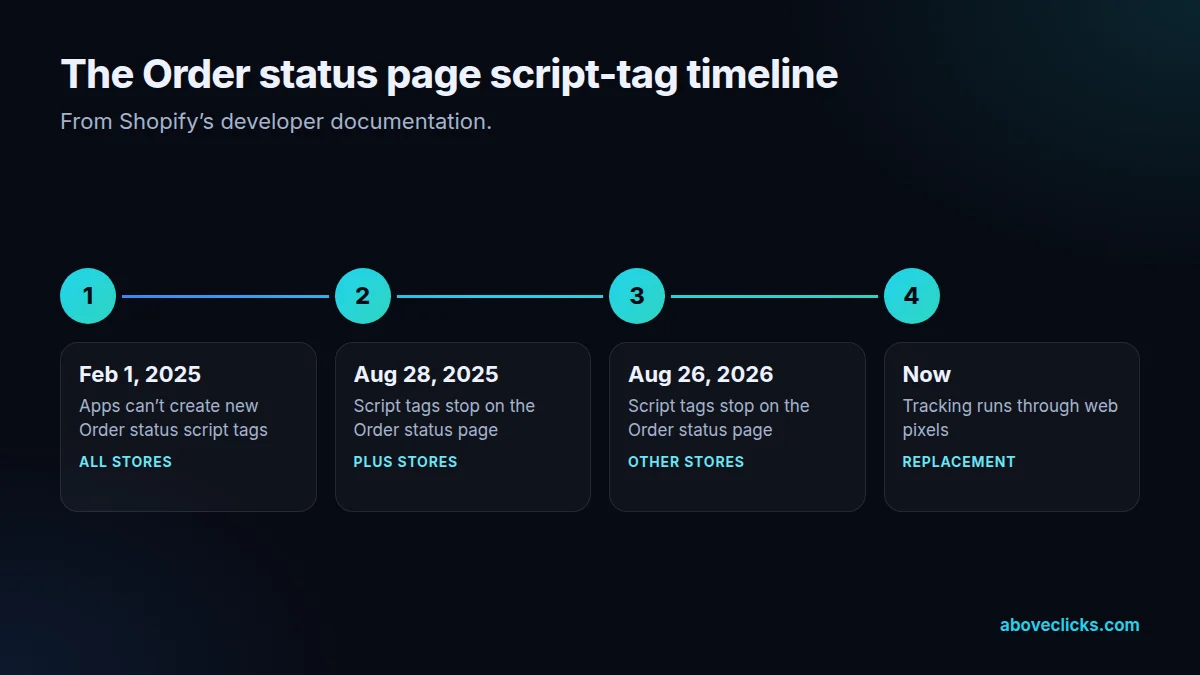
Shopify’s developer documentation on Order status script tags sets out the timeline: apps couldn’t create new ones from February 1, 2025, script tags stopped running for Plus stores on August 28, 2025, and for all other stores on August 26, 2026. For tracking analytics and conversions, the replacement is web pixels.
We start by finding what broke. We compare purchases in GA4, Meta, Google Ads and any other platform with Shopify orders by day around the change date, list every script, app and pixel that sends purchase events, and check which of them still runs.
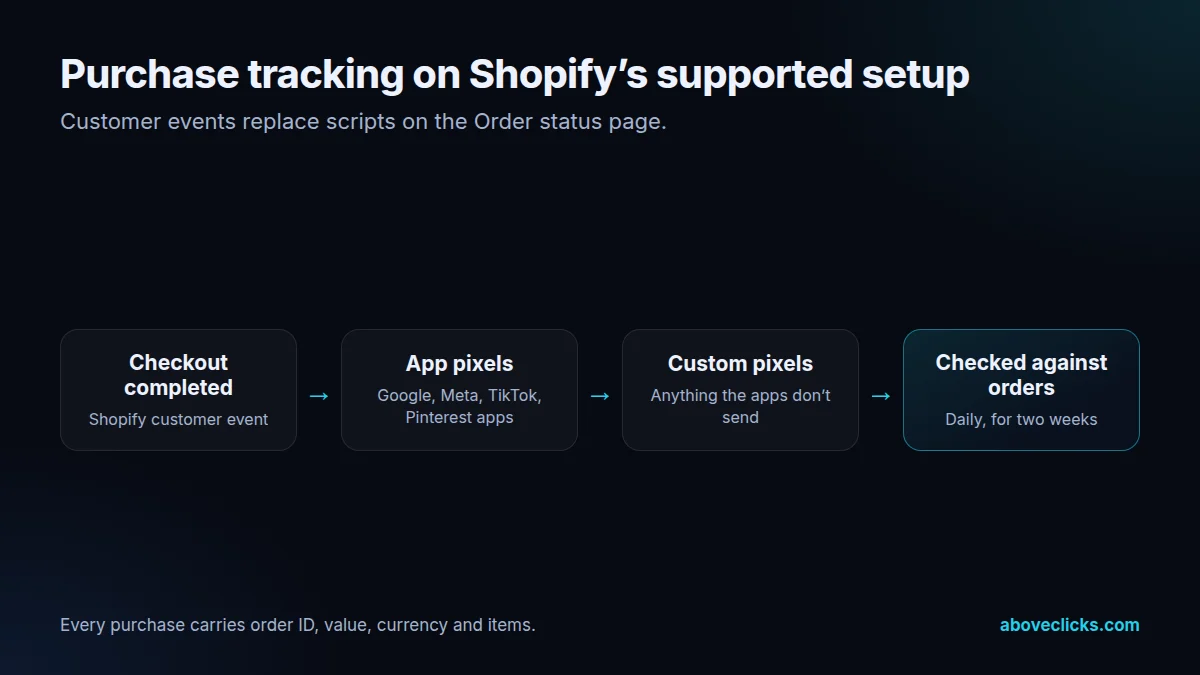
Then we rebuild on Shopify’s supported setup. Pixels and customer events in the Shopify admin let official app pixels and custom pixels subscribe to events such as checkout completed, built on the Web Pixels API. We use the official apps where they do the job, and custom pixels where you need something they don’t send.
Every purchase event gets the details reporting depends on: order ID for deduplication, value, currency and items. For GA4 that follows Google’s e-commerce measurement guide, so purchases line up with the rest of your funnel events.
Finally we test with real orders and reconcile. Purchases in each platform are compared with Shopify orders for at least a couple of weeks, old scripts are removed so nothing double counts, and you get a short document showing what sends what.
Thank you page content is a separate question from tracking. Post-purchase surveys, upsells and messages that used scripts need customer account UI extensions or apps built for the new pages, as Shopify’s documentation notes. We list those too, so nothing else quietly stopped working.
We also look at the steps before purchase. Checkout started, payment info submitted and other checkout events are available as customer events, and adding them gives GA4 and the ad platforms a fuller funnel than purchases alone.
Where purchases also go server-side, through the Conversions API or enhanced conversions, we check that the rebuilt browser events and the server events share IDs, so the repair doesn’t create duplicates on the other side.
How we use AI here
Checkout tracking problems hide in small details. AI helps us write and test the fix; real test orders prove it.
Web pixels and customer events subscriptions are drafted with AI coding tools, then reviewed and tested in a development store.
Scripts compare test orders with what GA4 and the ad platforms received, field by field.
A check flags it if purchases stop arriving after a checkout, app or theme change.
Where it doesn’t help: proving the numbers. Only orders in your store, matched against each platform, confirm that checkout tracking works.
What’s included
Purchases per platform compared with Shopify orders around the change dates, and every purchase-tracking source listed.
Official app pixels connected and configured, with custom pixels where needed.
Purchase with transaction ID, value, currency and items, consistent with your other e-commerce events.
Meta, Google Ads, TikTok and Pinterest purchase events checked for values and event IDs.
Retired scripts and duplicate pixels cleaned out so nothing double counts.
Real test orders traced through every platform, then two weeks of platform numbers compared with orders.
A short document listing every pixel, what it sends and where it’s managed.
How we run it
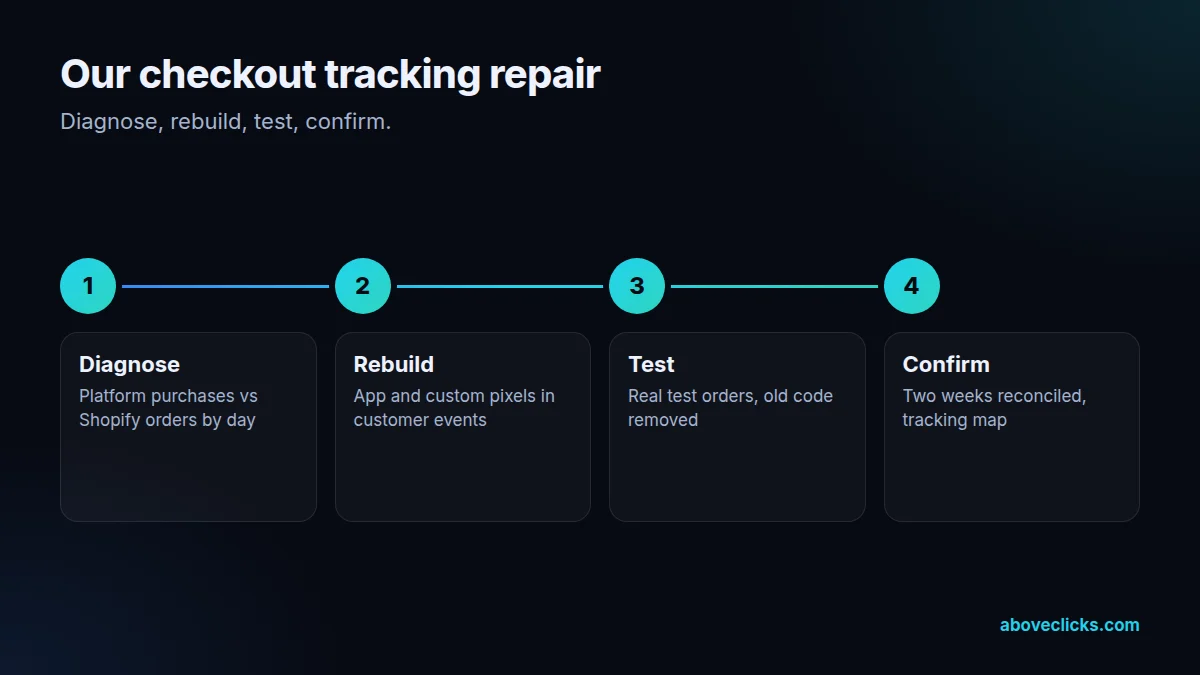
Diagnose, rebuild, test, then confirm with real orders. Typical timing: the audit within 2 workdays, the build in about a week, and testing and handover within 2 weeks.
Step 1
Purchases per platform against Shopify orders, and an inventory of every tracking source.
Step 2
App pixels and custom pixels set up in customer events, with complete purchase data.
Step 3
Real test orders traced through GA4 and each ad platform; old code removed.
Step 4
Two weeks of platform numbers reconciled with orders, and a tracking map handed over.
Pricing
The audit is free. Paid work starts at these prices, and your exact cost is fixed in writing before any work begins.
Free no obligation
We will check your checkout tracking and send the gaps within 2 workdays.
Get my free auditFixed scope
From $400 one-off
Clean checkout events in GA4 and ad platforms.
From $150 monthly
Checks after theme and app changes so tracking stays correct.
All prices are starting prices in US dollars. Custom work beyond these options is quoted after the audit.
By industry
For jewelry stores with high order values, each missing purchase weakens bidding more. We check values and currencies carefully, including gift card and discount handling.
Fashion stores often run several apps that fire on purchase, from reviews to loyalty. We map them all, so only the ones that should send conversions do.
For low-volume, high-value stores, a few missing purchases can change what smart bidding learns. We trace every test order end to end.
Sources
Platform rules change. These are the official pages we check the work against, so you can check it too.
FAQ
Can’t find yours? Ask on WhatsApp or by email and we’ll answer it.
Shopify stopped running script tags on the Order status page, for Plus stores on August 28, 2025 and for all other stores on August 26, 2026. Tracking that relied on them must use web pixels instead.
Compare purchases in GA4 and each ad platform with Shopify orders by day. A sudden drop around the change date, while orders stayed steady, is the usual sign.
Sometimes, with changes. Custom pixels run in a sandbox and subscribe to Shopify’s customer events, so old code that reads the page directly usually needs rewriting.
Often they do, once connected and configured in customer events. We check what each app sends and fill gaps with custom pixels.
No. Missing purchases can’t be added back to GA4 or ad platforms after the fact. The repair stops further loss and makes future data reliable.
Plus stores lost script tags on the Order status page earlier, on August 28, 2025. Many have already moved to customer events, but we still find gaps in older setups.
We check whether it offers an app pixel or customer events integration. If not, we rebuild its tracking with a custom pixel, or suggest an alternative app.
GA4, Google Ads, Meta, TikTok and Pinterest purchase events, plus any other tool you use that needs order data, such as an affiliate or review platform.
Yes. The breakage check comes first, and it tells you which platforms are missing purchases and why. You decide on the repair after seeing it.
It depends on how many platforms and apps are involved. We agree the scope after the breakage check, and the reconciliation runs for about two weeks after the fix.
Related guides
Measurement
MER vs ROAS comes down to scope: MER judges all ad spend against all revenue, while ROAS judges one channel's spend against…
E-commerce SEO
Affordable SEO is a scoping decision, not a shopping decision. This guide shows what a small budget actually buys, what to buy…
E-commerce SEO
Email marketing cost is five bills in one: the tool, the list, the sends, the flows and the people. This guide prices…
Free growth audit
Tell us about your store. We’ll review your tracking, campaigns and SEO and send you a written audit with the top fixes, ranked by impact.