Shopify email vs Klaviyo comes down to how you are charged, not which logo looks better. Shopify charges per email sent, with 10,000 free emails a month. Klaviyo charges per profile on your list, with a free plan capped at 250 profiles and 500 emails a month. So the right pick follows from two numbers you already know: how big your list is, and how often you send.
This comparison of Shopify email vs Klaviyo uses the two vendors’ own published prices and limits, as of October 2026, starting with Shopify’s published Messaging email pricing. Where Klaviyo does not publish a flat price, this piece says so instead of quoting a review site’s number. Search it the other way round, klaviyo vs shopify email, and you get the same two tools and the same question: which billing model fits your store? In short, the Shopify email vs Klaviyo choice is a billing choice first and a features choice second.
How much does Shopify Email cost?
Shopify Email costs nothing extra up to 10,000 emails a month, then $1 for every 1,000 extra emails. That is the whole pricing model, and it is why small senders love it. That simplicity is the main reason the Shopify email vs Klaviyo debate starts with price.
Shopify Email now lives inside Shopify Messaging, the app that holds Shopify’s email and SMS, as of October 2026 (Shopify’s Messaging overview). Every store on the Basic, Grow, Advanced and Plus plans gets 10,000 free emails at the start of each calendar month, shared across every campaign sent that month. After the free allowance, Shopify Email pricing runs in three tiers: $1 per 1,000 extra emails up to 300,000 emails, $0.65 per 1,000 after 300,000, and $0.55 per 1,000 after 750,000. Emails are counted per recipient address, so one campaign to 800 subscribers counts as 800 emails, and unused free emails do not carry over to the next month.
Shopify’s own example makes the counting plain: 2 campaigns sent to 6,000 subscribers each come to 12,000 emails, of which 10,000 are free and 2,000 are paid. Automations draw from the same 10,000 free emails, with one exception: abandoned checkout automations are always free and do not count toward the monthly limit. That exception matters, because recovery emails are the highest-volume automation most small stores run.
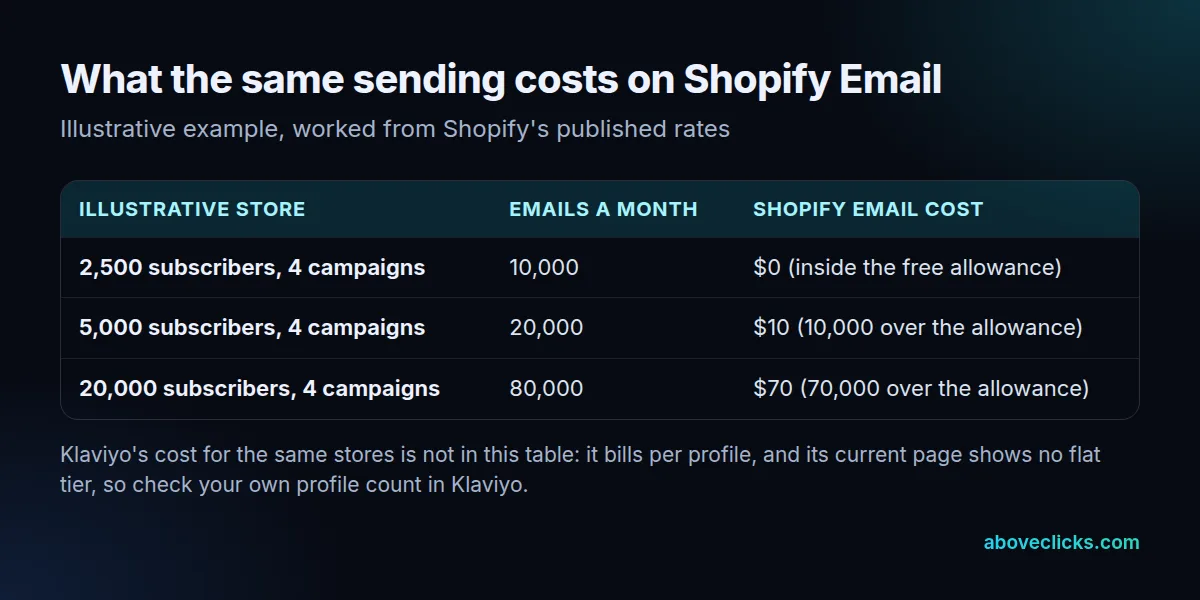
Here is an illustrative worked example using Shopify’s published rates. A store with 5,000 subscribers sending 4 campaigns a month sends 20,000 emails: 10,000 free, 10,000 paid at $1 per 1,000, which is $10. The same store sending weekly to 20,000 subscribers sends 80,000 emails and pays $70. Your bill rises with how often you send, not with how big your list is, so a large list that rarely hears from you can still cost nothing. This is where Shopify email vs Klaviyo diverges most sharply: one bill follows sends, the other follows list size.
What does Klaviyo’s free plan actually cover?
The Klaviyo free plan covers up to 250 profiles and 500 emails a month, plus $5 of mobile messages and $5 of Composer usage a month. That is a trial-sized plan, not a small-store plan.
The Klaviyo pricing page lists the free plan in full, as of October 2026: up to 250 profiles, 500 emails a month, $5 of mobile messages a month, $5 of Composer usage a month, built-in reporting, and email support for the first 60 days. A store with 300 subscribers is already past the Klaviyo free plan, and a store with 250 profiles can only send 2 emails per profile per month before hitting the 500-send cap. For the Shopify email vs Klaviyo comparison, the free plans alone settle the small-store question: 10,000 sends against 500.
Paid Klaviyo usage is priced by active profile count, with its email, SMS and other products sold as separate solutions. Klaviyo’s current pricing page shows no single flat paid tier in the text retrieved, so this piece quotes no paid Klaviyo price as fact. That is not a gap in the comparison; it is the point. Before you budget for Klaviyo, put your own profile count into Klaviyo’s pricing tool and read the number it gives you, because third-party articles quote different tiers from different months and those numbers go stale fast.
The billing contrast with Shopify email vs Klaviyo is now clear. Shopify bills you for what you send, so a quiet month costs little whatever your list size. Klaviyo bills you for who you keep on the list, so a large list costs money even in a month you send nothing. Which model hurts depends entirely on your sending pattern, which is why the pick table later in this piece starts from list size and send frequency.
Shopify email vs Klaviyo: which automations and segments do you get?
Shopify Email gives you the three recovery automations most stores need first, while Klaviyo gives you flows triggered by almost anything a shopper does. The gap is breadth, not basics. In the Shopify email vs Klaviyo feature gap, breadth is Klaviyo’s edge and simplicity is Shopify’s.
Shopify’s pre-built marketing automations, listed in its automations help page, cover three moments: convert abandoned product browse, recover abandoned cart, and recover abandoned checkout, over email and SMS. Shopify Email also supports dynamic product sections, so best sellers and most recently added products can appear in a campaign at send time. For a store whose email work is campaigns plus recovery, that is a complete basic set.
Klaviyo’s flows start from 6 trigger types, per its flows help page: list, segment, metric, date property, price drop, and low inventory. A price-drop flow or a low-inventory flow has no equivalent in Shopify’s three templates, and flows can split on behaviour mid-flow, so first-time buyers and repeat buyers can travel different paths inside one automation. That is the difference between sending a recovery message and running a lifecycle program.
Segmentation shows the same gap. Shopify segments by purchase history, timing and location, which covers most campaign targeting. That is the Shopify email vs Klaviyo automation gap in one line: three templates against flows triggered by behaviour.
Klaviyo’s predictive layer is where the gap widens further, but it has entry bars worth knowing before you pay for it. Klaviyo adds predictive segments: predicted customer lifetime value, expected next order date, and churn risk, all living on the shopper’s profile. Its CLV help page sets real entry bars for those predictions: at least 500 customers with orders, an ecommerce integration, at least 180 days of order history, orders within the last 30 days, and some customers with 3 or more orders. Predicted lifetime value covers the next 365 days by default. A store below those bars gets Klaviyo’s flows and segments, but not its predictions, so do not pay for predictions you cannot yet use.
Shopify email vs Klaviyo: which should you pick?
Pick Shopify Email when your list is small or your sending is light, and pick Klaviyo when behaviour-based flows are the work itself. The shopify email vs klaviyo table below turns that rule into rows you can match to your store.
| Shopify Email | Klaviyo | |
|---|---|---|
| Billing | Per email sent | Per profile on your list |
| Free allowance | 10,000 emails a month | 250 profiles and 500 emails a month |
| Automations | 3 recovery templates | Flows triggered by shopper behaviour |
| Predictive segments | Not offered | Predicted lifetime value, next order date, churn risk |
| SMS | Inside recovery automations | Inside any flow, next to email |
| Best for | Small lists and light sending | Stores running behaviour-based flows |
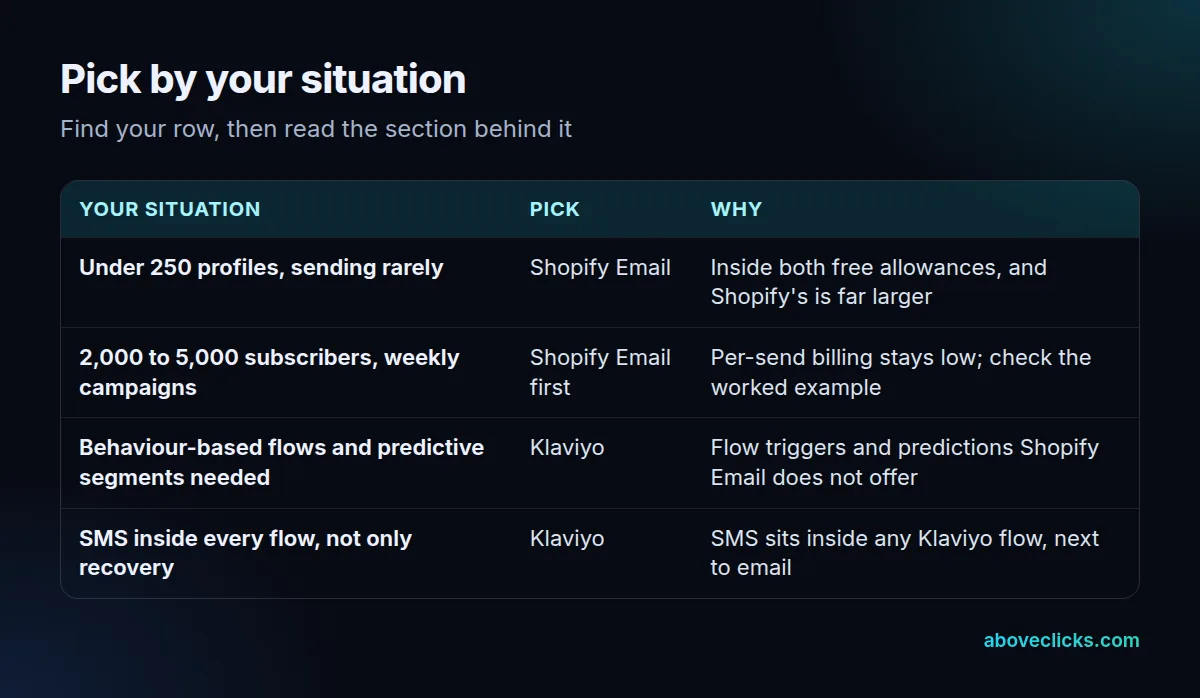
Read the table by your row, not by the tool’s reputation. A store with 2,000 subscribers sending one campaign a month sends 2,000 emails and pays nothing on Shopify Email, while the same store on Klaviyo needs a paid plan because 2,000 profiles is far past the 250-profile free cap.
Use the Shopify email vs Klaviyo table as a filter, not a verdict: if your row points to Shopify Email, the extra Klaviyo features are not free, they are unused. A store sending daily to a large list should work out both bills: Shopify’s per-send tiers stay low for a long time, and Klaviyo’s per-profile bill is fixed whatever you send, so heavy senders can find Klaviyo cheaper per email even though its monthly bill looks larger.
SMS placement is the second tie-breaker. In Shopify Messaging, SMS sits inside the three recovery automations and the SMS automations you build yourself. In Klaviyo, SMS is a step inside any flow, next to email and behind the same splits, so a welcome flow can mix texts and emails from the start. If your texts only ever chase abandoned checkouts, Shopify covers it; if texts belong in every lifecycle flow, Klaviyo fits better.
When we audit a store’s current email setup, we start with four numbers before naming any tool: list size, sends per month, flows live today, and whether SMS is needed beyond recovery. Those four numbers answer the Shopify email vs Klaviyo question for most stores without any further debate. That is how a Shopify email vs Klaviyo decision should be made: numbers first, features second. Our Klaviyo email marketing service covers that audit and the setup that follows it.
Is Klaviyo worth it for a small Shopify store?
Klaviyo is worth it for a small store only when the flows it adds earn more than the subscription costs, and most small stores cannot show that yet. Start from your own numbers, not from the feature list.
Take the worked example in the cost table: a store with 5,000 subscribers sending 4 campaigns a month pays $10 on Shopify Email. That store would need a paid Klaviyo plan, because 5,000 profiles is 20 times the free cap, and its Klaviyo bill is fixed whether it sends 4 campaigns or 14. The Shopify email vs Klaviyo math for a small store is simple: compare $10 against a fixed monthly bill for features you may not use. If that store’s only automations are the three recovery messages, Klaviyo adds little it can use, and the extra bill buys features that sit idle.
Klaviyo starts to earn its place when two things are true at once: the store runs flows Shopify cannot build, such as price-drop or browse-based win-back sequences with behavioural splits, and those flows run every week without manual work. At that point the question stops being “which tool is cheaper” and becomes “which tool runs the program”. A store that sends one campaign a month and has no flows beyond recovery should stay on Shopify Email and revisit the question when its list or its automation needs grow.
One more small-store trap is worth naming: the Klaviyo free plan support lasts 60 days, so a store that sets Klaviyo up slowly can lose email support before it sends its first serious campaign. Shopify Email, by contrast, has no separate subscription to lose; its cost only appears when you pass 10,000 sends. Neither fact decides the pick alone, but both belong in the budget you draw up before choosing.
How do you move from Shopify Email to Klaviyo?
Move in 6 steps, in order, so no shopper gets the same message twice: export and clean, map the old flows, rebuild, test small, switch off the old automations, then watch. The step most movers skip is the switch-off, and it is the one that causes double-sends. Every Shopify email vs Klaviyo migration fails the same way: the old automations keep running.
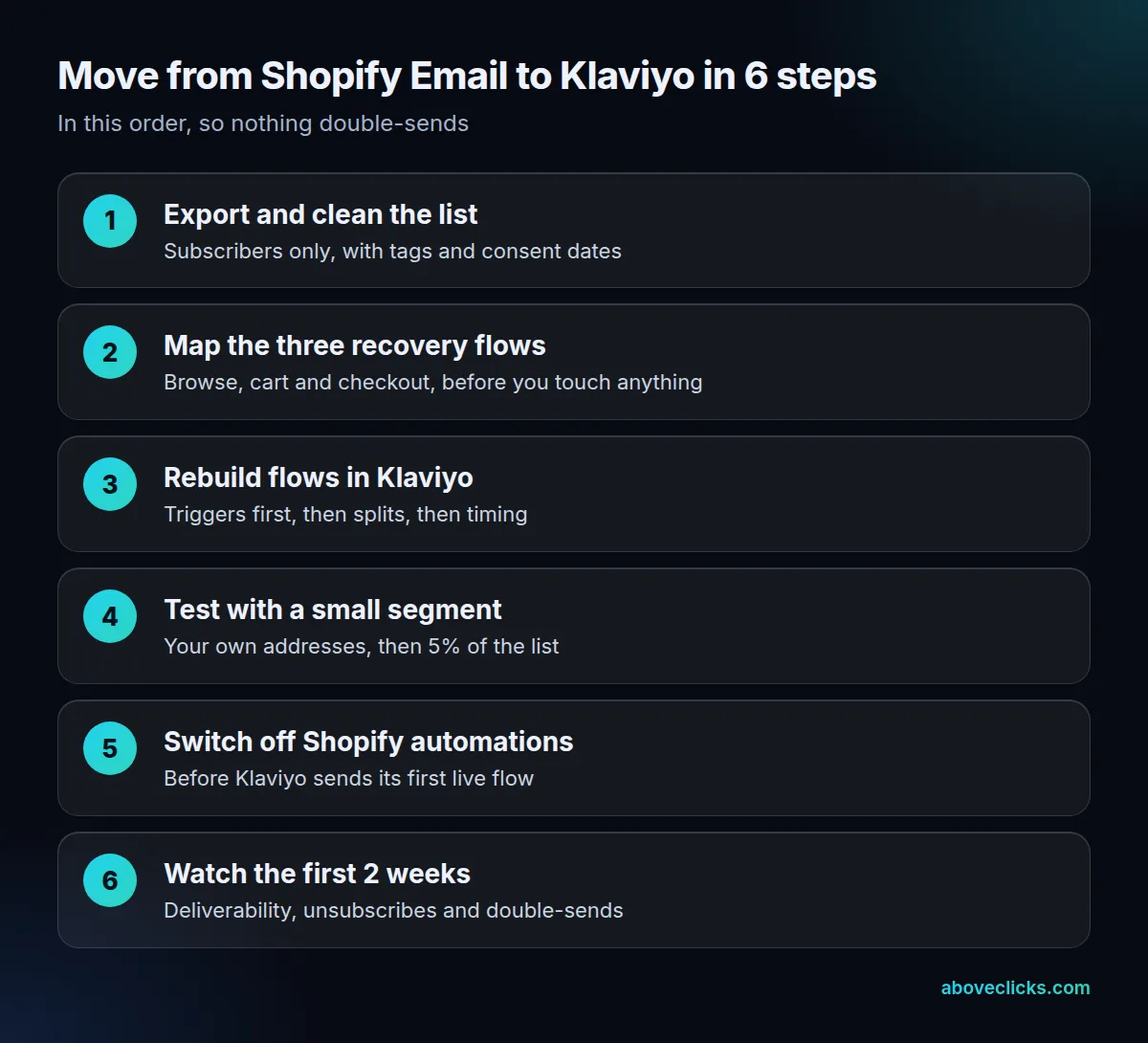
Start by exporting subscribers only, with their tags and consent dates, and leave unsubscribed and bounced addresses behind. Then write down the three Shopify recovery automations as they run today, including their timing and discounts, because you will rebuild each one in Klaviyo rather than importing it. Flows do not transfer between tools, so budget an evening for the rebuild even for a simple setup.
Test with your own addresses first, then with 5% of the list, and check that browse, cart and checkout triggers fire once each. Only then switch off the Shopify automations, before Klaviyo sends its first live flow. Watch the first 2 weeks for deliverability, unsubscribes and any double-sends, and keep Shopify Email switched off rather than running both tools in parallel. If the move ever needs reversing, the same steps run backwards: rebuild the three recovery automations in Shopify, switch Klaviyo’s flows off, then send.
That is the whole Shopify email vs Klaviyo decision: per-send billing against per-profile billing, three recovery automations against behaviour-based flows, and a free allowance of 10,000 sends against 250 profiles. Work out your list size and your sends per month, find your row in the pick table, and the answer usually writes itself. More comparisons in this series sit in our general topic collection. Revisit the Shopify email vs Klaviyo pick once a year, or whenever your list or your automation needs jump, because the right answer changes as the store grows. To have your current setup read before you choose, start with the free audit.