E-commerce SEO
Affordable SEO services for small business: 5 best proven
Affordable SEO is a scoping decision, not a shopping decision. This guide shows what a small budget actually buys, what to buy…
Custom Solutions · Shopify integrations
We build Shopify integrations for stores whose orders, stock and customers have to reach an ERP, CRM, warehouse or accounting tool. You get each data flow mapped, built on Shopify’s current APIs and webhooks, tested with real orders, and watched so a failed sync is caught the same day.
200+ clients served 500+ projects delivered
Free and no obligation. A list of the tools you use today is all we need to plan your Shopify integrations.
Free integration audit
Three fields and you’re done. We look at the apps and systems your store uses, where staff copy data by hand, and which syncs break, then write up the plan we would follow.
Your PDF report comes by email. If you want to discuss going ahead after reading it, we’ll set up a video meeting. We use your details only for this audit.
What we can show today
Worked example, with illustrative figures for a hypothetical store (not a client result): Shopify integrations for a store keying 1,200 orders a month into its ERP by hand, at 3 minutes each, save about 60 hours a month. The report tracks orders synced, failed syncs caught and fixed, and the error rate, for example from 2% of orders keyed wrongly to 0.1% after the sync.
We build integrations on our own systems too. This site’s lead forms check each submission, store it, and send a WhatsApp notification to our team without anyone copying data by hand, and every step logs its result so a failure shows up at once. A store integration follows the same pattern at a larger scale: each record moves once, is checked on arrival, and leaves a trail.
What we check
Most broken syncs fail in one of these six places. We settle each one before writing code.
For stock, price and customer data, one system is the source of truth and the others follow.
New builds on the GraphQL Admin API, because Shopify has marked the REST Admin API as legacy.
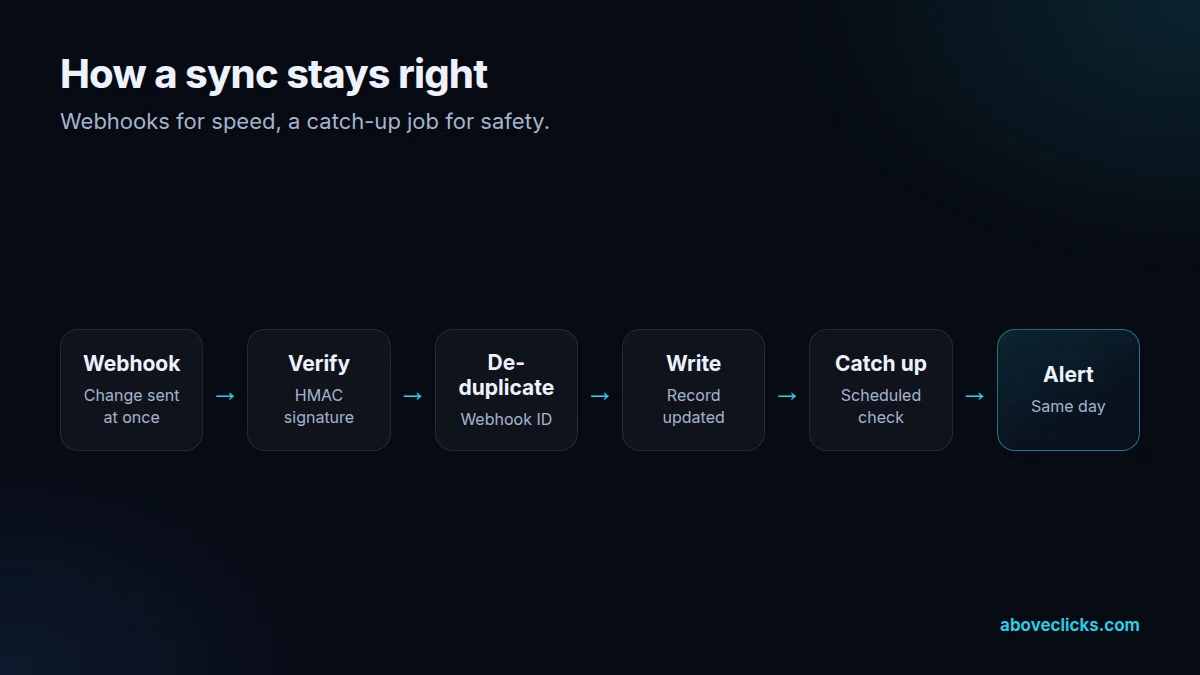
Every delivery checked for its HMAC signature and its webhook ID, so duplicates are ignored.
Requests paced to Shopify’s limits, with bulk operations for large exports.
A scheduled check that finds anything a webhook missed and syncs it.
A message to your team the same day a sync fails, with the record that failed.
In 1:10 · animated
A short animated walk-through of the first checks in our audit. No sound needed: everything is on screen, and the transcript is below.
What we check first in a Shopify integration, an animated explainer of 1:10 with on-screen captions and controls to pause.
How we work
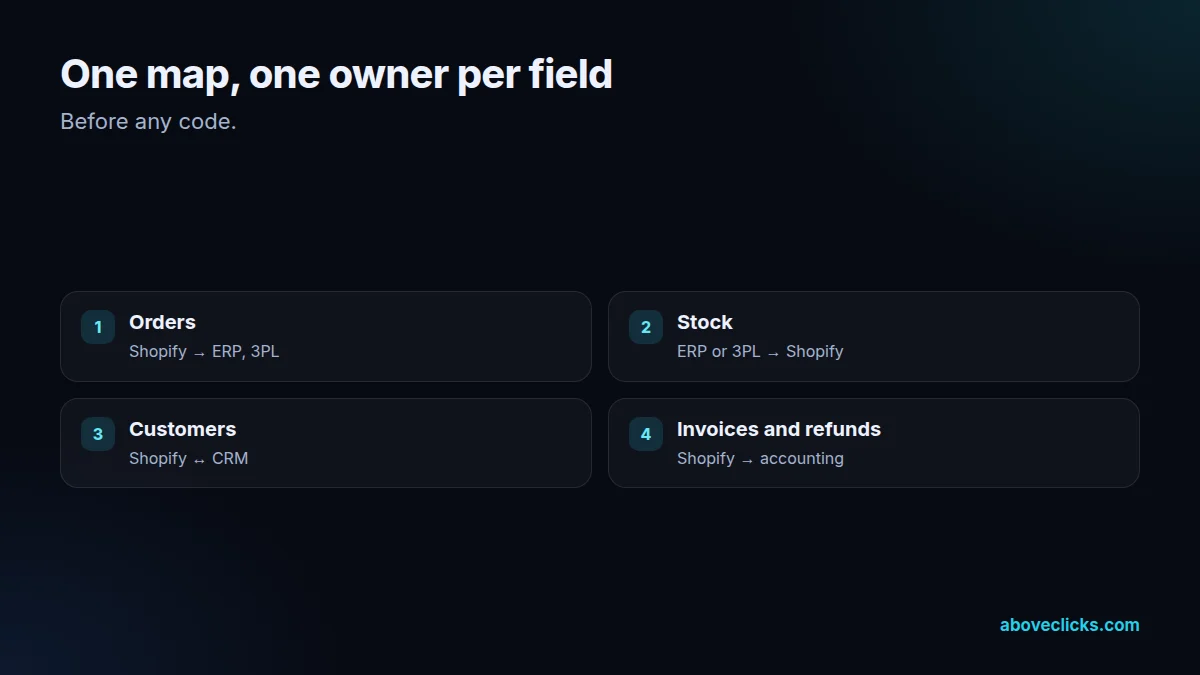
Shopify integrations start with a map, not code. We list every system the store uses (ERP, CRM, warehouse or 3PL, accounting, marketplaces) and draw what moves between them: orders out, stock in, customers both ways, invoices and refunds. For each field we agree which system owns it. Most sync bugs we see come from two systems both thinking they own the stock count.
Then we choose the lightest tool that works. Plenty of flows are covered by an existing app or by Shopify Flow, and we say so in the audit. Custom work is for the flows no app handles well, such as an ERP with its own order format, a B2B price list from an internal system, or several warehouses that each report stock differently.
New builds use the GraphQL Admin API. As of October 2026, Shopify’s REST Admin API reference says REST became a legacy API on 1 October 2024 and that new public apps must use GraphQL from 1 April 2025. Older private integrations often still call REST, so the audit lists those calls and we move them before they become a problem.
Webhooks carry the changes. When an order is created, Shopify sends it to the integration at once instead of the integration asking every few minutes. Shopify’s webhook guide says to verify the HMAC signature, ignore duplicate deliveries using the webhook ID, and not rely on order, because a product update can arrive before the product create. We build all three in, and answer each delivery quickly, since Shopify’s troubleshooting page says a delivery fails if the app takes more than five seconds.
Nothing is left to webhooks alone. Shopify’s webhook troubleshooting page says failed deliveries are retried up to eight times over four hours, and then the subscription can be removed. So every integration has a scheduled catch-up job that compares recent orders and stock on both sides and syncs anything missed. Large first syncs, such as a full product catalogue, run as bulk operations, which return the data as one file instead of thousands of calls.
Last, we keep it running. Shopify releases a new API version every quarter and supports each one for at least 12 months, according to its API versioning page. We pin each integration to a version, note when it expires, and update it in time. Your team gets an alert the same day any sync fails, with the record and the reason, and a monthly note on what ran.
What’s included
The audit is free. If you want us to build it, this is the work.
Every system and field, with one owner agreed for each.
Existing app, Shopify Flow or custom build, chosen per flow.
GraphQL Admin API and webhooks, with signatures checked and duplicates ignored.
Products, customers and open orders moved in bulk, then checked line by line.
Real test orders, refunds and stock changes run through every flow before launch.
A catch-up job, same-day alerts and a log of every record synced.
A plain-English document of each flow, so your team knows what runs where.
How we work
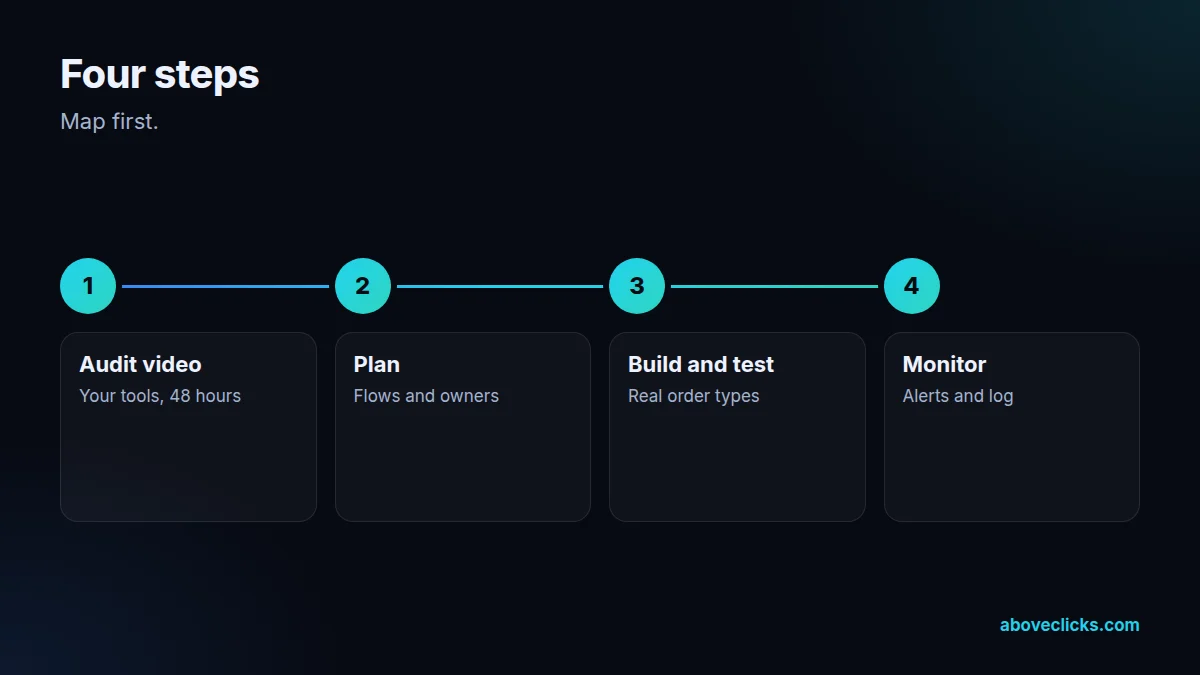
Nothing is charged until you have seen the map.
Step 1
You list your tools; within 2 workdays you get the map and the plan.
Step 2
Flows, tools, fields and owners agreed, with a fixed scope and cost.
Step 3
Built against a development store, tested with real order types.
Step 4
Switched on, watched daily for the first two weeks, then by alert.
Fit
Not the right fit if one existing app already does everything you need. We will tell you which one and how to set it up, and that is the end of it.
Pricing
The audit is free. Paid work starts at these prices, and your exact cost is fixed in writing before any work begins.
Free no obligation
We’ll map how your data moves today and send a PDF report within 2 workdays.
Get my free auditAfter the audit
From $600 one-off, per integration
One data flow between Shopify and another system, built and tested.
From $100 monthly
Sync monitoring and API updates, so nothing stops quietly.
All prices are starting prices in US dollars. Custom work beyond these options is quoted after the audit.
After the audit
The PDF report and the map are yours to keep either way.
Pricing
Every store is different, so we don’t quote before we’ve seen it. Within 2 workdays of the audit you get a fixed-scope plan with the cost and timeline. The cards above show where shopify integrations starts, in US dollars.
Third-party app or connector subscriptions are billed by those vendors, not by us. Send your store URL for the free audit.
Sources
Each rule on this page traces back to these pages, so you can check them yourself.
FAQ
Can’t find yours? Ask on WhatsApp or by email and we’ll answer it.
They are connections that move data between Shopify and the other systems a store runs on, such as an ERP, CRM, warehouse or accounting tool, so orders, stock and customers stay the same everywhere without manual entry.
Try an app first. If a well-reviewed app covers your systems and fields, it is cheaper to run. Custom work makes sense when your ERP, pricing or warehouse setup is unusual.
Usually, yes. Most ERPs connect through an app, a middleware tool or a custom integration on the Admin API. The hard part is agreeing which system owns stock and prices.
Shopify marked REST as legacy in October 2024 and requires GraphQL for new public apps. Existing REST calls still work on supported versions, but new builds should use GraphQL.
Shopify retries it several times and then can remove the subscription. That is why a good integration has a scheduled catch-up job that finds and syncs anything missed.
A single flow, such as orders to an accounting tool, often takes a couple of weeks including testing. A full ERP sync takes longer. The audit gives you a fixed timeline.
Your free integration audit
Same map, same PDF report, no obligation. If an off-the-shelf app does the job, the report says so.
Related guides
E-commerce SEO
Affordable SEO is a scoping decision, not a shopping decision. This guide shows what a small budget actually buys, what to buy…
E-commerce SEO
Email marketing cost is five bills in one: the tool, the list, the sends, the flows and the people. This guide prices…
E-commerce SEO
PPC pricing has two parts: money paid to the platform for clicks, and money paid to the person or agency managing the…