E-commerce SEO
Affordable SEO services for small business: 5 best proven
Affordable SEO is a scoping decision, not a shopping decision. This guide shows what a small budget actually buys, what to buy…
Web development · Magento & BigCommerce
We work on Magento and BigCommerce stores, and we are honest about how: our Magento development is mostly maintenance, security patches, upgrades and fixes on existing stores, and our BigCommerce work is theme, app and integration fixes. We don’t build large new Magento stores. When the upkeep of either platform costs more than it returns, we plan and run the migration to Shopify or WooCommerce, with rankings protected.
200+ clients served 500+ projects delivered
Free Magento development audit, no obligation. Your store URL is all we need to start.
Free Magento audit
Three fields and you’re done. The PDF report shows what we found on your own pages and accounts, and the order we’d fix it in. It covers the problems we see most often:
Your PDF report comes by email. If you want to discuss going ahead after reading it, we’ll set up a video meeting. We use your details only for this audit.
Fit
Not the right fit for large new Magento builds or complex multi-site Adobe Commerce programmes with their own agency teams. For those, a specialist Magento agency is the better choice.
Problems we fix
A Magento 2.4 release past its support dates, without security fixes, on PHP versions nearing end of life.
Security patches postponed because the last update broke an extension.
Dozens of extensions overriding the same parts of Magento, so every change has side effects.
Servers sized for Magento’s demands, costing more each year as the store stands still.
Changes made in a theme copy that can no longer take theme updates.
A store that should move, but nobody has mapped the URLs, data and integrations to do it safely.
In 1:10 · animated
A short animated walk-through of the first checks in our audit. No sound needed: everything is on screen, and the transcript is below.
What we check first in a Magento or BigCommerce store, an animated explainer of 1:10 with on-screen captions and controls to pause.
Our approach
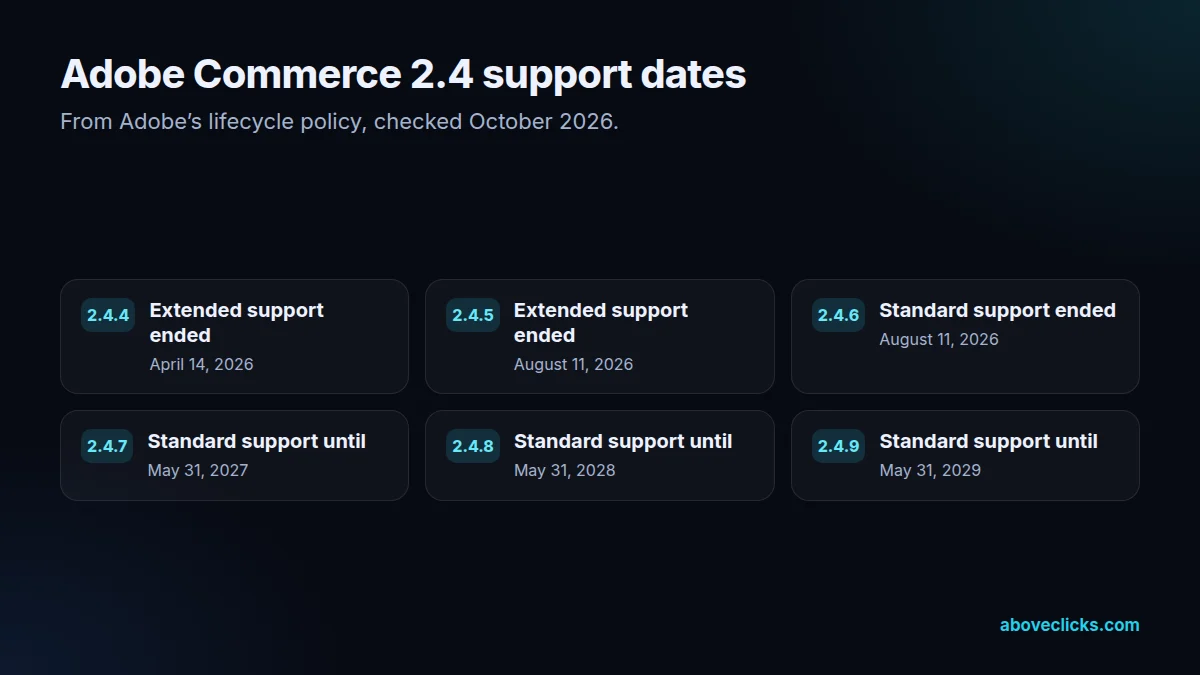
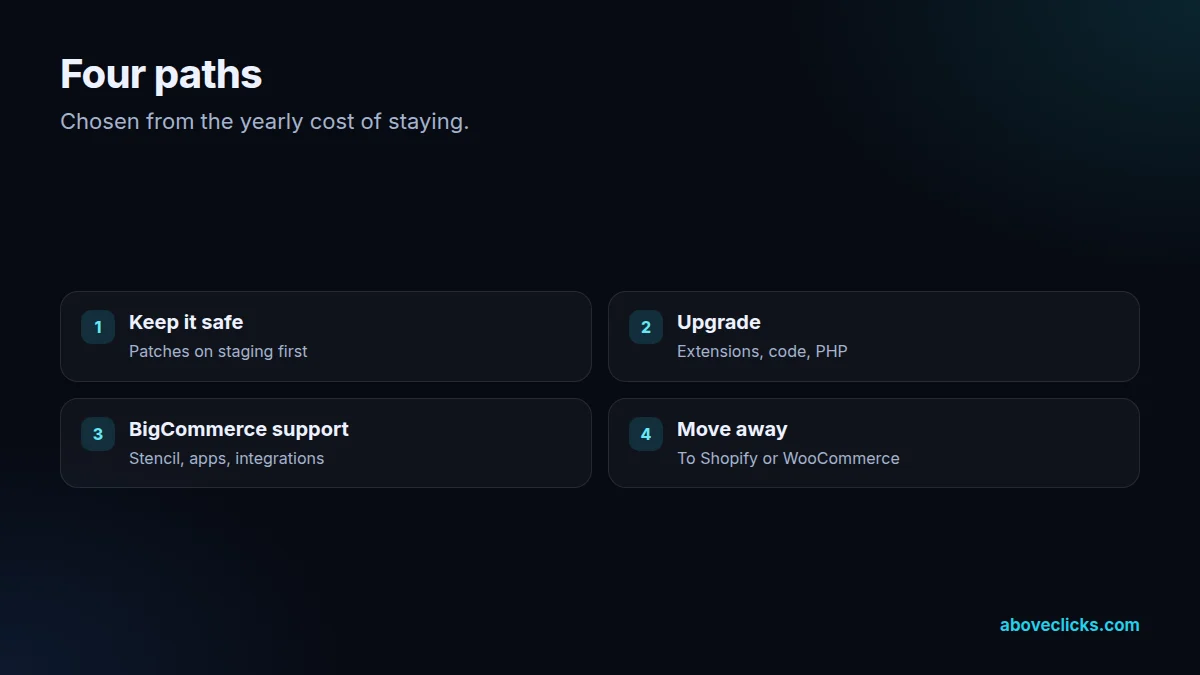
Path one of our Magento development is keeping a store safe. Adobe’s lifecycle policy gives each Adobe Commerce 2.4 release three years of standard support from its release date, and some releases a year of extended support. The dates matter: on Adobe’s table, extended support for 2.4.4 ended on April 14, 2026 and for 2.4.5 on August 11, 2026, and 2.4.6’s standard support ended on August 11, 2026. We check your exact version against that table, apply security patches on a staging copy, test checkout and key extensions, then patch the live store.
Path two is upgrading Magento or Adobe Commerce when it’s worth it. An upgrade within the 2.4 line usually means updating extensions, checking custom code and moving to a PHP version the new release supports. PHP’s supported versions page shows PHP 8.2 getting security fixes only until December 31, 2026, so the server is part of the plan. We list every extension and customization, estimate the work and compare it with the cost of a migration before you decide.
Path three is BigCommerce development and support. BigCommerce stores run on Stencil, its Handlebars-based theme engine, or headless on Catalyst, BigCommerce’s storefront framework built with Next.js and its GraphQL Storefront API. We make Stencil theme changes with the Stencil CLI in a way that survives theme updates, clean up apps that overlap, and fix integrations. Catalyst storefronts are covered through our Next.js development work.
Path four is moving away. When a Magento store costs more in hosting, patching and developer time than it earns from the flexibility, or a BigCommerce store needs features or apps it can’t get, we plan the migration, whether it is a Magento migration or a BigCommerce move: products, customers, orders and content moved, every URL mapped and redirected, tracking rebuilt. Most stores move to Shopify through our Shopify migration service; stores with deep WordPress content may be better on WooCommerce.
We are honest about depth in Magento development and BigCommerce development. Kashif has worked on Magento and BigCommerce stores, but these platforms are a smaller part of our work than Shopify and WordPress. That’s why we focus on maintenance, upgrades and migrations, where a developer background and careful testing matter most, and don’t take on large new Magento builds.
In Magento development, every change is tested on staging first. Magento changes are made on a copy of the store with the same extensions, checked through product pages, cart, checkout and the admin, then deployed in a maintenance window you approve. BigCommerce theme changes are previewed before they are applied. A rollback plan is ready before anything touches the live store.
Tracking and SEO are checked after every change, because upgrades and theme changes are a common reason purchase tracking stops and pages drop out of the index. We compare analytics purchases with store orders, check Search Console, and fix what moved. That ties into our technical SEO work for stores.
The decision to stay or start a Magento migration is made on your numbers. We add up the yearly cost of staying, including hosting, patches, extension licences and developer time, and compare it with the one-off cost of a migration and the running cost of the new platform. Some stores should stay and upgrade; others save money within a year by moving. You get the comparison in writing.
How we use AI here
Dozens of extensions and overrides mapped and explained quickly before an upgrade.
Products, attributes and URLs matched between platforms faster, then checked by a person.
Release notes and patch lists summarized so testing focuses on what changed.
Where it doesn’t: AI tools never get database access or customer data, and patches, upgrades and data moves are carried out and checked by a developer, step by step, on staging first.
What’s included
Your exact release checked against Adobe’s support dates and PHP support.
Applied on staging, tested through checkout, then applied live.
Extensions, custom code and server checked, upgrade planned and carried out.
Overlapping or abandoned extensions removed or replaced.
Stencil theme changes made to survive updates; Catalyst through Next.js.
Overlapping apps cleaned up and broken integrations repaired.
The yearly cost of staying compared with migrating, in writing.
Products, customers, orders and content moved, URLs redirected, tracking rebuilt.
How we run it
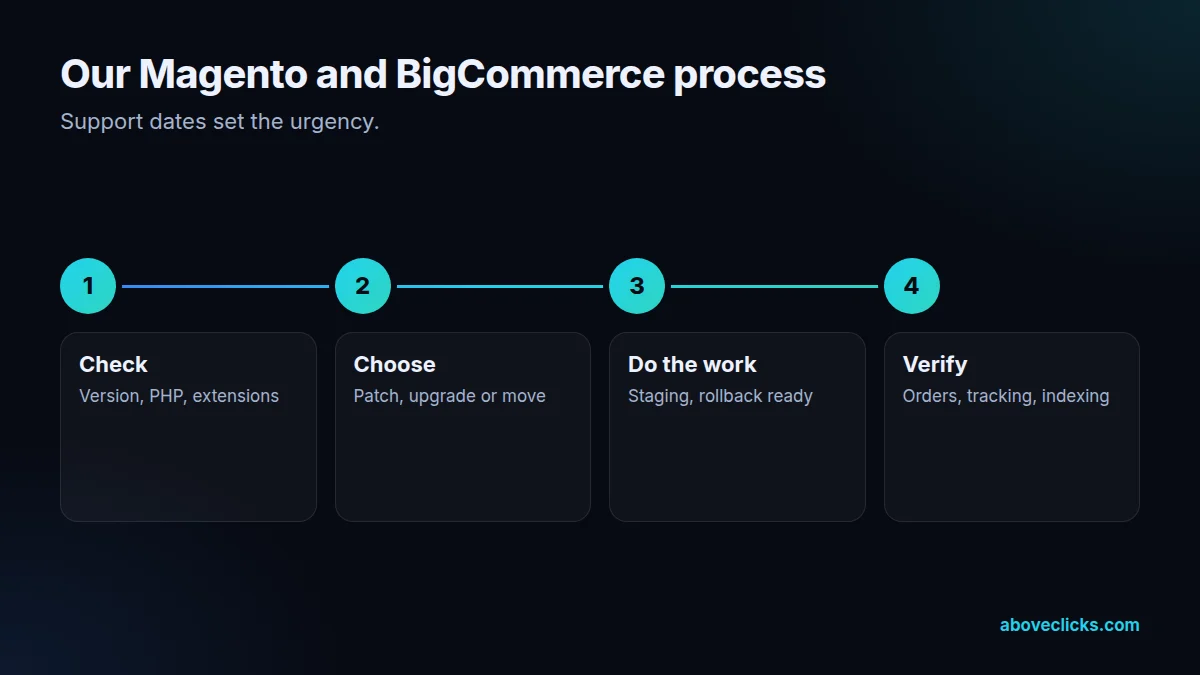
Version check first, because support dates set the urgency. Typical timing for Magento development: the scope within 2 workdays, the build in 2 to 4 weeks depending on size, then testing, launch and handover in the final week.
Step 1
Magento or Adobe Commerce version, support dates, PHP, extensions or apps, hosting and tracking reviewed.
Step 2
Patch, upgrade, support or migrate, recommended from the numbers.
Step 3
On staging first, tested through checkout, with a rollback plan.
Step 4
Orders, tracking and Search Console checked after every change.
Pricing
The audit is free. Paid Magento development work starts at these prices, and your exact cost is fixed in writing before any work begins.
Free no obligation
We’ll check your Magento or BigCommerce store and send a PDF report within 2 workdays.
Get my free auditAfter the audit
From $1,200 one-off, fixed scope
Fixes, upgrades or a migration plan, built and tested.
From $200 monthly
Patches, updates and fixes.
All prices are starting prices in US dollars. Custom work beyond these options is quoted after the audit.
Per project or monthly
Pricing
We quote after a short audit, once we’ve seen the account or the store, so the number is based on the real work. Each project is a fixed one-off cost, agreed before work starts: from $1,200. Ongoing patching can move to a monthly plan.
Start with the free audit to get a quote for your store.
Sources
Platform rules change. These are the official pages we check the work against, so you can check it too.
FAQ
Can’t find yours? Ask on WhatsApp or by email and we’ll answer it.
No large new builds. Our Magento development is maintenance, security patches, upgrades, fixes and migrations away. For a large new Adobe Commerce build, a specialist agency is the better fit.
Check Adobe’s lifecycle table for your exact release. For example, extended support for 2.4.4 ended in April 2026 and for 2.4.5 in August 2026. We check yours as the first step.
It depends on what the flexibility earns you against the yearly cost of hosting, patches, extensions and developers. We compare both on your numbers and recommend one.
Yes: Stencil theme changes, app clean-ups, integration fixes and migrations. Headless Catalyst storefronts are built in Next.js, which we also work in.
A migration always carries some risk, but mapping every old URL to its new page with 301 redirects, as Google recommends, protects most rankings and links.
Products, customers and order history are moved with the platform’s import tools or migration apps, and checked against the old store before launch.
Yes. We start with an audit of the version, extensions, custom code, hosting and tracking, then fix the riskiest problems first.
AI tools help map extensions, summarize release notes and match data between platforms; a developer carries out and checks every change on staging.
Related guides
E-commerce SEO
Affordable SEO is a scoping decision, not a shopping decision. This guide shows what a small budget actually buys, what to buy…
E-commerce SEO
Email marketing cost is five bills in one: the tool, the list, the sends, the flows and the people. This guide prices…
E-commerce SEO
PPC pricing has two parts: money paid to the platform for clicks, and money paid to the person or agency managing the…
Free growth audit
Tell us about your store. We’ll review your tracking, campaigns and SEO and send you a written audit with the top fixes, ranked by impact.