Klaviyo vs Mailchimp pricing comes down to what moves the bill, not the first-month rate: Klaviyo moves you up a tier at the end of a billing cycle, and Mailchimp bills your peak contact total. Compare both at the same list size and send plan.
This guide covers what each tool bills for, when the bill changes, what happens at a tier limit or a send limit, how a list clean-up helps, and a worksheet for fair quotes. For features, flows and switching, see our Mailchimp vs Klaviyo comparison.
What does Klaviyo vs Mailchimp pricing actually bill for?
In Klaviyo vs Mailchimp pricing, both tools bill for the size of your list and the emails you send. Mailchimp calls the list “contacts” and Klaviyo calls it “active profiles”, and each tier of either tool comes with an email send allowance.
Klaviyo’s billing guide says paid Profiles and Email plans are based on both your active profiles and the emails sent in the billing cycle. An active profile is anyone with an email address who can be emailed, whether or not they ever subscribed. Mailchimp’s pricing page lists its Standard plan from $20 a month at 500 contacts with a 14-day trial, as of November 2026.
The free plans are close in Klaviyo vs Mailchimp pricing. Klaviyo’s free plan allows up to 250 active profiles and 500 email sends a month, and Mailchimp’s Free plan includes 250 contacts and 500 sends a month. So the free tier rarely decides Klaviyo vs Mailchimp pricing; the first paid month does.
We do not quote Klaviyo’s paid tiers in this klaviyo vs mailchimp pricing guide. Klaviyo shows them in its billing screen and calculator, they change, and a number copied here would go stale. Read yours in the tool at your own count.
When does each bill change during the month?
In klaviyo vs mailchimp pricing, the timing differs: Klaviyo checks your count at the end of the billing cycle. Mailchimp bills the highest contact total reached during the period. In both cases a quiet start to the month does not protect you from a busy end.
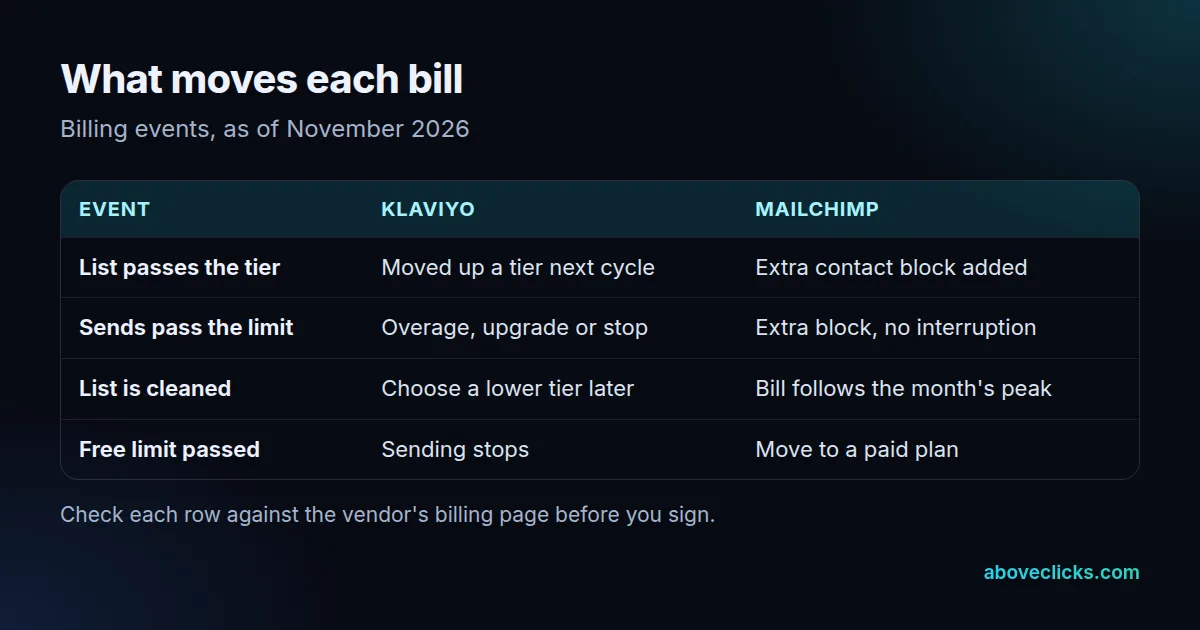
Klaviyo’s plan must cover your active profile count at the end of your billing cycle. With 7,000 active profiles, for example, the plan must allow at least 7,000, and you are upgraded automatically at the end of the cycle if you exceed it.
Mailchimp works the other way. Its additional charges article says the monthly bill reflects the peak contact total in the period, so a list that grows and shrinks inside one month is billed at its high point.
That difference in mailchimp vs klaviyo pricing matters for a store that runs a big signup push. A weekend giveaway that adds thousands of addresses is billed for the full month under Mailchimp’s peak rule, while Klaviyo sees the count only at the cycle’s end. Neither is better; know which one you are on.
What happens when your list passes a plan tier?
On Klaviyo you are not stopped; you are notified and moved to a higher tier from the next billing cycle. On Mailchimp service continues too, and an extra block of contacts appears on your bill.
Klaviyo’s guide says that when you exceed your plan’s active profile limit it does not stop you from sending or adding profiles, but moves you to a plan with enough profiles from the next cycle. The one exception is its free plan: over 250 active profiles, you cannot send emails or set flow emails live until you are under the limit.
Mailchimp says it will not interrupt your service when contacts exceed the plan. It charges for an extra, smaller set of contacts called an add-on block, and several blocks if you are far over.
The practical rule for klaviyo pricing vs mailchimp: set a calendar reminder for the week before each renewal and read your count. A tier jump you expected is a budget line; one you did not expect is a surprise invoice.
What happens when you send more than the plan allows?
On both tools, the extra sends in klaviyo vs mailchimp pricing cost money rather than stopping the account, unless you choose otherwise. The size of the send limit differs, so work out your normal month before you compare plans.
Klaviyo lets you choose what happens at the send limit: flexible overages for that cycle, an upgrade to a higher tier, or stopping until the next cycle. Its guide says an upgrade is generally more economical than flexible sending if your needs are consistent. Received and bounced emails count toward the limit; skipped emails and double opt-in confirmation emails do not.
Mailchimp ties the allowance to your contact limit. On Standard it is 12 times your contacts, and the same formula applies to add-on blocks, so one block of 1,000 contacts adds 12,000 sends.
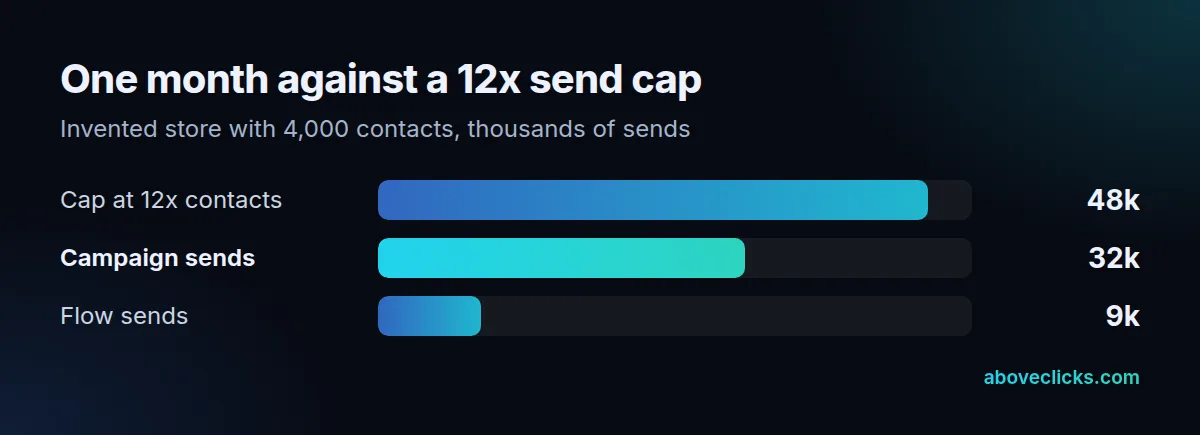
Here is a worked example with an invented store: 4,000 contacts on Mailchimp Standard, so a cap of 48,000 sends. The store sends 8 campaigns a month to its whole list, which is 32,000 sends, and its flows add 9,000. That is 41,000 sends, 85% of the cap in a normal month. One extra sale campaign adds 4,000 more, still under the cap; two more would push the store to 49,000, over it.
How does cleaning your list change each bill?
A clean-up lowers the count in klaviyo vs mailchimp pricing on both tools, but neither lowers your plan by itself. Klaviyo needs you to pick a lower tier afterwards, and Mailchimp bills the month’s peak before the clean-up shows.
On Klaviyo, suppressed profiles drop out of the active email count once suppression is processed, and deleted profiles stop counting too. After a large clean-up, the count shown in billing can take up to 72 hours to refresh. The plan does not downgrade automatically: you choose a lower tier after the count updates, and it takes effect in the next cycle.
On Mailchimp, archived and cleaned contacts do not count toward your limit, and you can change your contact limit at any time. Because the bill follows the peak, do the clean-up early in the period, not at the end.
A clean list also protects delivery. Google’s sender guidelines ask bulk senders to keep their spam rate below 0.30%, and mailing people who never engage pushes complaints up. Paying less for a smaller list is the side benefit.
How do you compare Mailchimp vs Klaviyo pricing at your own numbers?
Use the same list count, the same send plan and the same date for both klaviyo vs mailchimp pricing quotes. A comparison made before the clean-up, or with a different send plan, compares two different stores.
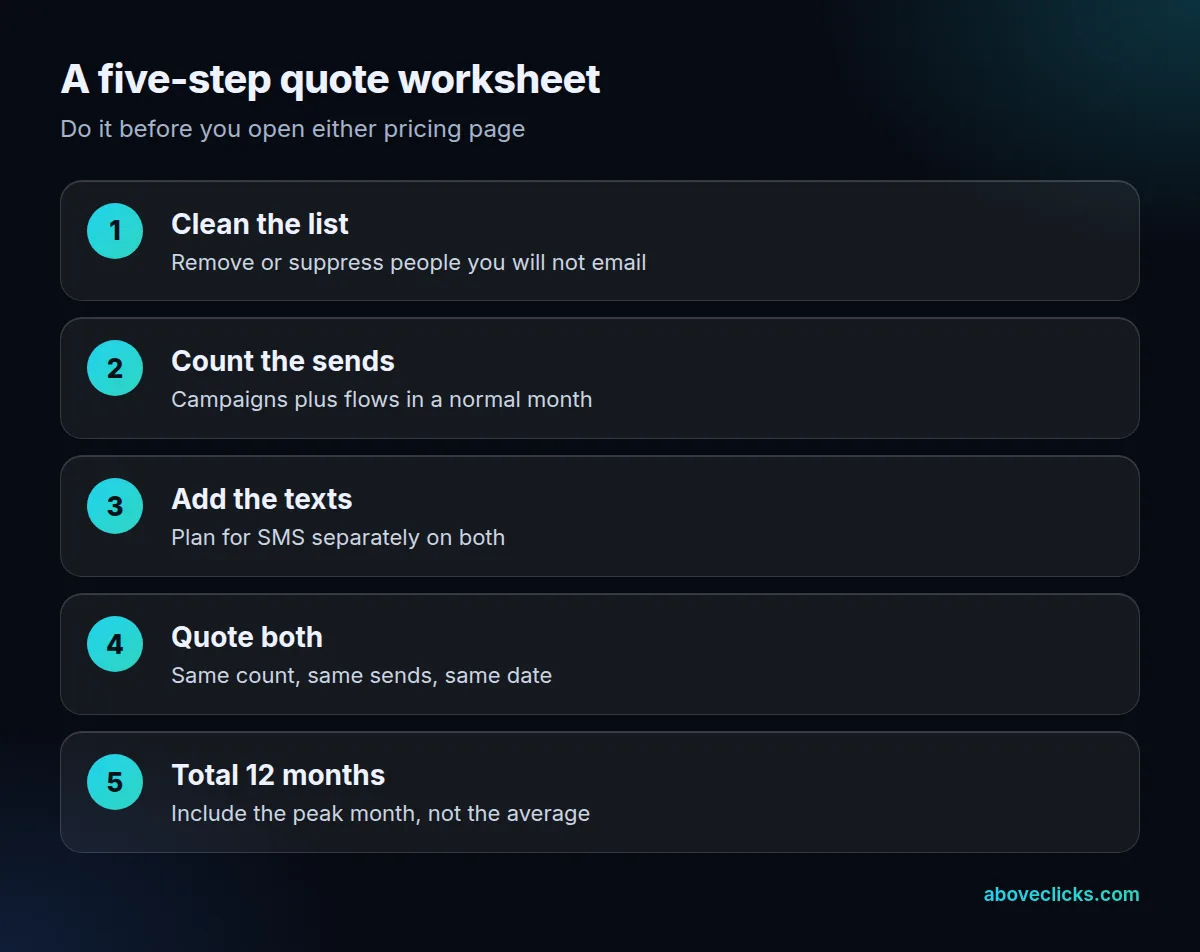
- Clean the list first, then write down the count.
- Count a normal month: campaigns times list size, plus flow sends.
- Add text messages as a separate line on both tools.
- Read each tool’s quote at that count in its own billing screen or calculator.
- Multiply by 12 and add the peak month for each, not the average.
Our email marketing cost guide shows what else belongs in the yearly total, and the Omnisend vs Klaviyo pricing guide runs the same worksheet for a different pair. Write the worksheet down once and reuse it at every renewal. Klaviyo vs Mailchimp pricing is a moving target: lists grow, send plans change and vendors rework their tiers, so a quote that was fair in January may not be fair in October. Keeping the five numbers in one sheet lets you rerun the comparison in ten minutes and see whether a switch would still pay back.
Ask each vendor three things in writing: which profiles or contacts are counted, what happens at the send limit, and what the rate is after any introductory offer ends. Those answers matter more than the headline rate in any mailchimp vs klaviyo pricing table.
Mailchimp’s page also lists a 15% saving on the first 12 months for 5,000 or more contacts, as of November 2026, so ask what the rate becomes in month 13.
When is the cheaper plan the costlier choice?
When it holds back the automated flows that earn the revenue. A lower quote in mailchimp vs klaviyo pricing only wins if the cheaper tool does the same job.
Our own published results show the stake. For an anonymous US skincare store on Shopify, automated flows produced $68,975.42 of the $93,842.76 email revenue in September 2026, which is 73.50%, according to our Klaviyo service page. Revenue per recipient was $0.17 for campaigns and $2.57 for flows. A plan that limits flows, or a team that never builds them, gives up the larger share.
So test the cheaper quote with these questions:
- Can the plan run your welcome, abandoned checkout and post-purchase flows without extra tiers?
- Does the send allowance cover campaigns and flows in your busiest month?
- Who builds and maintains the flows once the first month is over?
Klaviyo pricing vs Mailchimp comes out differently for a store with a few hundred newsletter readers and no plan to automate; there the free or entry plans may well be enough. If you are moving a list across, read our notes on Klaviyo migration, and for a second opinion on your current setup, our free audit covers it. More guides are in buying guides.