Buying guides
Questions to ask a marketing agency before you hire one (with good answers and red flags)
21 questions for your intro calls, grouped by topic, each with what a good answer sounds like and what should worry you.…
Pinterest Ads · Shopping, catalogs, Performance+
We run Pinterest Ads for jewelry, fashion and home brands: product catalogs turned into shopping ads, the Pinterest tag and Conversions API so sales are counted, and campaigns timed to when people plan. Pinterest reaches shoppers earlier than search, so we judge it on new customers and MER.
200+ clients served 500+ projects delivered
Free Pinterest ads review
Three fields and you are done. We check your catalog and site, then send a Pinterest ads starter plan.
Your PDF report comes by email. If you want to discuss going ahead after reading it, we’ll set up a video meeting. We use your details only for this audit.
Fit
Not the right fit for products people buy on impulse with no planning, or for stores without tracking. We’d start with tracking if purchases aren’t counted yet.
Problems we fix
Without the Pinterest tag firing on checkout, or the Conversions API next to it, Pinterest can’t see sales and optimizes for clicks instead.
Shopping ads, collections and dynamic retargeting all depend on the catalog. Without it, campaigns run on a few hand-made Pins.
Pinterest users are often planning, not buying today. Judged by a short click window, the channel looks weak even when it starts journeys that end in sales later.
Pins that look like banners get scrolled past. Pinterest rewards images that look like ideas: styled, vertical and useful.
Pinterest users plan ahead. Campaigns that start the week before a holiday miss most of the planning.
Tag and Conversions API events sent without a shared event ID are counted twice, which inflates results and misleads bidding.
In 1:10 · animated
A short animated walk-through of the first checks in our audit. No sound needed: everything is on screen, and the transcript is below.
What we check first in Pinterest Ads, an animated explainer of 1:10 with on-screen captions and controls to pause.
Our approach
Pinterest Ads for a store start with measurement. We install the Pinterest tag with checkout events and add the Conversions API next to it, with matching event IDs so the two don’t double count. Pinterest’s Event Quality Score shows how well that data is working, and we use it as a checklist.
Next is the catalog. Pinterest turns your product feed into product Pins once the store meets its merchant guidelines, as explained in getting started with retail catalogs. Shopify stores can connect through the Pinterest app; other platforms use a feed. We group products by category and margin so shopping ads can be split the same way as Google Shopping.
Campaigns then follow the planning calendar. We launch prospecting weeks before a season or gifting date, run dynamic retargeting for people who viewed products, and test Performance+ campaigns, Pinterest’s automated setup, against manual ones where the account has enough conversions.
Results are read over a longer window than search and judged with your other channels on MER. If creative is the bottleneck, our ad creative service makes vertical, styled images and short videos that look native to the feed.
Creative matters more here than on search. Pins that do well usually look like the content people save: vertical images, the product in a styled setting and short text that explains the idea. We brief creative for each product group, refresh it before saves and clicks fall, and reuse the strongest Pins as organic content so the account keeps working between campaigns.
Audiences come from three places: your customer lists, people who engaged with your Pins or visited your site, and interest and keyword targeting for new reach. Retargeting and customer lists stay in their own ad groups, and recent buyers are excluded from prospecting, so the account doesn’t keep paying to reach people who already ordered. Pinterest says over 600 million people come to it each month to find ideas and products. Speed is judged against Google’s Core Web Vitals thresholds: main content within 2.5 seconds, a response to input within 200 milliseconds and layout shift of 0.1 or less.

How we use AI here
Pinterest’s Performance+ campaigns automate targeting and bidding. Our job is choosing where that helps and feeding it the right products and Pins.
We test Pinterest’s automated campaigns against manual ones for your catalog, and keep whichever earns more per dollar.
AI helps produce text overlays, sizes and seasonal backgrounds for real product photos, so each product has several Pins to test.
We cluster Pinterest search terms and trends into themes and use them in Pin titles, boards and shopping ads copy.
Where it doesn’t help: Pinterest rewards original, inspiring images. AI variants support your photography; they don’t replace it.
What’s included
Campaigns, audiences, creative, the Pinterest tag, Conversions API and Event Quality Score, checked against your store orders.
Checkout events with values, deduplication by event ID, and match data checked.
Product feed connected, product groups by category and margin, and catalog errors fixed.
Prospecting shopping ads, dynamic retargeting and collections, with budgets set from your margins.
Customer lists, engaged audiences and site visitors for retargeting, interests and keywords for prospecting, recent buyers excluded.
Launch dates set weeks ahead of the moments your buyers plan for.
Briefs for vertical, styled images and short videos that look like ideas, not banners.
Spend, revenue, new customers and MER, what we changed and what’s next.

How we run it
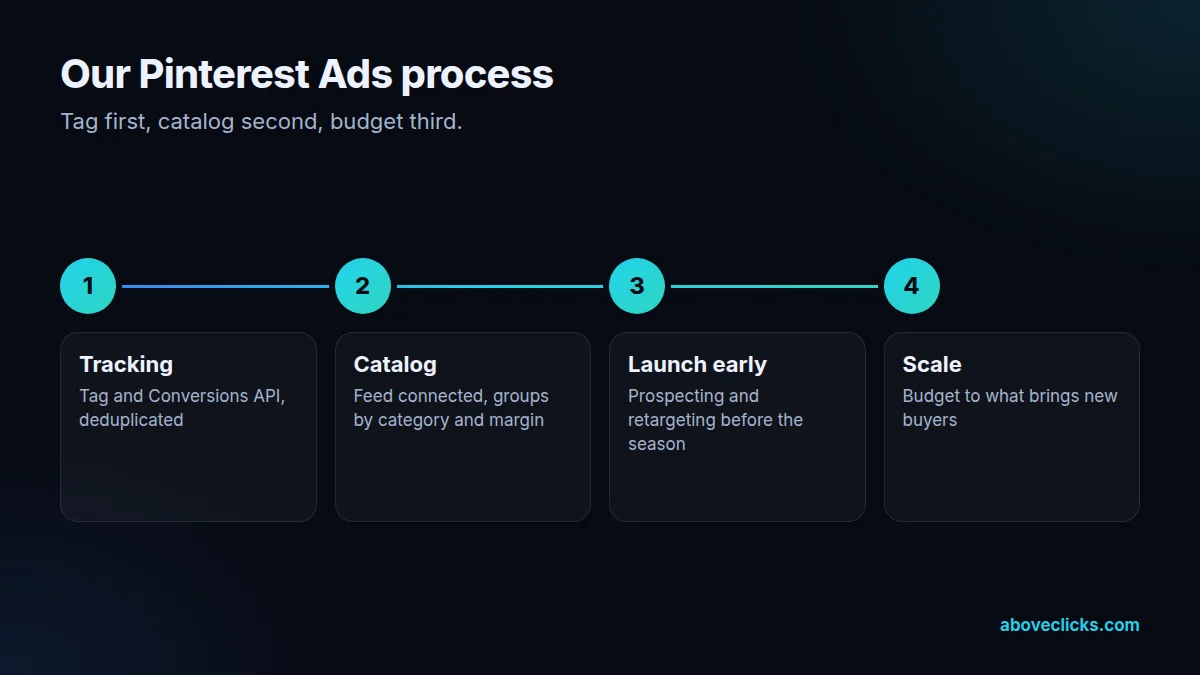
Tag first, catalog second, budget third. Typical timing: the audit within 2 workdays, setup and fixes in about a week, the first optimization cycle within 2 weeks, and the first monthly report after 30 days.
Step 1
We check the account and install or repair the Pinterest tag and Conversions API, with deduplication.
Step 2
Feed connected, product groups built by category and margin, errors cleared.
Step 3
Prospecting and retargeting go live weeks before your season, with creative made for the feed.
Step 4
Budget moves to product groups and audiences that bring new buyers at a cost your margins allow.
Pricing
The audit is free. Paid work starts at these prices, and your exact cost is fixed in writing before any work begins.
Free no obligation
Tell us your catalog size and we will plan your Pinterest ads.
Get my free auditFixed scope
From $350 one-off
Catalog connected and campaigns launched.
From $350 monthly, plus ad spend
Optimization and creative tests each month.
All prices are starting prices in US dollars. Custom work beyond these options is quoted after the audit.
By industry
People save rings, earrings and gift ideas long before they buy. We run prospecting early for engagement season, Valentine’s Day and the holidays, and retarget product viewers patiently.
Outfits and styling ideas are core Pinterest content. We group the catalog by category and season, and brief styled, vertical creative for each drop.
High-ticket pieces suit inspiration boards and slow decisions. We use longer evaluation windows and keep retargeting running while buyers compare.
Sources
Platform rules change. These are the official pages we check the work against, so you can check it too.
FAQ
Can’t find yours? Ask on WhatsApp or by email and we’ll answer it.
For visual categories where people plan purchases, such as jewelry, fashion, home and gifts, they can. Pinterest reaches shoppers earlier than search, so we judge it on new customers and MER over a longer window.
Pinterest supports using both, and we set up both. The tag records browser events and the Conversions API sends events from your server, which helps when browsers block the tag. Shared event IDs stop double counting.
From a catalog: your product feed connected to Pinterest, through the Shopify app or a feed URL. Pinterest turns the products into product Pins that can run as shopping ads.
Earlier than on search. People save ideas weeks before they buy, so we start prospecting well ahead of the date and move budget to retargeting as it gets closer.
Tracking and catalog setup take the first weeks. After launch, campaigns need time to learn, and because people plan ahead on Pinterest, part of the effect arrives later as direct, branded or search sales. We read results over a longer window and against MER, and agree the test length before we start.
Pinterest’s automated campaign setup, with fewer inputs and automated bidding and targeting. We test it against manual campaigns once the account has enough conversions.
Yes, and that’s how we plan it. Pinterest reaches people while they plan, Meta while they scroll and Google when they search. We exclude recent buyers across channels where we can, and judge the mix on blended MER rather than letting each platform claim the same sale.
You do. We work through access to your Pinterest business account, and the tag, catalog and data stay with your business.
Related guides
Buying guides
21 questions for your intro calls, grouped by topic, each with what a good answer sounds like and what should worry you.…
Buying guides
Percentage of ad spend, flat retainer, performance fee, hourly or a hybrid: what each model rewards, how it behaves as your spend…
Buying guides
In-house team, agency or freelancer? A side-by-side comparison on 7 factors, a total-cost worksheet built from US government pay data, and a…
Free growth audit
Tell us about your store. We’ll review your tracking, campaigns and SEO and send you a written audit with the top fixes, ranked by impact.