E-commerce SEO
Shopify vs WooCommerce SEO: what each platform lets you control
Is Shopify good for SEO? Yes, and so is WooCommerce: both platforms can rank. This comparison shows what you control on Shopify…
Web development · Node.js
Much of what makes a business run online happens behind the website: orders reaching a warehouse, leads reaching a CRM, stock syncing between channels. Our Node.js development builds those pieces: APIs and Express backends, webhook handlers for Shopify and WooCommerce, integrations between your tools, and background jobs. It is AI-assisted development, reviewed by a developer who owns every change, and built to fail loudly instead of silently.
200+ clients served 500+ projects delivered
Free Node.js audit
Three fields and you’re done. The PDF report shows what we found on your own pages and accounts, and the order we’d fix it in. It covers the problems we see most often:
Your PDF report comes by email. If you want to discuss going ahead after reading it, we’ll set up a video meeting. We use your details only for this audit.
Fit
Not the right fit for high-scale platforms that need a dedicated backend team on call. When a no-code tool like Zapier or Make can do the job reliably, we recommend that first.
Problems we fix
An integration stops overnight and nobody knows until stock is wrong or an order is missing.
Incoming requests accepted without verifying they came from Shopify or the payment provider.
Keys committed to a repository or pasted into a script on someone’s laptop.
A service still running a Node.js version that no longer gets security fixes.
The same order handled twice because retries weren’t planned for.
A script written years ago, running on a server nobody remembers paying for.
In 1:10 · animated
A short animated walk-through of the first checks in our audit. No sound needed: everything is on screen, and the transcript is below.
What we check first in a backend integration, an animated explainer of 1:10 with on-screen captions and controls to pause.
Our approach
We start with the simplest tool that works. Many integrations can run in Shopify Flow, Zapier or Make, and our business automations service builds those. Node.js development is the right choice when volume makes per-task pricing expensive, when logic is too complex for a no-code tool, or when a custom app needs a real backend.
Kind one is API development and backends. We build REST and GraphQL APIs in Node.js, usually with Express or the server side of a Next.js app, with a database where one is needed. Express 5 is the current major version, and its migration guide lists what changed from Express 4; older Express services we take over get upgraded as part of the work.
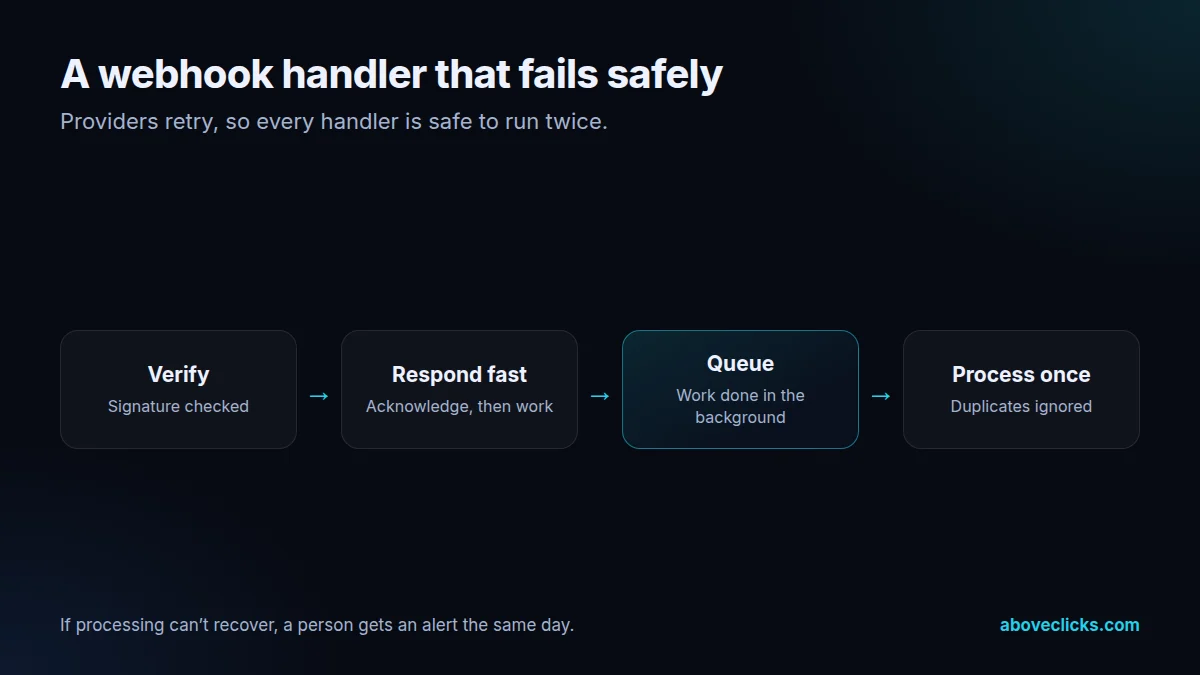
Kind two is webhooks. Shopify, WooCommerce, payment providers and most SaaS tools send webhooks when something happens: an order is paid, a customer signs up, stock changes. Our handlers verify each request’s signature, respond quickly, put the real work on a queue and are safe to run twice, because providers retry and duplicates happen.
Kind three is integrations: your store connected to an ERP, warehouse, 3PL, CRM or marketplace, through each system’s official API. Every sync logs what it did, retries when the other system is down and sends an alert when it can’t recover. Data moves in documented directions, and only the fields each system needs move at all.
Kind four is background jobs: nightly reports, feed generation, image processing, data clean-ups and scheduled imports. They run on a schedule with logs and alerts, so a failed job is noticed the same morning.
Runtimes are kept supported. Node.js’s release page says production applications should only use Active LTS or Maintenance LTS releases, and Node.js 20 reached end of life in March 2026. We run services on a supported LTS line and plan upgrades before support ends, not after.
Security basics are not optional: API keys and passwords in environment variables or the host’s encrypted settings, never in code; input validated at every endpoint; dependencies checked for known vulnerabilities; and access limited to what each service needs. The OWASP Top 10 is the checklist we review against.
AI-assisted development is a good fit for this kind of work. Integration code is often repetitive: mapping fields, handling pagination, retrying requests. AI tools draft it quickly, a developer reviews it, and the time saved goes into the error handling, logging and tests that integrations usually lack.
Taking over an existing Node.js service is a common starting point. A Node.js developer on our side reads the code first, writes down what it does and which systems it touches, and checks the runtime and dependencies against their support dates. We then add logging and alerts before changing anything, so the first improvement is that failures become visible. Only after that do we fix bugs, move hard-coded keys into environment variables and take on new API development, with tests for the parts that handle orders or customer data.
How we use AI here
Field mappings, pagination and retry logic drafted by AI tools from the API docs, then reviewed.
Retries, duplicates, timeouts and bad data covered by tests that get written because they’re cheap to draft.
Inherited scripts explained and documented before they are changed or replaced.
What we don’t do: give AI tools access to production systems, real API keys or customer data, or deploy code that handles orders, payments or personal data without a line-by-line human review.
What’s included
Whether a no-code tool, a platform feature or custom code is the right choice.
What moves between which systems, in which direction, and how often.
API development in Node.js and TypeScript, AI-assisted and reviewed, in your repository.
Signature checks, queues, retries and safe re-runs.
Every sync and job logged, with alerts when something can’t recover.
Key handling, input validation and dependency checks against OWASP guidance.
Deployed on a Node.js LTS release, with an upgrade plan.
Runbook, documentation and access in your name.

How we run it
The data flow is mapped before any code. Typical timing: the scope within 2 workdays, the build in 2 to 4 weeks depending on size, then testing, launch and handover in the final week.
Step 1
Systems, data, volumes and failure cases written down and agreed.
Step 2
The Node.js development work done with tests, logging and alerts, against test accounts first.
Step 3
Checked against real data alongside the old process before switching over.
Step 4
Runbook, monitoring and documentation handed over; support if you want it.

Pricing
The audit is free. Paid Node.js development work starts at these prices, and your exact cost is fixed in writing before any work begins.
Free no obligation
We’ll check your back end or the API you need and send a PDF report within 2 workdays.
Get my free auditAfter the audit
From $1,200 one-off, fixed scope
An API or back end built to a written spec.
From $200 monthly
Updates, monitoring and fixes.
All prices are starting prices in US dollars. Custom Node.js development beyond these options is quoted after the audit.
Per project
Pricing
We quote after a short audit, once we’ve seen the account or the store, so the number is based on the real work. Each project is a fixed one-off cost, agreed before work starts: from $1,200. Monitoring and upkeep can move to a monthly plan.
Start with the free audit to get a quote for your store.
Sources
Platform rules change. These are the official pages we check the work against, so you can check it too.
FAQ
Can’t find yours? Ask on WhatsApp or by email and we’ll answer it.
When volume makes per-task pricing expensive, when the logic is too complex for a no-code tool, or when a custom app needs a real backend. Otherwise a no-code tool is usually simpler to run.
A supported LTS release, as Node.js recommends for production. Node.js 20 reached end of life in March 2026, so services we take over on older versions get upgraded.
Often, for APIs and webhook handlers. For apps with a Next.js frontend, the backend can live in the same project.
Every sync logs what it did, retries when the other system is down and alerts a person when it can’t recover.
Handlers verify the signature, respond quickly, queue the work and are safe to run twice, so a retried webhook never creates a duplicate order.
On hosting in your account, chosen for the job: a serverless platform for light work, a small server or container for steady jobs.
AI tools draft mappings, API clients and tests. A developer reviews every change, and production systems, keys and customer data never go into AI tools.
Yes. A Node.js developer documents what it does, upgrades the runtime and dependencies, adds logging and alerts, then makes the changes you need.
Related guides
E-commerce SEO
Is Shopify good for SEO? Yes, and so is WooCommerce: both platforms can rank. This comparison shows what you control on Shopify…
E-commerce SEO
Product schema markup tells Google a product's price, availability and identifiers. Here's what Google requires, an example annotated property by property, and…
E-commerce SEO
Most Shopify SEO checklists are 25 items in no order. This one has 21 checks in three tiers, says what Shopify already…
Free growth audit
Tell us about your store. We’ll review your tracking, campaigns and SEO and send you a written audit with the top fixes, ranked by impact.