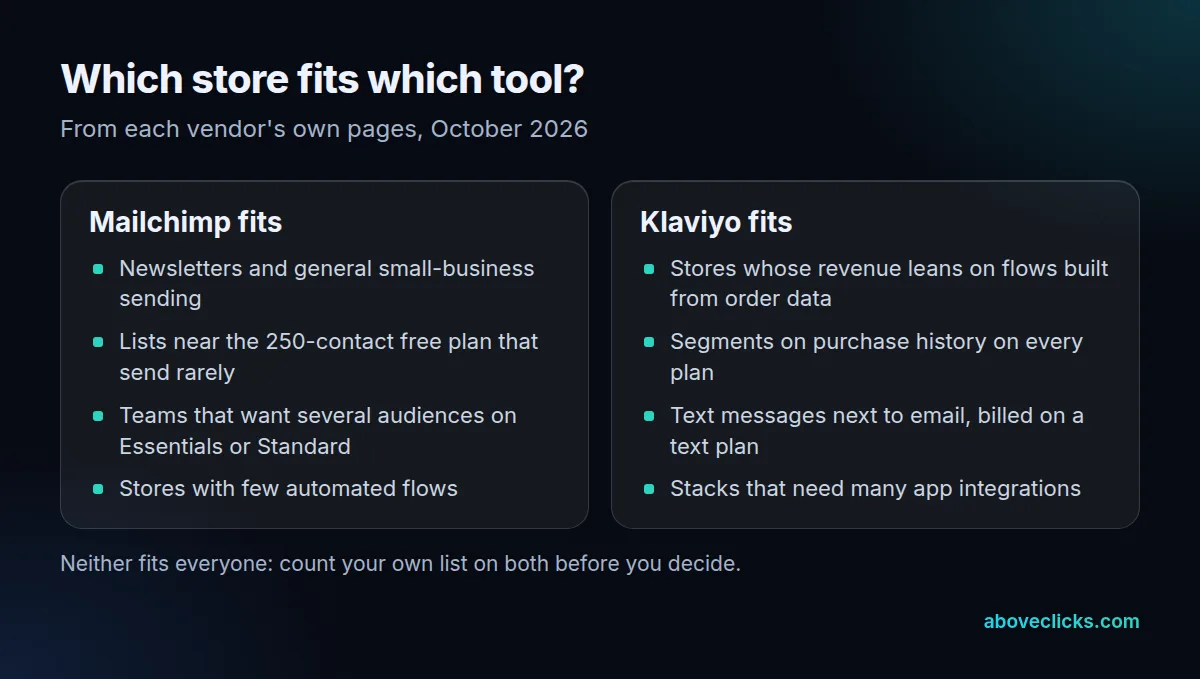
Mailchimp vs Klaviyo comes down to fit: Klaviyo suits stores that run automated flows from order data and want texts, while Mailchimp suits newsletters and small lists. Compare what each platform counts and caps for your own list before you compare features.
This guide uses each vendor’s own pricing and help pages, dates every plan detail, and says plainly where Mailchimp is the better fit. A note before we start: we set up and migrate Klaviyo accounts for online stores, so that is the platform we know best.
Mailchimp vs Klaviyo: what’s the real difference?
Mailchimp began as a newsletter tool and grew into a general marketing suite. Klaviyo was built around store data, so its flows and segments start from orders and browsing. Both send campaigns, run automations and sync with Shopify.
In a Klaviyo vs Mailchimp decision, a feature grid makes the two look closer than they are. Four differences change the bill or the workload, and each can turn into a costly trap:
- Contact counting: Mailchimp counts unsubscribed contacts toward your total; Klaviyo bills only reachable profiles.
- Sends and flows: Mailchimp caps sends per contact and flow steps by plan; Klaviyo includes flows on every plan.
- Segmentation: Mailchimp keeps predictive segments for Standard and Premium; Klaviyo segments on order history from the start.
- Text messages: Mailchimp sells SMS as an add-on in select markets; Klaviyo bills texts on a separate plan.
On breadth, Klaviyo says it integrates with 400+ apps, as of October 2026, on its pricing page. Mailchimp’s strength is the opposite: one tool for newsletters, forms and a simple automation or two.
Start the Mailchimp vs Klaviyo decision from your own store, not the feature grid. Write down how many contacts you hold, how many of them have unsubscribed, how much of last quarter’s email revenue came from automated flows, and whether you plan to text customers in the next 12 months. Those four answers settle most of the choice before you open a pricing page.
How do the Mailchimp and Klaviyo free plans compare?
Almost identically on paper, as of October 2026: 250 contacts and 500 emails a month on each. The gaps are in what else comes free and how long support lasts.
Mailchimp’s plan comparison lists Free as 250 contacts and a maximum of 500 sends a month or 250 a day, with no flows and email support for the first 30 days. Klaviyo’s free plan allows up to 250 active profiles and 500 email sends a month, per its own pricing page. It adds $5 of mobile messages a month and email support for the first 60 days.
So the free tier rarely settles Mailchimp vs Klaviyo for a store. In the Klaviyo vs Mailchimp free plan comparison, the deciding difference is flows: Klaviyo lets you build them on the free plan, while Mailchimp reserves them for paid plans. A store that wants a welcome and an abandoned checkout email from day 1 will outgrow Mailchimp’s free plan fast.
How does each platform count what you pay for?
Mailchimp counts every contact you hold except archived, cleaned or deleted ones. Klaviyo bills active profiles, the people you can actually reach. That single rule drives most of the Mailchimp vs Klaviyo pricing gap on a long-lived list.
Mailchimp’s plan terms say subscribed, unsubscribed and non-subscribed contacts all count, while archived, cleaned and deleted contacts do not. Klaviyo’s billing page says unsubscribed and suppressed contacts do not count toward billing, and that each profile tier comes with email send capacity.
Here is a worked example with an invented store: 12,000 contacts, of which 9,000 are subscribed and 3,000 have unsubscribed over the years. Exported as is, Mailchimp bills against 12,000 contacts. Archive the unsubscribed ones first and it counts 9,000, the same as Klaviyo’s active profiles.
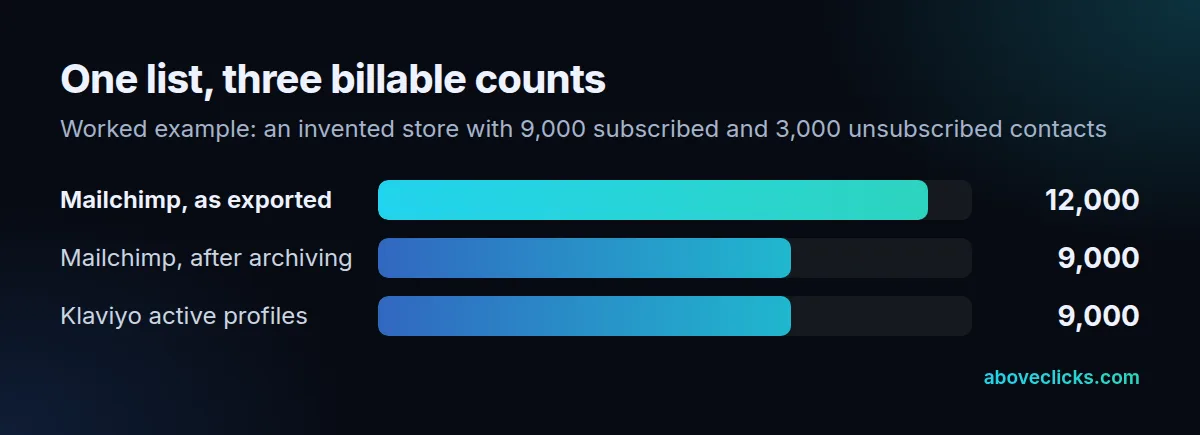
The lesson: part of the Mailchimp vs Klaviyo pricing difference is housekeeping, not platform. Mailchimp vs Klaviyo quotes taken before a clean-up compare two different counts. Clean the list before you compare any quote, then price both tools at the same count. When you read a Mailchimp vs Klaviyo pricing page, ask each vendor the same three questions: which contacts are counted, what happens when you pass the send allowance, and what text messages cost on top. We don’t state paid-plan dollar figures here, because both vendors’ calculators are interactive and change often. Our email marketing cost guide explains what else goes into a monthly bill.
Which plan limits will you hit first?
In Mailchimp vs Klaviyo, the limits that matter are the ones you hit in month 3, not on day 1. For most stores it is the send allowance, then flow steps, then segmentation. Mailchimp sets these by plan; Klaviyo ties send capacity to the profile tier and leaves flows open.
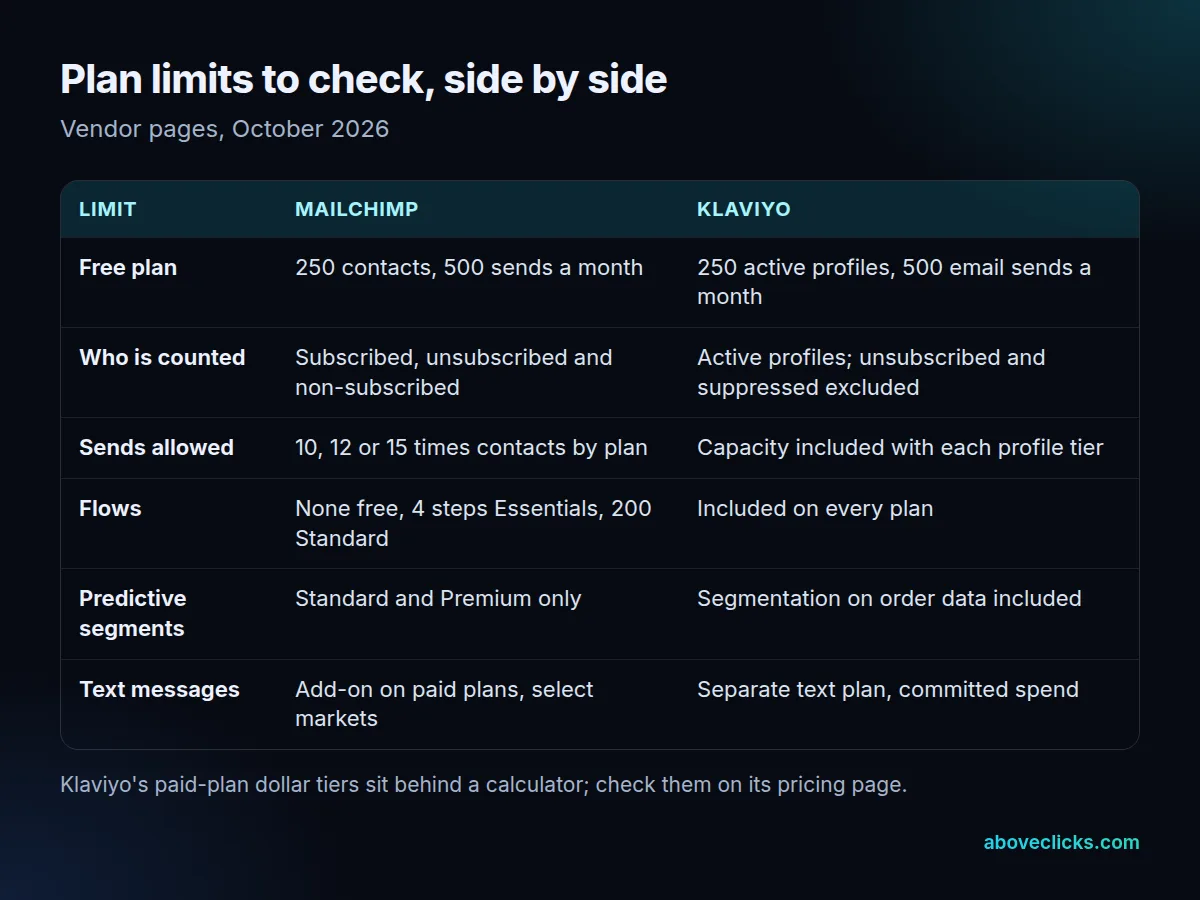
Mailchimp’s monthly email sends are 10 times contacts on Essentials, 12 times on Standard and 15 times on Premium, per its plan comparison. One email to 500 contacts equals 500 sends, and test emails count, according to its plan terms. Use this formula for your own list: contacts x emails per contact per month, compared with contacts x your plan’s multiple.
Example: 3,000 contacts and 8 emails a month (campaigns plus flow emails) need 24,000 sends. Essentials allows 30,000, so the plan fits. At 12 emails a month you need 36,000 and would move up to Standard.
Flows are the sharper limit. Essentials caps each flow at 4 steps and Free has none, while Standard allows up to 200 flows. A welcome series with a branch and a post-purchase follow-up passes 4 steps quickly. Predictive and advanced segmentation are also Standard-and-up features.
A practical test: write down the segment you most want, such as customers who ordered twice in 90 days and have not opened an email in 30 days. Then check which plan builds it. On Klaviyo that segment is a standard order-history filter; on Mailchimp you need to confirm your plan includes the segmentation tier before you rely on it. This is where a Klaviyo vs Mailchimp comparison on paper often differs from daily use.
Is Klaviyo better than Mailchimp for a Shopify store?
For most stores that rely on flows, yes, because its Shopify data is the foundation. For a store that mostly sends a monthly newsletter, Mailchimp is often enough. So “is Klaviyo better than Mailchimp” depends on how much revenue your automations carry.
On Mailchimp vs Klaviyo for Shopify, the checkout flow is the test. Shopify treats a checkout as abandoned when it stays incomplete for more than ten minutes after the customer gave an email address, per its abandoned checkout guide. Recovery emails apply only to the Online Store and Buy Button channels. Your email tool should send its own recovery flow from that event and not clash with Shopify’s. Decide which of the two sends the first recovery email, and turn the other off, or customers receive the same reminder twice. Then check the flow after a test order: the email should show the right products, the right discount and a working link back to the cart.
Connection steps matter too. Klaviyo’s Shopify guide tells migrating stores to disconnect the prior email app from Shopify first, because leaving it connected could send double opt-in emails to existing subscribers. It also lets you sync Shopify email subscribers to a chosen list.
Texts are the last Shopify-fit question in any Mailchimp vs Klaviyo for Shopify comparison. If you plan to text customers within 12 months, price the Klaviyo text plan or the Mailchimp SMS add-on (select markets, paid plans) before you pick. For other pairs, see Omnisend vs Klaviyo.
Should you switch from Mailchimp to Klaviyo?
The Mailchimp vs Klaviyo answer for you is a switch when flows, order-based segments or texts would earn more than the move costs. Stay when you send mostly newsletters to a small list and your automations are a welcome email and little else. A store with 400 contacts that sends once a month gains little from moving, and the migration time is better spent on the product pages. If the honest answer to “is Klaviyo better than Mailchimp for us” is “not yet”, revisit it when your list or your flows grow. If neither fits, a wider shortlist helps; see our Klaviyo alternatives guide.
If you move, order the work consent first. Allow more time for rebuilding and testing each flow than for importing the list:
- Export subscribed contacts with their opt-in status, date and source.
- Disconnect Mailchimp from Shopify before connecting Klaviyo.
- Import only contacts with consent as subscribed; keep unsubscribes as suppressed.
- Rebuild the welcome, abandoned checkout and post-purchase flows, and test each.
- Authenticate your sending domain, then switch the old flows off so nothing sends twice.
Two rules apply on either platform. The FTC’s CAN-SPAM guide requires honoring opt-outs within 10 business days, with penalties up to $53,088 per violating email. If you send more than 5,000 messages a day to Gmail, Google’s sender rules add SPF, DKIM, DMARC, one-click unsubscribe and a spam rate under 0.30%.
If you want a second opinion before you commit, our Klaviyo email marketing service covers setup and migration, and the free audit reviews your current setup. More comparisons are in buying guides.