Elevar server side tracking is a managed service that sends a Shopify store’s orders and events to ad and analytics platforms from Elevar’s servers instead of the shopper’s browser. Judge it by a 7-day check of purchase events against your real orders, not by the vendor’s claims.
This guide covers how Elevar works on Shopify, what it does not fix, how consent fits and how to run the check, as of November 2026. We have not tested Elevar ourselves, so everything below comes from its documentation, the platforms’ own rules and a worked example with an invented store. Plans and overage rates are in our Elevar pricing guide.
What is Elevar server side tracking?
A packaged way to send conversion data from the server rather than from the browser. Elevar collects events from your store, cleans them and delivers them to the tools that need them, such as GA4, Meta and Klaviyo.
Elevar was an independent company and, as of November 2026, its site says it is now part of Audiense. The same page lists a free base plan for up to 100 orders a month and a 15-day free trial on paid plans. The product still goes by the Elevar name.
In the browser, a tag only works if the shopper’s browser runs it. Ad blockers, browser privacy settings and slow pages can stop it. A server sends the event itself, so those stops matter less. That is the idea behind any server side tracking Shopify store can use, and Elevar server side tracking is one packaged version of it. The main alternative is a Google Tag Manager server container, which Google describes as processing data on a server you control. If you would rather build your own, see our GTM server side tracking guide.
How does Elevar work with a Shopify order?
Elevar server side tracking takes events from 3 kinds of source, processes them on Elevar’s servers and sends them to the destinations you switch on. The Shopify order webhook confirms the real purchase.
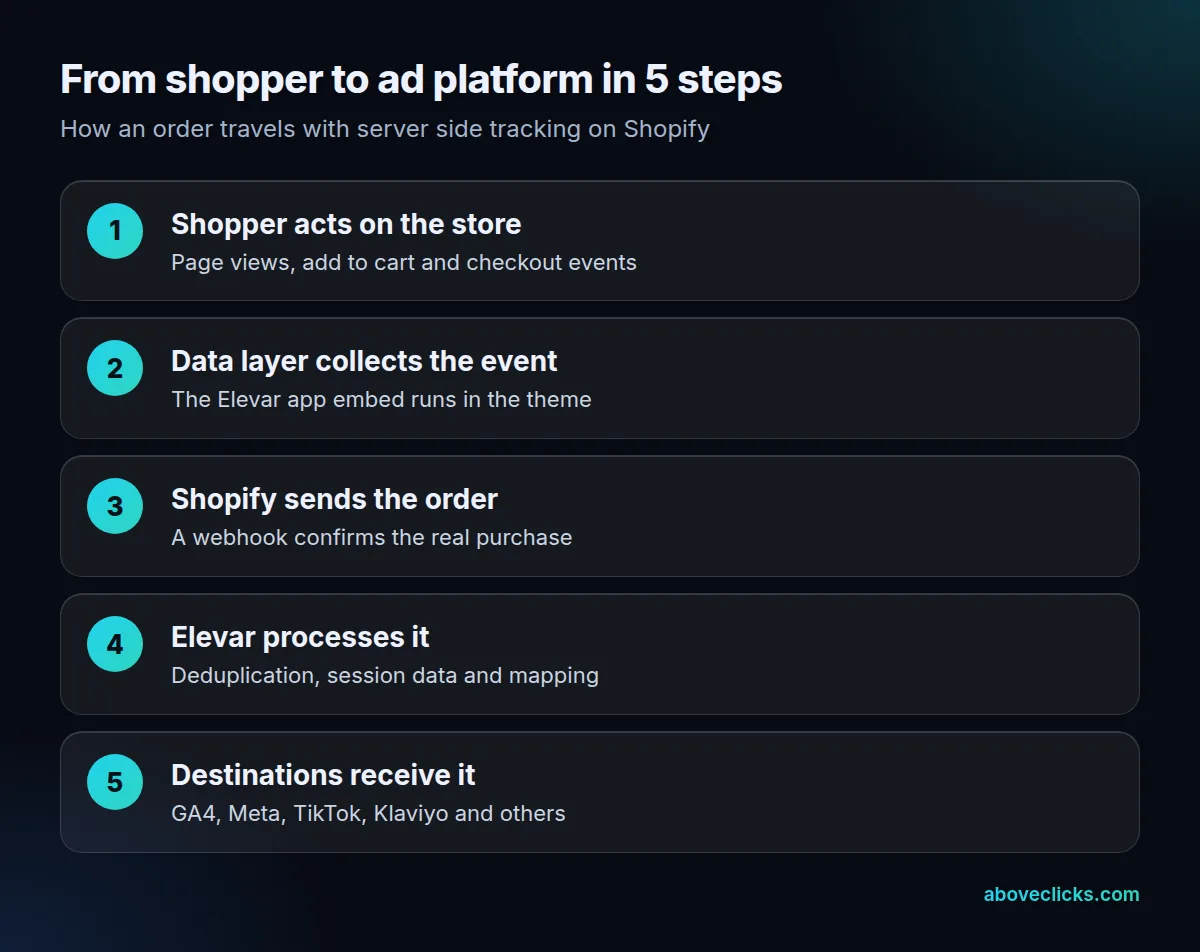
Elevar’s technical documentation lists the sources as your online storefront, Shopify webhooks and other compatible data sources. It then routes the data to your connected destinations based on the settings in its dashboard. On a Shopify store, the install step that matters most is turning on the “Elevar Data Layer” app embed in your theme, which is how the Elevar Shopify setup gets its browser events. Shopify’s own custom pixels help shows the other route, where you add tracking code yourself, and says Shopify does not support that code.
A destination is any endpoint that receives the data: GA4, Meta, TikTok, Klaviyo and affiliate networks are typical examples. Plan limits count destinations by channel, so 3 Meta destination cards still count as 1.
Its alert example is a warning when fewer than 95% of orders reach a destination in the last 2 hours. Two other details from the documentation are easy to miss. Elevar runs on Google Cloud and does not support your own servers. It also says it is not a data warehouse, so it keeps data only long enough to route it, plus its logging and monitoring data.
What does Elevar server side tracking fix, and what doesn’t it?
Elevar server side tracking fixes purchases that never reach an ad platform because the browser stopped them. It does not fix a bad ad account, weak creative or the limits of ad platform attribution.
Elevar’s home page says Audiense customers with server-side tracking report up to 20% more purchases attributed in platforms such as Facebook and GA4. That is a vendor claim about its own customers, and your store may see more or less. Its docs also say they monitor destinations and alert you when tracking falls below 95%, which is a useful alarm but not proof of accuracy.
The limits are the part worth reading before you pay. Elevar’s gotchas page says that:
- Criteo dynamic product ads use third-party cookies and view-through conversions, so it recommends client-side tracking for them.
- A subscription app called Upscribe overwrites the order notes that Elevar needs for server-side attribution.
- Offline orders such as draft and POS orders show the order confirmation as their landing page in GA4, because they have no browsing session.
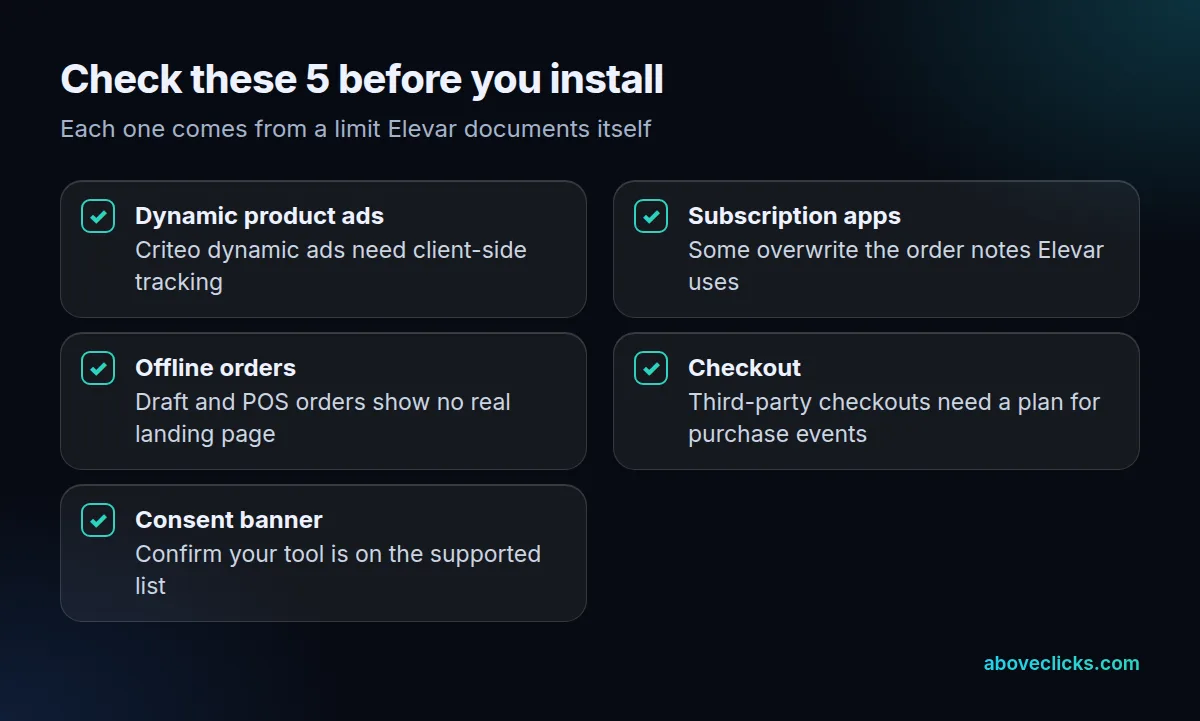
The checklist above turns those limits into five checks. If your store uses a subscription or third-party checkout app, ask whether purchase events still arrive with the right attribution data before you commit.
Does Elevar replace Google Tag Manager?
Not for every store. Elevar can sit alongside Google Tag Manager or replace the browser tags that GTM would have fired, so the real question is who maintains the server side of your tracking.
Google describes the do-it-yourself route. A server container runs on a server you control, not in the browser, and Google strongly recommends putting it on your first-party domain and in production mode before real traffic arrives. The GA4 Measurement Protocol is a separate server-to-server option, but Google says it is meant to augment tagging, not replace it, and an event that should carry a session’s location and device details has to be sent within 24 hours of the session start.
If your team already runs GTM well, the question is who maintains the server. Our Stape vs Elevar guide compares renting a container with buying a packaged service.
Does Elevar handle consent?
Elevar server side tracking can pass consent signals, but it does not remove the need for them. Server-side delivery changes where an event is sent from, not whether the shopper agreed to it.
The plan page lists 10 consent tools Elevar works with, including Cookiebot, CookieYes, OneTrust and the Shopify consent banner. Check that yours is on that list. Shopify’s own rule points the same way: its web pixel documentation says that in regions where consent is required, pixel callbacks run only after consent is given.
So a higher event count after an Elevar Shopify install should come from events that were allowed all along but blocked by the browser, not from events you were never allowed to send. If the numbers jump suspiciously in a region with strict consent rules, ask why before you celebrate. This is not legal advice; your privacy lawyer or consent tool vendor owns that call.
How do you check Elevar server side tracking is working?
To check Elevar server side tracking, count purchase events received and divide by Shopify orders, over the same 7 days before and after the switch. The match rate is the number to trust, not a dashboard total.
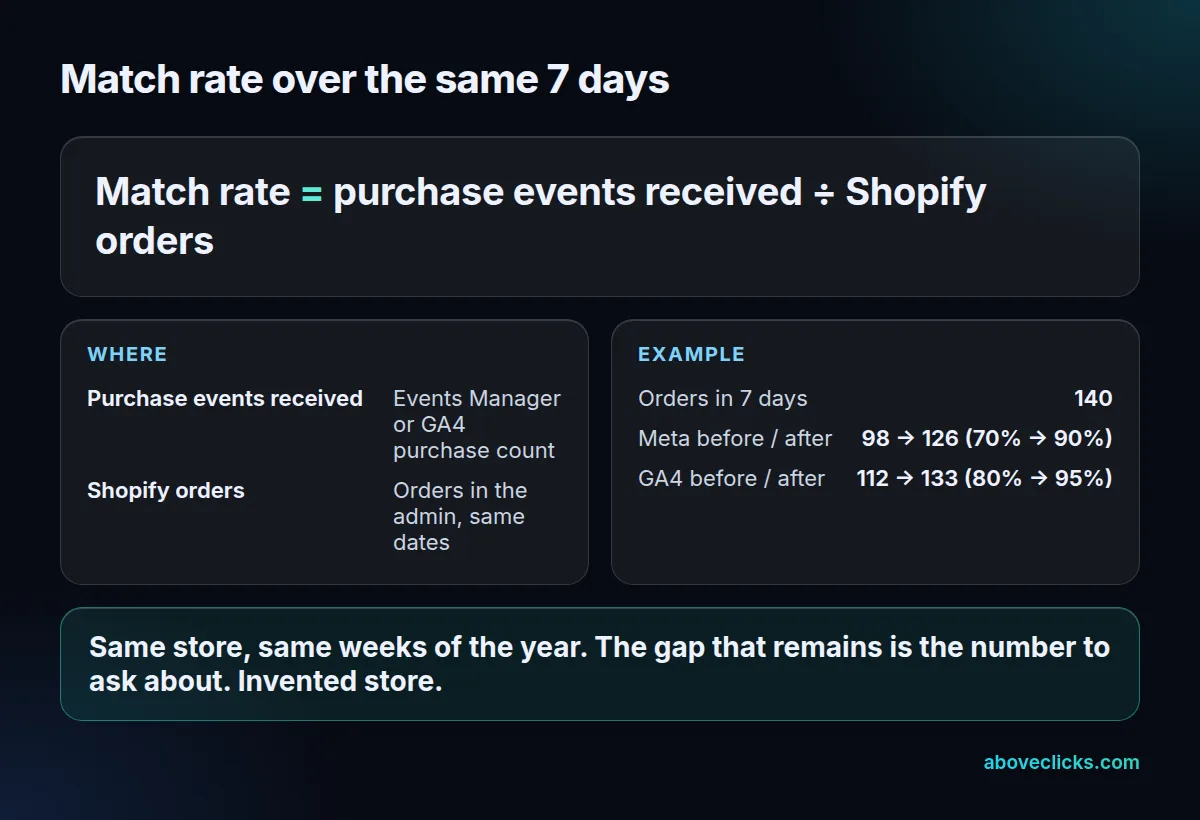
The worked example is an invented store with 140 orders in a 7-day window. Before install, Meta received 98 purchase events (70%) and GA4 received 112 (80%). After install, over a comparable week, Meta received 126 (90%) and GA4 received 133 (95%). The gap that remains, 14 orders in Meta, is the number to chase.
Steps for your own store:
- Export Shopify orders for 7 days, excluding test and draft orders.
- Read purchase events for the same dates in Meta Events Manager and in GA4.
- Divide each by the order count. Do this before the switch and again after.
- Compare weeks of the same kind, so a sale or holiday does not skew the result.
- Check the Meta event setup: the Pixel event and the server event must carry the same event ID and event name to be deduplicated, or your purchases may count twice. Our Meta Conversions API Shopify guide shows how to read that in Events Manager.
A match rate above 100% is a warning, not a win: it usually means double counting.
Before you start, put four questions to Elevar support or your developer, and keep the answers in writing:
- Which of our apps touch checkout or order notes, and have they been tested with the server side flow?
- Which destinations will receive purchase events, and which events are not covered?
- Who sees the alert when tracking drops below the threshold, and who fixes it?
- How do we remove Elevar later, and which old tracking code must come out first?
Is Elevar server side tracking worth it for your store?
Elevar server side tracking is worth testing if you spend meaningfully on paid ads and your purchase events do not match your orders. If your match rate is already close to 100% and your ads are profitable, you have less to gain.
Run the check above first, because Elevar server side tracking only pays off when there is a gap to close. If the match rate is 70% to 80%, a fix could change what your ad platforms learn from. If it is above 95%, spend your time on creative and budget instead.
Cost matters too for server side tracking Shopify stores, and it depends on your order volume; the plan limits and overage rates are in our Elevar pricing guide. Because the base plan is free up to 100 orders, a very small store can test it before paying.
If your numbers still don’t add up after Elevar server side tracking or any other tool is installed, the cause is often in the settings, not the tool. Our tracking and analytics service starts by comparing platform purchases with your store’s orders, and the free audit is the quickest way to see where yours differ. More guides are in measurement.