Elevar pricing is a monthly plan set by how many orders your store processes and how many destinations you connect, with five plans as of October 2026. Read the order limit and the overage rate before the headline number.
This guide to Elevar pricing lays out each plan, shows where the extras sit, works through one store’s numbers and ends with the questions to ask before you buy. It sits in our measurement guides, and our tracking and analytics service covers the work behind it. Elevar is now part of Audiense, so the vendor’s old pricing address redirects to a page on the Audiense site, and every figure below is read from there on 31 October 2026.
What is Elevar pricing based on?
Orders and destinations. Elevar pricing gives each plan a set number of orders a month and a set number of places the data can be sent, and the cost rises with both.
An order is a completed purchase processed by the Elevar tracking setup. A destination is a tool that receives the data, such as an ad platform, an analytics tool, an email tool or a data warehouse. The vendor’s pricing page lists the Elevar pricing order limit and the destination count side by side for every plan, as of October 2026.
Elevar sells server-side tracking, which means the order and event data goes from your store to a server and from there to each tool, instead of relying only on the visitor’s browser. Google’s introduction to server-side tagging explains that a server container does not run in the visitor’s browser. The vendor says stores without it can miss 20 to 25 percent of conversions to ad blockers and browser limits, a claim made on its own site that we have not tested.
Elevar pricing by plan: how much does each plan cost?
Elevar pricing has five plans, and the order limit, the destination count and the overage rate all step up together from one plan to the next.
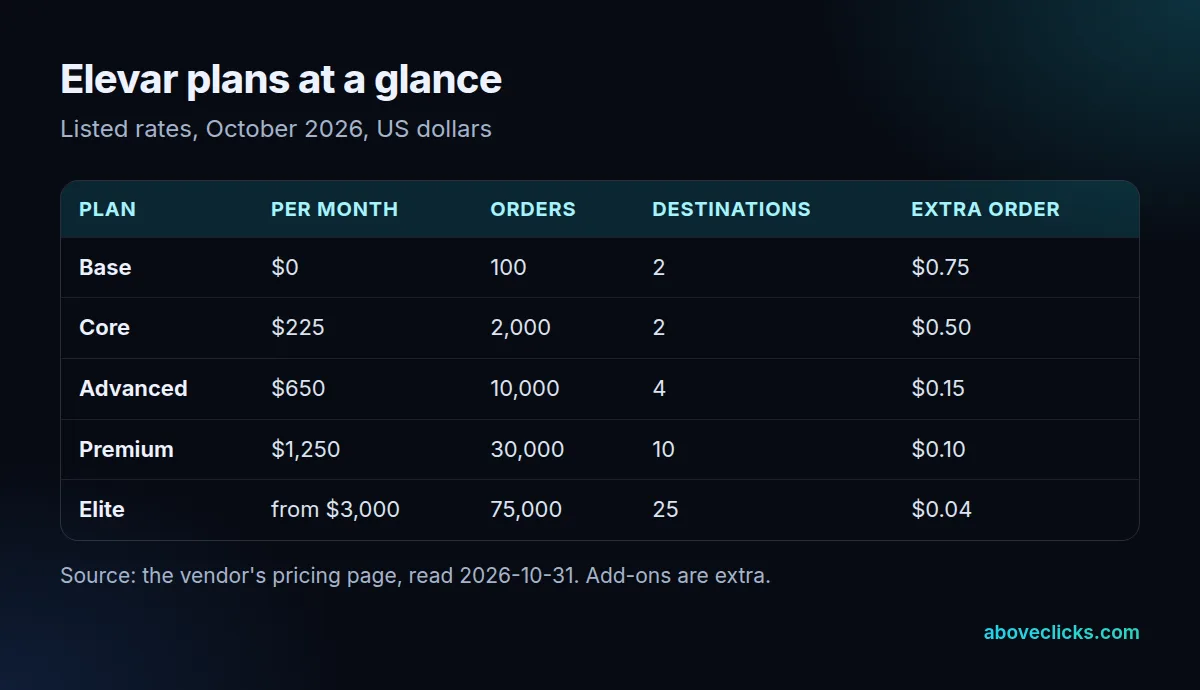
Here is what each Elevar plan includes, from the vendor’s pricing page as of October 2026:
- Base: $0 monthly, up to 100 orders and 2 destinations.
- Core: $225 monthly, up to 2,000 orders and 2 destinations.
- Advanced: $650 monthly, up to 10,000 orders and 4 destinations, plus profit signals and custom events.
- Premium: $1,250 monthly, up to 30,000 orders and 10 destinations, with API access for other commerce platforms.
- Elite: from $3,000 monthly, up to 75,000 orders and 25 destinations.
The jump from Core to Advanced is the one most growing stores meet first in Elevar pricing, and it is the only step where the destination count doubles while the cost rises by about three times. These Elevar plans also differ in support speed: the page lists chat and a knowledge base on Base, a 24-hour response on Core and Advanced, and 12 hours on Premium and Elite.
What does Elevar cost beyond the plan?
Four extras: overage on orders, extra destinations, one-time install help and analyst time. Together they can add more to Elevar pricing than the plan itself in a busy year.
The first is overage. Each plan lists a rate for every order above its limit, billed per order rather than in bulk: $0.75 on Base, $0.50 on Core, $0.15 on Advanced, $0.10 on Premium and $0.04 on Elite, as of October 2026 on the pricing page. A sale month can push a store past its limit without any warning from the plan itself.
The other three, read from the same page as of October 2026:
- Extra destinations: $125 monthly for each destination above the plan’s count, listed on three of the plans.
- Expert installation: $1,000 once for a standard Shopify setup. A headless Shopify store is $4,500 once, and an API setup is $4,500 once.
- Analyst services: $500 monthly for up to 3 requests, or $1,000 monthly for up to 10 requests on the larger plans.
Predicted lifetime value and a comeback score are also listed, with a Tailored Start at $500 monthly as of October 2026 on the same page. They matter only if you plan to feed those signals into ad platforms, so treat them as optional.
Is there a free Elevar plan, and what does it cover?
Yes. Base is $0 and covers up to 100 orders a month and 2 destinations, and the paid plans start with a 15-day free trial, as of October 2026.
The Elevar pricing page offers the trial and the Base plan as the starting points. A store with 100 orders a month or fewer can run the free plan indefinitely if two destinations are enough, for example Meta and GA4. Most stores that run ads on more than two platforms, or that also send data to an email tool, will need a paid plan.
The free Elevar plan is also a low-risk way to test whether the data layer fits your theme. A trial tells you about install effort and data quality, but not about overage, because a trial month rarely looks like your busiest one.
Which Elevar plan fits your order volume?
The cheapest plan whose order limit covers your busiest month, once overage is counted. Work out your Elevar cost with the rates above, because the plan that looks cheapest on the page often stops being so.
Take a worked example: a Shopify store that processes 2,600 orders in its busiest month. On Core that is the $225 plan, plus 600 extra orders at $0.50, which is $300 of overage, so $525 monthly. Advanced is $650 for the same month, as of October 2026 on the vendor’s page. The cheaper plan is Core, but only just.
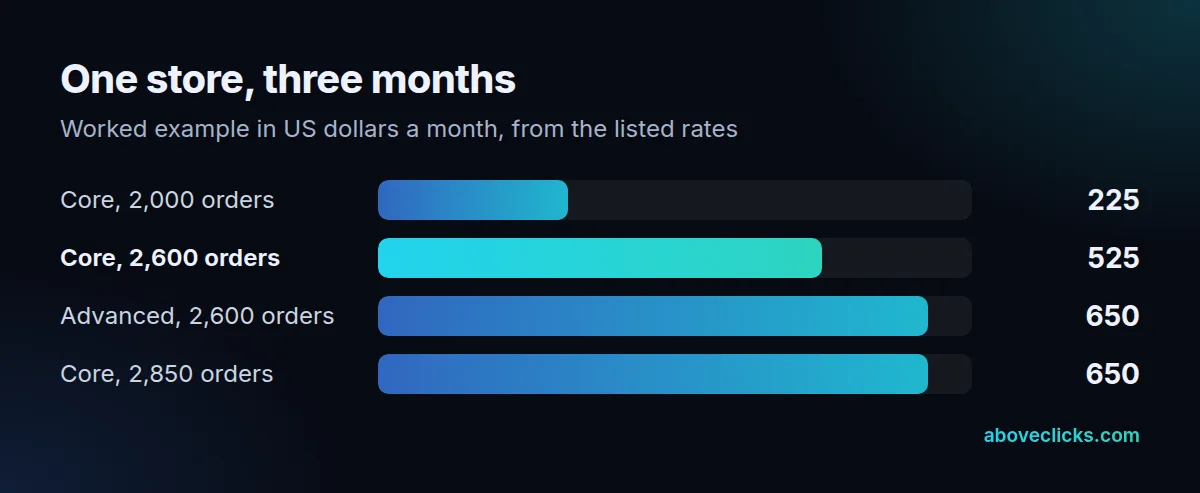
The break-even in Elevar pricing is easy to find. Core costs $225 plus $0.50 for each order above 2,000, so it reaches the $650 Advanced rate at 2,850 orders: $225 plus 850 × $0.50 equals $650. Above 2,850 orders in a month, Advanced is the cheaper plan, even if the store never uses its fourth destination.
Now the first year, with the same 2,600 orders every month and the $1,000 expert installation. Core comes to 12 × $525 plus $1,000, which is $7,300. Advanced comes to 12 × $650 plus $1,000, which is $8,800. The difference is $1,500, and it widens quickly if orders grow. This Elevar cost is a worked example built from the listed rates, not a quote, and the page does not say whether annual billing changes the monthly rate.
What does an Elevar pricing quote need to include?
Your order volume, the destinations you need, the install type and the support level. If an Elevar pricing quote leaves one of these out, the monthly figure will not match your invoice.
For a standard Shopify store, a complete Elevar pricing quote states the plan, the order limit, the number of destinations included, the overage rate, the installation charge and the support tier. Ask for the same list from any competing service, so the totals can be compared line by line.
How does Elevar compare with building server-side tracking yourself?
Elevar pricing buys the setup, hosting and monitoring as one service. Doing it yourself means running a server container, usually on Google Cloud, and paying for that hosting and the person who maintains it.
Google’s Cloud Run setup guide recommends a minimum of 2 instances to reduce the risk of data loss, and our glossary entry on server side tagging prices that minimum at about $90 a month as of October 2026. The hosting is the small part. The time to build the events, test each destination and keep up with platform changes is the larger one.
Shopify matters here too. Its web pixels documentation says app pixels run in a sandbox, so older browser scripts that read or write the page will not work there. A tracking setup for Shopify therefore has to use the supported events, whichever route you choose.
Comparisons that come up in searches for Elevar include Triple Whale, Stape and Littledata. Triple Whale is a reporting and attribution platform rather than a server-side tracking service, as covered in our guide to Triple Whale alternatives, so it solves a different part of the problem. Whichever you pick, the data still has to be matched to the ad platform. Google’s enhanced conversions help describes how hashed first-party data from your site is sent to improve the accuracy of conversion measurement.
If you want the setup done for you, with or without an app, our server-side tracking service covers the container, the events and the destinations.
What should you ask before you buy Elevar?
Six things about Elevar pricing: your real order count, the destinations you need, the overage rate, the install cost, the support level and how you leave. Put each answer in writing.
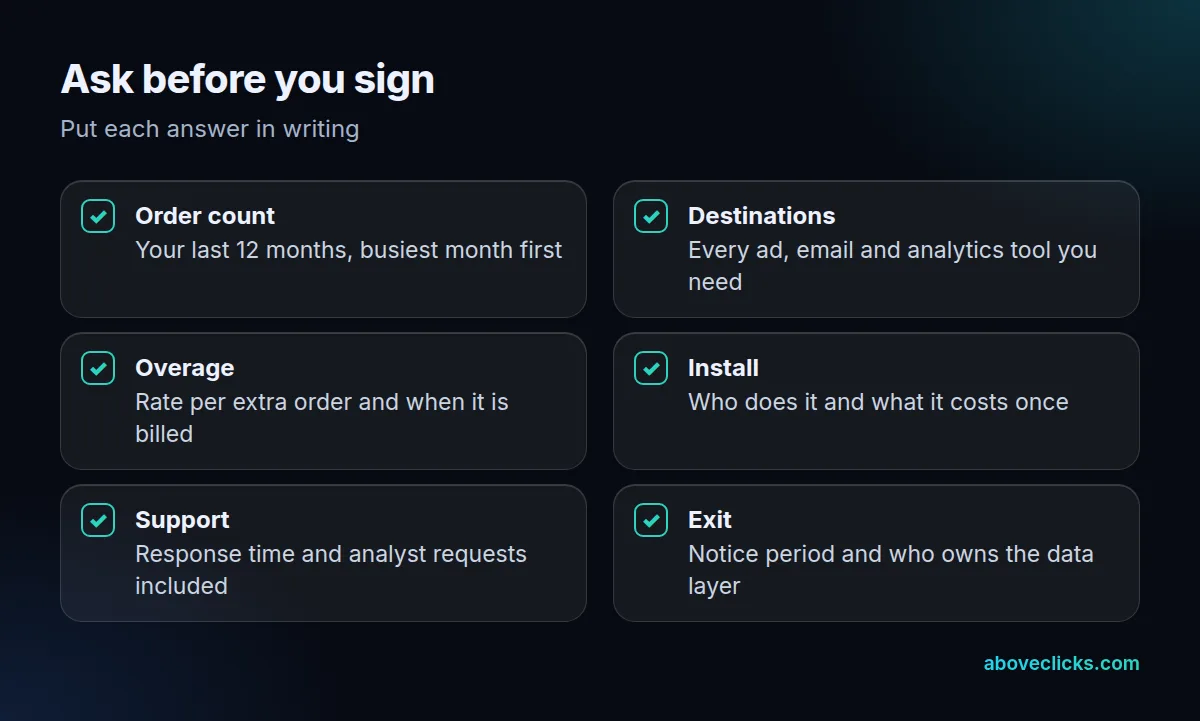
When we review a server-side tracking quote, including Elevar pricing, we start from the store’s order count in the platform’s own report, then count every tool that needs the data. Only then do we look at plans, because the order count and the destination count set the plan before any feature does. Pull the busiest month of the last 12, not the average, since overage is billed on the busy months.
A few more checks sit outside the checklist. First, ask whether the plan changes automatically when you pass a limit, or whether you stay on it and pay overage. Second, ask who holds the data layer and the destination connections if you cancel. Third, ask what happens to your consent settings, because the Elevar plans list consent tools among the compatible technology on the pricing page.
If you want a second opinion on a quote, our free audit checks the tracking you have against the orders and tools you run, and tells you which Elevar plan the numbers support.