PPC conversion tracking records the purchases, leads and calls that follow a paid click, using conversion actions that each carry their own settings. Six of those settings decide what your ad account reports, and a wrong one either inflates or hides results.
This guide covers the six settings in Google Ads, shows with arithmetic what the count setting does to a cost per lead, lists the usual reasons conversions go missing and ends with a monthly check against your own orders. For the install steps, use our PPC tracking guide.
What is PPC conversion tracking?
It is the measurement of valuable actions, such as purchases, sign-ups and phone calls, that happen after someone interacts with a paid ad, so the account can report and bid on them.
Google’s conversion measurement page says you choose what counts as valuable, and that this data lets Smart Bidding strategies such as Maximize Conversions, target CPA and target ROAS optimize toward it. It names 4 places to measure: website, app, phone call and offline. For a website, the data source can be Google Analytics, the Google tag or both.
Google Ads conversion tracking therefore has two layers. The tag or import sends the event. The conversion action then decides how that event is counted, valued and credited. Most guides stop at the first layer and treat ppc conversion tracking as finished once the tag fires. The table below lists the second layer. Its first default is the click-through window of 30 days, which sets how long a click can still earn credit.
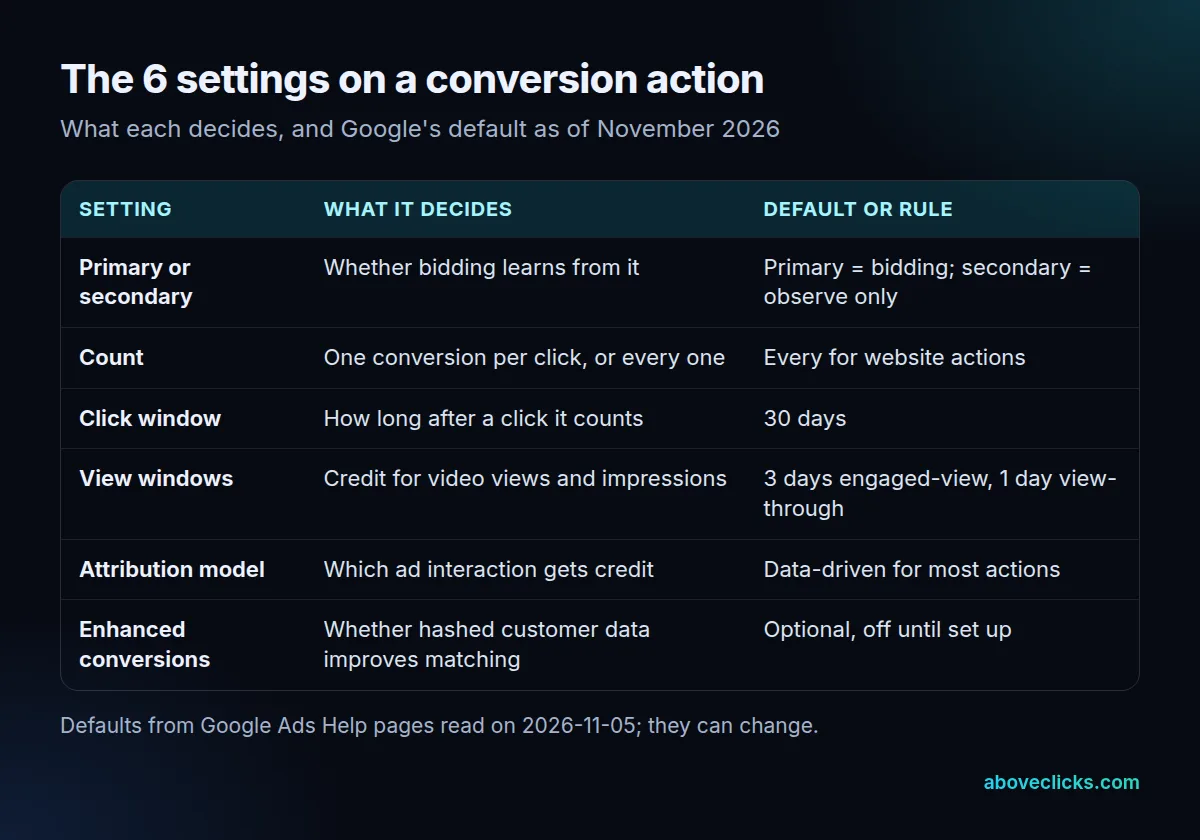
Good ppc conversion tracking gets all 6 right, and the sections below take them in order. Each one shows the mistake it usually causes, so you can match it against your own account before you change anything.
Which conversion actions should be primary?
Primary actions are the ones used for bidding and shown in the Conversions column. Secondary actions are for observation only and appear in the All conversions column.
That is how Google defines the two roles, with one exception: an action inside a custom goal is used for reporting and bidding whichever role it has. Google also warns that a wrong setting can stop Smart Bidding from optimizing well, because the algorithm learns from the primary signals.
A simple rule for conversion tracking setup, and for every later review of ppc conversion tracking:
- Primary: a completed purchase, or a lead you would pay for, such as a qualified quote request.
- Secondary: early steps that you want to see but not bid on, such as an add to cart or a newsletter sign-up.
One trap: conversions created from Google Analytics events are secondary by default, and Google says they can only be changed to primary inside Google Ads. An imported purchase can sit in All conversions for months while bidding ignores it.
When you change what is primary, give the system time. Google suggests allowing 1 to 2 conversion cycles for bidding to adapt, so judge the change after a full buying cycle, not after 3 days.
Should you count every conversion or one?
Count every conversion for sales, because each sale adds value. Count one conversion for leads, because usually only one unique lead per ad click adds value.
Google’s counting options page gives that same split. It also lists the defaults: every conversion for website actions, in-app actions and imported actions, and one conversion for calls from ads and app installs. So a website form action starts on “every”, and a visitor who submits the form 3 times after one click is counted 3 times.
Here is what that does. The advertiser below is invented: 400 clicks cost $1,200, and the form action recorded 52 conversions, but only 40 were unique leads.
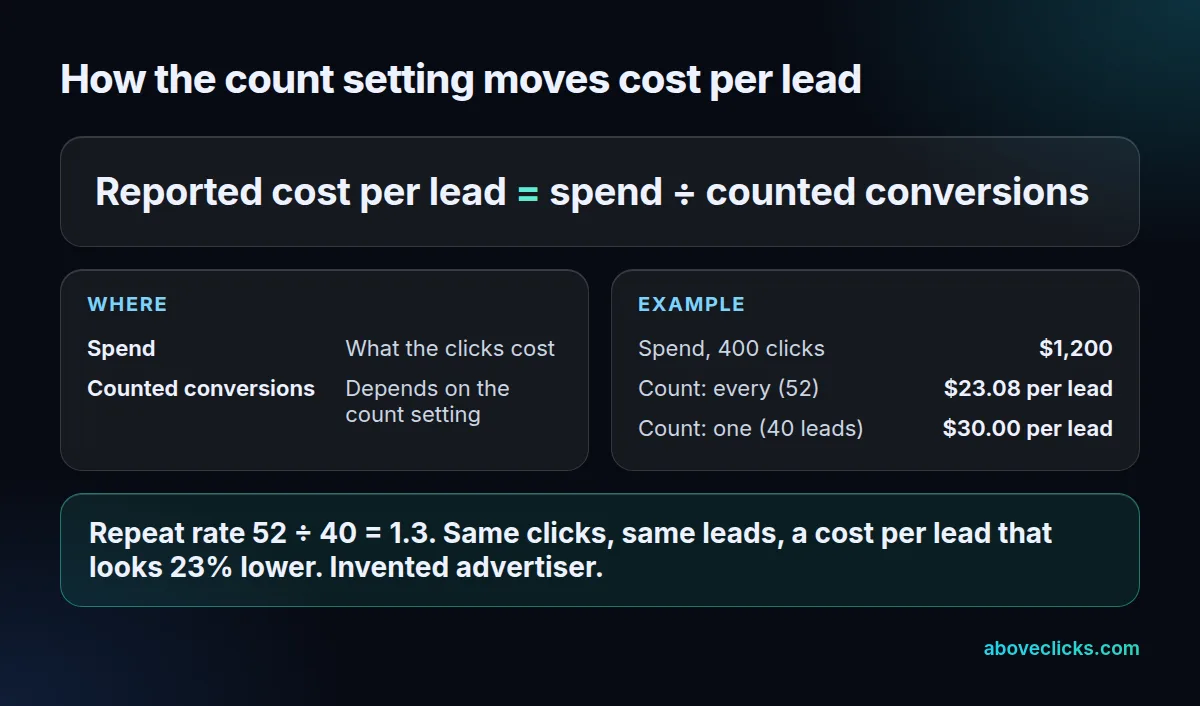
The account on “every” reports a cost per lead of $23.08; on “one” it reports $30.00. The leads and the spend are identical. Google calls the ratio the repeat rate: 52 ÷ 40 is 1.3 here, and its own example shows that a repeat rate of 1.5 on 10 conversions means 15 on “every”.
The count setting also changes what Smart Bidding sees, so repeat submissions can teach it to chase people who submit more than once. Set it deliberately for each action in your ppc conversion tracking, and note that a change applies only to future conversions.
How long should the conversion window be?
Long enough to cover most of your real buying cycle. The click-through window defaults to 30 days, and a conversion after the window ends is not recorded.
The conversion windows page lists 3 defaults: 30 days for click-through, 3 days for engaged-view and 1 day for view-through conversions. You can set a different window for each action.
To choose, open the time lag report in the attribution reports. Google’s example: if 75% of conversions happen between the 25th and 30th day after an interaction, the window must be at least that long, or you miss them. A shorter window suits a one-week promotion; a high-ticket product with a long decision may need more than 30 days.
Remember the date rule. If you change a 30-day window to 10 days, the 10-day window applies only from that day forward, and a later move back to 20 days does not recover a conversion already missed.
Which attribution model should PPC conversion tracking use?
Most accounts should keep data-driven, which is Google’s default for most conversion actions. It shares credit across ad interactions using your account’s data, where last click gives all credit to the final click.
The attribution models page uses a restaurant example with 4 searches in a row. Last click gives 100% of the credit to the keyword from the last search. Data-driven gives each of the 4 keywords a share, based on how much it contributed.
This matters for ppc conversion tracking because the same conversions can look different by model, and a keyword that closes few sales on last click may start many of them. Use the model comparison report to see the effect before you judge a keyword. If you also use Google Analytics, remember that its models differ, and our GA4 attribution guide explains the settings that change those numbers.
How do you track offline conversions in Google Ads?
Import them, or use enhanced conversions for leads, which match hashed website form data to the sale that closes later by phone or in a shop.
Google describes 2 versions of enhanced conversions. The web version improves the measurement of online conversions. The leads version improves measurement of offline transactions that began as a website lead, by using hashed first-party data together with imported offline conversions.
The data is hashed with SHA256, a one-way function, before it is sent. Enhanced conversions supplement a conversion you already measure; they don’t replace one. If the basic conversion action is broken, fix that first, because better matching on a conversion that never fires adds nothing to ppc conversion tracking.
For a business that closes sales offline, the useful step is to record which lead became a sale, then send that back, so bidding learns from money and not from form fills.
Example: an invented service business gets 50 leads from its ads in a month, and 8 of them become paying customers, a close rate of 16%. Without the import, the account sees 50 equal conversions and cannot tell the 8 from the 42 that went nowhere. With it, google ads conversion tracking can report the sales themselves, and the cost per sale replaces the cost per lead as the number you manage.
Why is Google Ads conversion tracking not working?
Usually one of 5 causes: the event isn’t set up as Google expects, the accounts aren’t linked, the window is too short, the action is still secondary, or two sources are counting the same sale.
Check these in order when google ads conversion tracking shows zero or too few conversions:
- Import prerequisites. Google’s Analytics import page requires the event to be marked as a key event, the accounts to be linked and auto-tagging to be on. After linking or marking an event, allow 24 to 48 hours before the import options appear.
- Event names. They must match exactly between Google Analytics and the Google Ads conversion action, or the import finds nothing.
- Window. A conversion after the window isn’t recorded, and a window change isn’t applied backwards.
- Role. An imported action that is still secondary sits in All conversions, not in the Conversions column you bid on.
- Duplicates. If both the Google tag and the Analytics import are active for one event, make sure only one is primary.
Google also notes that when attribution is set to paid and organic channels, some settings, such as counting, are managed in Google Analytics and may not be editable in Google Ads. If the checks still don’t explain a gap, our GA4 audit goes through the tags, events and imports one by one.
How do you check PPC conversion tracking against your orders?
Once a month, compare the Conversions column with the orders or leads you can name in your own records, then explain any gap above a few percent.
Example: an invented store sees 90 purchases in the Conversions column for last month, but its order export shows 70 orders from paid traffic. The gap is 20, which is 29% above the real figure. For a store, the likely causes are a duplicate purchase event from two sources, a second action marked primary, or a shared window that credits the same sale to 2 campaigns.
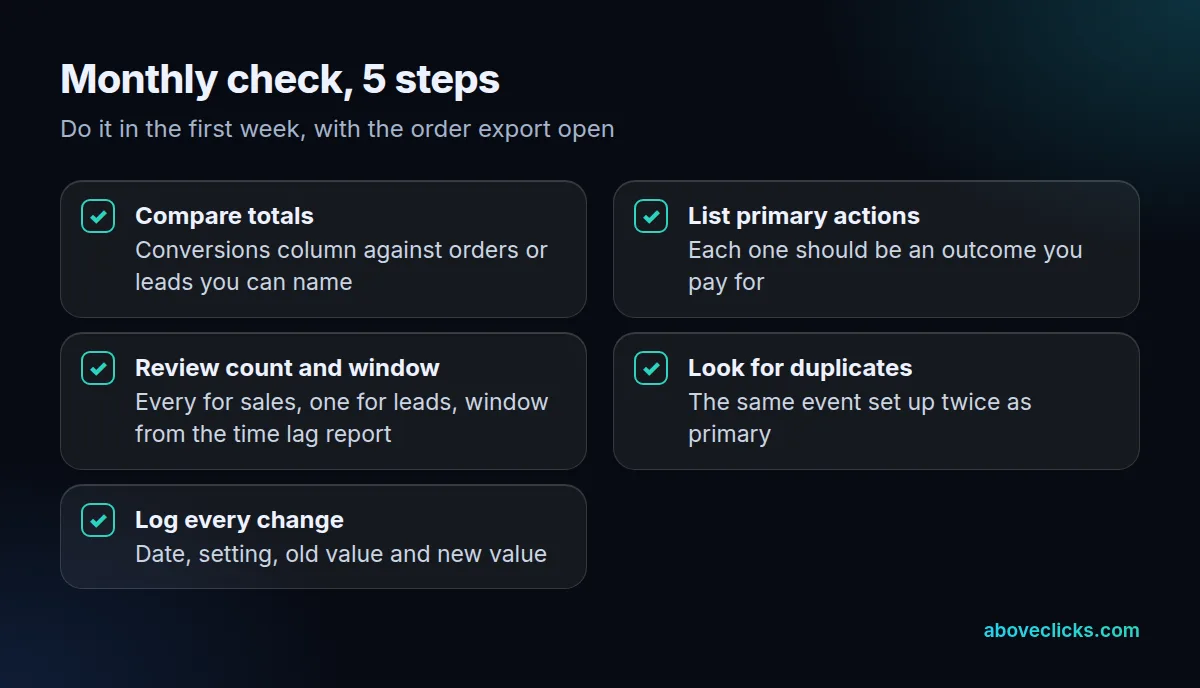
The checklist above takes about an hour with the export open, and it is the cheapest habit in ppc conversion tracking. Keep the log of changes with it: when a number jumps in March, the note that says “count changed to one on March 4” saves a week of guessing.
If you’d rather have a second pair of eyes, our free audit covers your GA4, Pixel, Conversions API and Google Ads conversion tracking in a written PDF. The wider measurement service is on the tracking and analytics page, and more guides are in measurement.