Stape vs Elevar is a choice between renting server-side tracking infrastructure and buying a packaged tracking service for Shopify. Stape bills by the requests your server container receives, and Elevar bills by the orders your store processes.
This guide to Stape vs Elevar compares the two on billing, setup, Shopify fit and a worked yearly cost, as of October 2026. It sits in our measurement guides, and our tracking and analytics service covers the work behind it. Every figure below was read on 31 October 2026 from Stape’s pricing page or the Elevar pricing page on Audiense, because Elevar is now part of Audiense. We have not tested either product.
What is the difference between Stape and Elevar?
Stape hosts a Google Tag Manager server container for you and charges by traffic. Elevar sells a packaged tracking setup for Shopify and charges by orders. In Stape vs Elevar, the billing unit is the first difference.
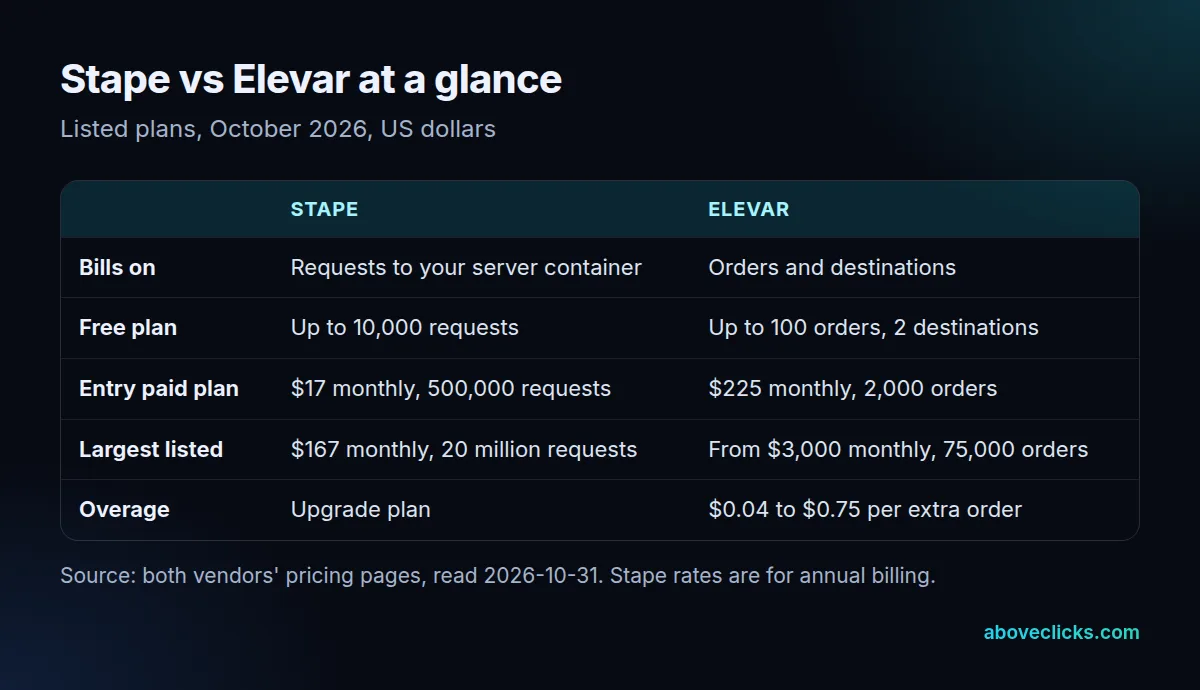
The second difference in Stape vs Elevar is the work that comes with the plan. Stape’s free plan covers 10,000 requests, Elevar’s free plan 100 orders, and the paid plans diverge from there. Stape’s pricing page lists hosting features such as a custom loader, logs, a setup wizard and a Shopify app, and you still decide which events and tags run in the container. Elevar’s plan page lists a data layer and event pipeline, monitoring, alerts and destination connections as part of every plan, as of October 2026.
The third difference in Stape vs Elevar is who the plan is built around. Elevar describes its core plans as server-side tracking for a Shopify or Shopify Plus store. Stape serves any site that can run a server container, so a store on another platform fits it more easily, though one container equals one site.
What does Stape do?
In a Stape vs Elevar comparison, Stape is the hosting side: it hosts your server-side Google Tag Manager container and bills you by the incoming requests it receives. It does not choose your events for you, so the quality of the tracking depends on how the container is built.
Google’s introduction to server-side tagging explains that a server container does not run in the visitor’s browser. You can host it yourself, and Stape sells that hosting as a service.
Stape lists four plans with a request limit, as of October 2026, on its pricing page: Free at $0 for up to 10,000 requests, Pro at $17 monthly for up to 500,000, Business at $83 monthly for up to 5 million and Enterprise at $167 monthly for up to 20 million. Those monthly rates are for annual billing, and the page shows a higher struck-through figure beside each. A Custom plan has unlimited requests and is quoted on request.
What counts as a request matters more than the plan name. Stape’s own FAQ says a request is every incoming hit to the container, including script loads such as gtm.js, and that preview sessions, bots and crawlers can use requests too. Outgoing calls are not counted, so one event sent to five platforms is still one request. Each site needs its own container and plan.
What does Elevar do?
In Stape vs Elevar, Elevar is the packaged side: it collects clean ecommerce events from a Shopify store and sends them to your ad, analytics, email and affiliate tools from the server. It bills by monthly orders and by the number of destinations you connect.
The plan page lists five plans as of October 2026: Base at $0 for 100 orders and 2 destinations, Core at $225 monthly for 2,000 orders, Advanced at $650 monthly for 10,000 orders and 4 destinations, Premium at $1,250 monthly for 30,000 orders and 10 destinations, and Elite from $3,000 monthly for 75,000 orders and 25 destinations. Paid plans start with a 15-day free trial.
Orders above the plan limit are billed per extra order, from $0.75 on Base down to $0.04 on Elite. Extra destinations, expert installation at $1,000 one time and analyst time are separate lines on the same page. We list every plan and add-on in our guide to Elevar pricing, so this section keeps to the limits that matter for the comparison.
How do Stape and Elevar pricing compare?
Stape’s listed plan prices are lower, but they price different work. Stape pricing covers hosting and tools for a container you build, while Elevar’s plans include the data layer and destination setup tooling.
Here is a worked Stape vs Elevar example, not a quote. A hypothetical store takes 2,600 orders a month and has 100,000 sessions, and we assume each session sends about 15 incoming requests (page views, events and script loads), which gives 1.5 million requests a month. That is above the 500,000 requests on Pro, so Stape Business at $83 monthly applies: $996 a year on annual billing, as of October 2026 on Stape’s pricing page.
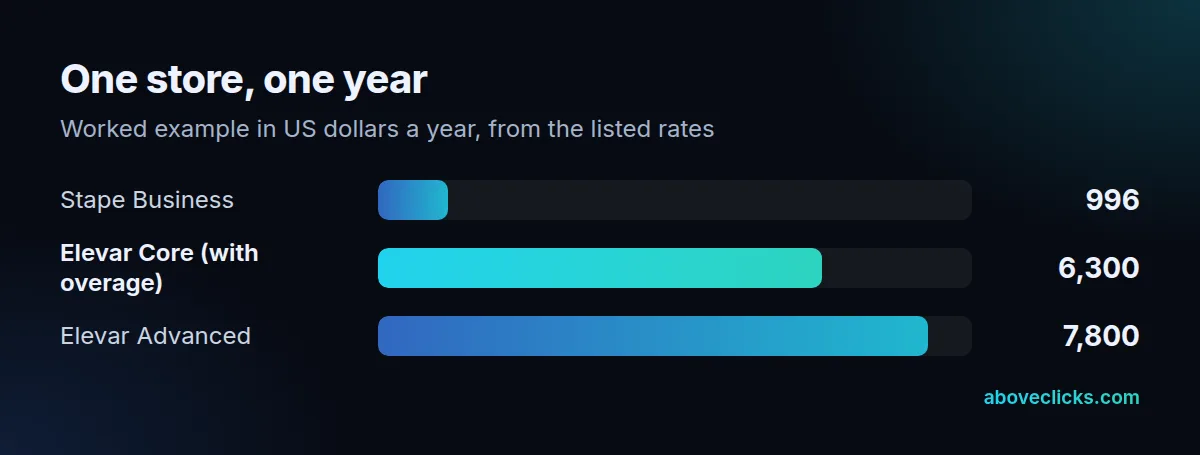
On the Elevar side the same store passes the 2,000-order limit of Core. Core at $225 plus 600 extra orders at $0.50 is $525 monthly, so $6,300 a year. Above 2,850 orders in a month, Advanced at $650 monthly is cheaper than Core with overage. Advanced for the year is $7,800, from the listed rates as of October 2026.
The Stape vs Elevar gap in this example is $5,304 a year against Core. It is not a saving until someone has built and monitored the Stape setup. Google’s Cloud Run guide puts a self-hosted server at about $45 monthly each, with at least 2 instances recommended, as of October 2026. So Stape pricing mainly replaces that hosting bill, and the hours to build tags remain.
How does each one work with Shopify?
For a Shopify store, Stape vs Elevar means two routes to the same ad platforms. Shopify’s rules shape both: its web pixels run in a sandbox and subscribe to customer events.
Shopify’s web pixels documentation says pixels load in a secure sandbox with APIs for subscribing to customer events. Older scripts that read or change the page do not fit that model, so any setup should use the supported events whichever vendor you choose.
Elevar’s plan page says its data layer collects ecommerce events for Google Tag Manager, the Shopify web pixel and server-side tracking. Stape’s pricing page lists a Shopify app as a way to implement server-side tagging for a store, and a setup wizard. Stape’s Pro plan adds 3 days of logs and Business adds 10 days, which helps when you check events. We have not tested either, so check which events each one sends before you rely on it.
Google also recommends serving the container from your own domain in production. Its manual setup guide tells you to set the server container up on a first-party domain and enable production mode. Ask each vendor who controls that subdomain, because it decides who can switch the setup off.
Matching still matters after the data arrives. Google’s enhanced conversions help describes how hashed first-party data from your site improves conversion measurement, and both routes can send it if the events carry the right fields.
Which one should you choose?
In Stape vs Elevar, choose by who will do the work, then by volume. Three rules cover most stores, and they are rules of thumb from reading both pages, not a verdict.
- Choose Elevar when you run Shopify, want a packaged data layer with monitoring, and nobody on your team will maintain a tag container. The cost is higher and rises with orders.
- Choose Stape when someone, in-house or an agency, builds and maintains your Google Tag Manager server container, or when you run more than one platform. The cost is lower and rises with traffic, including bot hits.
- Choose neither yet when you have fewer than 100 orders a month. Both free plans fit that size, and fixing your browser-side events first costs nothing.
Volume can flip the Stape vs Elevar order. A store with few orders and heavy traffic, such as a content-led shop, pays Stape more as requests grow and Elevar little. A store with many orders and light traffic does the reverse. Count both numbers before you compare totals.
If you want the setup done for you on either vendor or on your own container, our server-side tracking service covers the container, the events and the destinations, and our glossary entry on server side tagging explains the term.
What should you check before you buy either?
Check six things in writing: traffic, orders, destinations, who builds the setup, who controls the tracking domain and how you leave.
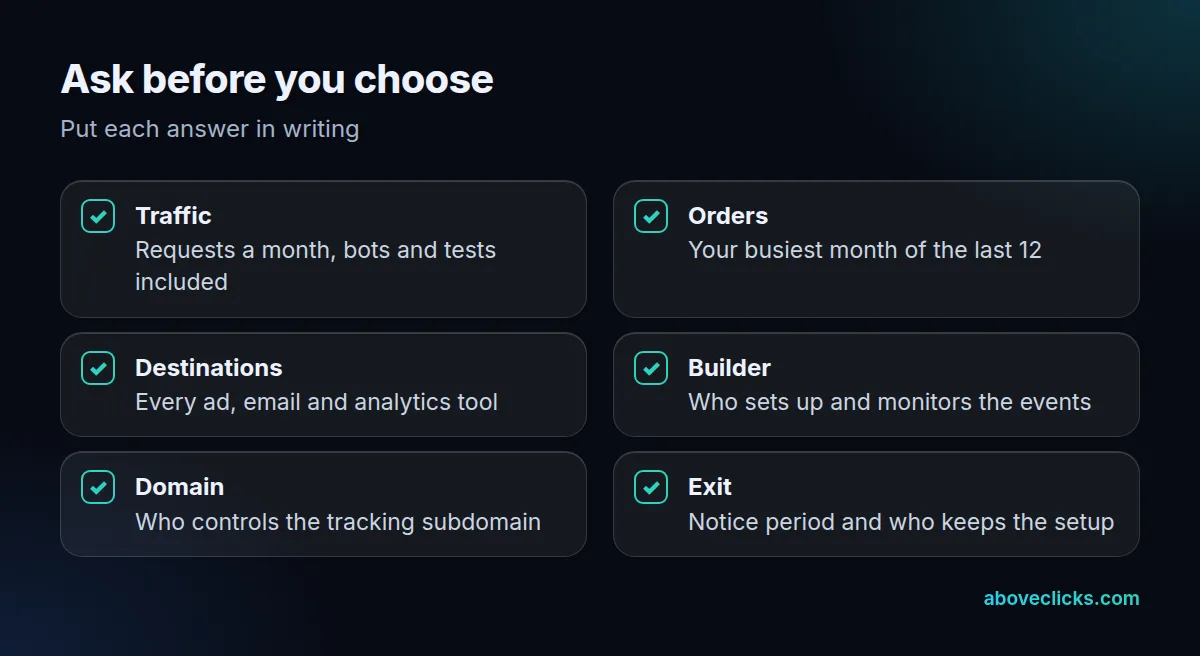
Stape vs Elevar: what belongs in the written quote?
A written quote in the Stape vs Elevar decision should state the plan, the unit it is billed on, the limit, what happens above the limit, any one-time installation charge and who does the build. If a quote leaves one of these out, the monthly figure will not match your invoice.
When we review a server-side tracking quote, we start from the store’s own report: orders for Elevar-style plans, and a traffic estimate with bots and test sessions included for request-based plans. Then we count every tool that needs the data. Only after that do we look at plans, because volume and destinations set the plan before any feature does. Use the busiest month of the last 12 rather than the average, since overage and plan upgrades follow the busy months.
Two more checks sit outside the list. First, ask whether the plan upgrades automatically when you pass a limit, or whether you stay on it and pay overage. Stape’s FAQ describes a toggle that upgrades the plan with traffic, and a downgrade goes through support. Second, ask what happens to your consent settings, since the Elevar page lists consent tools among its compatible technology.
If you want a second opinion before you sign, our free audit checks the tracking you have against the orders and tools you run, and tells you which side of Stape vs Elevar the numbers support.