To optimize Amazon PPC campaigns, work out your break-even ACOS first, then clean up search terms, bids and budgets in that order. Make a few changes a week so you can see what moved the numbers.
This guide shows how to optimize Amazon PPC campaigns in that order. It covers the numbers to calculate, how to read the search term report, how to set bids and budgets, and a weekly routine, with examples from an invented store.
How to optimize Amazon PPC campaigns in the right order?
Start with the numbers, then the listing, then search terms, then bids and budgets. Skipping ahead is the most common reason an account keeps spending without improving, however often you optimize Amazon PPC.
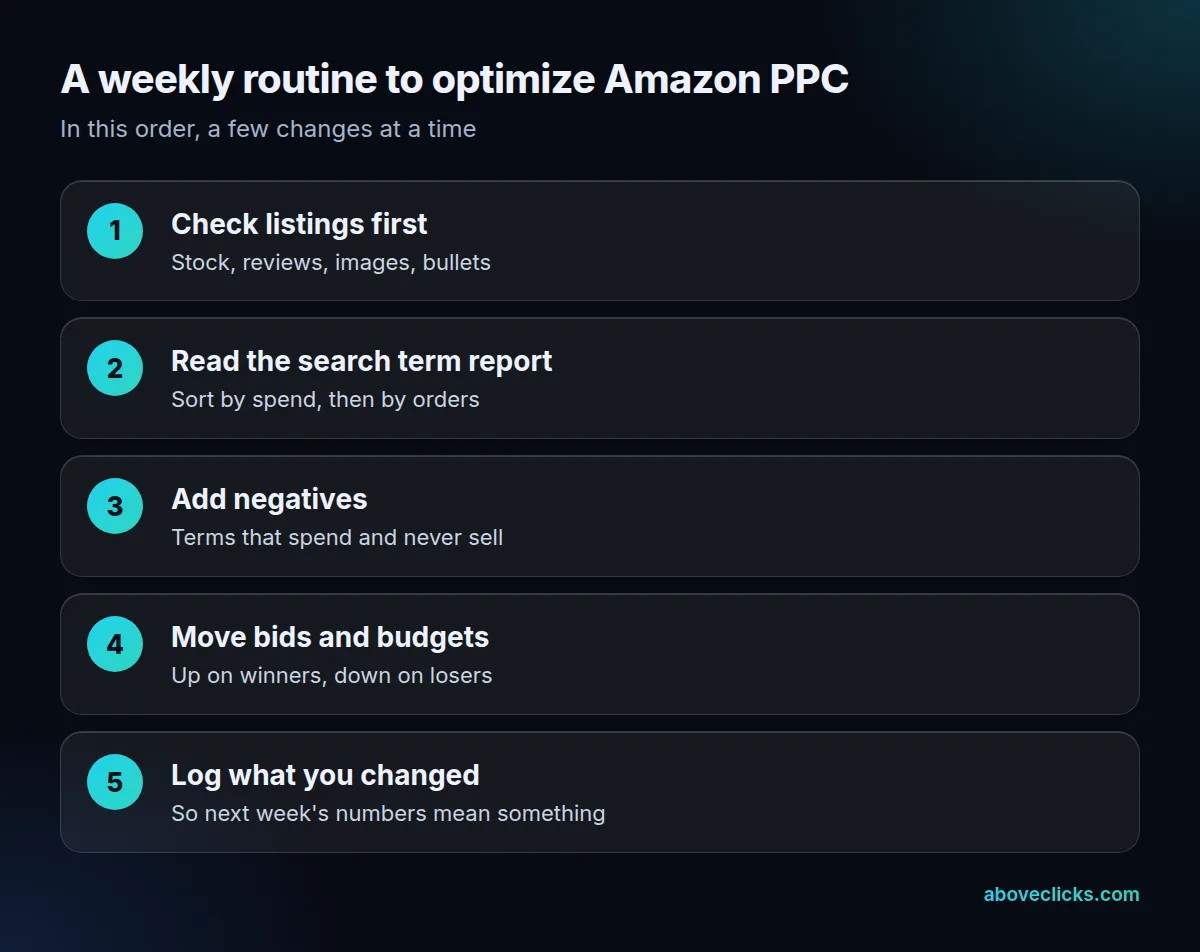
Over 30 days that is 4 weekly passes through the same 5 steps. The order matters because each step feeds the next. The first rule of Amazon PPC optimization is that a target ACOS tells you what a click is worth. A listing that converts makes that click worth more. The search term report shows which clicks you’re paying for, and only then do bids make sense.
Our Amazon ads service page lists the same leaks we look for first: automatic campaigns nobody prunes, ACOS treated as the only number, bids set once and forgotten. If you’re new to the basics, start with our Amazon PPC explainer and come back to optimize Amazon PPC with the routine below.
What does ACOS mean on Amazon?
ACOS is advertising cost of sales: ad spend divided by ad revenue, shown as a percentage. Amazon’s ACOS guide gives the example of $50 spent for $100 of sales, which is a 50% ACOS.
ROAS is the same measure turned upside down: ad revenue divided by ad spend, so that example has a ROAS of 2. Use whichever your reports show, but pick one and stay with it. Every Amazon PPC optimization decision below uses ACOS.
ACOS has a blind spot: it counts only sales attributed to the ad. Amazon itself says brands shouldn’t focus on it too much and should also look at impressions, click-through rate and conversion rate. A very low ACOS on a tiny budget can mean you’re missing sales, not saving money.
What is a good ACOS for Amazon PPC?
One that’s below your break-even ACOS. Amazon says there’s no definitive good number, because it depends on your industry, company size and campaign type, so Amazon PPC optimization starts with working yours out from your margin.
The ACOS guide says your ACOS needs to be lower than your profit margin to stay profitable. That gives a simple chain you can redo with your own numbers:
- Margin before ads = selling price minus product cost, Amazon fees and shipping.
- Break-even ACOS = that margin divided by the selling price.
- Target ACOS = a figure below break-even, set by your goal.
Example: an invented store sells a product for $40. The product, shipping and Amazon’s charges total $28, so the margin before ads is $12, which is 30% of the selling price. Break-even ACOS is 30%. If the store sets a target of 20%, each sale can carry $8 of ad spend and still leaves $4 of profit.
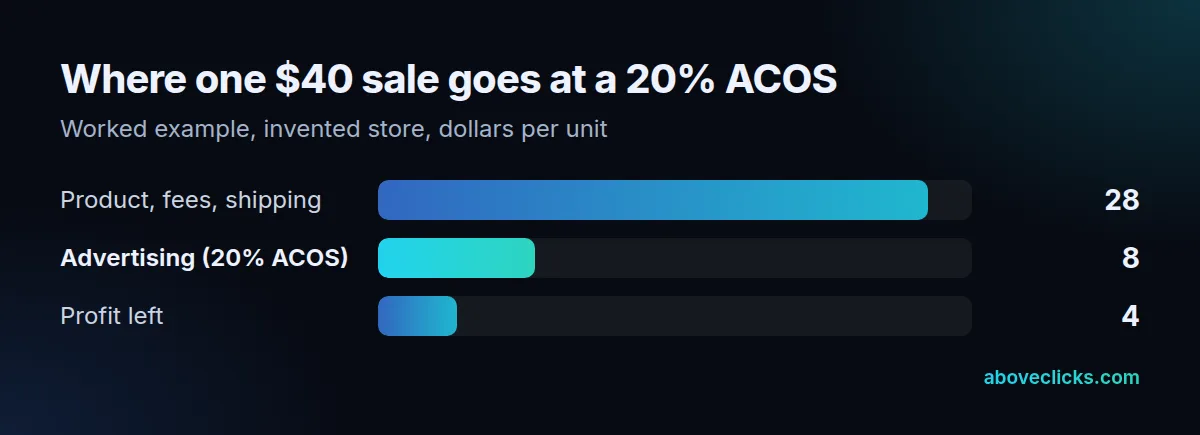
A launch can run above the target for a while to collect reviews and data. Any plan for how to optimize Amazon PPC campaigns should say when that ends. Decide that on purpose, with an end date, instead of discovering it in the monthly numbers.
How do you read the Amazon PPC search term report?
Download the search term report from the Amazon Ads console and sort it by spend. It lists the shopping terms customers typed that led to at least one click on your ad, according to Amazon’s Sponsored Products guide.
Amazon’s guide lists four other reports as well: the targeting report, the advertised product report, the placement report and the performance over time report. To optimize Amazon PPC every week, the search term report does most of the work.
Look at each term with three numbers: clicks, orders and spend. This is the core of Amazon PPC optimization at term level. Then use the triage table below.
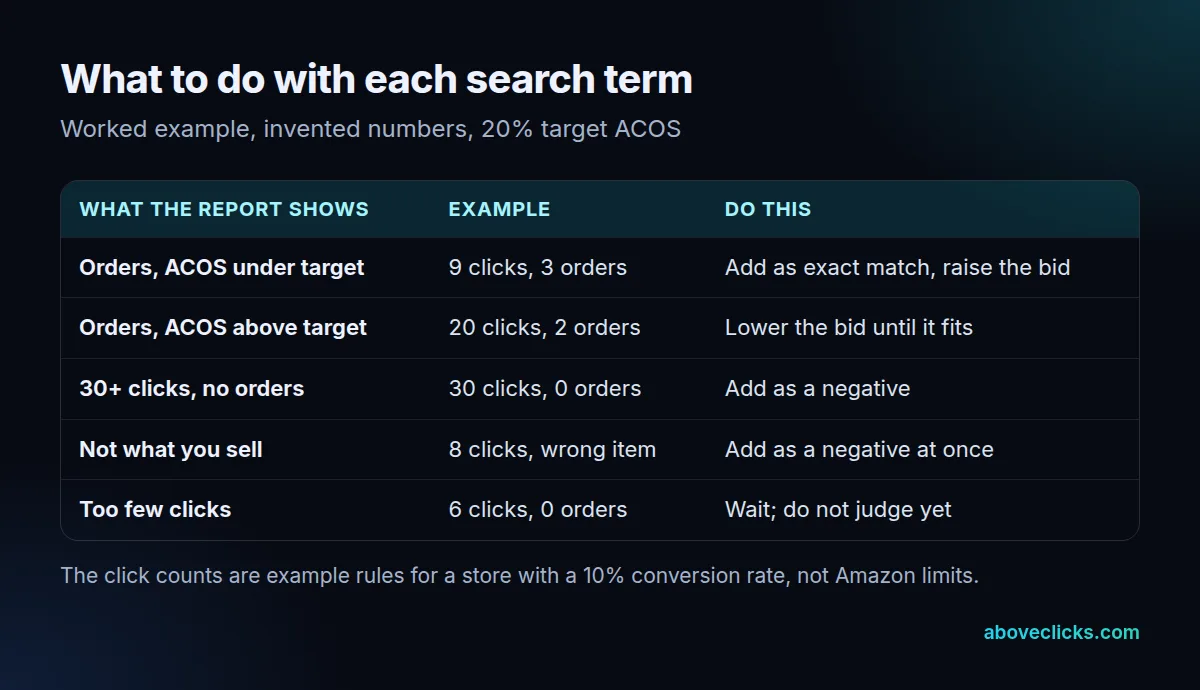
The 30-click rule in the table comes from arithmetic you can redo. If a term truly converts at 10%, the chance of 30 clicks with no order is 0.9 to the power of 30, about 4%. At that point, the term is much more likely to be a bad fit than unlucky. With fewer than 10 clicks, it’s too early to say, so leave it alone.
Change the thresholds to match your own conversion rate. A product that converts at 5% needs about 60 clicks for the same confidence. Keep the rule written down so you apply it the same way each week.
Negative targeting is how you act on this, and it is the cheapest way to optimize Amazon PPC spend. Amazon’s FAQ says negative keywords stop your ads from appearing on shopping results that don’t meet your performance goals, and Amazon’s guide adds that you can exclude products and brands too, not just keywords.
How do you lower ACOS on Amazon?
To optimize Amazon PPC campaigns for a lower ACOS, cut spend that doesn’t sell, then raise the conversion rate of what’s left. Lowering bids across the board is the weakest option, because it also cuts the clicks that do sell.
Amazon’s best practices guide says to check the search term report, raise bids on terms and products with higher sales and conversion rate, add them as exact match, and lower bids on those with low sales and conversion. It also suggests adding negative targeting for anything not relevant.
Fix the listing before you touch a bid, because no way to optimize Amazon PPC campaigns can rescue a page that doesn’t convert. The same guide says to advertise products that have 5 or more reviews at 3.5 stars or higher, at least 4 zoomable images of 1,000 pixels or more, and at least 3 bullet points. It also says the product must be in stock to be eligible for the featured offer. A click on a weak page is a click you paid for twice.
A lower ACOS from better conversion helps your organic ranking as well, which is why we treat Amazon SEO and ads as one job on a listing.
How should you set Amazon PPC bids and budgets?
Bids are where Amazon PPC optimization turns into money. Set the bid from your target, not from a guess: maximum bid = selling price x conversion rate x target ACOS. Then set a daily budget that lets your best campaigns run all day.
Using the invented store: $40 x 10% conversion x 20% target ACOS = $0.80. That’s the most a click can cost before the term misses the target. If the average click on a term costs $1.20, the term can’t hit 20% at a 10% conversion rate, so either the conversion rate has to rise or the bid has to fall.
Amazon describes the bid options in its Sponsored Products guide:
- Dynamic bids, up and down: Amazon raises or lowers your bid on real-time signals.
- Dynamic bids, down only: Amazon only lowers it.
- Fixed bids: your exact bid is used.
- Placement adjustments: up to 900%, to balance top of search, rest of search and product pages.
For budgets, Amazon suggests starting at a daily budget of $10 or the equivalent. A $100 daily budget can add up to $3,000 of clicks in a 30-day month. If a campaign that sells at a good ACOS runs out of budget early in the day, raise its budget. Amazon’s guide says to move money from overfunded campaigns to the ones that need it. The final cost per click comes from an auction and never exceeds your maximum adjusted bid, as Amazon’s cost-per-click guide explains.
How often should Amazon PPC optimization happen?
Amazon PPC optimization works best weekly for bids, negatives and budgets; daily checks only for budget caps and stock-outs. Amazon suggests checking a new campaign at least twice a week in its first week, then adjusting on performance.
Use this rhythm to optimize Amazon PPC without over-managing it:
- Week 1: check twice for errors, but change little. Early clicks are mostly noise.
- Weeks 2 to 4: run the weekly routine in the figure above. Amazon’s 30-day guidance also says to set no end date, and to add manual campaigns to supplement an automatic campaign.
- Monthly: look at ACOS by product, not by account. Pause or fix any product that can’t pay back at its maximum bid.
Automatic campaigns have four match types (close match, loose match, substitutes and complements), according to Amazon’s Sponsored Products page and guide. Check the four separately in the targeting report, and turn off the ones that waste money. Our guide to Amazon PPC automation shows which of these weekly jobs you can hand to rules, and what an account costs to run is in Amazon advertising cost.
The five costly mistakes behind most poor accounts are all in this guide: no break-even number, judging terms on too few clicks, ignoring the listing, changing everything at once, and never adding negatives. Now that you know how to optimize Amazon PPC campaigns, you can check your own account against it. If you’d like a second pair of eyes, our free audit covers it. More guides are in buying guides.