What are sessions in Google Analytics? A session is a period of time during which a user interacts with your website or app, and by default it ends after 30 minutes of inactivity.
That one rule explains most of the numbers in your reports. This guide answers what are sessions in Google Analytics in plain terms, as part of our measurement guides. It covers what starts and ends one, what makes a session engaged, how sessions differ from users and events, and six reasons your session counts may not match across reports or tools. The rules below are Google’s own, as of November 2026.
What are sessions in Google Analytics?
A session is a counting unit: one visit’s worth of activity from one user, grouped together. In Google Analytics 4 (GA4), the Sessions metric is the number of sessions that began on your website or app in the date range you picked.
If you have ever asked what is session in google analytics reports, think of it as a container. Inside it sit the page views, scrolls, clicks and other events one person triggers in one sitting. In other words, what are sessions in Google Analytics if not the unit that groups one sitting’s activity? Google’s sessions help page describes it as a period of time during which a user interacts with your website or app.
Sessions matter because most other numbers are built on them, and a session ends after 30 minutes of silence. Since October 2021, GA4 has also counted them with an estimation method, so a session total is never an exact head count. Engagement rate, bounce rate, views per session and session key event rate all divide by sessions. Get the session rule wrong and each of those numbers will look odd. The sessions report also sits behind the traffic-source view in how to use Google Analytics 4, so it is the first number to understand before the weekly routine.
What counts as a session in GA4?
Put simply, what counts as a session in GA4 is the first view with no active session. It starts when a user opens your app in the foreground, or views a page or screen and no session is currently active. Nothing else starts one, not a click, a purchase or a new campaign tag.
When that happens, Google Analytics collects a session_start event and creates a session ID, ga_session_id, and a session number, ga_session_number. The ID is the timestamp, in seconds, of the moment the session began. The number says how many sessions that user has started so far, such as their third or fifth. Both are attached to every event in the session by the Google tag or the Firebase SDK.
Here is what that means in practice:
- Counted: the first page view after the previous session timed out, and a return after the 30-minute gap.
- Not a new session: a second page view 5 minutes later, a click on a button, or a purchase in the middle of a visit.
- Not attached automatically: events sent through the Measurement Protocol or Data Import do not carry the session ID unless you add it.
What is session in google analytics counting here? Analytics then works out the number of sessions by estimating the number of unique session IDs. That wording matters later, in the section on mismatched counts. If you want to check that your own tag fires session_start once per visit, our free tracking health check is a quick first test.
How long is a session in Google Analytics?
Anyone asking what is a session google analytics counts must also ask when it ends. By default, a session ends, or times out, after 30 minutes of user inactivity. Google adds that there is no limit to how long a session can last, so a visitor who keeps clicking can stay in one session for hours.
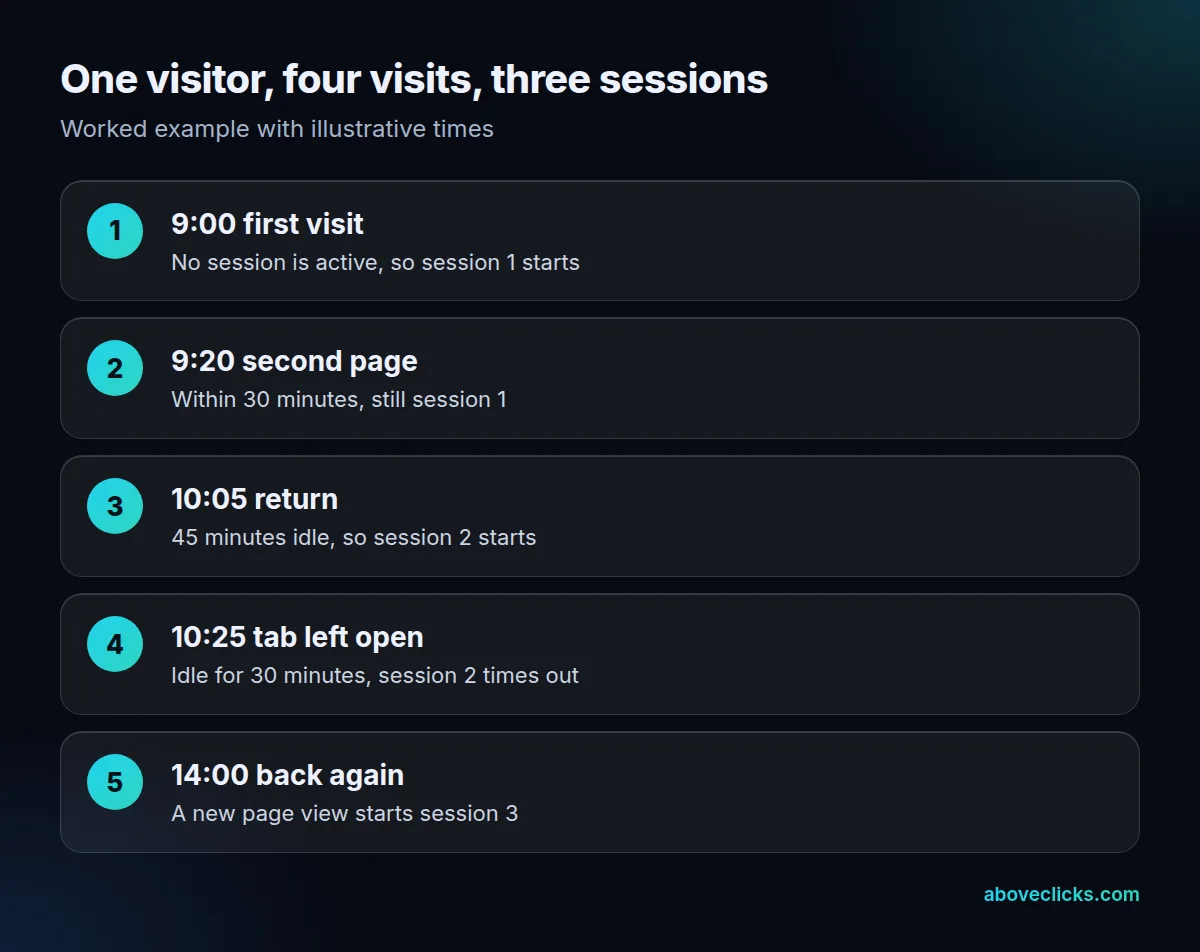
The worked example above uses illustrative times and answers what is a session google analytics reports when someone leaves and returns. A visitor arrives at 9:00 and reads a second page at 9:20, so both belong to session 1. They return at 10:05 after a 45-minute gap, and that starts session 2. They leave the tab open, so session 2 times out, and a view at 14:00 starts session 3. That is 4 visits by one person, counted as 3 sessions.
For web streams you can change the timeout. In Admin, open the web data stream, choose Configure tag settings, then Adjust session timeout, and set the hours and minutes. The same panel has a timer for engaged sessions. For apps, a session begins to time out when the app moves to the background, and the extend_session parameter can keep it going for apps that run there, such as navigation or music apps.
Anyone who knows what are sessions in Google Analytics at the default setting should treat the timeout as the one lever that changes every session total. Change it only with a reason. A longer timeout merges visits that are close together, which lowers sessions and raises time per session. Write the date of the change in your notes, because older reports will not match.
What is an engaged session?
Within what are sessions in Google Analytics, an engaged session is a session that lasted 10 seconds or longer, had 1 or more conversion events, or had 2 or more page or screen views. A session that meets none of the three is not engaged.
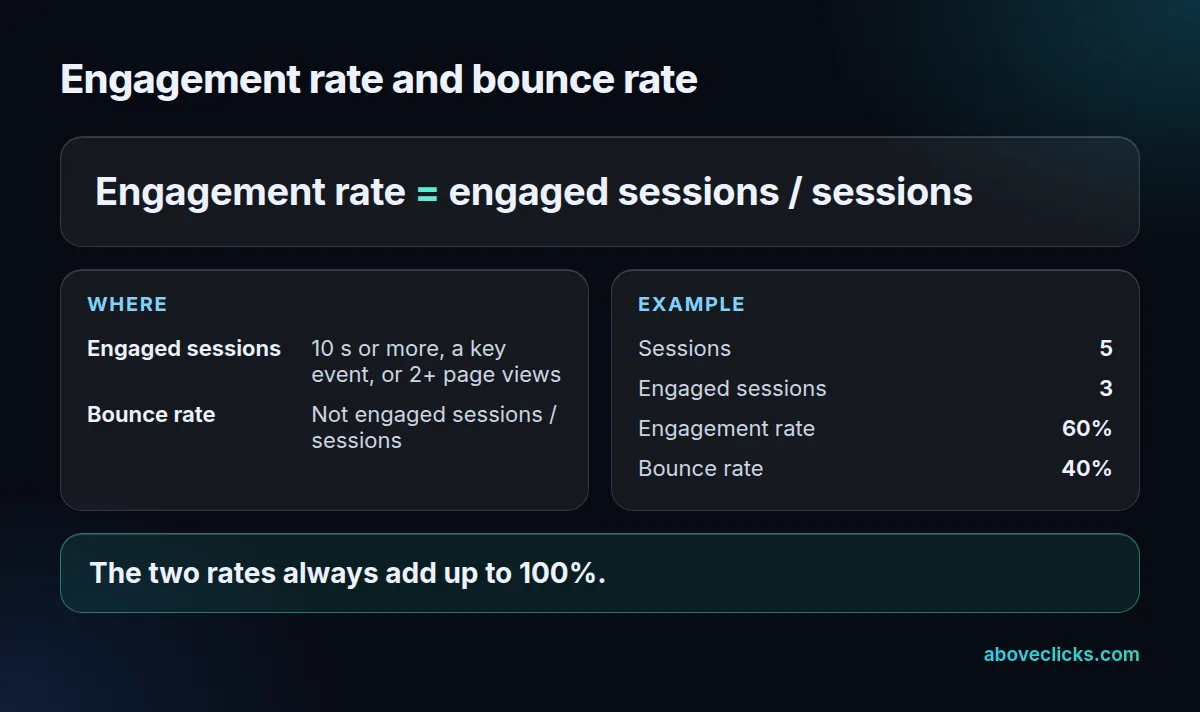
Google’s metric definitions set out the two related rates from this one number. Engagement rate is engaged sessions divided by sessions, and bounce rate is the percentage of sessions that were not engaged sessions. In the worked example above, 3 engaged sessions out of 5 give an engagement rate of 60% and a bounce rate of 40%. The two always add up to 100%.
This is a change from older analytics tools, so what is session in google analytics 4 differs from what you learned in the old version. In GA4, a visitor who reads one page for 40 seconds and leaves is an engaged session, not a bounce. If your old reports showed a high bounce rate on blog posts, expect the GA4 figure to look lower, because the rule is different, not because the pages improved.
So what is session in google analytics when the timer is changed? Still a session, but with a different bar for engaged. You can adjust the timer for engaged sessions in the same tag settings panel, from the default 10 seconds. Treat it the way you treat the session timeout: change it only for a reason, and note the date.
Two more session metrics are worth knowing:
- Views per session: screen_view plus page_view events, divided by sessions. Repeat views of one page count.
- Session key event rate: sessions in which a key event happened, divided by all sessions.
How are sessions different from users and events?
For anyone still wondering what are sessions in Google Analytics compared with users: a user is a person, a session is a visit and an event is a single action inside a visit. One user can start many sessions, and one session holds many events.
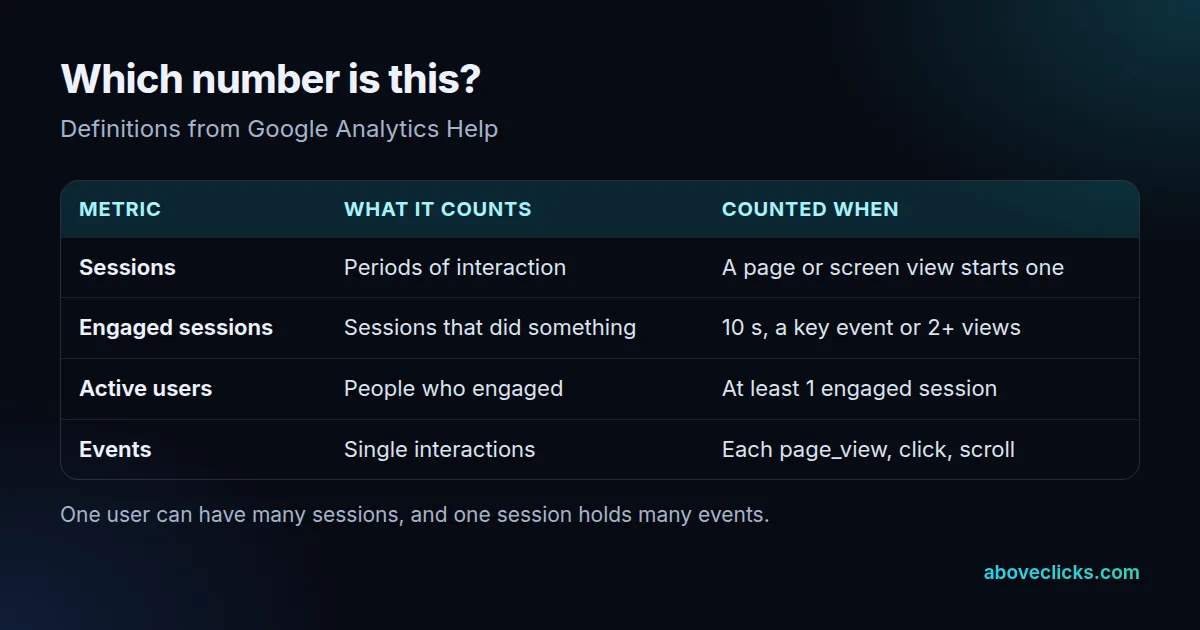
Google’s user metrics page says an active user is any user who has an engaged session, or for whom Analytics collects the first_visit event or engagement_time_msec. In reports you see active users, and new users are people who triggered first_visit or first_open in the date range.
This is why sessions are almost always higher than users, and why what are sessions in Google Analytics is a different question from how many people visited. If 100 people each visit 3 times after the timeout, you have 100 users and 300 sessions. Sessions per active user, a standard metric, is that ratio. When it climbs, people are coming back more often; when it falls with the same users, they come back less.
Events per session is the same idea one level down, and it is another reason to be clear on what are sessions in Google Analytics before comparing reports. It is the number of events divided by sessions, so a tracking change that adds a scroll event or a button event raises it without changing any visitor behaviour. If your events per session jump overnight, look for a tag change before you celebrate.
What are direct and referral sessions?
They are labels for how a session arrived, which is the part of what are sessions in Google Analytics that marketers use most. Each session is attributed using the information in its session_start event: the click ID, UTM parameters and the referrer.
In Google’s default channel group, Direct is the channel by which users arrive at your site or app via a saved link or by entering your URL. Referral means a link from another site. Google also uses Unassigned when no channel rule matches the event data. Learn more in our guide to GA4 attribution.
What is a session google analytics source report built on? Session attribution uses the non-direct last click model. That means a direct visit does not overwrite the earlier source: if someone arrives from a Google organic link on day 1 and comes back directly on day 68, the second session is still attributed to google / organic. The lookback window is set by the “All other conversion events” setting, which is 90 days by default.
Two setups cause a lot of false referral sessions, and both change what are sessions in Google Analytics tells you about traffic:
- Payment processors: if shoppers pay on a third-party domain and return, add that domain to the referral exclusion list. Google gives this as the standard example of an unwanted referral.
- Separate domains: without cross-domain measurement, a person who moves between two root domains is identified as two users and two sessions instead of one.
Why do your session counts not match?
When you ask why the answer to what are sessions in Google Analytics looks different in two tools, the gap comes from six causes: estimation, tag timing, timeouts, filters, cross-domain setups and other tools that define a session differently. Check them in this order before you decide a number is wrong.
- Estimated counts. Google Analytics uses an estimation method, HyperLogLog++, for session metrics in standard reports, Explorations and Looker Studio. It has been applied back to October 2021, so a small difference from older numbers is normal.
- BigQuery is exact. The BigQuery export has time to count precisely, so its session totals can differ a little from the report. Google’s developer note lists time zones and different methods among the usual causes.
- A different timeout. Another tool with a 30-minute rule that resets at midnight, or one with a shorter timeout, will count more sessions than GA4.
- Missing or double tags. A page where the tag does not fire cannot start a session. A page where it fires twice may start extra ones.
- Cross-domain gaps. Checkout on a second domain splits one visit into two unless the domains are linked.
- Filters and consent. Internal traffic filters, bots and consent settings remove sessions from one report but not from another.
If what are sessions in Google Analytics shows a gap between two reports of more than a few percent after those checks, test the tag on a real visit and read the session_start event in the DebugView. We do that as the first step of every tracking and analytics job, and you can ask for it on a store as part of a free audit. For the wider picture of what GA4 measures, see what GA4 is in marketing.
To keep the rules close at hand, remember the four that answer what are sessions in Google Analytics: a page view starts a session, 30 minutes of silence ends it, 10 seconds or 2 views make it engaged, and the first non-direct source gets the credit. Check any strange sessions number against those four before you change any setting.