GA4 in marketing means Google Analytics 4, the event-based tool that counts what people do on your site or app and splits those counts by channel. What is GA4 in marketing good for? It tells you which campaigns bring visitors and what those visitors then do.
This guide explains what GA4 is, which questions it answers, how data reaches it, how to tag campaign links, and what to check in the first week so the numbers can be trusted.
What is GA4 in marketing?
GA4 is the current version of Google Analytics, built around events instead of sessions. What is GA4 in marketing terms? It is the place where traffic sources and visitor actions are counted side by side.
Google describes the next generation of Google Analytics as a property that collects both website and app data, uses event-based data instead of session-based data, and includes privacy controls such as cookieless measurement and modeling. Standard Universal Analytics properties stopped processing data on July 1, 2023, so for more than 3 years new data has gone into GA4 properties only.
So when someone asks what is GA4 in digital marketing, the short answer is this: it is the counting layer under your reports. The same answer covers the GA4 meaning marketing teams search for. Ads platforms tell you what they delivered. GA4 tells you what happened on your own site afterwards, for every channel at once, not just paid.
If you only want a one-paragraph definition, our Google Analytics 4 glossary entry has it. This guide on what is GA4 in marketing is about using it, in 7 short sections.
What is GA4 used for in marketing?
For 6 jobs: finding which campaigns bring visitors, which pages they land on, which actions they complete, which touchpoints led there, whether new tracking works, and how ads connect to results.
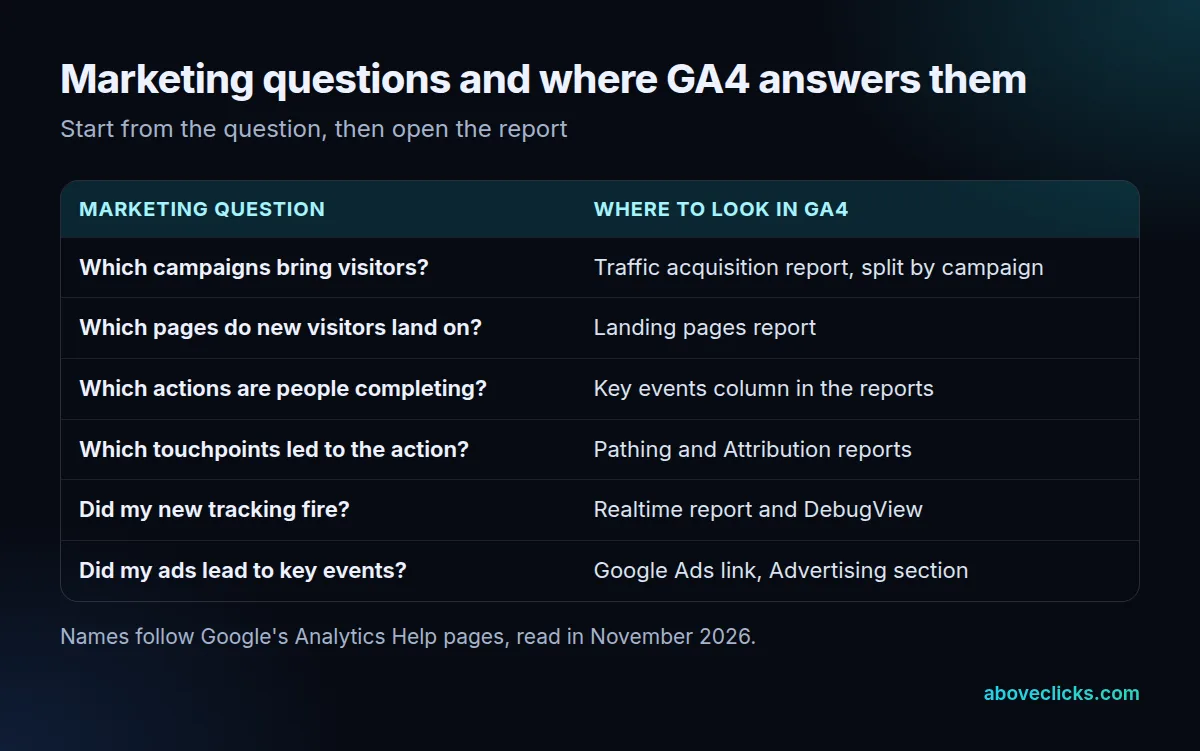
Start from the question, not the report list. The honest answer to what is GA4 in marketing is a list of 6 questions, each with one report. A new user opening GA4 sees dozens of reports, and most owners only need the ones above. A first look at the last 30 days is enough to start. The first, Traffic acquisition, is where tagged campaign links show up. The second and third use the same pattern: Google notes that reports such as Landing pages and User acquisition include a Key events column that counts how often users triggered key events, split by the dimension on the left.
The fourth job needs more care. In the Advertising section, the Pathing and Attribution reports attribute credit to touchpoints along a user’s path and show how different attribution models share that credit. Our guide to GA4 attribution covers the models and their settings traps.
The last job, linking ads, is covered in the key events section below. Together these jobs are what is GA4 in marketing at its most practical.
How does GA4 collect data?
Through events: 4 types, from the ones collected automatically to the ones you define yourself. Every report in GA4 is built from them, so what is GA4 in marketing really comes down to which of the 4 event types you rely on.
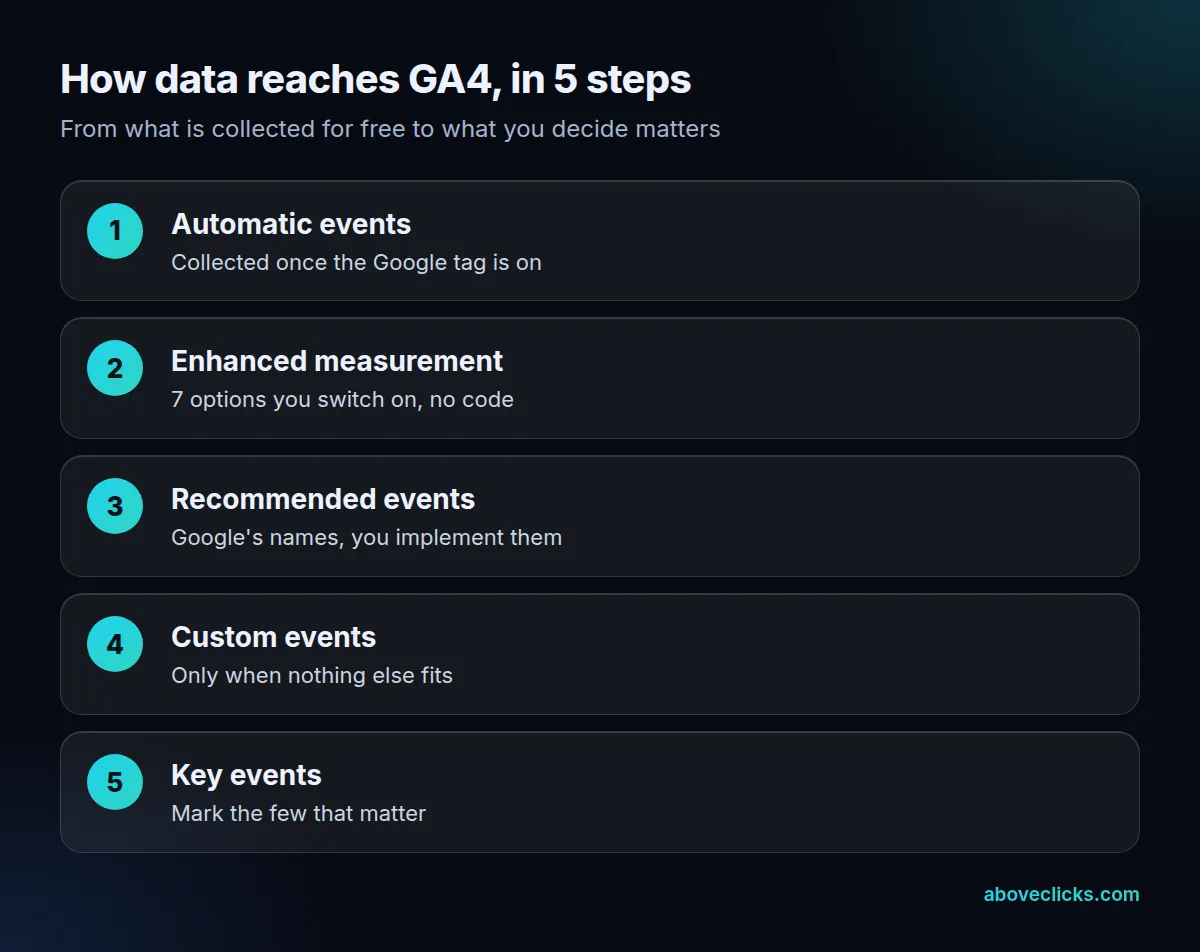
Google’s page on events lists them. Automatically collected events and enhanced measurement events are collected when you set up Google Analytics. Recommended events and custom events must be implemented before they appear. Recommended events have predefined names and parameters; custom events are yours, and Google warns that they don’t show up in most standard reports, so they need custom reports or explorations.
Enhanced measurement is the easiest win. It measures page views, scrolls, outbound clicks, site search, video engagement, file downloads and form interactions by switching on options in the interface, and no code changes are required. Google adds that you should understand each option before turning it on.
A practical rule for what is GA4 in marketing setups: use what GA4 collects for free first, then add a recommended event, and create a custom one only when nothing else fits. A store with a checkout that sends the standard purchase event gets revenue reports; a store with a custom event named after the developer’s habit usually gets an empty report.
What are key events in GA4?
Events you mark as especially important to the business. A purchase, a submitted enquiry form or a booking are typical.
For what is GA4 in marketing reports, the answer starts here. Google defines a key event as an event that measures an action that’s particularly important to the success of your business. Any event you collect can become a key event: you identify the event, then mark it. After that, you can see how many users perform the action and how each channel performs.
Keep the list short when you decide what is GA4 in marketing for your business. If every click is a key event, the Key events column stops separating good traffic from busy traffic. Most small sites need 1 to 3 key events.
Key events also connect to advertising. Google says you can create a Google Ads conversion from a Google Analytics key event, which lets you report the same conversion counts in both tools, include non-Google channels, bid against the conversions and build audiences. Linking the accounts is covered on Google’s page on connecting Google Ads to Google Analytics, which describes seeing the full cycle from the ad click to the key event.
How do you tag campaigns so GA4 can report them?
By adding UTM parameters to every link you control: utm_source, utm_medium and utm_campaign, spelled the same way each time.
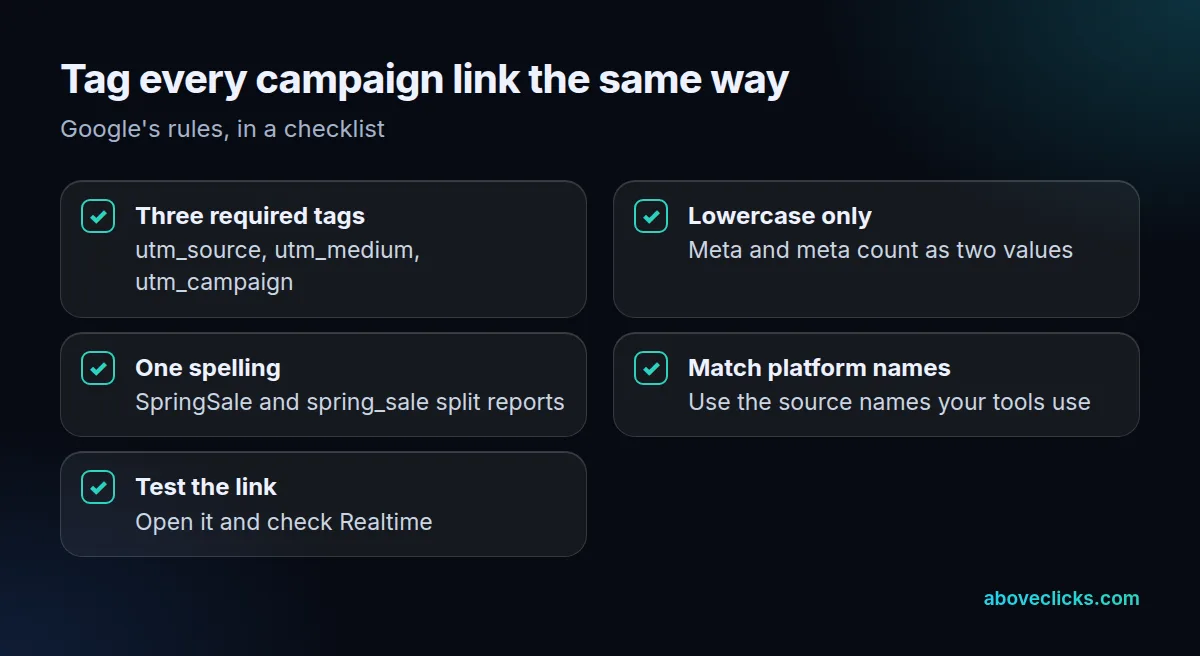
Tagging is the part of what is GA4 in marketing that you control. Google’s URL builder guide says to always use those three. Its own example for a summer sale email uses utm_source=summer-mailer, utm_medium=email and utm_campaign=summer-sale, and the values then show in the Traffic acquisition report.
The catch is that parameter values are case sensitive, and a typo costs you a whole campaign row. Google states that utm_source=google is different from utm_source=Google, that Meta and meta are treated as different values, and that SpringSale and Spring_Sale are distinct. Its advice is a strict naming convention and lowercase as the standard.
Write the convention down in one shared sheet, because GA4 in marketing is only as good as the tags feeding it. A newsletter tool, an agency and a founder posting on social media will otherwise each invent a spelling, and one campaign ends up in four rows.
What should you check in the first week?
That events arrive, key events fire once, and tagged links land in the right channel. Run these 5 checks before you read any month-end report; they are the practical half of what is GA4 in marketing.
- Open the Realtime report. Google’s page on events says the Event count by Event name card shows each event triggered in the last 30 minutes. Visit your site and watch for yours.
- Use DebugView for one user. It shows all the events a single user triggered and helps you confirm that events and parameters are set up correctly. Debug mode has to be enabled first.
- Click one tagged link. Check that the source and medium appear as you wrote them.
- Complete a test action. Place a test order or submit your own form and check the key event counts once.
- Write down the start date. Numbers from before the fix aren’t comparable with numbers after it.
When we audit a setup, the first thing we look at is whether the money event, usually a purchase or an enquiry, fires once and carries a value. Our GA4 audit and setup is 25 checks followed by the fixes, and it sits within our tracking and analytics service. If you’d rather have a second pair of eyes first, the free audit is the quickest way to ask.
What mistakes make GA4 numbers misleading?
4, in the order we usually find them: untagged links, too many key events, custom events nobody reports on and ignoring data limits.
- Untagged or inconsistent links. Without the three UTM tags, campaign traffic can’t be split, and mixed capitalization splits one campaign into several.
- Too many key events. Marking every interaction makes every channel look good.
- Custom events with no report. Google notes that custom events don’t appear in most standard reports. Build the exploration, or use a recommended event instead.
- Ignoring retention. For Google Analytics properties, user-level data can be kept for 2 months or 14 months. That affects explorations, not the standard reports, but it’s why a 20-month comparison in an exploration can come back short.
A short example shows how the pieces fit. A shop sends one email with a tagged link, a visitor clicks it, scrolls the product page and buys. GA4 records those steps as events, the tagged link puts the visit in the email channel, and the purchase, if it is a key event, is credited to that channel. That is what is GA4 in marketing at its simplest: a chain from the tagged link to the event you care about.
None of these 4 needs a developer to spot, and each one changes what is GA4 in marketing for your team. They need someone to open the reports with a specific question and notice when the answer looks too good.
More guides on this topic are in measurement.