CAPI server side tracking means your server sends the same events as your Meta Pixel to Meta’s Conversions API, so a blocked or failed browser call no longer loses the event. Done well, Meta gets each purchase once, matched to a person.
This guide covers what CAPI server side tracking is, how it differs from the pixel, how one purchase travels, the 4 setup routes, deduplication, the checks to run and what it still won’t fix.
What is CAPI server side tracking?
It is a connection from your server, store platform or CRM to Meta, which processes those server events like pixel events. Meta says they can be used for measurement, reporting and optimization.
Meta’s Conversions API overview describes it as one connection for website, app, business messaging and offline events, instead of a separate integration per source. If you already run a pixel, it adds that website events can be switched on in 1 click from Events Manager, with no code.
People search for it as CAPI, the Conversions API, Facebook CAPI or Meta CAPI server side tracking. They all mean the same thing, and CAPI server side tracking is the name we use here. Our glossary entry on the Conversions API gives the short definition, and this guide is about choosing a route and checking it.
CAPI vs pixel: which one does what?
The pixel records what happens in the browser, and the server records what your systems know. Meta recommends running both and sending the same events through each.
The comparison of CAPI vs pixel is not either-or, and CAPI server side tracking works best as the second half of a pair. Meta’s best practices call the combination a redundant setup: if you share Purchase, Initiate Checkout and Contact with the pixel, share them from the server too. The server can pass on website events the pixel loses to network problems or page-loading errors, and events that happen offline or later.
| Meta Pixel | Conversions API | |
|---|---|---|
| Runs in | The visitor’s browser | Your server or a partner’s |
| Strength | Browser cookies and page context | Events that happen in your systems |
| Weakness | Lost if the page or connection fails | Needs customer details to match people |
| Request size | Not applicable | Up to 1,000 events per request |
The batch limit comes from Meta’s page on sending requests. The same page says to send events as soon as they happen, ideally within an hour.
How does a purchase travel through CAPI server side tracking?
The browser sends the pixel event, your server sends a matching event, and Meta keeps one copy. Five hops, each with a check.
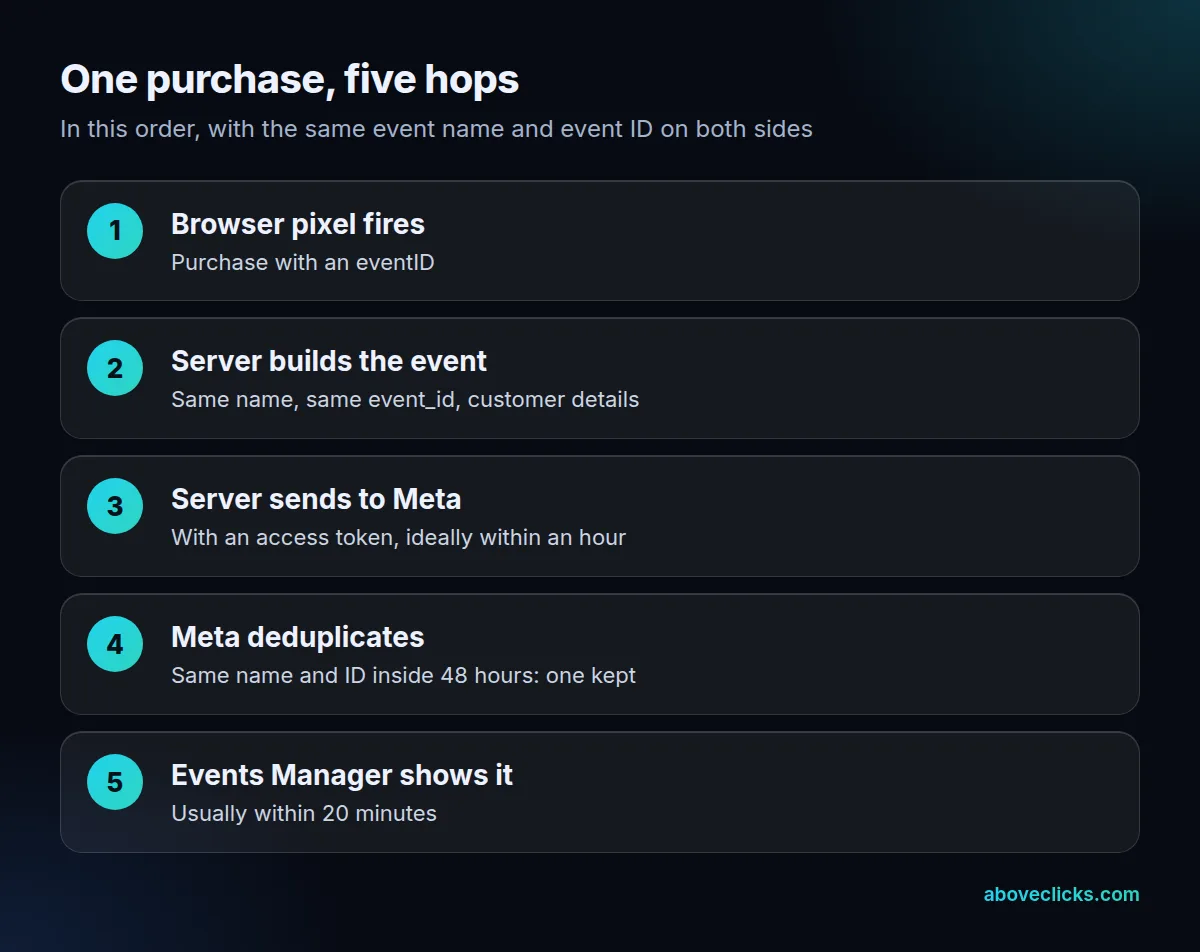
Two details matter most. First, the server event needs a timestamp: event_time can be up to 7 days before you send it, and if any event in a request is older, Meta returns an error for the whole request and processes none of them. Second, you need an access token. Meta’s get started guide says to generate it in Events Manager (Settings, then Conversions API), and that no App Review is needed.
Customer details travel hashed. For an email address, Meta’s parameter rules say to trim spaces, convert to lowercase and hash with SHA256, and the Business SDK does this for you.
Which CAPI setup route should you choose?
Choose by who will maintain it after launch. There are 4 routes: Meta’s one-click setup, a partner, the Gateway or a direct build.
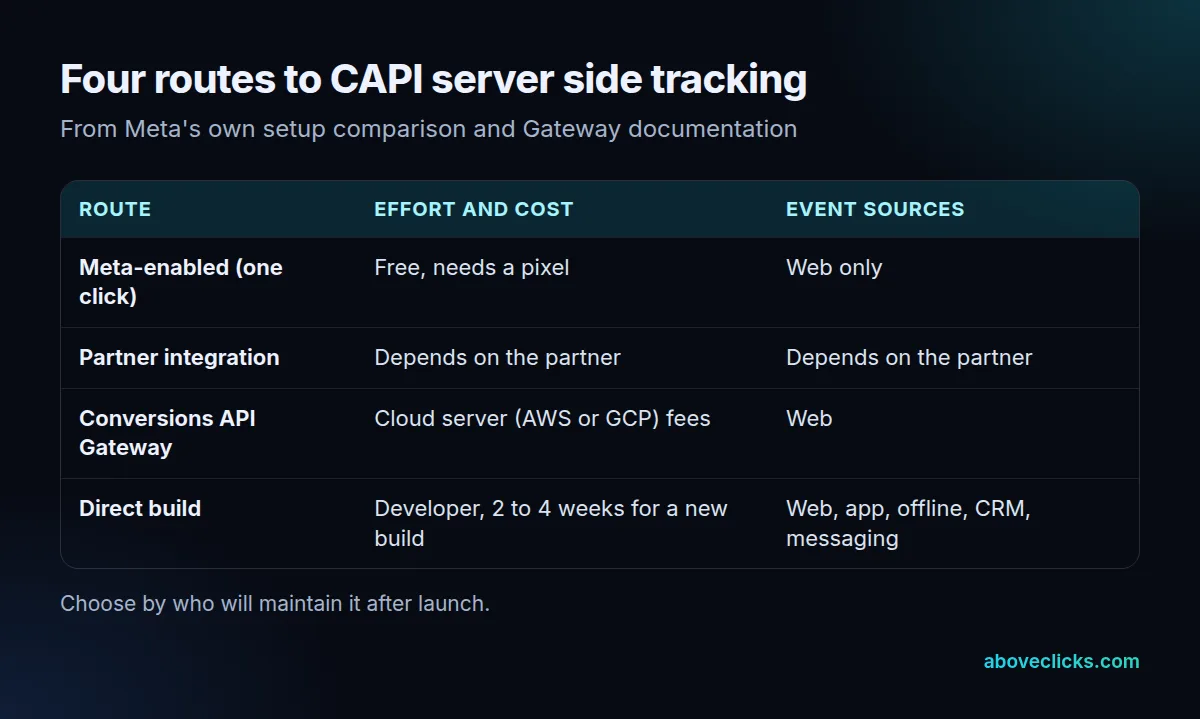
Meta’s setup comparison lists the first, third and fourth routes by cost, time and event sources. A direct integration needs a developer and 2 to 4 weeks for a new build, and it is the only option for app or offline events. The one-click route covers web events only and shares the pixel’s events and parameters, so for many web stores CAPI server side tracking starts there.
The Conversions API Gateway sits in between. You provision a server in your own cloud account (AWS EKS, AWS ECS Express or GCP), and its only cost is that cloud resource or partner fees. It generates the event ID for deduplication.
A rough way to choose:
- Web events only, one pixel, no custom data: start with one click.
- Your store platform has a Meta partner: ask what it sends and what it costs.
- Several domains or pixels, no developer: look at the Gateway.
- App, offline, CRM or messaging events: plan a direct build.
Whichever route you pick, settle who owns three things: the access token, the monitoring and the fix when a checkout change breaks an event. Meta’s guide says the Manage step in Events Manager creates the Conversions API app and system user for you, so the token sits in your own business account and can be shared with whoever builds it, instead of living in their account.
Some teams build the direct route on a server container they run. Google’s server-side tagging introduction says that container runs on a server you control, not in the browser. We cover that build in our GTM server side tracking guide, and our server side tracking service page shows how we scope it.
How do you deduplicate pixel and CAPI events?
Send the same event name and the same event ID from both sides. Meta then discards the later copy when both reach the same pixel ID within 48 hours.
Meta pixel CAPI deduplication is a rule, not a guess, and it is the step that most often breaks CAPI server side tracking. The deduplication guide says the pixel’s eventID must match the server’s event_id, and the pixel’s event name must match event_name. In the browser, the ID goes in the fourth argument of the track call:
fbq('track', 'Purchase', {value: 12, currency: 'USD'}, {eventID: 'EVENT_ID'});
Use an ID both sides already know, such as the order number. A stable ID also makes retries safe: Meta’s sending requests page says that if one event in a batch is invalid, valid events with an event_id are still accepted, and resending the whole batch drops the ones already stored as duplicates. The fallback uses fbp or external_id instead, but Meta says it generally works only when the browser event arrives first. It does not deduplicate browser-only or server-only duplicates.
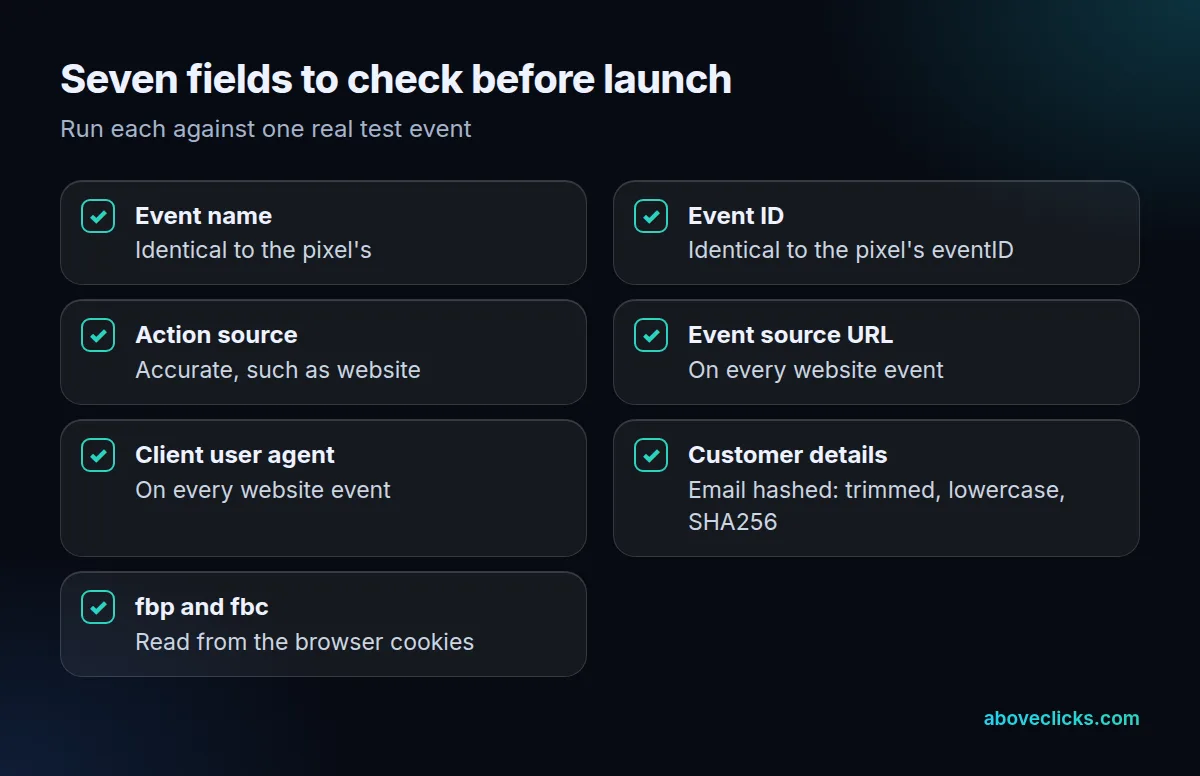
Meta’s best practices also list required fields: action_source on every event, and event_source_url and client_user_agent on website events. Add fbp and fbc, the browser cookie values. Meta’s fbp and fbc guide recommends setting the _fbc cookie with a 90-day expiry, and refreshing the values because they change.
How do you check CAPI server side tracking works?
Check three jobs: events arrive, duplicates are removed and the customer details match people. Meta says events should be verifiable in Events Manager within 20 minutes.
Meta’s verification page points to the Overview report, which shows events received, deduplicated, discarded and processed. The Event Deduplication tab shows the overlap between sources. Event Match Quality runs from 1 to 10, and Meta suggests aiming for 6.0 or higher.
Then run a 7-day count test, the quickest health check for Meta CAPI server side tracking. Example: a hypothetical store records 200 orders in a week. Compare that with the Purchase count in Events Manager for the same 7 days:
- About 200 (say 190 to 210): healthy. Each order arrives once. Small gaps are normal, because some orders never reach the thank-you page.
- About 400: deduplication is broken. Both sources send the order and the IDs or names don’t match, so Meta sees double and your reported revenue is inflated.
- About 150: server events are missing. The pixel is catching most orders and the server is not sending, or Meta rejects the requests.
The ranges are our rule of thumb, not a Meta threshold, and they work for any CAPI vs pixel comparison. They tell you which of the 3 jobs to debug first. For the store-platform version of this check, our Shopify Conversions API guide has the 6 checks step by step.
What does CAPI server side tracking not fix?
It does not replace consent, and it cannot repair bad events. If the event name, ID or customer details are wrong, the server only sends the mistake faster.
Meta’s verification Overview lists events discarded due to consent controls and other policies, so a server event is not a way around a visitor’s choice. Pass the consent state along with the event, and set it up in the browser first: see our consent mode setup page.
Three more gaps to plan for in CAPI server side tracking:
- Thin customer details: Meta’s best practices say unmatched events can’t be used for attribution or delivery optimization, only basic measurement. Send hashed email, phone and name where you legitimately have them.
- Stale cookie values:
fbpandfbcchange, so read them fresh at purchase time. - No owner: a connection nobody watches drifts. Check the Overview report monthly, and after every site or checkout change.
If you’d like a second pair of eyes on yours, our free audit can read your setup and list what’s missing. The full range of this work sits under tracking and analytics, and more guides are in measurement.