How to use the tracking health check
The tracking health check is an ecommerce tracking checklist you answer yourself: 12 yes, no or not-sure questions in four groups. Each one has a “How to check” line, and most take a minute or two in Shopify or WooCommerce, GA4, Meta Events Manager and Google Ads.
- Store data: do GA4 purchases match your orders, does every purchase send value, currency and a transaction ID, and does one test order record exactly one purchase?
- Meta: Pixel purchases, the Conversions API deduplicated with the Pixel, Event Match Quality and domain verification.
- Google Ads: purchase as a primary conversion, enhanced conversions and auto-tagging.
- Consent and links: Consent Mode v2 signals and one lowercase UTM convention.
- When you don’t know, answer “Not sure”: it counts as a gap to look at.

Once you’ve answered, three fixes to start with appear under the score. For the example answers they are: make purchase the primary conversion, turn on enhanced conversions, and turn on auto-tagging and keep the gclid.
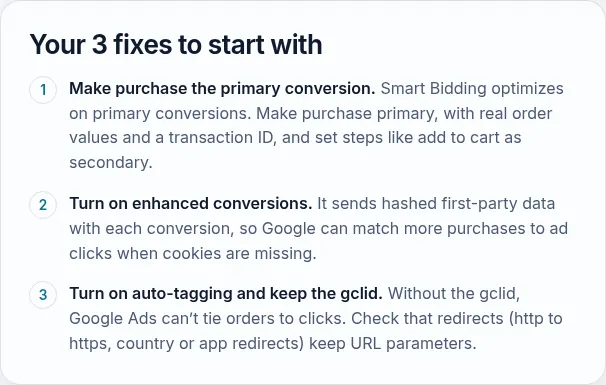
On a phone, the score sits under the questions.

For the GA4 checks, Google’s developer guide to measuring ecommerce lists the purchase event’s parameters, including value, currency and transaction_id. Once the data is clean, the UTM builder keeps campaign names consistent.
Why tracking comes before everything else
Meta and Google decide who sees your ads based on the purchases they’re told about. If purchases are missing, doubled or sent without their value, the platforms optimize for the wrong people and your reports show a ROAS that isn’t real. Every later decision (budgets, creative, bids) inherits the error.
This checklist covers the 12 places e-commerce tracking breaks most often, in four areas: your store data, Meta, Google Ads, and consent and links. Each check takes a minute or two in the tool named under it.
How the score works
You get two numbers:
- Checks passed (for example 7 / 12): every “Yes” counts once.
- Weighted health: checks that make the numbers wrong (purchase counts, values, duplicates, the purchase conversion itself) count three times; checks that weaken what the platforms learn from (deduplication, match quality, enhanced conversions, auto-tagging, consent signals) count twice; housekeeping (domain verification, UTM naming) counts once.
“Not sure” counts as a gap. If you can’t check something, that’s a reason to look.
The three fixes under your result are your “No” answers with the heaviest weight first, then your “Not sure” answers.
What the result means
- 90% or more: solid. Your ad platforms are learning from real orders, so you can trust them enough to scale.
- 60% to 89%: a few gaps. Fix them before you raise budgets.
- Below 60%: your numbers can’t be trusted yet. Fix tracking before you judge any campaign.
Where to start
Start with the store-data checks. If GA4 doesn’t match your store’s order count, nothing downstream can be right. Then the purchase events in Meta and Google Ads, which drive bidding. Consent and UTM naming come last: they matter, but they don’t break the numbers on their own.
After any fix, place a test order and check it arrives once, with the right value, in GA4, Meta Events Manager and Google Ads.
Limits of this check
It’s a self-assessment: it can only be as accurate as the answers. It also can’t see your setup. Our free growth audit includes a hands-on tracking review of GA4, the Meta Pixel and Conversions API, and Google Ads conversions, with the fixes ranked by impact.