GHL call tracking swaps the phone number a visitor sees on your website for one from a pool of numbers, so each call ties to the source that sent them. It is one layer only: Google Ads and GA4 still need their own call signal.
This guide covers how GHL call tracking works, the setup steps, how to read the keyword behind a call, where it stops short of Google Ads, five gaps to close and a six-call test to prove the report.
What is GHL call tracking?
It is HighLevel’s number pool feature: a group of tracking phone numbers that your site shows to visitors by source, so a call can be attributed to the campaign or page behind it. People also search for it as GoHighLevel call tracking, Go High Level call tracking or HighLevel call tracking.
HighLevel’s number pool guide says a pool has a minimum of 4 tracking numbers. You decide the size by call volume: the more calls, the more numbers you need. The numbers only show on pages that carry the snippet, and only to the visitors you pick. The swap can run on 1 page or on every page of a funnel or website.
Most agencies that run HighLevel for a client switch on GoHighLevel call tracking during onboarding and then never test it. That is how a report ends up looking complete while it is quietly wrong.
Think of GHL call tracking as attribution inside the CRM. It tells you which source a call came from. It does not, on its own, tell Google Ads or GA4 that a call happened.
How does GHL call tracking work?
A snippet on your page checks how the visitor arrived and swaps your displayed number for a pool number. When they call it, HighLevel matches the call to the visitor’s website cookie and records the source.
For Google Ads traffic, the guide says the snippet recognizes the gclid parameter at the end of the landing URL, switches the number and later links the call to that visitor. You choose which visitors see a pool number: all visitors, paid search only or all except direct.
Three call features sit on top of the pool:
- Forwarding: the call goes to your main business number, or rings up to 6 team members at once.
- Whisper message: a short message only you hear when you answer, such as “Call from an ad campaign”. The caller can’t hear it.
- Call recording: a switch plus a message the caller hears, such as a quality-assurance notice.
How do you set up GoHighLevel call tracking?
Create a number pool, give it a forwarding number and tracking numbers, set the whisper and recording options, then paste the snippet into your funnel or website. The wizard has 8 steps; six matter for attribution.
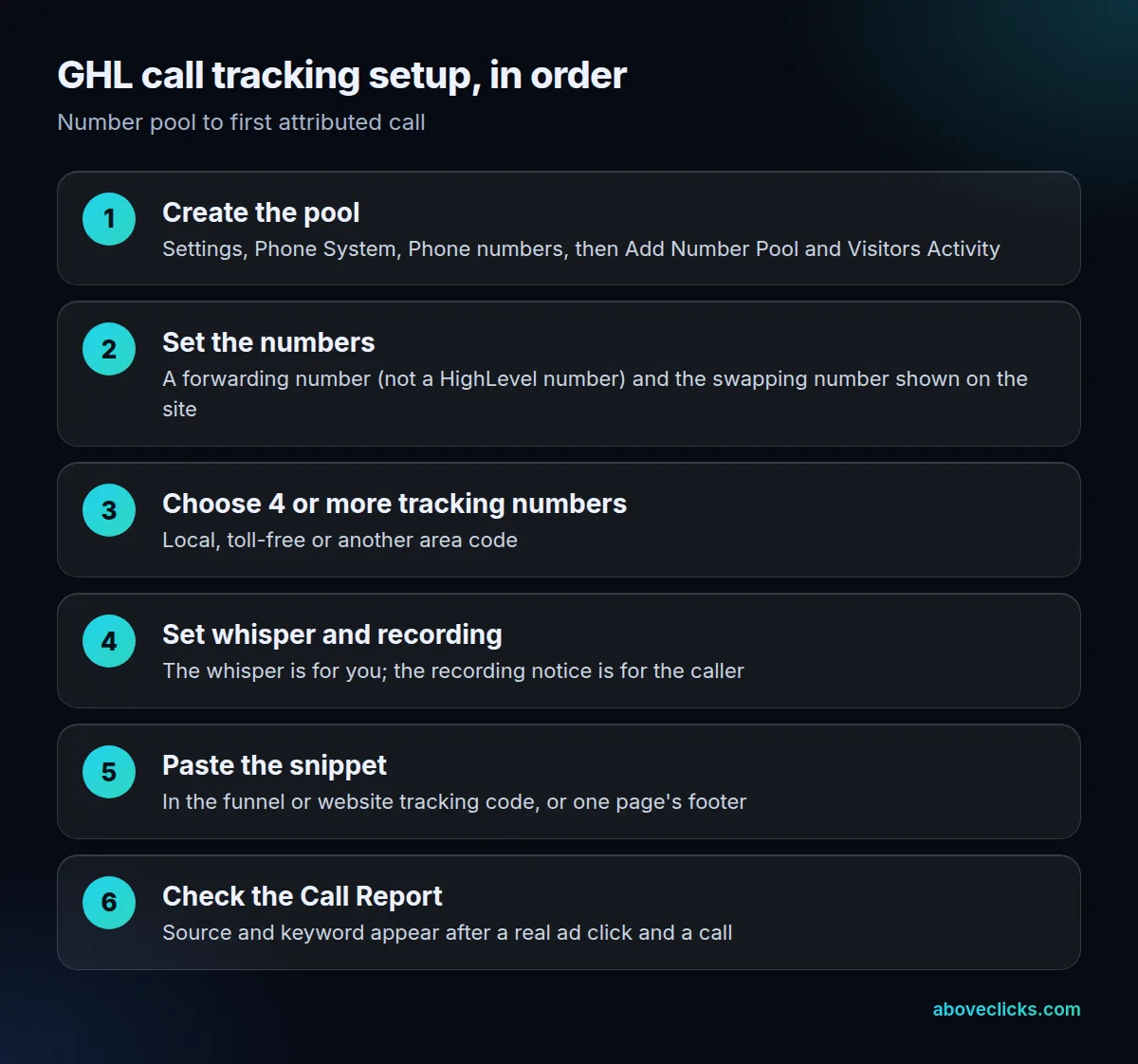
Two details trip people up when they set up HighLevel call tracking. First, the snippet goes in the funnel or website’s body tracking code to swap the number site-wide, or in a single page’s footer tracking code to swap it on one page. Second, if two ads should show different numbers, a Group ID makes HighLevel swap only the best-matching pool instead of every number on the page.
If a button on a page with HighLevel call tracking uses a link, the number inside the tel: link must be written the same way as the visible number. We cover that again in the gaps section below, because it is the most common silent failure.
How do you see which keyword drove a call?
Add ?keyword={keyword} to your Google Ads final URL, then read the Keyword column in HighLevel’s Call Report. Without that parameter, the report knows the source but not the search term.
HighLevel’s guide shows the example yourwebsite.com/landingpage/?keyword={keyword}. Your visitors search, land on the page and call the tracking number, and the keyword fills in the Call Report. If your final URL already has parameters, add the keyword one with &.
The reporting side of GHL call tracking is documented on the Call Reporting page lists what the report shows: incoming and outgoing calls, a split of answered, missed and busy calls, top call sources such as paid search and organic search, and a CSV export. It says the report is on the Agency Pro plan, so check your plan before you promise a client a call report.
Does HighLevel call tracking report to Google Ads?
Not as call conversions, according to HighLevel’s own Google Ads guide. It says HighLevel supports offline conversions only, and lists website, app and phone call sources as not supported.
An offline conversion is a different thing: a qualified lead or closed deal sent back to Google Ads using a click ID such as GCLID, GBRAID or WBRAID. That can work for calls that turn into contacts, but test that the click ID is actually stored on the contact before you rely on it.
Google lists 5 ways to track phone call conversions: calls from ads, calls to a number on your website, clicks on a number on your mobile site, clicks on call ads and assets, and imported call conversions. For website calls, Google’s tracking counts a call as a conversion when it lasts longer than a minimum length you set. Clicks on a number on mobile are measured as clicks, not calls.
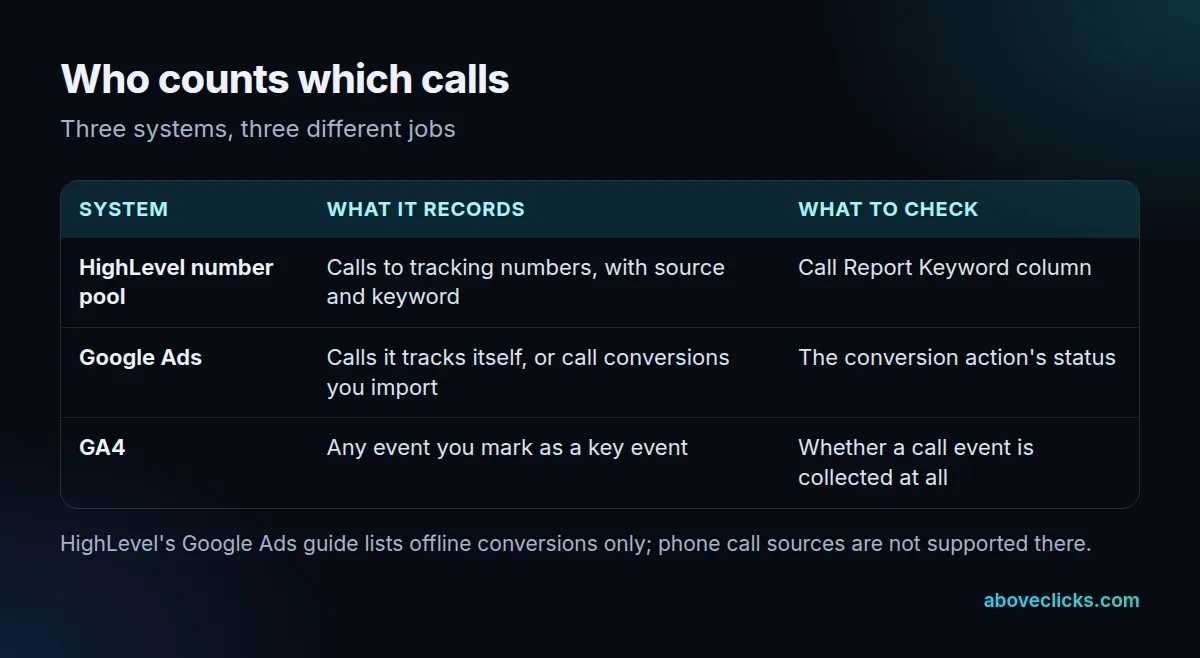
GA4 is a third layer. Any event you collect can become a key event once you mark it, but a phone call is only 1 event in GA4 if something sends it. Our PPC call tracking guide covers the setups that do, and PPC conversion tracking covers what to count.
What goes wrong with GHL call tracking?
Mostly small mismatches. Five gaps in GHL call tracking come straight from the help pages, and each can leave you with a report that looks full while calls are quietly missing.
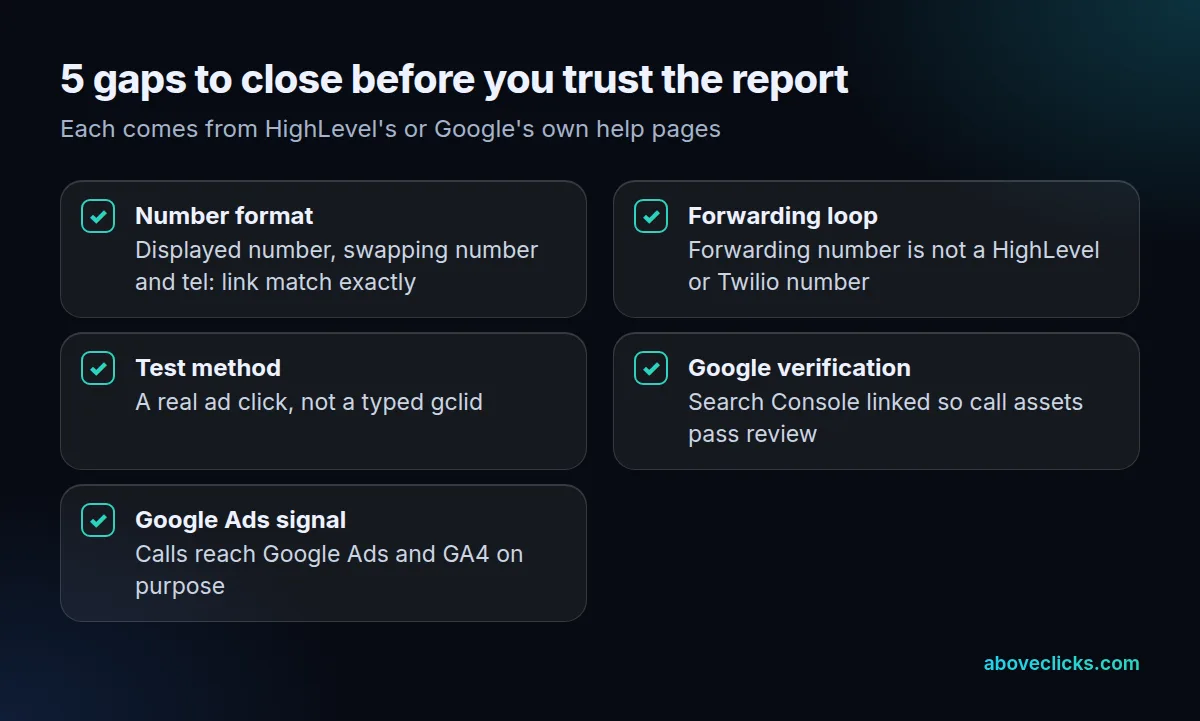
- Number formats. HighLevel says swapping does not treat a local number and its international version as the same. If the page shows (02) 6193 4089 and the link says
tel:+61261934089, the visible number can swap while the link does not. Use one format in the swapping number, the visible number and thetel:value. - A forwarding loop. A Twilio or LC Phone number can’t be the forwarding number, because it creates a loop. Use a different external number.
- A fake test. You can’t type a gclid into the URL to imitate a Google ad. Test with a real click, or with a visit from a page that links to your landing page.
- Google’s phone verification. Google says that if your site uses dynamic number insertion or third-party call tracking, its automated check can’t verify your number from the page source. Link your Search Console to Google Ads, which Google recommends; the link takes 24 hours to take effect, and you then resubmit your call assets for review.
- No signal in Google Ads. Google’s page says the Tag Manager call tag is not recommended on a site that uses dynamic number insertion or third-party call tracking. It also says the default tag tracks only one number per page.
Call recording adds one more thing to decide. HighLevel lets you play a message to the caller, such as a quality-assurance notice, before the call is recorded. Check the recording rules where your callers live before you switch recording on, because they differ by place and we do not give legal advice here.
Check the gaps in that order: the first two are quick, and the last three decide whether your ad platforms learn from calls at all.
How do you test that call tracking works?
Make six test calls from six different routes, and compare each with the Call Report afterwards. A swap that works on one route can fail on another.
- Click your own paid ad, land on the page and call the pool number. Expect a paid source and, with
?keyword={keyword}set, a keyword. - Tap the number in a
tel:link on a phone. Expect it to be the swapped pool number. - Open the page in a private window from a link on another page, then call. This matters if the pool is set to all except direct.
- Open the page by typing the address, then call. If the pool excludes direct visits, expect your normal number.
- Visit a second landing page with a different pool or Group ID and call. Expect a different number.
- Call from a phone with a known number and check the contact’s activity in HighLevel.
Then work out an attribution rate. Example: an invented store’s call report shows 50 calls in a week, and 34 carry a source.
> Attributed share = calls with a source ÷ all calls = 34 ÷ 50 = 68%
The other 16 calls may be direct, from a printed number or from a page without the snippet. List them before you assume Go High Level call tracking failed. A rate that is far below what your ad clicks suggest is a reason to rerun the six test calls, not to change the ads. Our Business Profile call tracking guide shows another place calls leak in.
What does HighLevel call tracking cost?
Each number in a pool has a monthly rental charge, a pool needs at least 4 numbers, and call usage is billed separately. HighLevel’s guide points to its phone system pricing guide for current rates, so we don’t quote figures here.
That is the whole cost structure of GoHighLevel call tracking: rental scales with pool size, usage scales with call minutes. Example: moving from 4 to 8 numbers doubles the monthly rentals, whatever the call volume. If your agency uses its own connected Twilio account, the rates in that account apply. A bigger pool means more rentals, so size it to your call volume, not to your ad count.
If you would rather have your HighLevel call tracking, the Google Ads side and GA4 checked together, our tracking and analytics service does that, and the free audit is a read-only first look. More guides are in the measurement topic.