Stape pricing is a monthly subscription set by the requests your server-side Google Tag Manager container receives, from a free plan with 10,000 requests to 20 million on Enterprise, as of November 2026. Work out your own request count first, then pick the plan above it.
This guide to Stape pricing covers the four Stape pricing plans and what each adds, what counts as a request, a formula and worked example for estimating yours, and the costs the subscription leaves out. If you are comparing Stape with a packaged Shopify service, read Stape vs Elevar after this.
What does Stape pricing cover?
Hosting for a server-side Google Tag Manager container, plus a set of tools around it. It does not cover building the tags, choosing the events or checking that each ad platform receives them.
Google explains that a server container runs on a server you control instead of in the visitor’s browser. Stape sells that server as a service, so you do not set up the cloud account yourself. The Free plan covers 10,000 requests a month and Enterprise 20 million, so the same product spans a test site and a very large store.
Stape server pricing is the infrastructure bill. The tracking work on top of it, such as the data layer and the ad-platform tags, is a separate job, and our tracking and analytics service is one place that work can come from.
What are the Stape pricing plans?
Four fixed plans plus a custom one: Free at $0 for up to 10,000 requests, Pro at $17 for 500,000, Business at $83 for 5 million and Enterprise at $167 for 20 million, as of November 2026.
Those monthly rates are for annual billing, per Stape’s price page, which shows a higher struck-through figure beside each. Over a year that is $204 for Pro, $996 for Business and $2,004 for Enterprise. The Custom plan has unlimited requests and is quoted by sales.
On Stape’s annual rates, as of November 2026, moving from Pro to Business adds $66 a month, which is $792 a year ($83 minus $17, times 12). Stape pricing plans differ in tools as much as in volume, so that step buys more than a bigger limit. This is what each step adds, as listed on the same page:
| Plan | What it adds over the one below |
|---|---|
| Free | Custom Loader, Requests Analytics, Setup Wizard, Global CDN and Anonymizer |
| Pro | 3 days of logs, Cookie Keeper for standard cookies, Bot Detection, Data Store, email and chat support |
| Business | Multi-zone infrastructure, 10 days of logs, Cookie Keeper for custom cookies, up to 20 domains, monitoring |
| Enterprise | Account manager, up to 50 domains, log export to S3 or GCS, call support |
| Custom | HIPAA BAA, dedicated IP, private cluster, single sign-on |
Cookie handling is the feature most stores should read twice. Google says a tagging server on your own domain is a best practice because server-set cookies last longer in a first-party context, so check which cookie tools your plan includes before you rely on them.
What counts as a request in Stape pricing?
Every incoming hit your server container receives, including script loads such as gtm.js, gtag.js and analytics.js. Outgoing calls from the container are not counted.
Stape’s FAQ adds two details that change the maths. One incoming event that triggers five tags and reaches five platforms is still 1 request. And preview or debug sessions, bots and crawlers that hit your container domain can use requests too.
Take one page view as an example: if it loads gtm.js and then fires 3 events, that is 4 incoming requests, whichever tags run afterwards. That means Stape sgtm pricing follows page views and events, not sales. A store with few orders and a lot of browsing can pass a limit sooner than the order count suggests, and a bot spike can push a quiet month over it.
How many requests will your store use?
To estimate Stape pricing for your store, multiply your monthly sessions by the requests each session sends, then add a margin for bots and testing. The result is the number to compare with the plan limits.
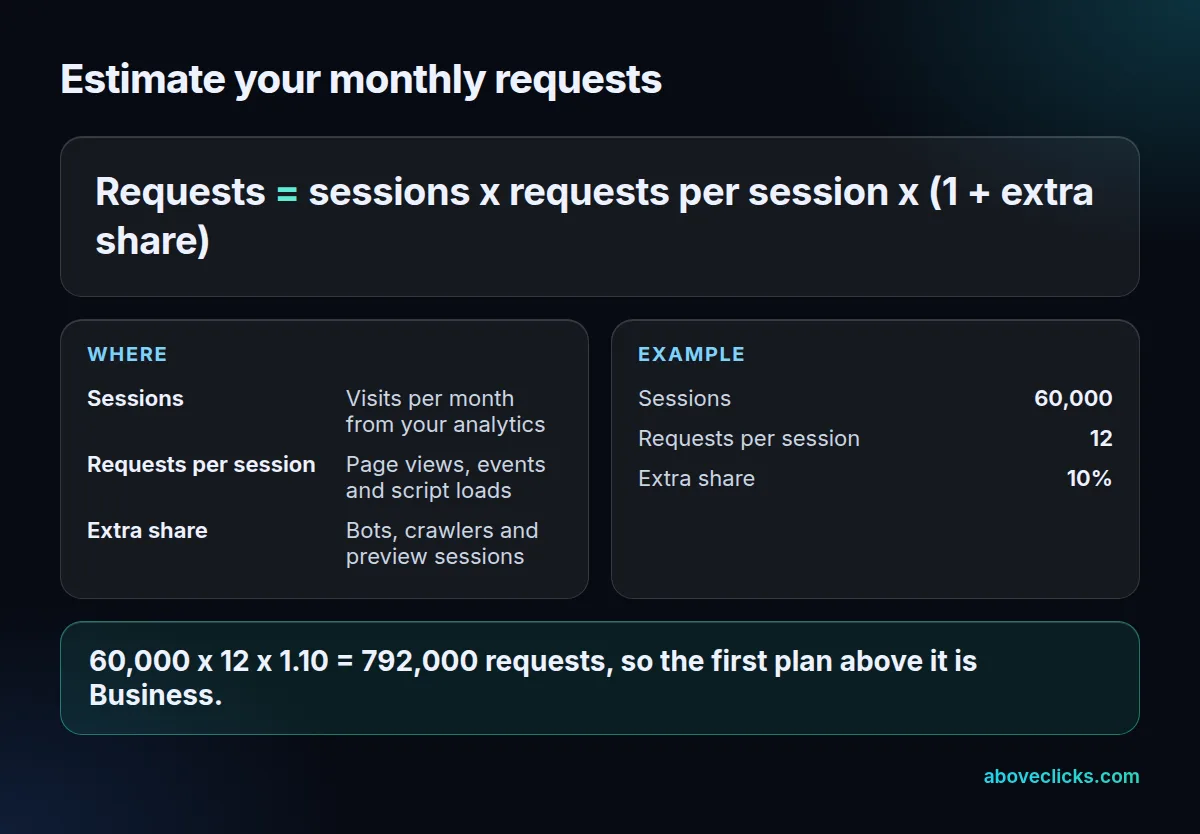
Here is a worked example, not a quote. An invented store has 60,000 sessions a month. We assume each session sends 12 incoming requests (page views, events and script loads) and that bots and preview sessions add 10%. That gives 60,000 x 12 x 1.10 = 792,000 requests a month.
That is above the 500,000 on Pro, so Business at $83 a month applies, which is $996 a year on Stape’s annual rate as of November 2026. The store would use about 16% of the Business limit, since 792,000 divided by 5 million is 0.158.
Traffic is not the only lever. The same 60,000 sessions with a heavier setup of 25 requests per session would be 60,000 x 25 x 1.10 = 1,650,000 requests, still Business. A store that grows to 150,000 sessions at 13.2 requests each reaches 1,980,000 requests, about 40% of the Business limit.
To place your own store, divide each limit by your requests per session. With 12 requests and a 10% margin, that is 13.2 per session:
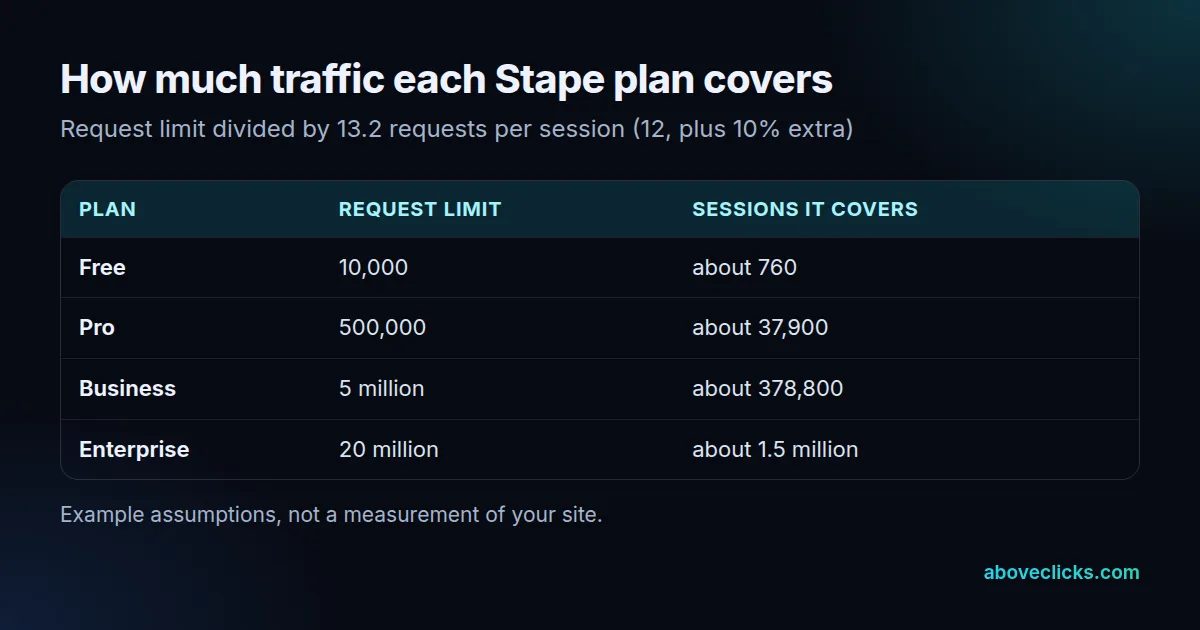
Pro runs out at about 37,900 sessions a month, and Business at about 378,800. Replace the 12 with your own figure, which you can get from Requests Analytics or the container’s logs, because a heavy page with many events could easily send twice as many.
Is the Stape free plan enough?
Only for a test or a very small site. At 13.2 requests per session, the 10,000 requests on Free cover about 760 sessions a month.
The Stape pricing for the free plan is $0 as of November 2026, and it is a good place to build and test a container. It includes the Setup Wizard and Requests Analytics on Stape’s price page. Preview sessions count as requests too, so a few hours of debugging can use a visible share of 10,000. Keep the container on Free while you test, and move to Pro only when real visitors arrive, so you do not pay for 500,000 requests you are not using.
Once real traffic arrives, Pro at 500,000 requests is the first of the Stape pricing plans with logs, Bot Detection and Cookie Keeper. For a store near 40,000 sessions a month, that is the point where the example above tips into Business.
What does Stape pricing leave out?
The build work, the ad-platform side, tax and extra sites. Stape pricing covers hosting and tools, so a Business subscription at $83 a month, or $996 a year as of November 2026, does not fill the container with working tags.
A store that runs 3 separate sites therefore needs 3 containers and 3 plans. Four lines are worth asking about before you pay:
- Setup and upkeep: someone has to build the tags, test each destination and keep up with platform changes. That is hours of work, whatever the plan, and it recurs each time an ad platform changes what it accepts.
- One site, one plan: Stape’s FAQ says each site needs its own container and plan, although containers can share an account and billing details.
- Tax: Stape says it must charge sales or consumption tax in certain US states.
- Going over a limit: a toggle upgrades the plan with traffic, and a downgrade goes through support, as of November 2026.
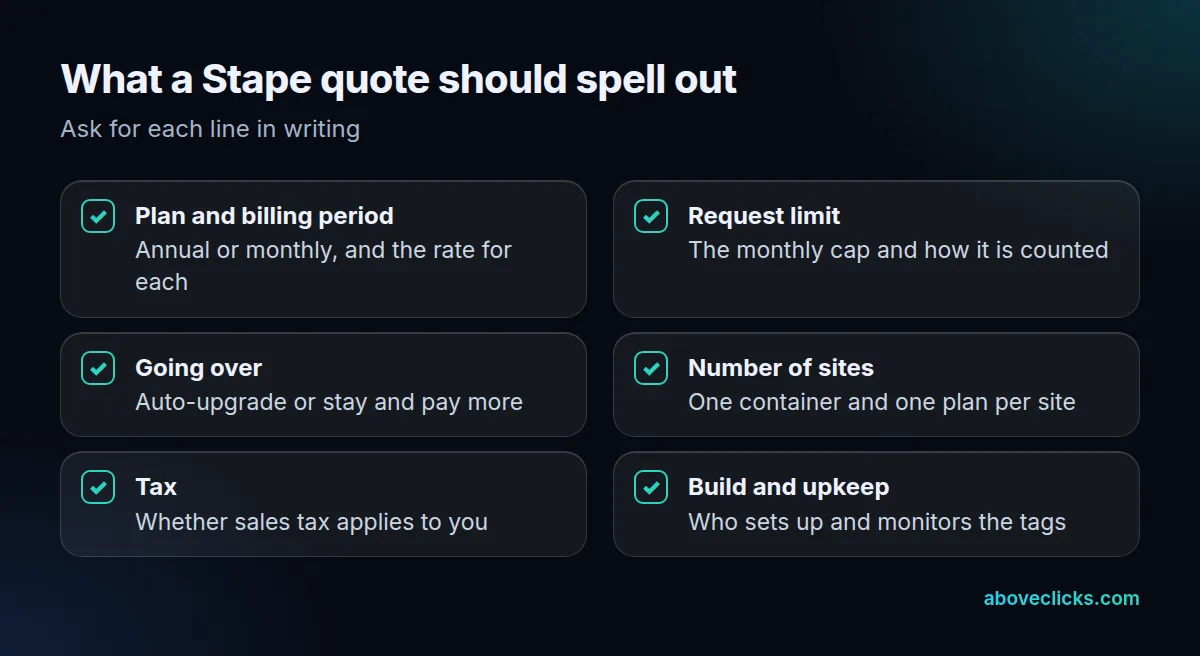
When a quote for Stape pricing looks cheap, ask what sits outside it. Our free audit checks the tracking you already have against your traffic and tells you which plan, if any, the numbers support.
Is Stape cheaper than hosting the container yourself?
For a small store, the two come out close, and Stape adds tools and support. Self-hosting on Google Cloud Run is about $45 a month per server, and Google recommends at least 2, according to its Cloud Run guide as of November 2026.
Those figures are for one default configuration. As of November 2026, two servers are $90 a month, or $1,080 a year, against $996 a year for Stape Business in the example above, per Stape server pricing. The gap is $84.
Google also says autoscaling 2 to 10 servers should handle 35 to 350 requests per second. Our example store averages 792,000 divided by 2,592,000 seconds in a 30-day month, or about 0.31 requests per second. At that size you are paying for the minimum, not the volume, so hosting is the smaller part of the cost.
Outside Cloud Run, Google’s manual setup guide says you provision the tagging cluster and a separate preview server yourself, which is 2 pieces to run instead of 1 subscription. The bigger difference is who does the work. Stape adds logs, bot detection and support for its fee, while Cloud Run gives you the raw server and the bill. Weigh Stape server pricing against your own hours, not only against the $1,080. For the full self-hosting picture, see our guide to GTM server-side tracking, and for what a packaged service costs instead, our guide to Elevar pricing. More measurement guides are in measurement.