Your Google Ads daily budget is the average amount you are happy to spend on one campaign per day. Google may spend up to twice that on a single day and no more than 30.4 times it in a month, for most campaigns.
This guide explains how that average works, how to set it, a worked way to size it from your cost per sale, what a mid-month change does and the four mistakes that waste it. It sits next to our guides on PPC pricing and agency pricing models, which cover what you pay an agency, not the ad platform.
How does a Google Ads daily budget work?
It is an average, not a hard cap. Google’s help page says it is roughly what you are comfortable spending each day over the month, and some days you will spend less and others more.
Google steers spend toward days when clicks and conversions are more likely, such as when search traffic is higher. That is why one day can look wrong while the month is right.
As of November 2026, the limits are set out in the budgets overview: for most campaigns the daily spending limit is 2 times your average daily budget, and the monthly spending limit is 30.4 times it, where 30.4 is the average number of days in a month. With a $10 budget you can be billed up to $20 on one day and $304 in a month.
Two things follow. A Google Ads daily budget of $10 does not mean every day costs $10. And a Google Ads daily budget does not let the month cost more than $304, whatever happens on any single day.
How do you set a daily budget in Google Ads?
In the Campaigns page, find the campaign, select the pencil icon in the Budget column, enter the new amount and save. Google’s steps are on its set and change a budget page.
If you plan by month, divide by 30.4. As of November 2026, Google’s spending limits page and set-budget page give this example: $304 a month divided by 30.4 gives a $10 average daily budget. You can change a Google Ads daily budget at any time and as often as you like, though changes affect your spending limits, covered below.
Each campaign has its own Google Ads daily budget unless you use a shared budget, which spreads one amount across several campaigns. Give campaigns with different jobs their own budgets. On our Google Ads service page, we describe keeping brand and non-brand apart for that reason: separate budgets show what the non-brand campaigns earn on their own.
What is a good daily budget for Google Ads?
One that buys enough sales at a cost per sale you can afford, so work backward from the sale, not from a round number. There is no good figure for everyone, so we give you the arithmetic instead of a range.
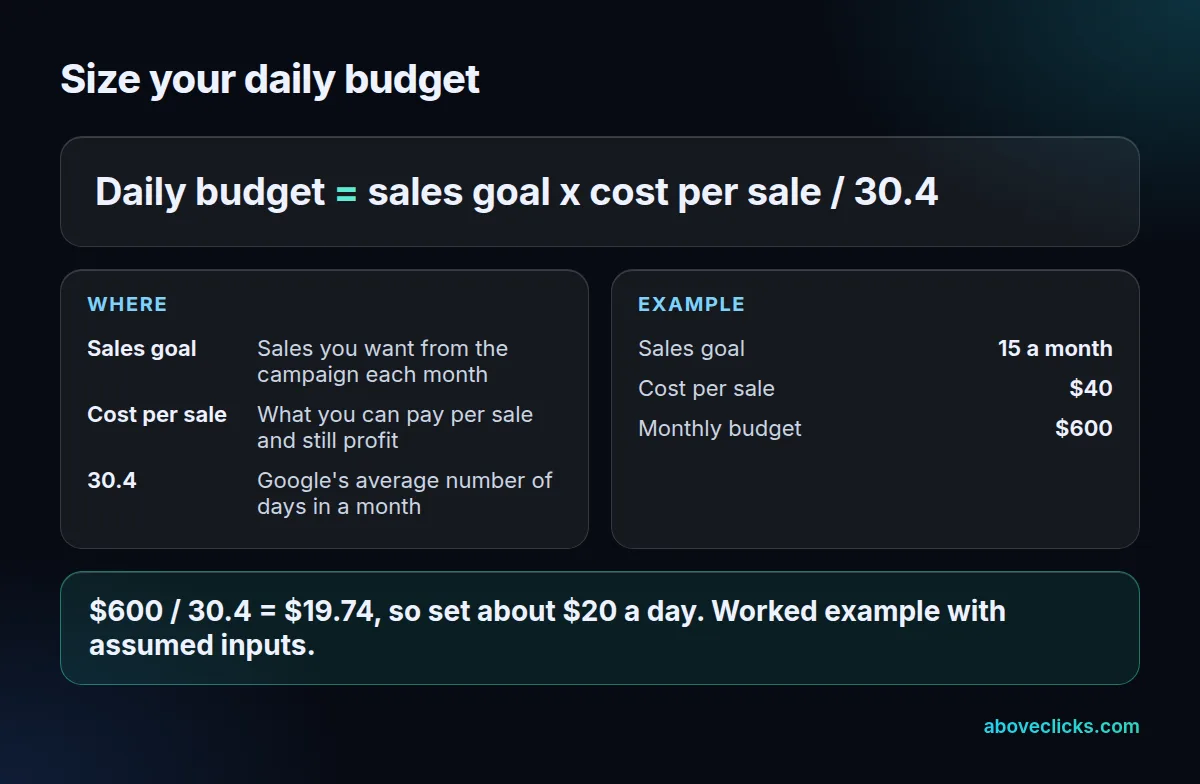
The sizing formula is the sales goal times the cost per sale, divided by 30.4. In the worked example, 15 sales a month at $40 each is a $600 monthly budget, and $600 divided by 30.4 is $19.74, so about $20 a day.
Cross-check the Google Ads daily budget with clicks. These inputs are assumptions for the example, not benchmarks: a cost per click of $2 and a 5% conversion rate. A $20 Google Ads daily budget buys about 10 clicks a day, or 304 clicks over 30.4 days. At 5% that is 15.2 sales, and $608 divided by 15.2 is $40 a sale. The two routes agree.
Read your own cost per click from Keyword Planner, which shows the average cost for a keyword, and your own conversion rate from the account. Our own cost per acquisition guide shows how to work out the sale cost you can afford.
Our approach on the same page: budgets start from your break-even ROAS and the searches you can win, not a round number. We set a test range in the audit and adjust it once a month of data is in.
Judge a Google Ads daily budget over weeks, not days. At about 10 clicks a day and a 5% rate, you expect about half a sale a day, so single days tell you almost nothing.
Is there a minimum daily budget for Google Ads?
The Help pages we read set no fixed minimum, so the real floor is arithmetic. Your budget must buy enough clicks to reach a sale at your conversion rate within the weeks you plan to test.
Take the example above. At $2 a click and a 5% rate, the cost per sale is $40. A $5 budget buys 2.5 clicks a day, about 76 clicks a month and under 4 sales, which is too little to judge. That is a limit of the test, not a rule from Google.
If your expected cost per sale is high, as with many B2B services, the Google Ads daily budget needed to see even a few sales a month is higher. Use the formula with your own figures. Google’s tips page also points to recommended budgets for campaigns that keep meeting their budget, which can help once there is data.
Can Google Ads spend more than your daily budget?
Yes, on a single day, up to the daily limit. Google says that on a given day your campaign might spend up to twice your average daily budget, and over the month you will not pay more than 30.4 times it.
In rare cases the cost of the clicks served can exceed those limits. Google’s spending limits page separates served cost, the cost of all clicks or impressions the campaign received, from billed cost, which is what you owe after adjustments such as invalid activity. You do not pay more than the two limits, and Google covers the difference.
To check, use the Billed cost report in the Report editor, as Google’s overdelivery page describes. The report shows what you were billed, not just what was served.
For a $20 Google Ads daily budget, that means a daily limit of $40 and a monthly limit of $608. Seeing $35 on a busy day is normal for that Google Ads daily budget, not an error.
What happens when you change your Google Ads daily budget?
The change shows in your account at once. It changes how often your ads show and how much you can be billed, because both spending limits are updated.
Google explains the two effects on its budget changes page. On the day of a change, the daily limit uses the highest average daily budget you chose that day. If you raise it to $50 and then lower it to $5, the limit for that day is $50 times 2, or $100. For the rest of the month, the limit is your new budget times the calendar days left.
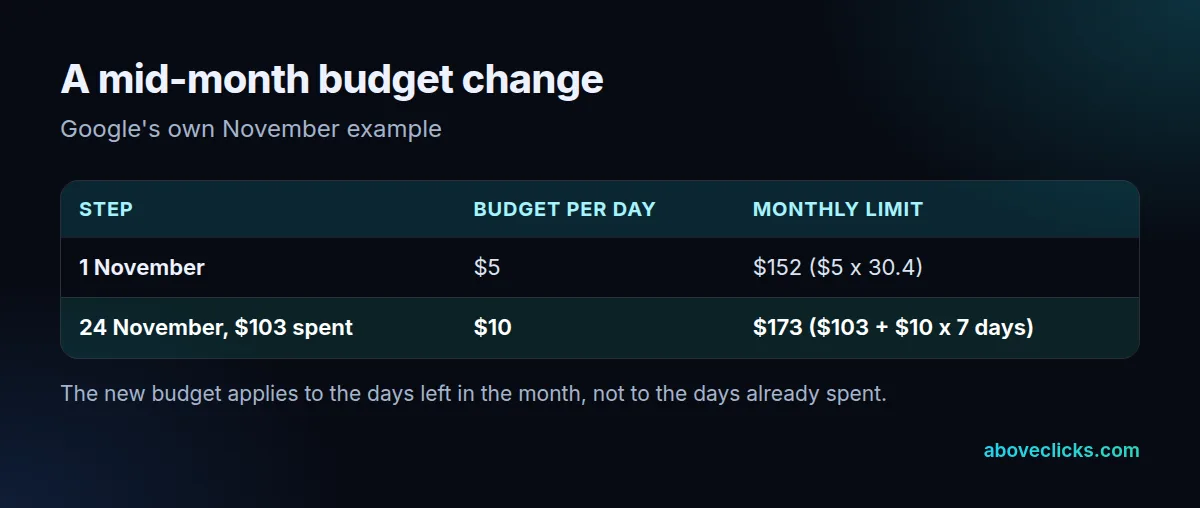
The table is Google’s November example. A $5 budget gives a $152 monthly limit. On 24 November, with $103 spent, raising the budget to $10 gives $103 plus $10 for 7 remaining days, a $173 limit.
So raising a Google Ads daily budget late in the month adds less than the new monthly figure suggests. Lowering it works the same way: on a $10 budget cut to $5 with $270 spent and 5 days left, Google’s example gives $270 plus $25, a $295 limit.
If you use ad scheduling, the monthly limit stays at 30.4 times your daily budget, according to Google’s spending limits page. The system paces toward that full limit however many days the campaign is scheduled to run.
What does “limited by budget” mean?
It means Google thinks the campaign could earn more clicks or impressions with a bigger budget. Google marks a campaign this way in 2 cases, and may show a recommended budget based on recent results, the current budget, keywords and targeting.
Google’s limited by budget page says it shows no recommended budget if you rarely meet your budget or the campaign has limited data. Raising the Google Ads daily budget is one fix. It is not always the first. In the worked example, a campaign that spends its full $20 on most days is the typical limited one.
Google’s optimization tips add two others. Slightly lowering bids on a limited campaign may earn more clicks, because the average click costs less, though lowering them too far can lose clicks. And automated bidding such as Maximize Conversions can help use the budget fully. On our side, we find that a budget leaving campaigns limited every day hides what works, so we review it monthly with the data.
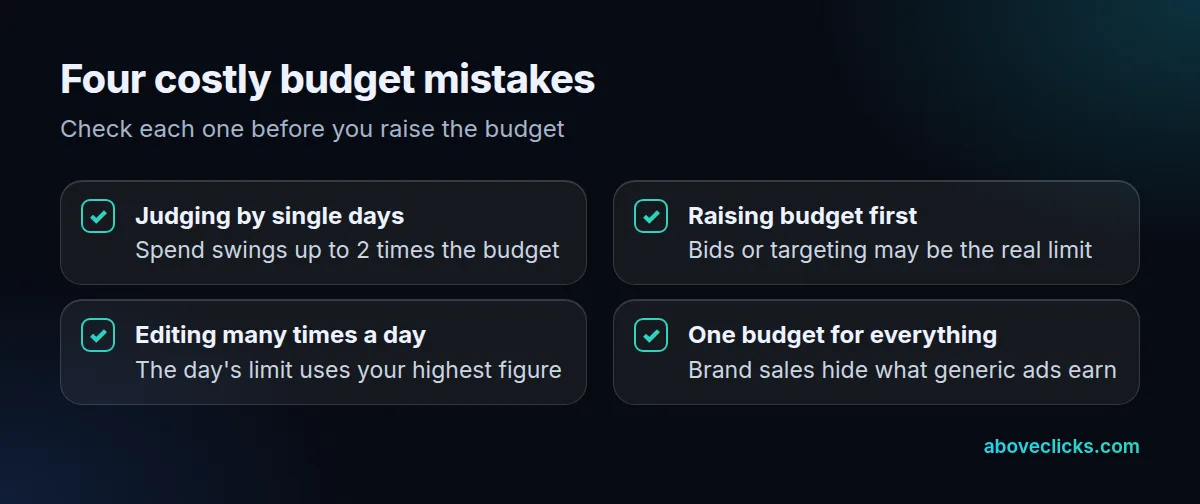
Before you raise a Google Ads daily budget, run through the checklist above. In short:
- Wait for weeks of data before judging a campaign by days.
- Check bids and targeting before adding money.
- Make one change a day, because the highest figure sets that day’s limit.
- Keep brand and non-brand apart so you can see which one earns the sale.
If you want a second opinion on how your budgets are split, our free audit reads your account with read-only access. More guides are in Google Ads guides.