GMB call tracking means measuring the phone calls that start from your Google Business Profile, formerly Google My Business. The profile’s own Calls figure counts clicks on the call button, so seeing which calls connect and turn into work takes one more layer.
This guide shows what each number counts, how a tracking number and tagged links fill the gap, and the order to set up GMB call tracking in. It also covers Google My Business call tracking for ad calls, the 5 mistakes that skew the numbers, and a worked monthly example.
What is GMB call tracking?
It is a way to connect the calls your profile generates to the jobs they produce over a 30-day review. Three numbers do the work: button clicks from Google, connected calls from a tracking number, and booked jobs from your own log.
Google Business Profile reports the first number for you. The other two you build, and GMB call tracking only becomes useful once all 3 sit side by side for at least 1 full month. Google’s performance help page lists Calls as one of several interaction metrics next to website clicks and directions. Without the other two numbers, a rising Calls figure only says that more people tapped a button, not that more customers reached you.
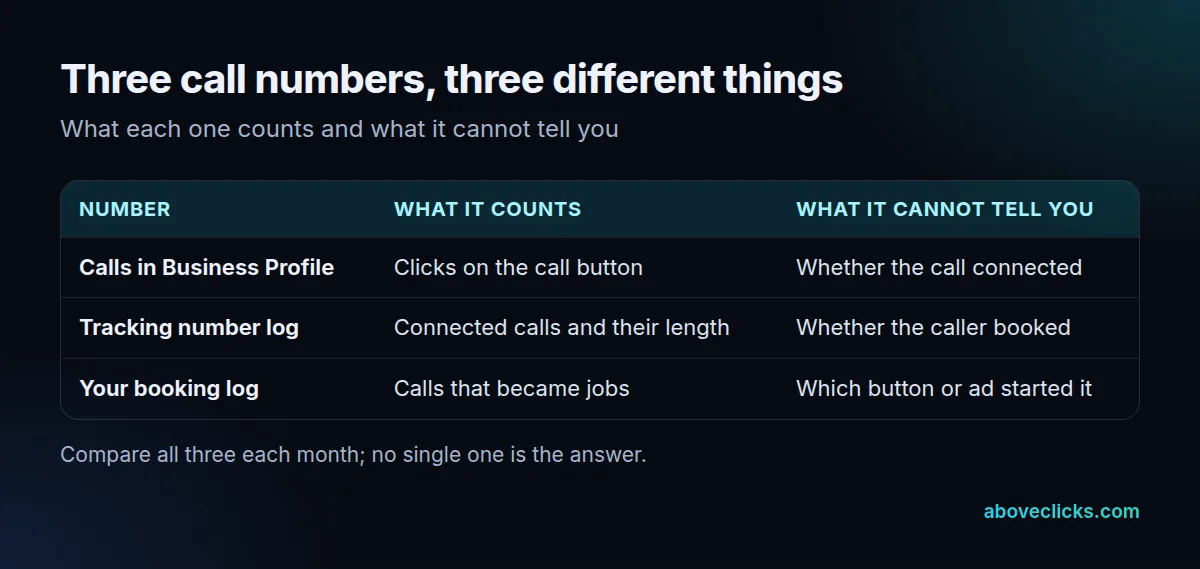
Most owners need all three, because each one answers a different question. The table shows what each counts, and what it hides. Google My Business call tracking, as people still call it, is the habit of comparing them, not a single report you switch on.
What does the Calls number in Google Business Profile count?
The number of times a customer clicked the call button on your profile. Google’s performance help page defines it that way and says you need to add a phone number to track the metric.
That makes it a count of intent, not of conversations. A tap that rings out, reaches voicemail or is hung up within 2 seconds still counts as a click. The same help page says performance data covers both organic results and Google Ads, so paid and free clicks sit together in one total.
Two more limits matter. Performance data is only available for verified profiles, and the searches metric updates at the start of each month and can take up to 5 days to appear. So for GMB call tracking, read the last full month, not the last few days.
How does Google Business Profile call tracking work with a tracking number?
A tracking number is a separate phone number that forwards to your real line and logs each call. The log shows connected calls and their length, which the profile report cannot.
Google’s profile guidelines say the number you list must connect to your individual business location and be under the direct control of the business. They also say additional phone numbers can be used on Google Business Profile websites and other local surfaces. Read the current wording before you change your primary number, because a wrong move can cost you consistency across your listings.
The second number is the heart of Google Business Profile call tracking, and it is the one most owners skip. A safe order is to keep your main local number as it is and test the tracking number as an additional one, or to use it only on your own site. Either way your Google Business Profile call tracking gets a log of connected calls, which is the second number in the table.
If you use a call-tracking tool or a cloud phone system, check that it can log call length and the time of day. Those two columns answer most questions about call quality.
A good log has 4 fields per call: the date and time, the call length in seconds, whether it was answered, and the source. A fifth field, the outcome, is added by hand or by your booking system. Missed calls matter most. If 15 of 100 calls go unanswered in the evening, no profile change will fix that.
How do you track website clicks from your profile?
Add UTM parameters to the website link on your profile, so Google Analytics can separate profile visits from other traffic. Analytics Help lists parameters such as utm_source, utm_medium and utm_campaign in its URL builder guide.
A tagged link might use google as the source, organic as the medium and gbp-profile as the campaign. The guide warns that values are case sensitive, so use lowercase every time. Our UTM parameters glossary entry has the full list.
Tagging does not capture calls by itself. Analytics’ enhanced measurement covers page views, scrolls, outbound clicks, site search, video, file downloads and form interactions, but no event for a tap on a phone link. If your site has its own call button, add a custom event for it in your tag setup, or use a tracking number on the page.
How do you track calls from Google Ads on your profile?
Turn on call reporting in Google Ads, then set a minimum call length such as 60 seconds, which uses Google forwarding numbers to report calls from ads. Google’s call assets help says call reporting is only available on the Search Network.
Google lists 5 ways to track phone call conversions: calls from ads, calls to a number on your website, clicks on a number on your mobile website, clicks on call ads and assets, and imported call conversions. For the first two you set a minimum call length, and only calls at least that long count.
The third way counts clicks, not calls, in Google’s own words. For website calls, a forwarding number script replaces your site number after an ad click. Our PPC tracking guide covers that setup inside campaigns.
Keep ad calls and profile calls apart in your sheet. Because the profile report includes Google Ads interactions, the same customer can appear in the Calls figure and in the ad report. Counting both as separate leads would inflate GMB call tracking by up to 2 times for those calls, so use the ad report for paid calls and the tracking number log for the rest.
Why does your Google Business Profile call history look wrong?
Treat the wrong-looking numbers as a checklist. Five mistakes cause most bad GMB call tracking: treating clicks as calls, counting ad calls twice, skipping a minimum call length, mixing months, and never logging the outcome. Each has a simple fix.
- Clicks read as calls. Divide connected calls by button clicks. A ratio far below 1 means many taps never connect.
- Ad calls counted twice. Remove calls from ads from the profile total before you report a number.
- No minimum call length. Set one, such as 60 seconds, so wrong numbers and hang-ups do not count as leads.
- Mixed months. Compare the same calendar month, because the searches metric updates at the start of each month.
- No outcome. A call that never reaches your booking log is a call you cannot value.
Fix these 5 and your GMB call tracking will already be more reliable than most vendor dashboards. None of them needs paid software.
How do you set up GMB call tracking step by step?
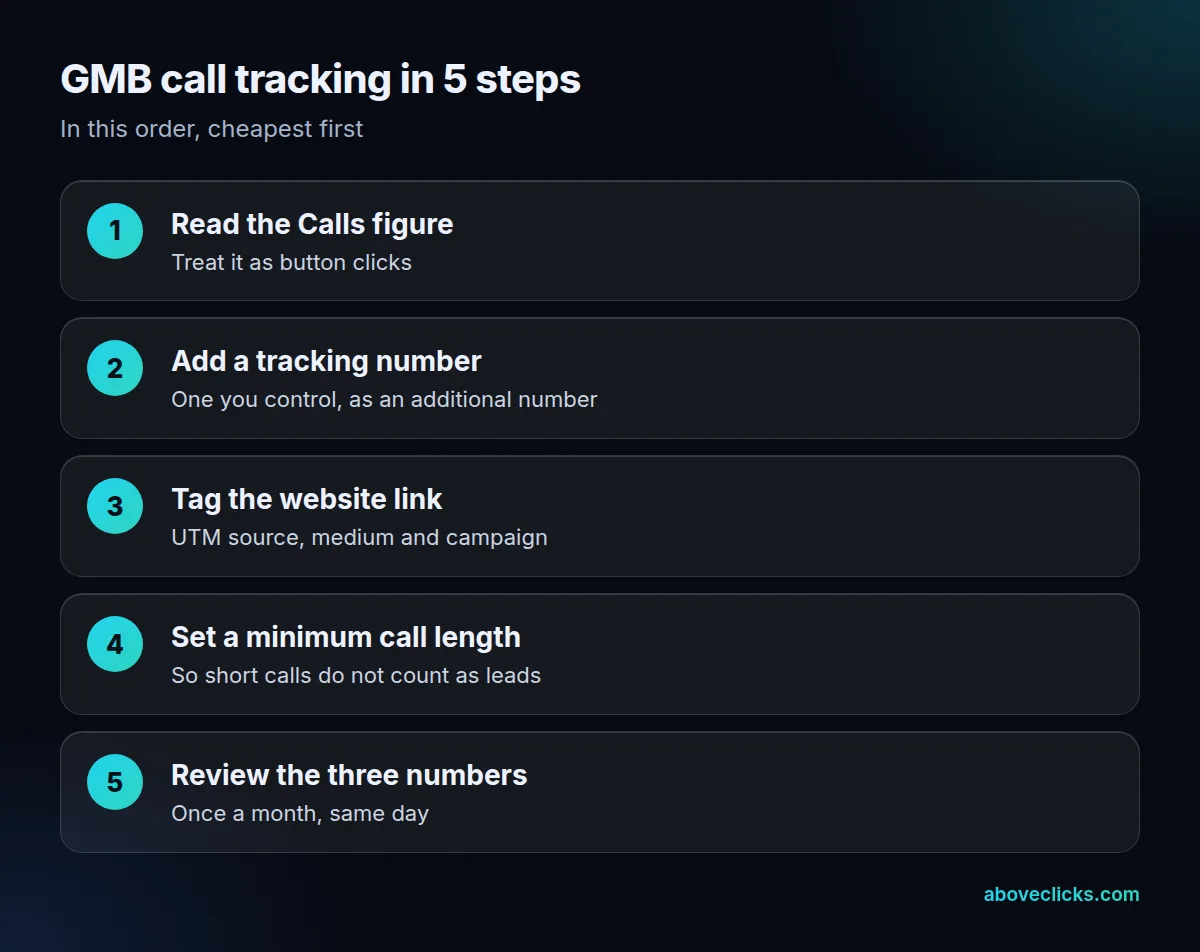
Work cheapest first, in 5 steps, and compare the three numbers once a month. Most local businesses can finish steps 1 to 4 in a day or two.
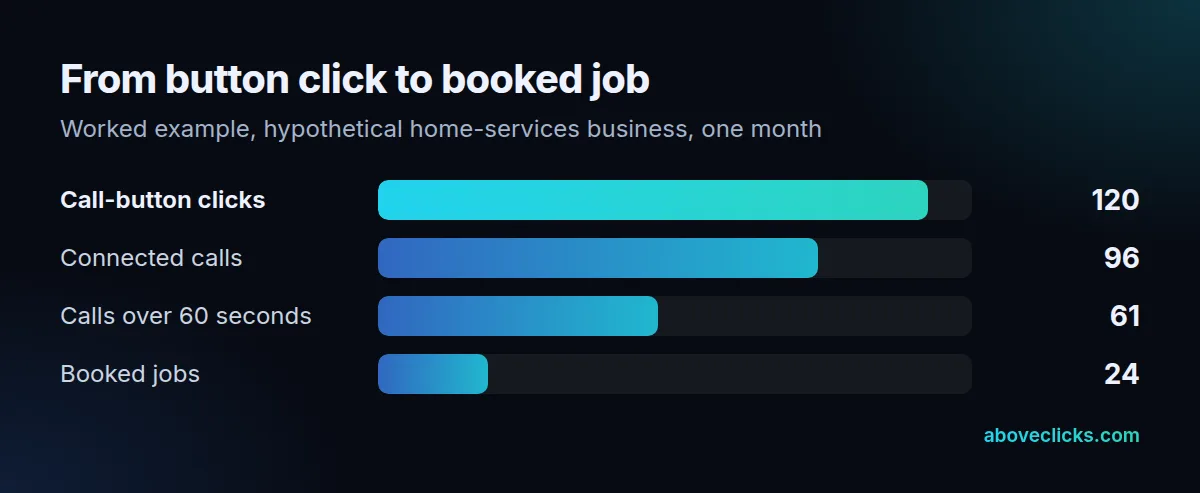
Here is a worked example for a hypothetical home-services business, not a client result. In one month its profile shows 120 call-button clicks. The tracking log shows 96 connected calls, and 61 of those lasted longer than 60 seconds. The booking log shows 24 booked jobs.
The 5 steps in plain words:
- Step 1, read the Calls figure. Write down last month’s total and label it “button clicks” in your sheet, so nobody reads it as connected calls.
- Step 2, add a tracking number. Use a number you control and keep your main line as the primary, as covered in the Google Business Profile call tracking section above.
- Step 3, tag the website link. Add lowercase UTM values so profile visits show up as their own source in Analytics.
- Step 4, set a minimum call length. 60 seconds is a common starting point for service work; adjust it after you listen to a sample of 20 calls.
- Step 5, review monthly. Put the three numbers in one row and note anything that changed on the profile that month, such as new photos, hours or categories.
Read the GMB call tracking example from left to right. 24 of 120 clicks is a 20% click-to-job rate, and 24 of 61 longer calls is about 39%. If the clicks double next month but the jobs stay flat, the extra clicks are low-quality, and the fix is on the profile or the landing page, not the phone.
Keep the three numbers in one sheet, one row per month. That sheet is your whole GMB call tracking report. If you also run ads, add a column for calls from ads. For a second opinion on a local setup, ask for our free audit, see our local services marketing work, or read about tracking and analytics in general. More guides are in measurement.