An SEO monthly report format is the fixed layout, file type and settings a report uses every month, so that one month can be compared with the next. Judge a format by whether the same question gets the same kind of answer in the same place each time.
This guide compares the four common file types, gives a one-page layout in order, lists the settings to keep fixed and shows how to build the format in Looker Studio. For the sections themselves, see our guide to the monthly SEO report.
What is an SEO monthly report format?
The layout, the file type and the data settings that stay the same from one report to the next. It is not the list of sections; it is how those sections are packaged, ordered and measured.
Think of three layers in any SEO report format. The layout is the order of the blocks on the page. The file type is how the report reaches you: a PDF, a spreadsheet or a live dashboard. The settings are the date range, the comparison and the way the numbers are grouped.
The settings matter most. Search Console’s Performance report opens on the past 3 months by default, so a report built from the default view quietly mixes 3 months into a “monthly” number. A format that names a calendar month, start to end, removes that risk.
Many agencies hand you an SEO monthly report format they designed for themselves. Ask for yours: a fixed format is easier to check and easier to keep if you change agency.
Which SEO report format should you choose?
A PDF for the record plus a dashboard for looking between reports. A spreadsheet is the backup copy of the numbers, and a document suits a short written story.
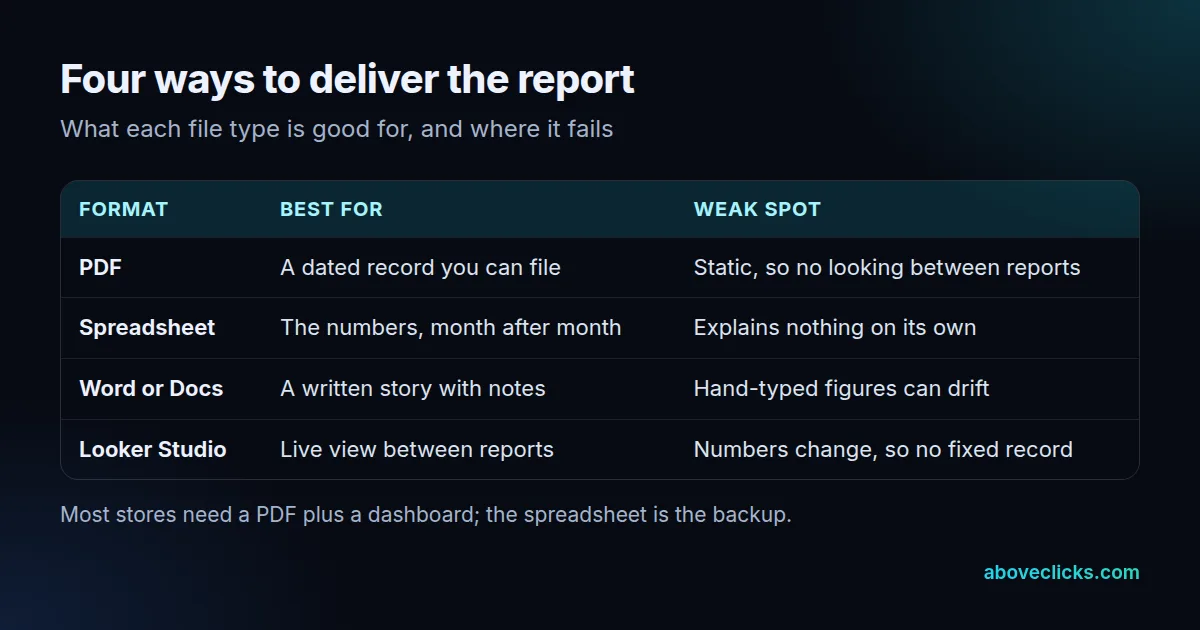
The table shows the trade. A PDF cannot change after it is sent, which is why it works as evidence of what was said in March. A dashboard changes with the data, which is useful on the 20th of the month and useless when you want to see the figures you were shown on the 5th.
A spreadsheet is a simple way to keep your own history. Many Search Console reports have an export button that downloads the chart and table data. If you pull data through the Search Console API instead, performance data is limited to 50,000 rows per day, per search type, per property (as of November 2026), which is plenty for a store of a few thousand pages but worth knowing before you promise “every query”.
Search for an SEO report format and you will mostly find downloadable templates in these same four file types. They are fine as a starting point, but none of them tells you which settings to freeze.
What does a one-page SEO monthly report format look like?
In an SEO monthly report format, that means five blocks in a fixed order: summary, search results, business results, work done and next month. A store owner should be able to read the page in about 2 minutes.
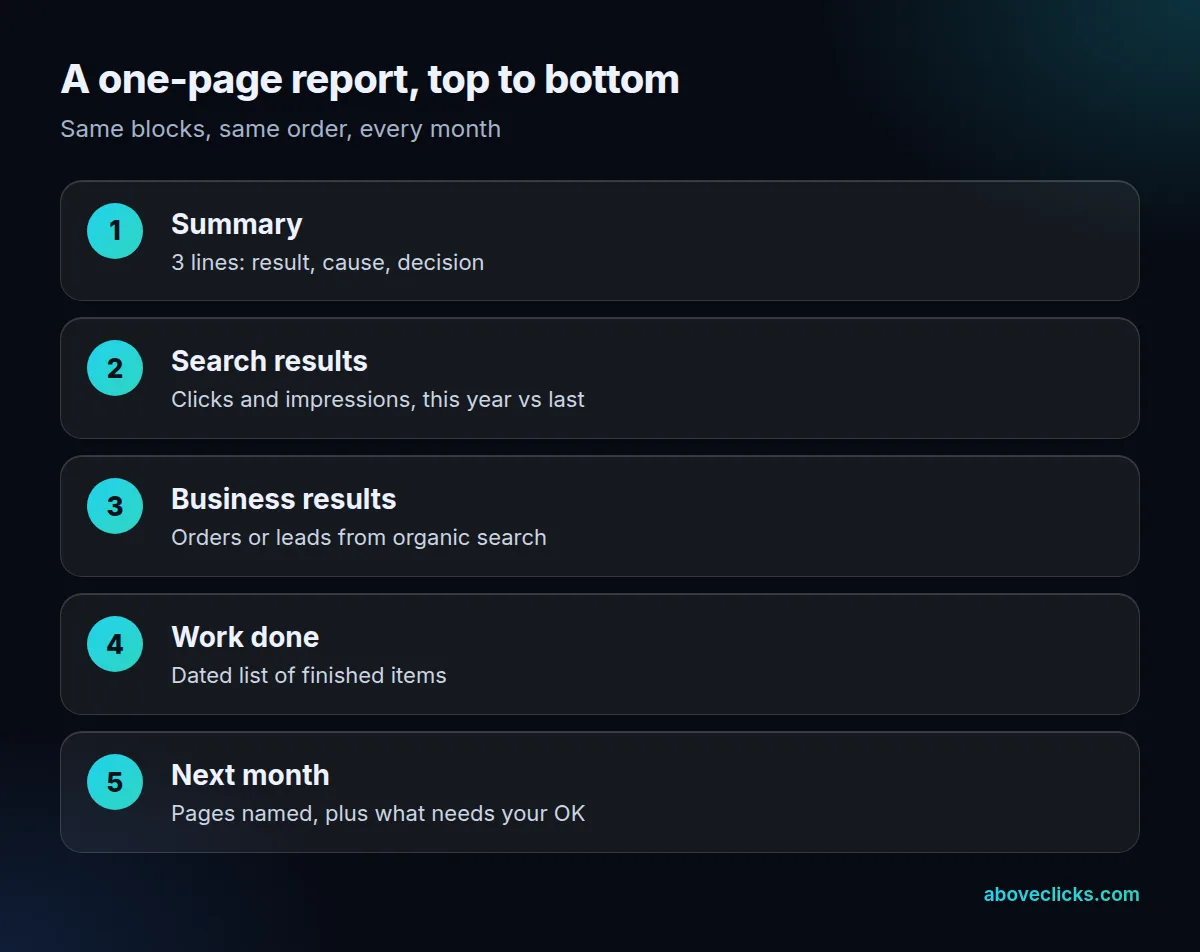
Example: an invented store selling kitchenware, with a 2-page report and 5 blocks. Page 1 holds the summary and the search results; page 2 holds business results, work done and next month. Detailed tables go in an appendix.
Each block of the SEO monthly report format has one job:
- Summary: 3 lines. One result, its likely cause and one decision for you.
- Search results: clicks and impressions for the month, set beside the same month a year earlier.
- Business results: orders or leads from organic search, from your own analytics rather than from Search Console.
- Work done: a dated list of finished items, each of which can be checked.
- Next month: pages named, split between what the agency does and what needs your approval.
The full list of sections behind each block is in our monthly SEO report guide, and a filled-in page is in the SEO monthly report sample. In this SEO report format the only rule is the order: same blocks, same place.
What should stay the same in every SEO monthly report?
Six settings: the date range, the comparison, the grouping, the impression basis, the source line and the export date. Change one and a month stops being comparable with the last.
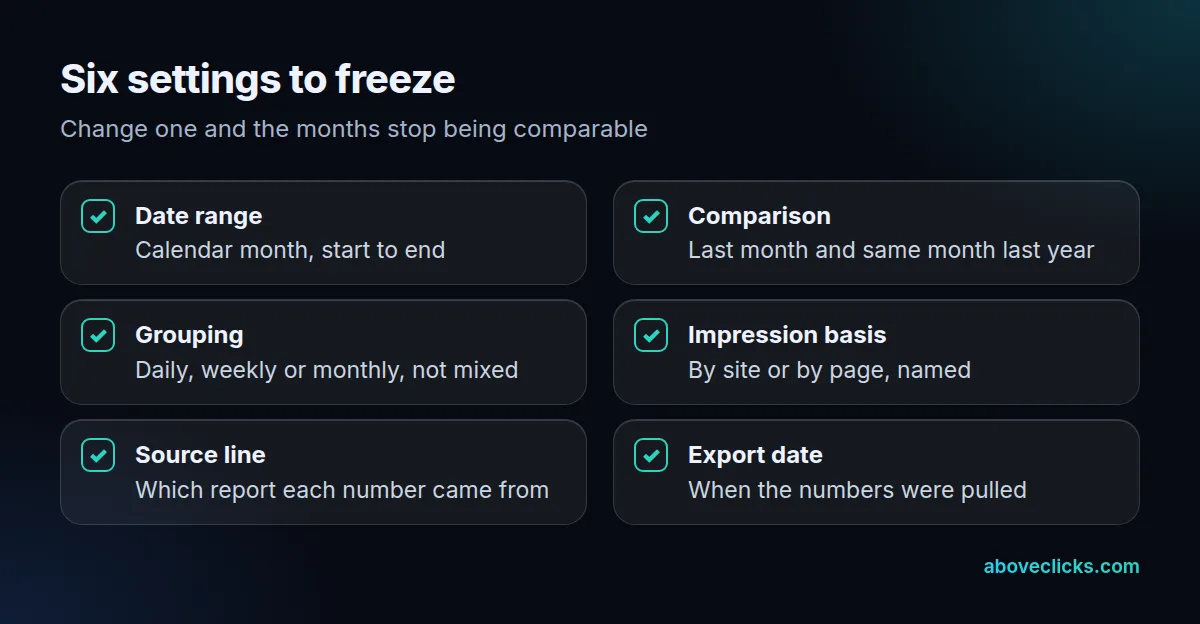
Ask your agency to show the SEO monthly report template with all six settings written on it. A template that hides them cannot be checked.
Two of these come straight from Google’s advice. Its guide to traffic drops says to set the Performance report to the last 16 months, so you can see whether a dip repeats every year. It also suggests comparing the last 3 months with the previous period or with the same period a year earlier. Build both comparisons into the SEO monthly report format, not into one person’s habits.
Next, the date range. A calendar month has 28 to 31 days, so a March report can show about 11% more clicks than February with no real change. Compare the same month a year earlier, which has the same number of days, or compare clicks per day.
Grouping is the quiet one. Search Console can group the chart by day, week or month, and weekly and monthly views smooth out weekend and holiday swings. Pick one and keep it in your SEO monthly report template. A report that groups by week in April and by day in May shows a different shape for no real reason.
The source line is a short note under each table: “Search Console, Performance, web search, 1-31 October, exported 3 November.” It takes 10 seconds to write and lets anyone rebuild the number.
How do you build an SEO monthly report template in Looker Studio?
Connect Search Console as a data source, choose the impression basis, add the fixed date range and comparison, then lock the layout. Looker Studio is free and reads Search Console directly.
The first choice is the data source. Make it before the design, because the chart totals follow from it. Looker Studio’s Search Console connector offers 2 tables, Site Impression and URL Impression, and a single data source can use only one. To see both side by side, create 2 data sources and add both to the report.
Then set the format rules for the template:
- Fix the date range to the previous calendar month, and add a comparison to the same month last year.
- Name the impression basis in a small caption on every chart.
- Keep the order of the blocks the same as the one-page layout.
- Save a copy of the finished SEO monthly report template as a PDF each month, because the dashboard itself changes.
Know that the data is not live to the minute. Search Console data in Looker Studio refreshes every 12 hours, and as of November 2026 that rate cannot be changed. For a monthly report that is fine, but it is a reason to pull the final numbers on the first day of the next month, not on the 31st.
Our Looker Studio dashboards service builds this setup. If you build it yourself, keep it in your own Google account and add the agency as an editor.
Which numbers need a footnote in an SEO report?
Any total taken from the chart, any figure that mixes site and page counts, and any number that is cut off by a limit. A footnote keeps a correct number from being read as a wrong one.
The main case is in Google’s own documentation. In the Performance report, chart data is aggregated by property, while table data grouped by page or search appearance is aggregated by page. The Performance report notes that chart totals can therefore differ from table totals. If your summary quotes the chart and the appendix adds up the table, a careful reader will find 2 different totals for the same month.
Example: an invented store has 4,200 clicks in the chart for October, while its page table adds up to 4,050. Both are right: one counts by site and the other by page, so the 150-click gap is aggregation, not an error.
In any SEO report format, the fix is a footnote: “Totals are by site. Page tables are by page and will not add up to the total.” Put it under the first table and the question is answered before anyone asks.
Two other limits belong in a footnote when they apply: an export that was cut at the row limit, and a figure shown as ~ or – in Search Console, which turns into a zero when downloaded. A zero on a spreadsheet can mean “no data”. Read the export notes before you quote one.
When should you change the report format?
Rarely, and only at a clean break. A stable SEO monthly report format is worth more than a fresh one. Changing it in the middle of a year makes that year impossible to compare, so change it at the start of a quarter and say so in the report.
Three good reasons to change an SEO report format: the business now sells in a new market, the owner reads the report differently, or a new tool replaces an old one. A bad reason is a redesign for its own sake.
When you do change it, run the old and the new format side by side for one month, so that every number in the new one can be matched with the old. Then note the change date under the first table of the new SEO monthly report format.
The timing of the first report matters too. For our own ecommerce SEO work, the first monthly report arrives after 30 days and each later one lands in the first week of the month. Whoever you hire, ask for the format, the day and the person who owns the template, and see our SEO monthly reporting guide for the cycle that produces it. For a look at the layout we use, see our sample report. More guides are in e-commerce SEO.