A monthly SEO report is a written summary, sent once a month, of what search traffic did, which SEO work was done and what comes next. A useful one shows results and activity side by side, so you can tell whether the work is moving the numbers.
This guide lists the 7 sections a monthly SEO report needs, shows where each number comes from, and explains how to read the result without being fooled by seasons or one-off dips.
What is a monthly SEO report?
A monthly SEO report is a once-a-month record of search results, site health and finished work, written for the store owner rather than for an SEO specialist. It answers three questions: what changed, why, and what happens next.
Most of the numbers come from Google’s own free tools. Search Console’s Performance report shows clicks, impressions, click-through rate and average position, and its default view covers the past 3 months. It can also group the chart by week or by month, which smooths out the weekend and holiday swings that make daily numbers hard to read.
That is why a month is the right unit. A week is noisy, and a quarter hides problems for too long.
A report is not an audit. An audit is a one-off review of what is wrong; a report repeats every month and tracks whether the fixes worked. If you are still deciding what a retainer should deliver, the monthly SEO package guide covers the work behind the report.
What should a monthly SEO report include?
Seven sections, in the same order every month: a summary, search results, indexing, page experience, work done, business results and next month’s plan. Each one should name the report its numbers come from.
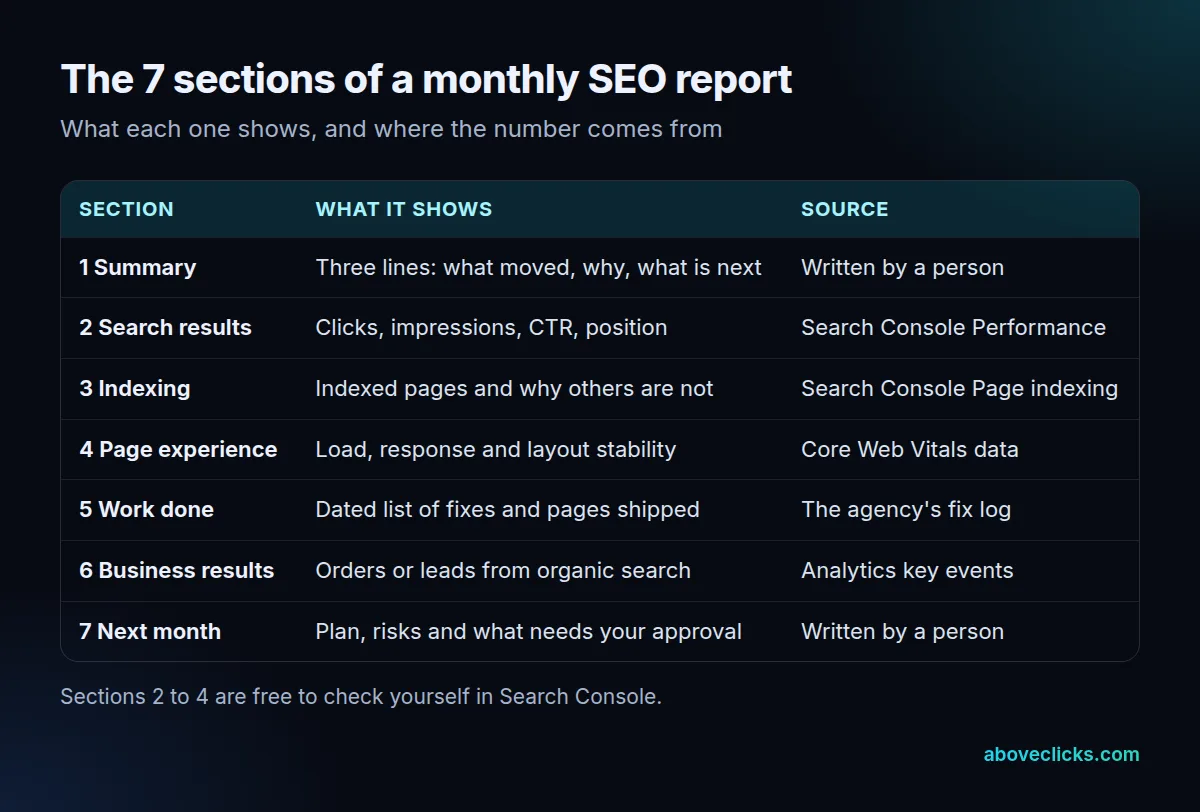
The sections that most reports get wrong are the middle ones. Here is what each should contain.
- Search results: clicks, impressions, click-through rate (CTR) and average position. Google defines CTR as clicks divided by impressions, and the average position is that of the topmost result from your site.
- Indexing: the count of indexed pages, and a reason for the pages that are not. Google’s Page indexing report says you should not expect every URL to be indexed, only the canonical version of each page, and its example lists stop at 1,000 URLs.
- Page experience: the three Core Web Vitals. Google’s web.dev guidance sets good targets at 2.5 seconds for Largest Contentful Paint, 200 milliseconds for Interaction to Next Paint and 0.1 for Cumulative Layout Shift, measured at the 75th percentile of page loads.
- Work done: a dated list. “Fixed 140 duplicate title tags on 12 May” can be checked; “improved on-page SEO” cannot.
- Business results: orders or leads from organic search. In Google Analytics, an event you mark as a key event is surfaced in your reports, so a purchase can be counted as one.
Sections 1 and 7 of a monthly SEO report are the ones only a person can write. The summary should fit in three lines: one result, its likely cause and one decision for you. The plan for next month should name pages, not themes, and it should separate what the agency will do from what needs your approval.
A report with only the first section is a traffic chart. A report without the last is a list of activity. Between them, the numbers in sections 2 to 4 should always carry a date range and a comparison, because a figure with neither cannot be checked.
What format works best for the report?
One or two pages in plain English, in the same order every month, with the detailed tables in an appendix. The summary is for you; the appendix is for anyone who wants to check the work.
Our own reports follow this pattern. The first monthly report for ecommerce SEO arrives 30 days after the work starts, and each later one arrives in the first week of the month. Whoever you hire, ask for the date as well as the format of the monthly SEO report.
A few rules make a report easier to trust:
- Same date ranges every month, so one month can be set against the next.
- Two comparisons: last month, and the same month last year.
- Blockers on your side, such as pages waiting for approval or a developer ticket.
- A PDF and a live dashboard. The PDF is the dated record; the dashboard lets you look between reports.
Ask who pulls the numbers, too. For any seo monthly report, the cleanest setup is read-only access to your own Search Console and Analytics accounts, so you can open the same report the author used and see the same figures. A report built from screenshots only is much harder to check.
Also agree on the delivery date. A report that lands in the second week of the month is already stale, and one that arrives on a different day each time makes it hard to notice when work has slipped. Pick a day, put it in writing, and treat a late monthly SEO report as the first sign of a late month.
Names vary. You may see an seo monthly report called a performance report or a progress report. What matters is that it covers the seven sections. Our sample report shows the layout we use, with illustrative figures.
How do you read an SEO monthly report?
Set each number against the same month last year first, then against last month. Seasonal stores rise and fall on a calendar, and a report should not take credit or blame for it.
As of October 2026, Google’s guide to debugging traffic drops recommends changing the Performance report’s date range to the last 16 months, so you can see whether a dip repeats each year. It also suggests comparing the last 3 months with the previous period.
Four more checks stop you misreading monthly SEO reports, whoever wrote them:
- Core updates: as of October 2026, Google says to wait at least a full week after an update finishes rolling out, then compare with the week before it started.
- Fresh data: the newest days in Search Console can be preliminary and are shown as a dotted line, so ignore the last few days of a month-end export.
- Metrics together: clicks, impressions and CTR move against each other, as the next section shows.
- Orders, not only visits: a rise in clicks that does not reach purchases is a finding to explain, not a win.
A short example of why the year-ago comparison matters: a store that sells gifts will often see impressions climb every autumn and fall every January. A report that only compares November with October would show growth that the calendar produced, and one that compares November with last November shows what the work added. Both views belong in the report, with the second one carrying the verdict.
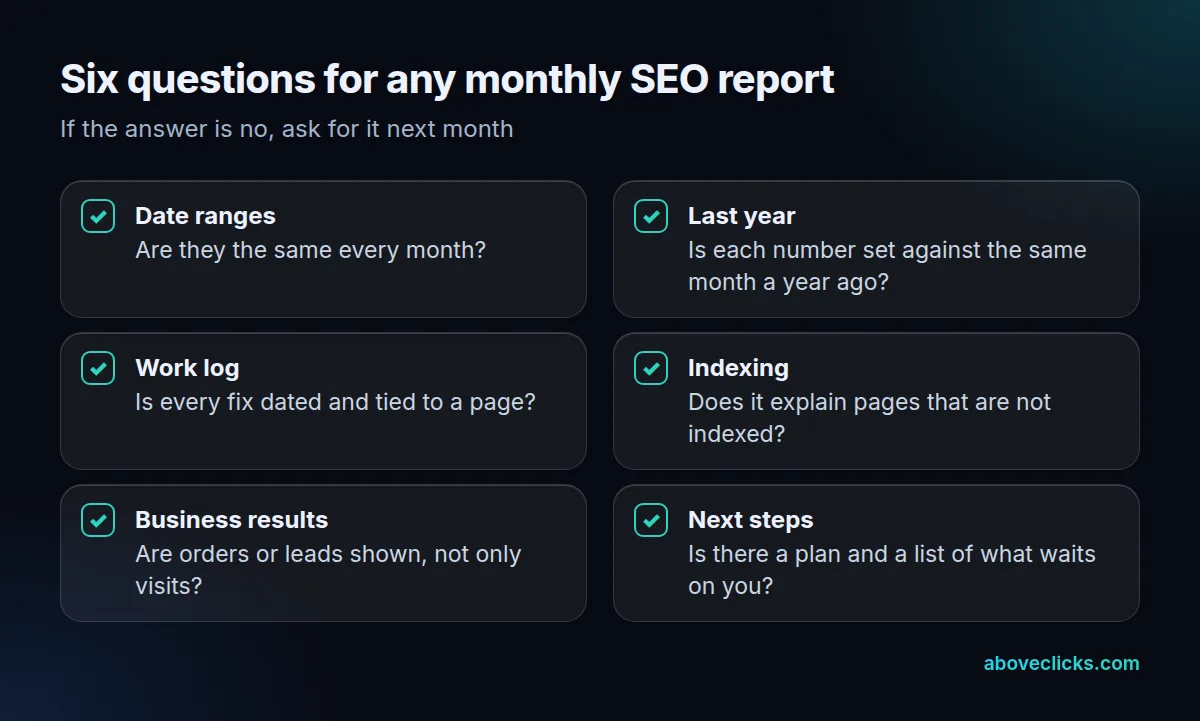
If you can answer yes to all six, the report is doing its job. Keep each month’s file, because a run of monthly SEO reports is also your record of what was changed and when, which matters if you ever switch provider. If not, ask for the missing item in next month’s version.
What does a monthly SEO report example look like?
It starts with a three-line summary, then shows the same few metrics against last month and last year. The example below uses an invented store and invented figures; it is not a client result.
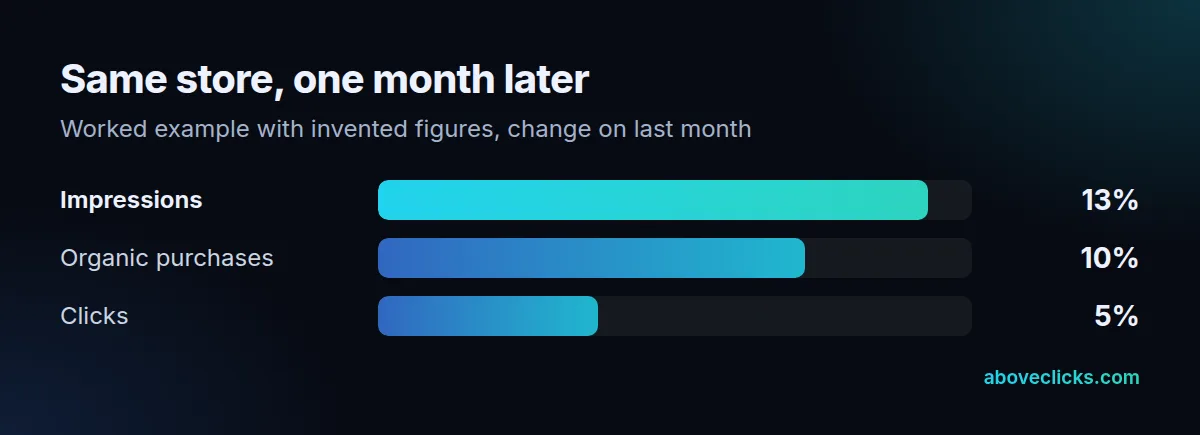
Example: an online store had 40,000 impressions and 1,200 clicks in September. In October it had 45,000 impressions and 1,260 clicks. Impressions rose 12.5% and clicks rose 5.0%. Organic purchases went from 31 to 34, a rise of 9.7%.
CTR, though, fell from 3.0% to 2.8%, because 1,260 divided by 45,000 is lower than 1,200 divided by 40,000. A careless reader sees a falling CTR and worries. A careful one checks the pages: ten new category pages had started to appear in results at lower positions, so they earned impressions first and clicks later. The summary should say exactly that, and the plan for November should name the pages whose titles will be rewritten to lift their CTR.
Notice what the summary in this monthly SEO report example does not do. It does not call the month good or bad. It states the movement, gives the cause that the page-level data supports and says what will be done next. A monthly SEO report written this way can be read in two minutes and checked in ten.
The same example also shows why one metric alone is never enough. Impressions without clicks say that pages are being seen but not chosen. Clicks without purchases say that the traffic may be wrong for the product, or that the product pages are losing people after they arrive. Purchases without any of the search numbers could just as easily be coming from email or paid ads, so the report has to show the organic channel on its own.
That is the pattern to look for when you collect monthly SEO report examples from agencies: a number, the reason it moved, and the next action. If an example shows only charts, ask what it would say when a chart goes the wrong way.
If you do not yet get a report like this, our free audit reads your Search Console with read-only access and shows what the first one would contain. To judge what a fair monthly fee buys, see the SEO price guide. More guides are in e-commerce SEO.