Shopify SEO problems are usually a short list of repeat patterns: duplicate product URLs, filter pages, deleted products without redirects, titles lost to apps, and slow pages. Match the status in Search Console’s Page indexing report to its cause first.
This guide to Shopify SEO problems maps each symptom to its cause and its documented fix, using Google’s and Shopify’s own help pages, then gives the order to work in. It is written for a store owner or marketer who can read Search Console and ask a developer for changes.
What are the most common Shopify SEO problems?
Seven patterns cause most Shopify SEO problems: duplicate product URLs, filter and sort pages, deleted products, pages blocked from crawling, missing titles or headings, slow pages and a store that has not been indexed yet. Each of the seven Shopify SEO problems leaves a different trace in Search Console.
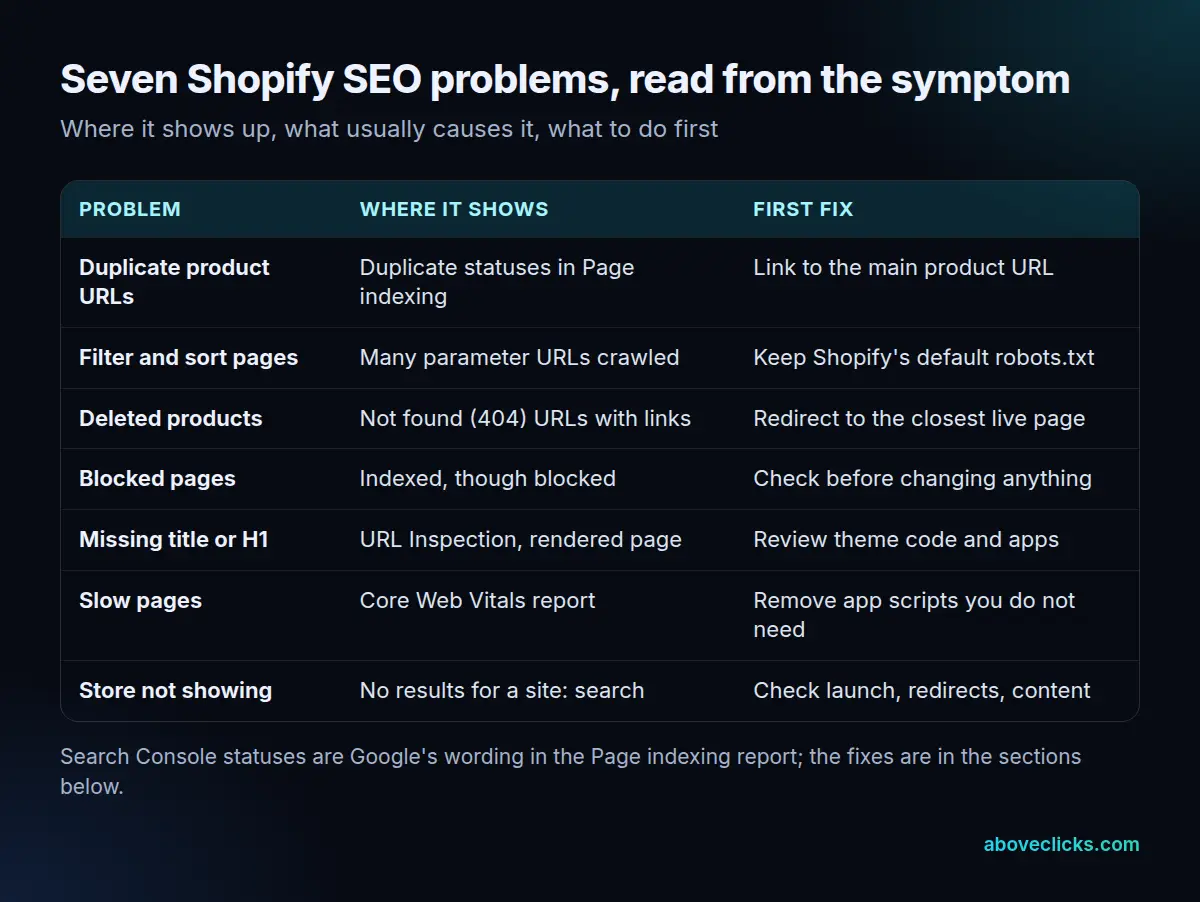
The Page indexing report in Search Console lists every URL Google knows about with a status and a reason. Group the URLs by status before changing anything, and open 5 pages from each group in the URL Inspection tool. Two stores can have the same drop in traffic and completely different Shopify SEO issues, and the report is the quickest way to tell which one you have.
Not every status points to one of these Shopify SEO problems. Google says a URL blocked by robots.txt is probably intentionally blocked, and that you should use judgment about which issues are worth fixing. Our Shopify SEO checklist covers the settings side; this guide covers what goes wrong.
Is Shopify duplicate content hurting your store?
Not by itself. Shopify duplicate content means one page reachable at more than one URL. Google picks one version to show, and the problem starts when it picks a different one from the one you want.
Our Shopify SEO page describes the most common version: many themes link to products through a collection path, such as /collections/name/products/item, while the canonical tag points to /products/item. Every internal link still sends crawlers to the duplicate.
Google’s guide to canonical URLs ranks the signals: redirects and annotations are strong signals, and sitemap inclusion is a weak one. It adds that these methods stack, so using more than one raises the chance that your preferred URL is the one shown. It also advises linking consistently to the canonical URL rather than to a duplicate.
In the Page indexing report, three statuses matter here:
- Alternate page with proper canonical tag: nothing to do. The page points to the canonical, which is indexed.
- Duplicate without user-selected canonical: Google chose a canonical for you. Not an error, but check that it chose the right one.
- Duplicate, Google chose different canonical than user: your tag was overruled. Inspect the URL and look at the Google-selected canonical.
A worked example, on an invented store: the report lists 120 URLs as duplicates, and 100 of them are collection-path product URLs. Fixing the theme’s product cards to link to the main product URL addresses 100 of 120, or 83%, in one change. The remaining 20 need a separate look. That arithmetic is an illustration, not a benchmark.
Do filter and sort pages cause Shopify SEO issues?
Only if crawlers spend their time on them, and then they become Shopify SEO problems. Filters and sort orders create many URLs showing the same products, and Shopify’s default robots.txt already blocks the common ones.
Google’s guidance on faceted navigation warns that these URL spaces cause overcrawling and slower discovery of new, useful pages. Its first recommendation, if you do not need those URLs indexed, is to use robots.txt to disallow them and keep crawling for the individual item pages and a dedicated listing page.
Shopify’s robots.txt help page says the default file does this: it disallows /collections/+ (filtered collections, which duplicate the collection page) and /collections/sort_by (the same products in a different order). It also blocks cart, checkout, account and order pages.
That is why “Indexed, though blocked by robots.txt” often appears. Shopify says this is normal and usually not a cause for concern. Google explains why: a blocked page can still be indexed if another page links to it, though any snippet will be limited. If you want a page kept out of results, Shopify’s guide to hiding a page describes meta tags, unlisted product status or a metafield, and notes that a hidden product stays visible in your storefront search.
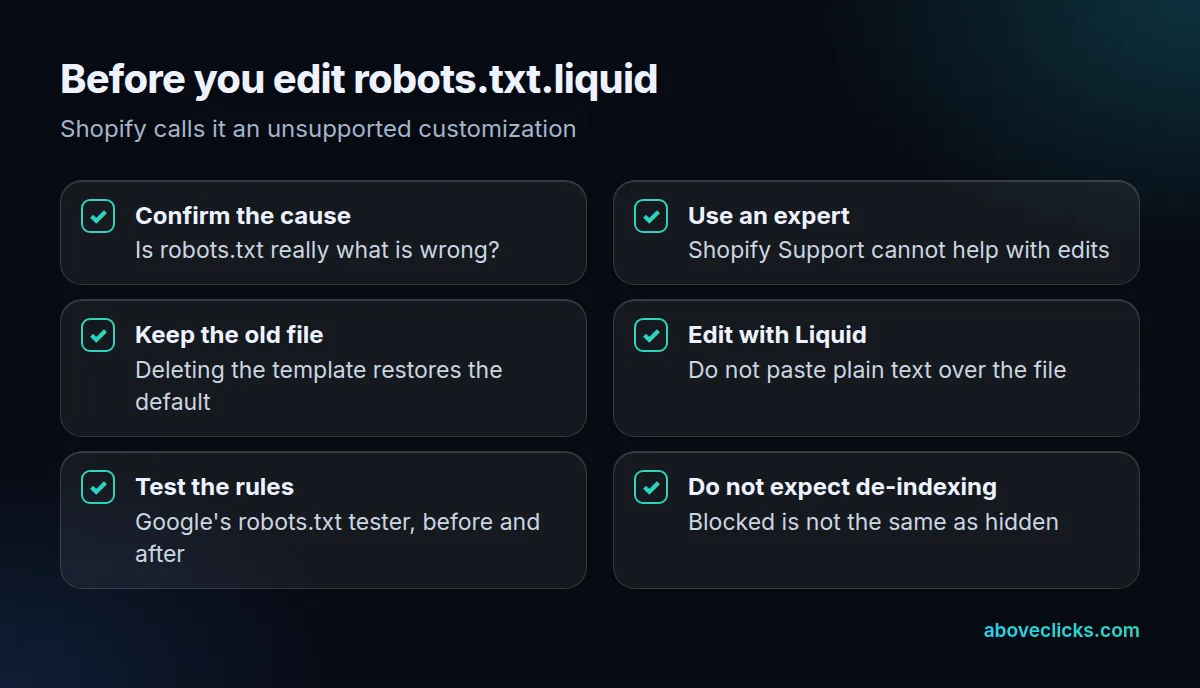
Treat the file as the last tool for Shopify SEO problems, not the first. Shopify calls editing it an unsupported customization, says Shopify Support cannot help with it, and warns that incorrect use can result in loss of all traffic. These Shopify SEO mistakes are easy to make and slow to notice, so use the checklist above if you must edit.
What happens to SEO when you delete a Shopify product?
This is one of the Shopify SEO problems that cost the most. Its URL returns a 404, Google removes it from the index, and any links pointing to it stop helping. A redirect to the closest live page keeps the visitor and most of the value.
Google’s page on HTTP status codes says that for 404 and 410, the indexing pipeline removes a previously indexed URL from the index, and that crawling frequency gradually decreases. It also describes a soft 404: a page that returns a success code but shows an error or empty page. Search Console flags those, and the Page indexing report recommends returning a real 404 for pages that are truly not found.
Shopify’s guide to URL redirects lists the limits that catch people out:
- You can redirect only from broken URLs. If the URL still loads a valid page, the redirect will not work.
- Some prefixes cannot be redirected, such as /cart, /orders and /apps, and the fixed paths /products and /collections.
- The maximum is 100,000 redirects, or 20,000,000 on the Plus plan, and Shopify suggests a third-party app for large batches.
Send a deleted product to the closest equivalent product or its collection, not to the home page. When a product or collection is only out of season, Shopify describes hiding it and redirecting: the hidden URL becomes a 404, which lets the redirect work.
Why is my Shopify store not showing on Google?
Usually because the store is new, still password-protected, on a trial, migrated without redirects or thin on content. Shopify’s own FAQ lists exactly those five reasons.
Check them in this order:
- Is Google indexing the store at all? Search
site:yourstore.com. Shopify says that if pages appear, Google is indexing the site. - Is the store live? Shopify says stores in private mode and trial accounts are not indexed.
- Did you migrate? Shopify names missing redirects from the old site as a cause. Map every old URL.
- Is a sitemap submitted? Submitting it in Search Console can speed up a new store.
- Is the content unique enough? Shopify calls adding keywords and relevant content the most common reason a store does not rank higher.
The last point is the honest one. Many stores have none of the technical Shopify SEO problems above, only collection pages with a heading and a grid and little else. Our Shopify website SEO guide shows where to add that copy.
How do apps and theme code break titles, headings and speed?
By changing what the page outputs, which makes them hard-to-see Shopify SEO problems. Shopify says a missing title or H1 on a current theme is usually caused by custom code or an app, and every script an app adds can slow the page.
The Shopify SEO FAQ lists the usual causes of a missing title: someone removing the title element, conditional logic that skips some page types, or an app introducing title logic that does not cover them. Its recommended test is to use Google’s URL Inspection tool and look at how the page is rendered, since that shows what a search engine sees, not what you see.
Speed has published targets. Google’s Core Web Vitals guidance asks for Largest Contentful Paint within 2.5 seconds, Interaction to Next Paint under 200 milliseconds and Cumulative Layout Shift under 0.1. Test one product page with an app on and off. If an app earns its keep, keep it; if it only adds scripts, remove it. Two apps writing the same product markup is a pattern we look for in an audit, and our technical SEO work starts there.
In what order should you fix Shopify SEO mistakes?
From the most reversible change to the least: read the report, fix links, add redirects, review code, check speed and edit robots.txt.liquid last.
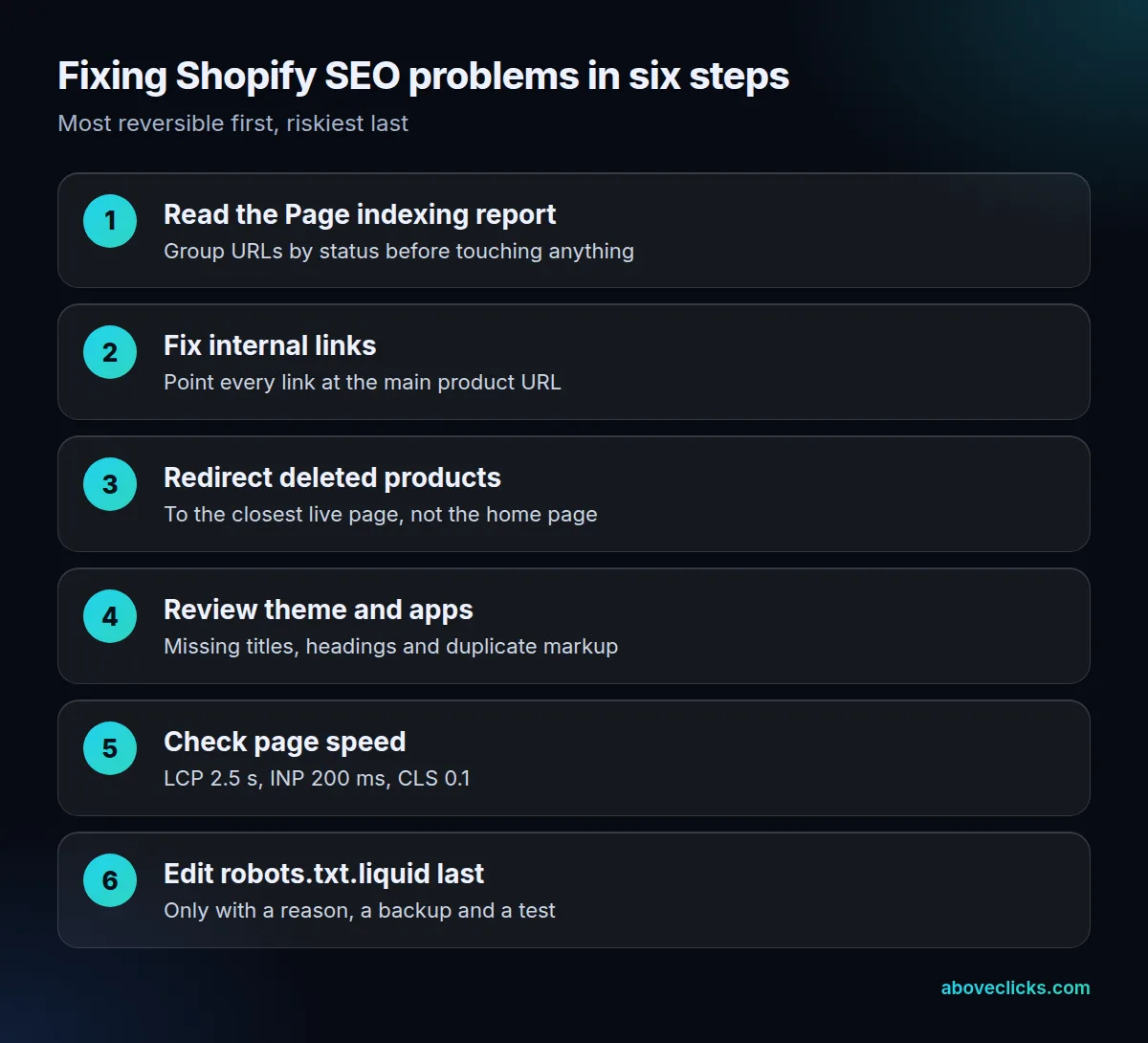
The order matters for any list of Shopify SEO problems, because early steps are cheap to undo and fix the largest groups of URLs. In the invented store above, the link fix covers 83% of the duplicates before anyone touches robots rules. After each change, use URL Inspection on a few key pages, and judge results against the same weeks last year. Shopify notes that Google can take days, weeks or months to update what it knows, so a quiet first week is not a verdict.
If you cannot tell which of these Shopify SEO problems you have, send us the error: use the WhatsApp button on this page or the free audit and we will read your Search Console with read-only access and reply with the likely cause. More guides are in e-commerce SEO.