An abandoned cart flow is an automated sequence of emails, sometimes texts, sent to a shopper who added something to their cart or started checkout and did not buy. Its quality depends less on the wording of the messages than on who it skips and when it stops.
This guide covers how an abandoned cart flow is built in Klaviyo, the settings worth changing, and a test-order routine to run before it goes live. For ready-made copy, see our abandoned cart email examples and subject lines; this page is about the flow behind them.
What is an abandoned cart flow?
A set of messages triggered by a shopper’s behavior in your store, not by a send date. It reminds them of what they left and stops as soon as they buy.
Klaviyo’s guide to an abandoned cart flow says almost 70% of shopping carts are abandoned on average, so the flow has plenty of people to work with. It treats “abandoned cart” as the umbrella term. A flow triggered by Added to Cart targets abandoned carts, and one triggered by Started Checkout targets abandoned checkouts.
Many stores run only one abandoned cart flow, not two. That leaves a gap, because someone who added a jacket and left never reaches checkout and never triggers an abandoned checkout flow.
How does the Klaviyo version work?
Your store sends an event to Klaviyo, a profile enters the flow, a time delay passes, and the profile filters decide whether each message goes out.
Klaviyo recommends running two flows: one on Added to Cart and one on Started Checkout. Someone who starts checkout has shown stronger intent, so you may want different timing or wording for them. To keep one person out of both, add the filter “Started Checkout zero times since starting this flow” to the Added to Cart flow.
Your platform decides how fast that event arrives. Klaviyo’s sync reference lists Shopify, BigCommerce and Wix as real time, Magento 2 as every 30 minutes, and OpenCart, Spree and Volusion as every hour. Even real-time syncing can show a processing delay, so the first delay should leave room for it.
On Shopify, an abandoned checkout is one that stays incomplete for more than ten minutes after the shopper gave an email address, according to Shopify’s help page. Without an email address nobody can be written to. Shopify’s own recovery email works only for the Online Store and Buy Button channels, and a shopper who enters only a phone number gets none.
Shopify also keeps suspected card-testing and bot checkouts out of its abandoned checkouts list, though it says not all automated activity is filtered out. Abandoned checkouts older than three months are deleted from the Shopify admin, so any recovery work has to happen well inside that window.
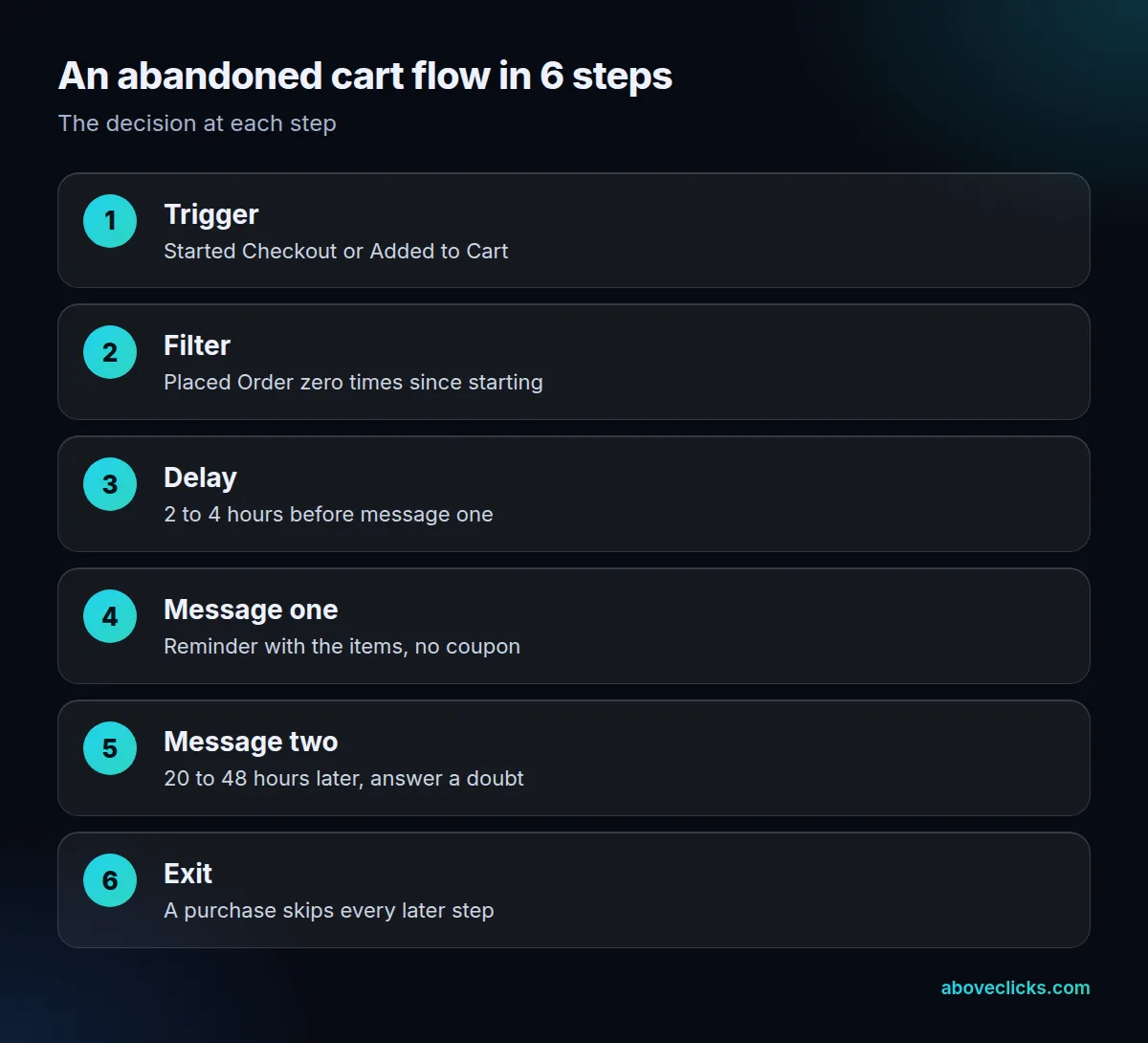
The map shows the 6 steps of an abandoned cart flow. Most of the real decisions are in steps 2, 3 and 6, not in the emails.
How do you set up an abandoned cart flow?
Pick a pre-built flow from Klaviyo’s flow library, then set the trigger, filters and a first delay of 2 to 4 hours before touching the design. Klaviyo advises starting from the library rather than from scratch.
Most pre-built abandoned cart flows trigger on Started Checkout. For Shopify, the Added to Cart metric needs the Track behavioral events setting switched on. The next table lists the settings we check first.
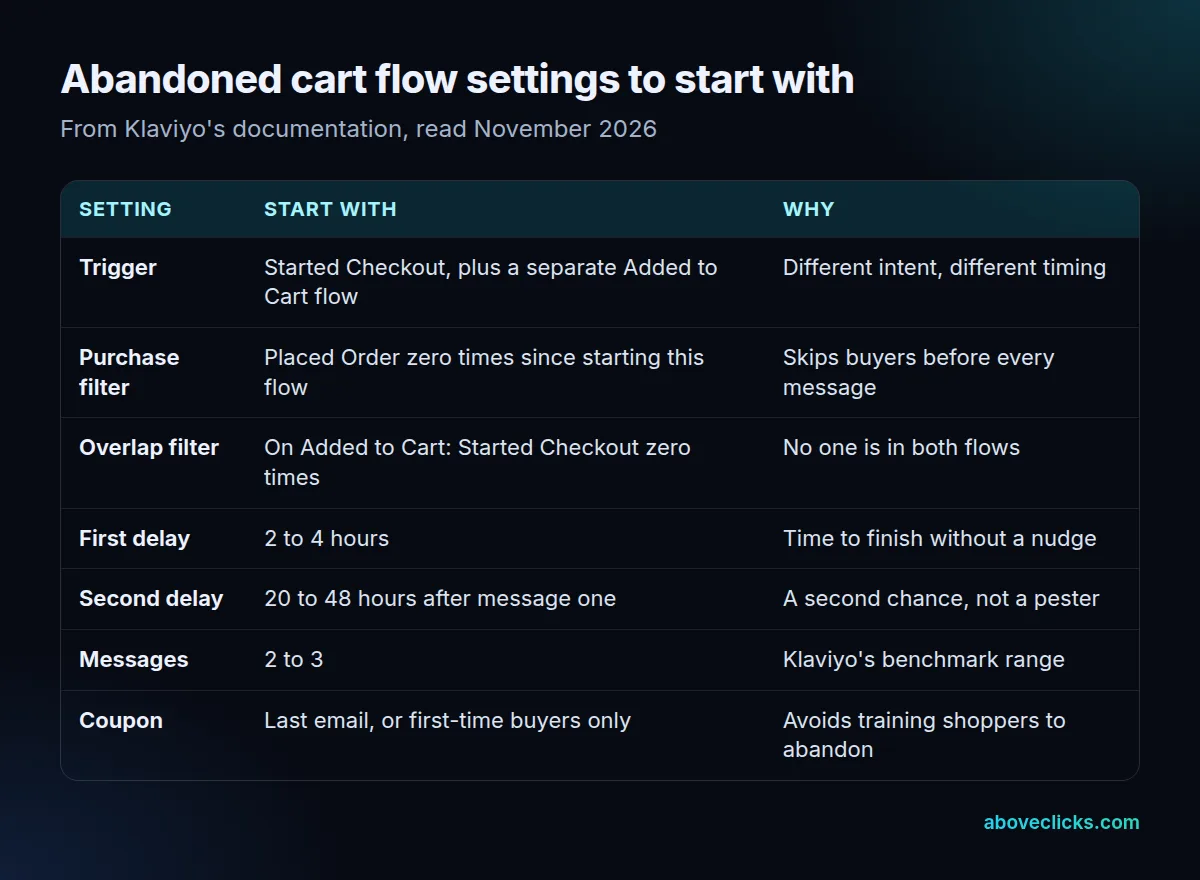
Two more rules from Klaviyo’s guide matter in practice for any abandoned cart flow:
- Turn off the platform’s default abandoned cart messages so a shopper doesn’t get two sets.
- Keep the dynamic product block. Event variables such as image, title, quantity and price exist only in metric-triggered flows, so a message built from scratch has to rebuild that block by hand.
The return link matters as much as the delay. Klaviyo’s guide shows that the cart-rebuild link depends on the platform: Shopify uses the checkout URL variable from the event, while Magento 2, PrestaShop and WooCommerce each use their own pattern. Some integrations rebuild the full cart on whatever device the shopper opens the link from, and a custom integration depends on how it was built, so ask your developer.
If you’d rather have someone check an existing setup, our Klaviyo email marketing service reviews a Klaviyo setup within 2 workdays.
When should the first email send?
Between 2 and 4 hours after the trigger for most stores. Klaviyo’s pre-built flow uses a 4-hour delay, and its guide recommends 2 to 4 hours for the first message.
Shoppers abandon for ordinary reasons: the card is in another room, the phone rang, they wanted to compare one more tab. Klaviyo’s guide gives similar reasons, and a short wait lets those people come back alone. Go shorter than that and the abandoned cart flow emails people who were still deciding. Go longer for big-ticket items: Klaviyo notes that a mattress takes more thought than a pair of shoes, so a longer delay may suit it better.
There is also a technical floor. On integrations other than Shopify and BigCommerce, Started Checkout data may not sync at once, and some sync once an hour. Klaviyo’s advice is a delay of at least 1 hour and 15 minutes on those. A 30-minute delay there can send late or not as planned.
How many emails should the sequence have?
Two or three. Klaviyo says its research across thousands of ecommerce customers found 2 to 3 messages perform best, with the second sent 20 to 48 hours after the first.
A simple pattern is a reminder first, then a second message that answers the most common doubt for your category, such as delivery time or returns. Each message should have one job, and only the products the shopper left should appear. Klaviyo advises against showing other products, because they distract from returning to the cart.
On discounts, Klaviyo’s advice is not to put a coupon in the first email, since that can train shoppers to abandon carts to get one. Hold the incentive in your abandoned cart flow for the final email, or offer it only to people who have never bought, using a split in the flow. Work out the margin first; our email examples post shows how.
Why does an abandoned cart flow email people who already bought?
Because a flow filter is missing. Everyone who starts checkout enters the flow, and only a filter stops buyers from receiving the next message.
Klaviyo’s fix is the profile filter “Placed Order zero times since starting this flow”. It checks before each message, so a shopper who buys after email one is skipped for every later step. A second filter, “Has not been in this flow in the last X days”, keeps recent recipients from re-entering; Klaviyo’s own example uses 7 days. Together with the overlap filter, that makes 3 filters on a well-built abandoned cart flow.
Think of the abandoned cart flow as a funnel of exits. In a store where most people who start checkout do pay on their own, most entrants never receive a message at all. A large number of “skipped, failed profile filters” entries is normal. It means the flow is working. Klaviyo says so itself in its guide.
If a message still reaches a buyer, check its status. Klaviyo’s troubleshooting guide explains that a Draft message neither sends nor queues anyone, a Manual message queues people under Needs Review, and only a Live message sends by itself. Shopify adds a limit of its own: a recovery link can’t be disabled once sent, and anyone who opens it can continue that checkout, so it should go only to the shopper who left.
How do you test an abandoned cart flow before it goes live?
Run 3 test orders on the abandoned cart flow: one that buys before the first delay, one that buys after message one, and one that abandons and waits. Each proves a different exit.
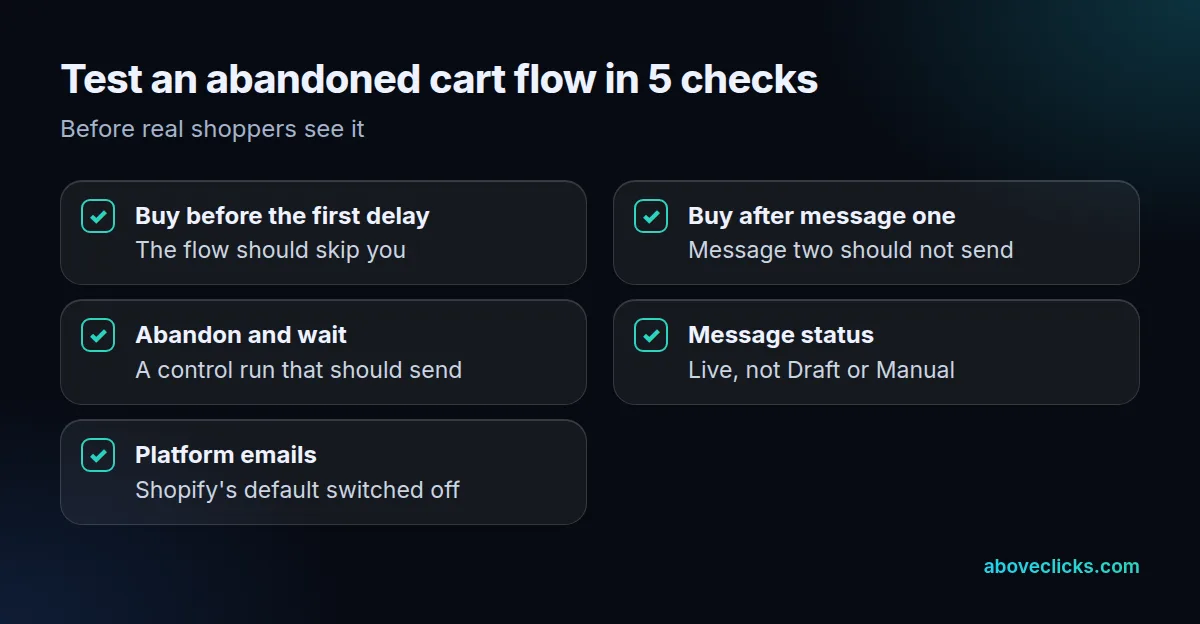
Here is the routine we use as a worked example, with no client data:
- Start a checkout with a test profile, then pay before the first delay ends. The profile should be skipped.
- Start a second checkout, let message one send, then pay. Message two should not send.
- Start a third checkout and leave it. This control should receive every message on schedule.
Use a different email address for each test profile, and note the time of every step so you can compare it with the delays. Only checkouts with an email address enter the flow, so a test that skips that field proves nothing.
Read the results in each message’s Recipient activity tab. If a profile that bought is still queued, cancel that send from there and fix the filter before launch. Allow 48 hours for the control run, because the second message goes out 20 to 48 hours after the first.
Open the return link from a phone as well as a laptop, because a link that works on one device and shows an empty cart on the other quietly wastes the whole abandoned cart flow. Then confirm the messages are Live and that the platform’s default emails are off. For an outside check, our free audit covers email flows, and our abandoned cart recovery service builds and maintains them. More guides are in e-commerce SEO.