Shopify has no plugins, so a plug in SEO Shopify search usually means a Shopify SEO app from the Shopify App Store. Install one only for a job Shopify doesn’t already do, and test it before you rely on it.
This guide explains what an app is, what Shopify already handles, what a Shopify SEO app can add, five checks to run before installing and how to tell whether it helped.
What is a plug in SEO Shopify app?
It’s an app from the Shopify App Store, because Shopify doesn’t use the word plugin. Shopify’s apps help page says most apps are built by third-party developers, not by Shopify, so support for an app comes from its developer.
If you’re used to WordPress, the habit of installing an SEO plugin on day one doesn’t carry over. A Shopify app runs next to your theme, and many modern apps add their features through theme app extensions. Shopify says apps built that way don’t edit theme code, and they add content through 2 kinds of block: app blocks and app embed blocks.
People also search for a Shopify SEO plugin, a Shopify SEO app and the same thing in other wording. They all point to one place: the Shopify App Store, where apps sit in categories such as marketing and conversion. Treat each listing as a third-party product from a separate company, with its own support, its own terms and its own effect on your store.
Lists of the best Shopify SEO apps usually jump straight to brand names. This guide doesn’t, because the right app depends on the job, and an app that fits a 5,000-product catalog can be wasted money on a small store.
Is Shopify good for SEO without an app?
Yes for the basics. Shopify’s SEO overview lists what’s handled automatically: canonical tags that reduce duplicate content, a generated sitemap.xml and robots.txt, title tags that include your store name, SSL on by default and product structured data in themes.
You still write the content. Shopify’s keyword guide lets you enter a page title of up to 70 characters, but recommends 60 or fewer, and suggests a meta description of about 160 characters. Alt text and URLs are editable in the admin too.
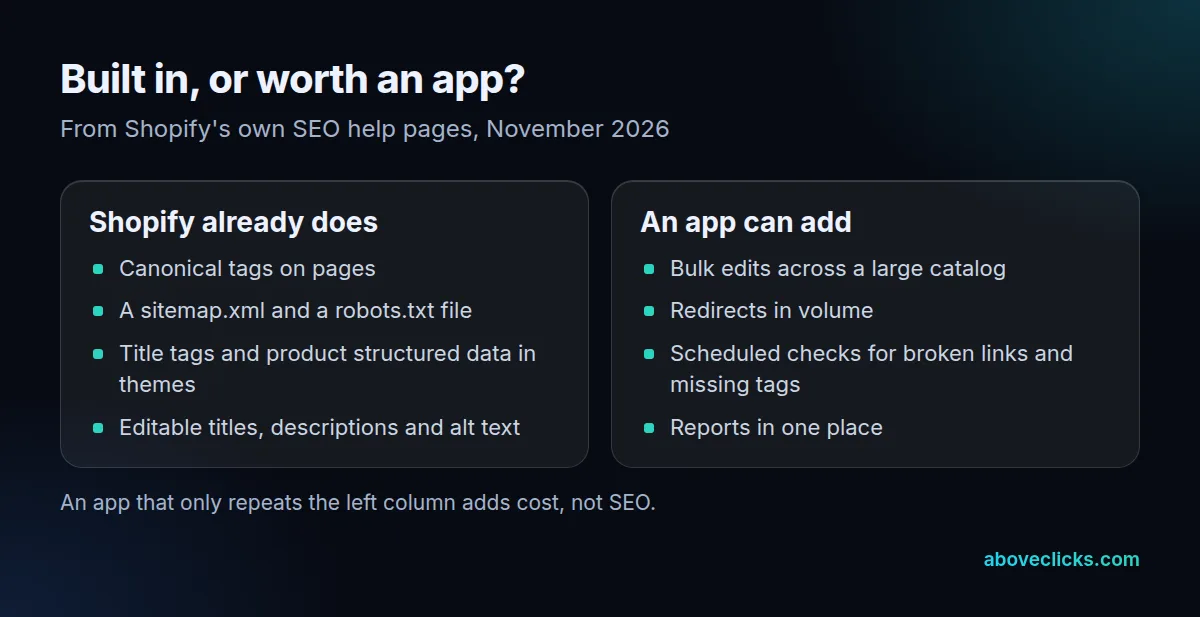
Two more limits are worth knowing. As of November 2026, Shopify’s redirect page gives a limit of 100,000 URL redirects, and suggests a third-party app if you need to create a large number of them. And the default robots.txt file is described as working for most stores, with a robots.txt.liquid template if you need custom rules.
For a step-by-step list of native settings, see our Shopify SEO checklist and the guide to where Shopify’s SEO settings live.
This matters when you compare a Shopify SEO app with the built-in tools. If an app’s main selling point is “adds a sitemap” or “adds canonical tags”, you already have both. Ask what it does beyond the 5 automatic items in Shopify’s own list: canonical tags, sitemap.xml, robots.txt, store-name titles and SSL.
What does a Shopify SEO app actually do?
It saves time on jobs that are slow by hand, and sometimes adds checks Shopify doesn’t run. It can’t make a page rank; the page still has to deserve it.
The jobs that tend to justify an app:
- Bulk edits: writing titles, descriptions or alt text from a template across hundreds of products.
- Redirects in volume: after a migration or a catalog clean-up, when typing each redirect isn’t realistic.
- Monitoring: scheduled checks for broken links, missing titles or pages that dropped out of the sitemap.
- Reporting: one place to see issues, instead of several admin screens.
Here is the arithmetic, as an example. A store has 1,200 products and spends 2 minutes on each title and description. That’s 2,400 minutes, or 40 hours of manual editing. A template that fills the first draft in bulk, followed by a review of your top 100 products, takes a fraction of that. The saving is real, and it’s the job to write down before you shop.
An app also can’t replace the work that moves rankings: pages that answer the search, useful product copy and links from other sites. Treat a Shopify SEO plugin or app as a power tool for repetitive jobs. It speeds up a plan; it isn’t the plan. Our Shopify SEO page shows how we sequence that work.
Be careful with promises about titles. Google’s title link guide says its title links are completely automated, drawn from the title element, the main visible title and headings. An app can set your title tag; it can’t force what Google shows.
How do you check a Shopify SEO app before installing it?
Run five checks on any Shopify SEO app: the job, the speed cost, the theme code, overlap with other tags and the exit. Do it on a duplicate theme or at a quiet time, and record the numbers before you start.
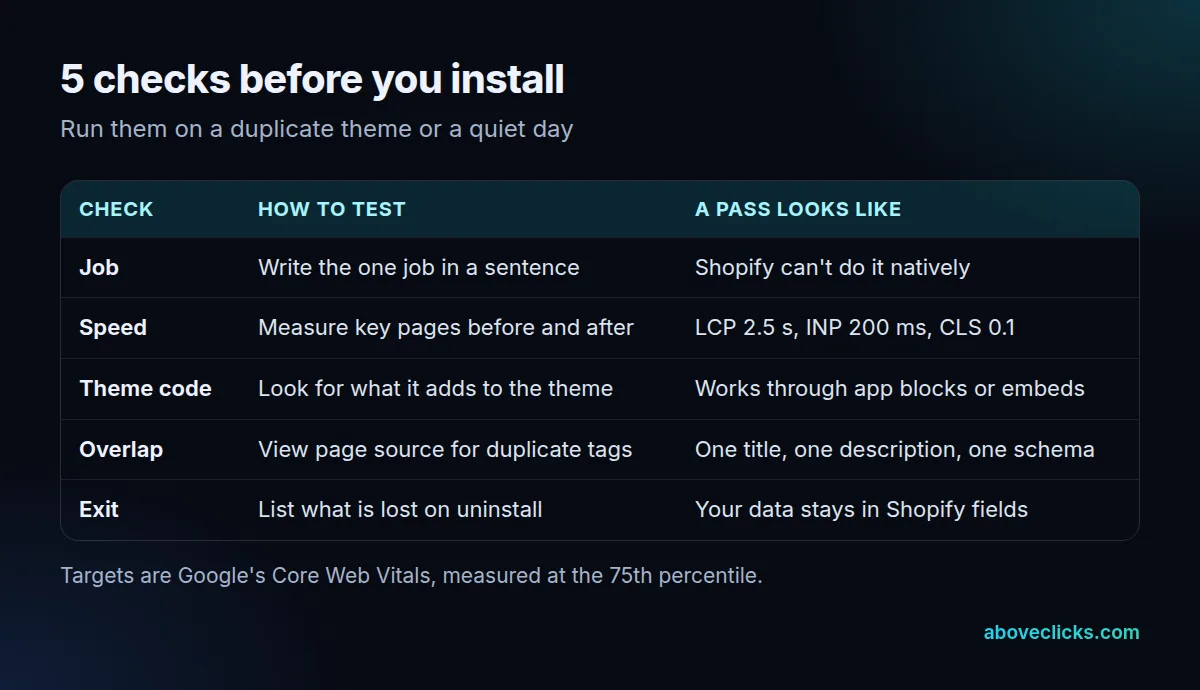
1. The job. Write one sentence, such as “bulk-edit alt text for 1,200 products”. If Shopify can already do it, skip the app.
2. Speed. Google’s Core Web Vitals guidance sets good targets of 2.5 seconds for Largest Contentful Paint, 200 milliseconds for Interaction to Next Paint and 0.1 for Cumulative Layout Shift, all at the 75th percentile. Test the home, a collection and a product page before and after the install.
3. Theme code. Check how the app adds its features. Apps built with theme app extensions can be switched off in the theme editor. After an install, search your theme code for the app’s name to see anything it added by hand.
4. Overlap. Open a product page’s source and count the title tags, meta descriptions and structured data blocks. You want one of each. Two sources writing the same tag is the commonest conflict between an app and a theme.
5. Exit. Before you commit, write down what disappears if you uninstall. Data saved in Shopify’s own fields stays; anything the app generates on the fly doesn’t.
Do you need a free Shopify SEO app?
Not for a small catalog. A free Shopify SEO app is worth trying when it does one bulk job you’d otherwise do by hand, and not worth installing for features Shopify already has.
Take a store with 40 products. At 2 minutes each, editing titles and descriptions by hand takes 80 minutes. A tool that saves most of that is nice, but it isn’t a reason to add scripts to every page. The same store with 1,200 products faces 40 hours, which is where an app pays back its cost.
Free and paid versions differ by plan, limits and features, and those change often, so check the app listing the day you decide. A free tier that stops at a small number of products may not cover your catalog. Don’t pay for an annual plan before you’ve finished the 30-day test below.
A simple rule by catalog size works as a starting point, and it comes from the arithmetic above, not from a market study:
- Under about 100 products: use Shopify’s own fields. At 2 minutes each, 100 products take 200 minutes, a few hours of careful work.
- Hundreds of products: try a free Shopify SEO app for the bulk edit only, and review the output by hand.
- Thousands of products or a migration: an app for redirects and bulk edits is usually worth it, plus a person to review the result.
If you want a second opinion on whether your store needs more than the native tools, our technical SEO audit covers crawl, indexing and structured data in one pass.
How do you tell if the app helped?
Compare against a saved baseline, change one thing at a time, and wait for recrawling before you judge a Shopify SEO app. Most “my SEO app didn’t work” stories come from judging after 2 days.
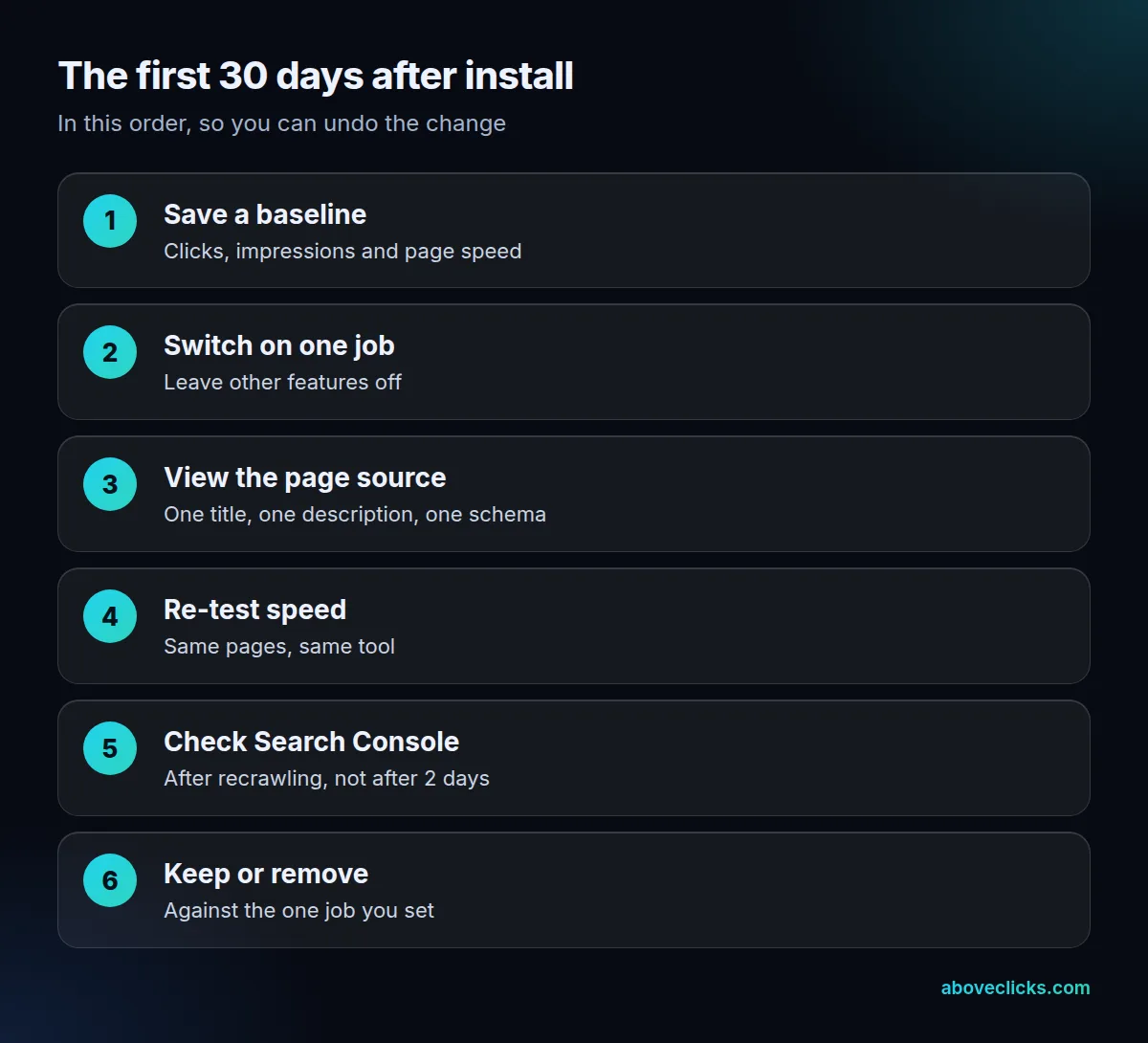
Save your baseline from Search Console before you install. Google’s traffic drops guide shows how to widen the Performance report to the last 16 months, so you can see whether a change is seasonal. Then turn on one job only.
Allow time for Google to notice. Its recrawl guide says crawling can take from a few days to a few weeks, so a change made on Monday often isn’t visible in Search Console by Friday. Re-test page speed the same day, because that effect shows at once.
A short note keeps the test honest. Write down the date, the app’s setting and the page set it touched, so a later drop in traffic can be traced to a cause. If you change titles on 300 pages and speed up images on the same day, you won’t know which change moved the numbers.
At day 30, hold the app to the one job you wrote down. If it did that and the speed numbers held, keep it. If not, remove it and replace what it did with a native setting. A plug in SEO Shopify search should end with an app that has one job, one test and one exit plan. We run this kind of read-only review in our free audit, and the Shopify SEO service page shows what we do for stores that want it handled for them. More guides are in e-commerce SEO.