Omnisend vs Shopify Email is a choice between a free built-in sender and a dedicated ecommerce email and SMS platform. Decide by how many emails you send, and by how deep your automations need to go.
This guide compares Omnisend vs Shopify Email on billing, automation, segments, channels and sending rules. It includes a worked monthly bill for the built-in tool and a five-trigger test for when a store has outgrown it. Rates are from each vendor’s own pages, as of November 2026.
Does Shopify do email marketing on its own?
Yes. Shopify’s built-in tool, now part of Shopify Messaging, lets you design and send email campaigns and automations without installing an app.
According to Shopify’s Help Center, you create marketing campaigns, send email and SMS marketing, build sign-up forms and connect third-party marketing integrations from the Growth area of the admin. That last part matters for Omnisend vs Shopify Email, because Omnisend is one of those integrations: it plugs into the same store rather than replacing it.
Shopify’s own Messaging page says branded templates pull your logo, products and prices from the store, and that automation templates cover welcome, winback and upsell emails. For a store with a small list and 2 to 4 campaigns a month, that is often enough. Omnisend or Shopify Email only becomes a real question once you want more than that.
Shopify’s developer documentation also describes customer segments and marketing automations as things apps can extend from the admin. In short, the built-in tool is the starting point and apps like Omnisend are the extension route. Shopify Email vs Omnisend is therefore not a fight between rivals, but a question of how far the free tool takes you before you add a platform. Our guide to Omnisend vs Klaviyo covers the next step up.
How does Omnisend vs Shopify Email billing differ?
Shopify charges for emails sent; Omnisend charges for the size of your contact list. That one difference decides which tool is cheaper for your store.
Shopify says every store gets 10,000 free emails a month on all plans, then $1 per 1,000 extra emails, with SMS charged separately (as of November 2026). The chart below is simple arithmetic from that rate. It leaves out Shopify’s lower rates at very large volumes, which our Shopify Email vs Klaviyo guide covers.
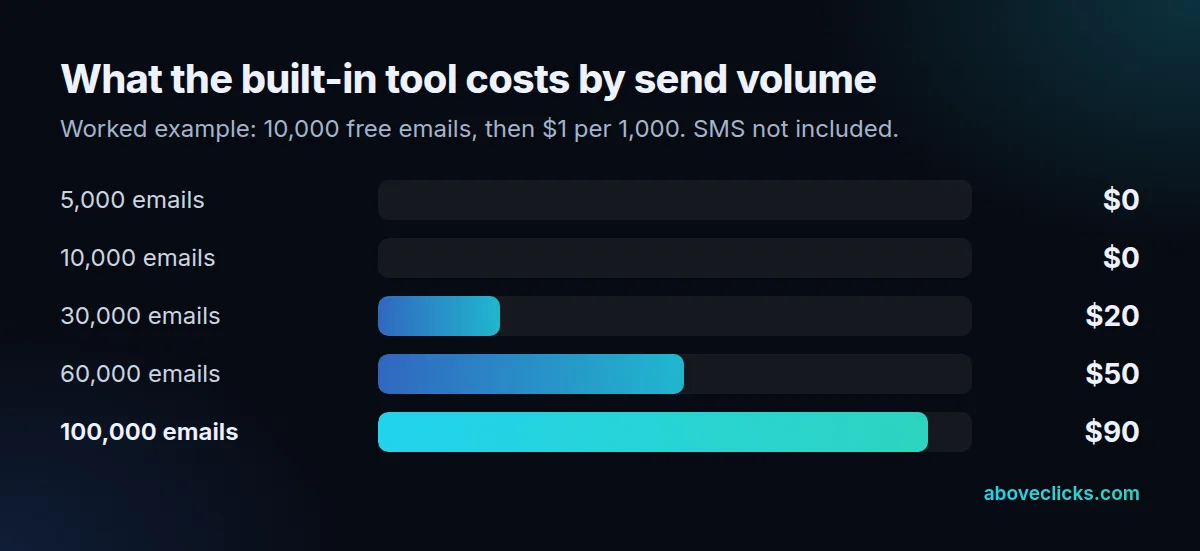
The billing side of omnisend vs shopify email is the part most owners get wrong, because the two tools count different things. Omnisend works the other way round. Its plans page lists a free plan with 500 emails a month and up to 250 contacts, a Standard plan that includes 6,000 emails at the 500-contact list size it displays, and a Pro plan with unlimited emails. Omnisend says it bills for subscribers and for non-subscribers who received automated messages, and that unsubscribed contacts are not billed.
We do not quote Omnisend’s paid amounts here: its plans page shows promotional discounts and sliders that move with list size, so any figure would be out of date quickly. Instead, test both against your own numbers:
- Count the emails you send in a normal month, including automations.
- Count the contacts you would load into Omnisend, including guests who only received an automated message.
- Open the plans page, set the list-size slider to your count and compare the result with the chart above.
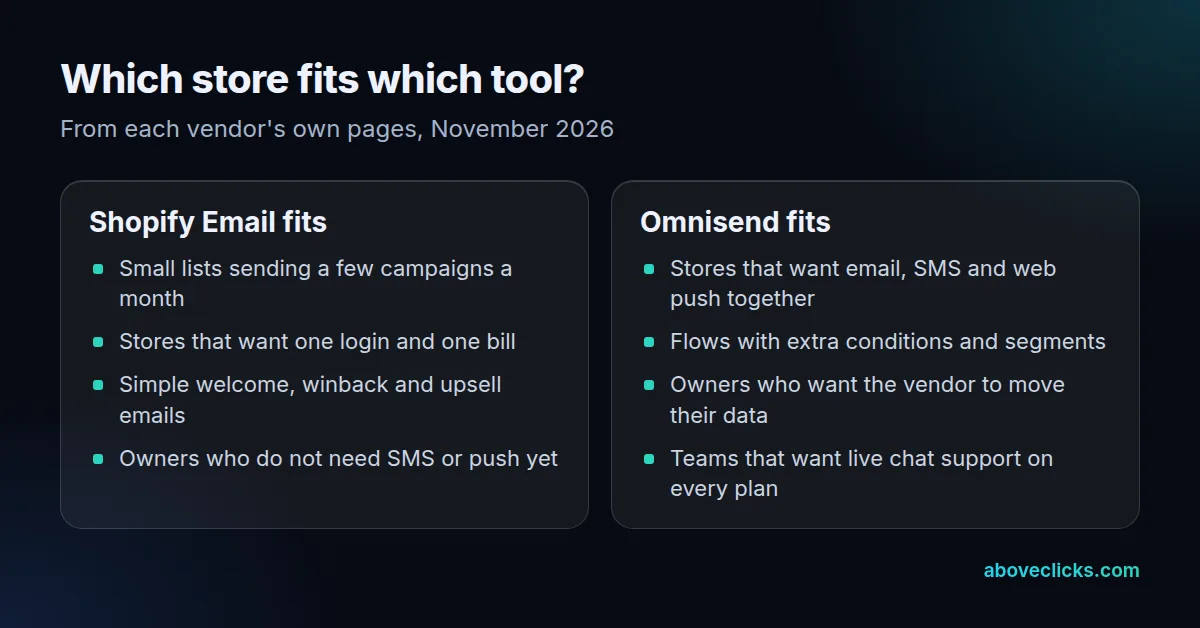
A store with a large list that emails 2 times a month tends to favor the per-email model. A store with a small, active list that sends often tends to favor the per-contact model. The email marketing cost guide explains the wider picture.
What can each one automate?
Shopify covers the standard recovery and welcome flows; Omnisend is built for longer flows with more conditions. Both let you start from a template.
Shopify’s page says its templates are ready to use for welcome, winback and upsell emails, and that you can build custom workflows with conditional logic and wait steps. That is a capable base for most small stores.
As of November 2026, Omnisend’s plans page lists pre-built automation workflows, a Standard plan with 6,000 emails a month at a 500-contact list size, and a Pro plan that removes the email cap and adds SMS from $0.007 per message. The practical gap shows up in how many branches you want in one flow, how often you want to test variants, and whether the same flow should reach a customer by email first and SMS second.
In the omnisend vs shopify email comparison, automation depth is where a paid platform earns its fee. Before you pay for more automation, list the flows you run today. If you have a welcome flow, a cart reminder and a winback email, the built-in tool already covers them. If your plan includes a post-purchase series, a browse reminder and a replenishment reminder, test whether the built-in editor can build each one before you pay for something else.
How do segments, forms and channels compare?
Both tools segment by customer data, but Omnisend adds AI-built segments, and web push and SMS sit on the same platform. That makes it the broader tool.
Shopify’s Messaging page says you can send to customer lists or segments and preview an email before sending. Omnisend’s segmentation page says you can describe a group in plain words, such as “frequent buyers” or “churn risks”, and its AI builds a segment with matching filters. The segments update as browsing and purchase data changes.
On channels, Shopify lists SMS marketing as available in selected countries and charged separately. Omnisend lists email, SMS and web push, with a free-plan allowance of 500 web push notifications a month and unlimited web push on the Standard plan, according to its plans page.
If you only email, the extra channels may not matter. If you want one list and one set of reports across email, SMS and push, that is one of the clearest reasons to choose Omnisend vs Shopify Email’s simpler built-in route. Ask yourself whether you will really send SMS within 6 months; if the answer is no, do not pay for a channel you will not use.
Which sending rules apply to both?
The same ones, because they come from the mailbox providers, not the tool. Whichever tool you pick in the omnisend vs shopify email decision, Google’s rules for bulk senders apply to it.
Google’s sender guidelines say that if you send more than 5,000 messages a day to Gmail accounts, you must set up SPF, DKIM and DMARC, support one-click unsubscribe for marketing messages, and keep your spam rate below 0.30%. A tool cannot fix a poor list for you: it can only follow those rules and show you the numbers.
That is why the Omnisend vs Shopify Email decision should not rest on the promise of better inbox placement, and why shopify email vs omnisend deliverability claims deserve a test, not trust. Sending to people who asked for your emails, and removing those who stopped opening them, does more than any platform switch.
Omnisend vs Shopify Email: when should you move?
When two or more of the five triggers below apply, a trial is worth your time. One trigger alone rarely justifies a move.
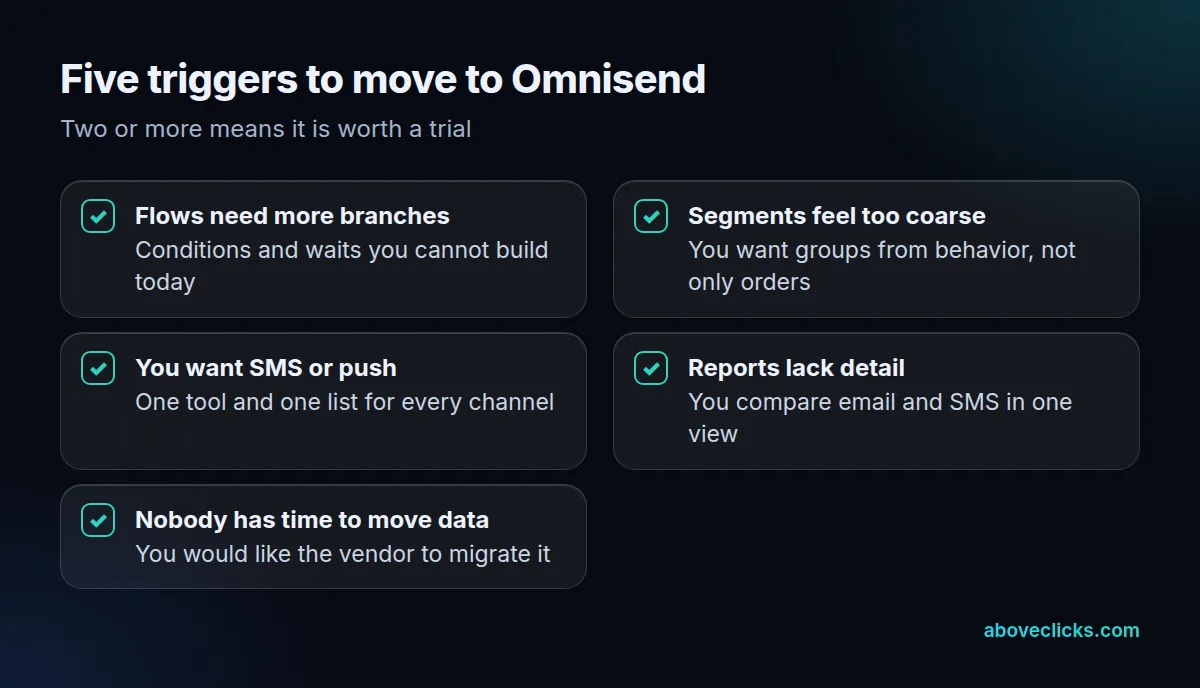
Run the test on real data rather than memory. Open the last 3 months of reports, count the flows you wish you could build, and note any segment you had to approximate. That small exercise usually settles Omnisend vs Shopify Email faster than a feature table.
The first three triggers are about capability: flows that need more branches, segments that need more detail, and a wish for SMS or push on one list. The last two are about effort: reports that do not compare channels, and nobody with the hours to rebuild lists and templates by hand. As of November 2026, Omnisend’s plans page says its team migrates contacts, data and segments for you, so the effort of moving does not have to fall on your team.
Be honest about the cost of waiting, too. A store that stays on the built-in tool for 12 more months with flows it has outgrown loses the revenue those flows would have earned, while a store that moves too early pays for features it does not use. For most owners, a 30-day trial on a copy of the list is the cheapest way to answer the omnisend vs shopify email question with their own numbers.
If you are weighing Omnisend or Shopify Email against a third tool, our Omnisend vs Klaviyo comparison covers that pair. A store with heavy segmentation and a large app stack may eventually outgrow both, and that is where Klaviyo email setup and migration comes in.
How do you switch without losing your flows?
Export first, import with consent status, rebuild the three revenue flows, then run both tools side by side for a short test before you turn the old one off.
A safe order of 5 steps:
Plan for 2 weeks of overlap, not a single cut-over day. The omnisend vs shopify email move is safest when the old flows keep running until the new ones have fired for real customers.
- Export your customer list from Shopify with each person’s marketing consent status.
- Import it into the new tool with that status intact, and never import unsubscribed people.
- Rebuild welcome, cart reminder and winback first, because they earn the most for the least effort.
- Send one small campaign to a slice of the list and compare delivery and unsubscribes against your last built-in send.
- Turn off the old flows only after the new ones have fired for real customers.
We set up and migrate email flows for Shopify stores, usually starting with the 3 flows above, and the Klaviyo email marketing service page lists what a setup covers. If you would like a second opinion before you choose, our free audit reviews your current email setup. More comparison guides are in buying guides.