Shopify vs WordPress for ecommerce is a choice between a hosted store and a publishing site that has a store added to it. Shopify suits teams who want little upkeep, and WordPress suits content-led shops that have someone to run it.
This guide covers three ways to set up a store, who looks after what in each, the mistakes that cost the most and a short test to choose. For fees, see our Shopify vs WooCommerce vs BigCommerce guide; for search, see Shopify vs WooCommerce SEO.
Is Shopify better than WordPress for ecommerce?
Not for every shop. Shopify is better when products drive the business and nobody wants to run a server; WordPress is better when content drives sales and you want full control of the site.
In shopify vs wordpress for ecommerce, the two don’t compete on equal terms, because they were built for different jobs. Shopify is a store from the first day: products, checkout and hosting come in one account. WordPress began as publishing software and needs a plugin before it can sell anything. Most shopify vs wordpress comparisons skip that point and set a store against a blog.
A fair test for shopify vs wordpress for ecommerce is to ask what you’d have to build yourself. On Shopify you choose a theme and add products. On WordPress you make 3 decisions first:
- Hosting that meets the store plugin’s published requirements, such as PHP 8.3 and 256 MB of memory.
- A theme that works with the store plugin you choose.
- A store plugin, plus payment, shipping and tax add-ons on top.
Neither route is wrong in shopify vs wordpress for ecommerce. They differ in how much you decide up front and how much you maintain afterwards. Shopify also has third-party parts, since most of its apps are built by outside developers, but the platform underneath stays Shopify’s job.
Shopify vs WordPress for ecommerce in one line
Shopify is a store with some content tools; WordPress is a content system with a store added. Pick by which side earns your revenue.
Is WordPress good for ecommerce?
On the wordpress vs shopify question, yes: WordPress works when a plugin supplies the store and someone maintains the site. WooCommerce is the best-known option, with more than 7 million active installations listed on its WordPress.org page (as of November 2026).
WordPress also has real strengths for shops that publish a lot. Guides, comparisons and long product stories sit naturally next to the products, and the editor handles many content types. The software itself is built on PHP and MariaDB and licensed under GPLv2, so you aren’t locked to one vendor.
The catch in shopify vs wordpress is that a store on WordPress is several parts working together: the core software, a theme, a store plugin, a payment plugin, shipping and tax add-ons and your hosting. Each part is updated on its own schedule. A shop with one person and 30 products can run that well; a shop with 5,000 products and nobody assigned to it often can’t. That is the core of shopify vs wordpress for ecommerce: WordPress hands you the control and the chores together.
What does WordPress for ecommerce actually mean?
Shopify vs WordPress for ecommerce comes down to one of three setups, and the setup matters more than the brand name. Two of them keep your store on WordPress; the third uses WordPress only for content.
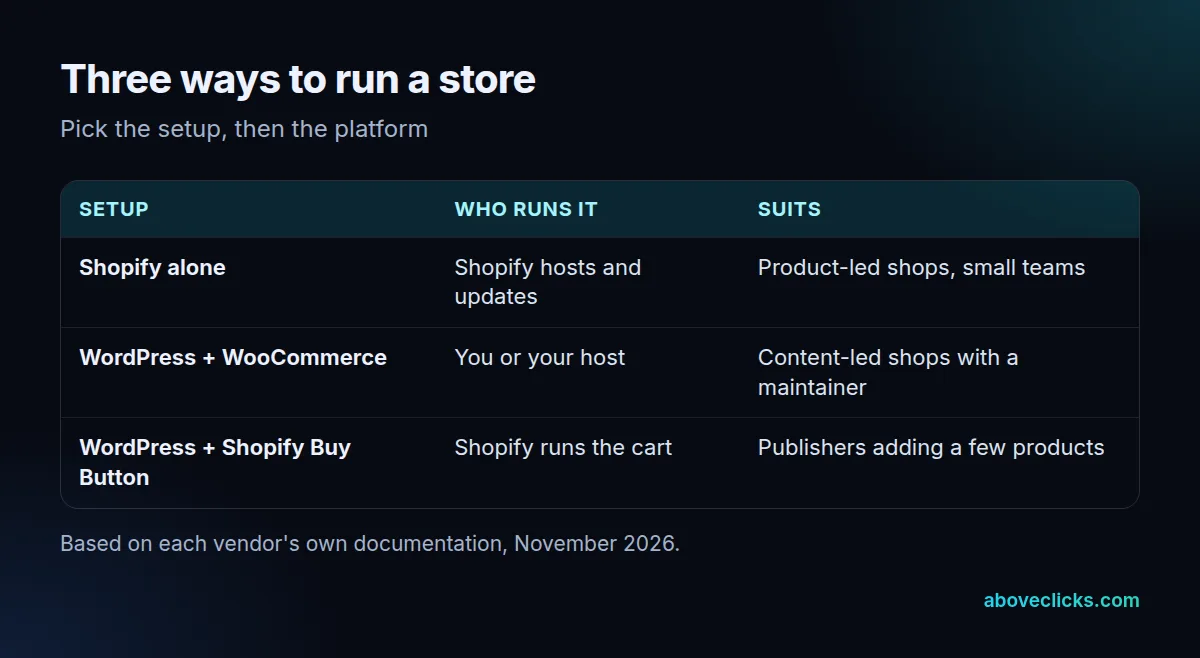
- Shopify alone: the storefront, checkout and content all live in Shopify, and Shopify hosts and updates the platform.
- WordPress with a store plugin: WooCommerce is the usual choice. WooCommerce 10.8 and later needs WordPress 6.9, and you or your host run everything under it. If you pick this route, our WooCommerce development page shows what we build.
- WordPress for content, Shopify for the cart: the blog or magazine stays on WordPress and products are sold through Shopify, covered below.
A woocommerce vs shopify comparison is really a comparison of setups 1 and 2. Setup 3 is the one most owners haven’t heard of, and it fits a lot of publishers. Whether Shopify or WordPress is right for you depends on which of the three your team can actually run.
Which costs more, Shopify or WordPress?
In shopify vs wordpress for ecommerce, it depends on what you’d otherwise pay for hosting, extensions and time, not on the headline fee. Shopify bundles hosting into its plan; WordPress software is free, but hosting, plugins and maintenance are paid for separately.
We don’t give fee tables here because plans change often and the current numbers are in our Shopify vs WooCommerce vs BigCommerce guide, dated and linked to each vendor. Instead, compare the two on these 4 lines, using quotes from your own host and processor:
- Platform plan or hosting for the same year
- Paid themes, extensions and apps you’ll actually need
- Payment gateway fees on your expected sales
- The hours someone spends on updates, fixes and backups
Hosting alone isn’t trivial: WooCommerce’s server page asks for PHP 8.3 and a 256 MB memory limit, which cheap shared plans may not meet (as of November 2026). The last line is the one owners forget. Free software doesn’t mean a free store. If your team’s time is already stretched, a hosted plan often costs less in practice than the same shop on WordPress with a part-time fixer. If you’re weighing wordpress vs shopify on cost alone, add those hours to the WordPress side before you compare.
Who looks after security and updates?
In shopify or wordpress, the split is simple. On Shopify, Shopify runs the platform. On WordPress, you or your host do. Both sides still depend on third parties: most Shopify apps are built by third-party developers, and so are most WordPress plugins.
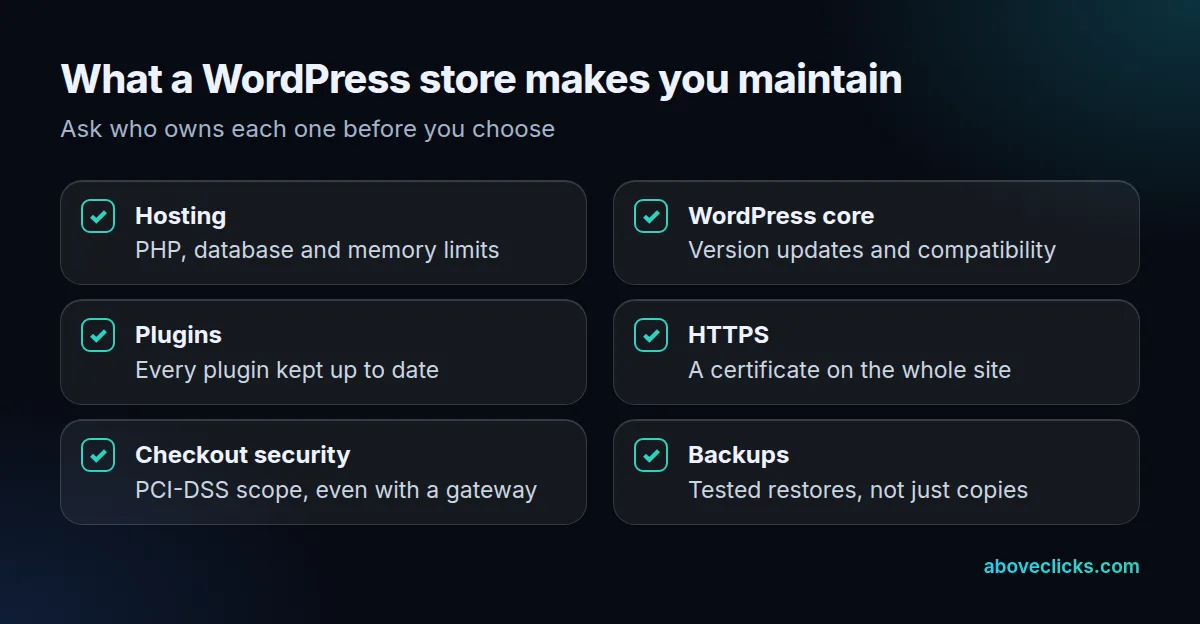
WooCommerce’s own documentation sets the bar. Its server requirements for version 10.8 and later list WordPress 6.9, PHP 8.3, MySQL 8.0 or MariaDB 10.6, HTTPS and a 256 MB memory limit (as of November 2026). Its security page tells owners to keep WordPress and all plugins up to date.
Card data is another point. WooCommerce’s PCI-DSS guidance says the standard still applies when you use an off-site gateway, because your site serves the checkout page, although the scope can be much smaller. Ask whichever platform you choose how it handles this, and get the answer in writing.
Can you use Shopify and WordPress together?
Yes. Shopify’s Buy Button lets you add products to a non-Shopify website or blog, and Shopify’s own example is a WordPress blog post with a product button inside it. The channel is included in all Shopify plans.
For shopify vs wordpress for ecommerce, this is the setup for publishers who don’t want to move their site. Start with 1 post and 3 products, and watch it for 30 days before you roll the button out further. Product details update from the Shopify admin, orders appear there too and customers can buy without leaving the post. In shopify or wordpress terms, you keep both and let each do what it was built for. Shopify notes that you need a supported payment gateway for it.
There is a trade-off. You then run two systems, and some features (a full storefront, filtering, collections) are weaker on the embedded side. If most of your revenue will come from product pages rather than articles, move the whole store to Shopify and keep the content on a subfolder or a connected blog instead. If you want that route, our Shopify development team builds both versions.
Which three mistakes cost the most?
The costliest mistakes come from choosing by brand name instead of by who does the work. These three show up most often.
- Choosing WordPress for the software price. The software is free; the hosting, plugins and upkeep aren’t, and nobody is assigned to them.
- Choosing Shopify and expecting WordPress’s content freedom. A hosted platform sets the URL paths, so plan your content structure before you commit.
- Switching without a redirect map. Google says to expect temporary ranking fluctuation in a move, and that it can take weeks or more for the new URLs to replace the old ones.
All three are avoidable with a decision made before the build, not after it. Write down who will run the store over the next 12 months, how you’ll organise the content and which URLs must survive. A page that ranks today is an asset; losing it to a rushed switch is the cheapest mistake to prevent and the most expensive to repair.
How do you choose, and what does switching involve?
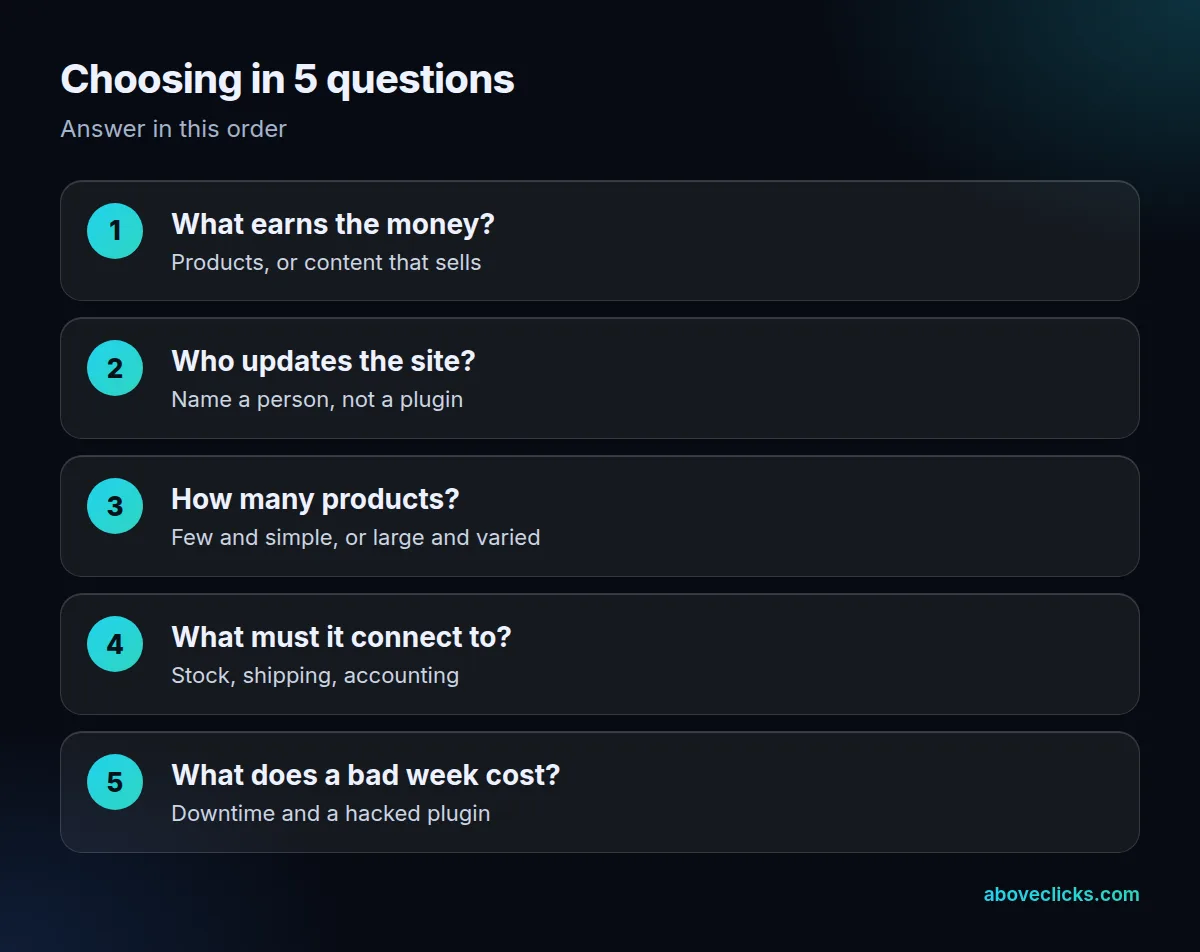
Answer these five questions in order for shopify or wordpress, then pick the setup that most answers point to for shopify vs wordpress for ecommerce. If the answers split evenly, start with the hosted route; it is easier to add a WordPress blog later than to take over a server. Read each answer against the three setups in the table above: product-led answers point to Shopify alone, content-led answers with a named maintainer point to WordPress with WooCommerce, and a mix of the two points to the Buy Button route.
Here’s the order we use when planning a platform move, with no client data involved. First list every live URL, with its traffic and its links. Then map each old URL to its new one and decide what changes. Google’s site move guide calls for permanent redirects from the old URLs to the new ones. Move the products by CSV file after that, testing 20 products first, then test redirects before launch day and check the new pages in Search Console. Our Shopify migration page describes that process.
If you aren’t sure which setup fits, our free audit reads your current setup read-only and tells you what to fix first. More comparisons are in buying guides.