Pay as you go email marketing means you pay for each email sent, or for a block of credits, instead of a monthly plan that grows with your list. It suits businesses that send rarely, and it is a poor fit for a store that emails every week.
This guide to pay as you go email marketing explains how the billing works, works out a sending cost with a real published rate, lists what a bare sending fee leaves out, and gives a checklist for the moment you buy credits.
What is pay as you go email marketing?
A billing style where the meter counts what you send, not how many contacts you store. You buy credits or are billed per 1,000 emails, and a month without sends can cost close to nothing.
That is different from the usual plan, where the fee depends on list size. Mailchimp’s pricing page says that instead of a recurring charge you can buy email credits through its Pay As You Go plan, and calls it best for infrequent senders. Klaviyo’s pricing page works the other way round: it asks you to choose a number of active profiles, and its free plan covers up to 250 active profiles and 500 emails a month (as of November 2026).
So the first question about any pay as you go email service is which thing you are being charged for: emails sent, or contacts held.
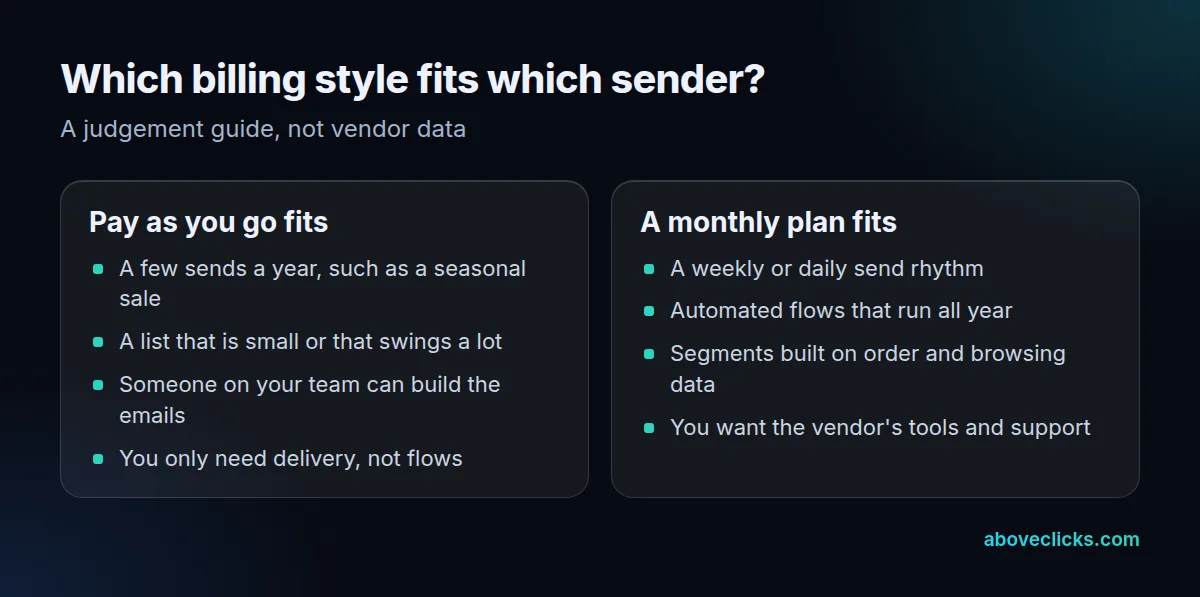
The difference shows up in quiet months. Under a per-contact meter you keep paying while you send nothing, because the list is still there. Under a per-send meter a quiet month costs little, but a busy month, such as a holiday sale with several sends, costs more than usual. Neither is better in general. Which one wins depends on how steady your sending is, how many people are on your list, and how many of the emails are automated rather than hand-built each time. Write down your own sends for the last 12 months before you compare anything, so the decision rests on your numbers and not on a vendor’s example.
How is a pay as you go email service priced?
Per email, in blocks of credits, or per 1,000 emails. A pay as you go email service usually has no minimum, so the fee follows your sending.
Amazon SES shows the plainest version. Its pricing page calls SES a pay-as-you-go service with no upfront commitments, and lists outbound email at $0.10 per 1,000 emails in its à la carte pricing, with extra charges for attachment data (as of November 2026). Credit-based tools hide the same idea behind a block: you buy a number of sends, and the platform subtracts one per email.
Credit blocks make the cost easier to budget but harder to compare. Divide the price of a block by the number of emails in it to get a rate per email, then compare that rate with any other pay as you go email service on the same footing. A block that looks cheap but lapses at the end of the month can cost more per email than a larger one that rolls over.
Three things set the real cost:
- The unit: one email, one recipient, or one block of credits.
- The tier: some platforms sell cheaper blocks at higher volumes.
- The extras: attachments, address validation and dedicated sending addresses are billed apart from the send.
Is pay as you go email marketing cheaper than a monthly plan?
Only below a break-even volume, and only if you can do the rest of the work yourself. Divide any monthly fee by the per-email rate and you get the number of emails at which the two cost the same.
Here is the sending fee alone at the SES rate of $0.10 per 1,000 emails, as of November 2026 (source):
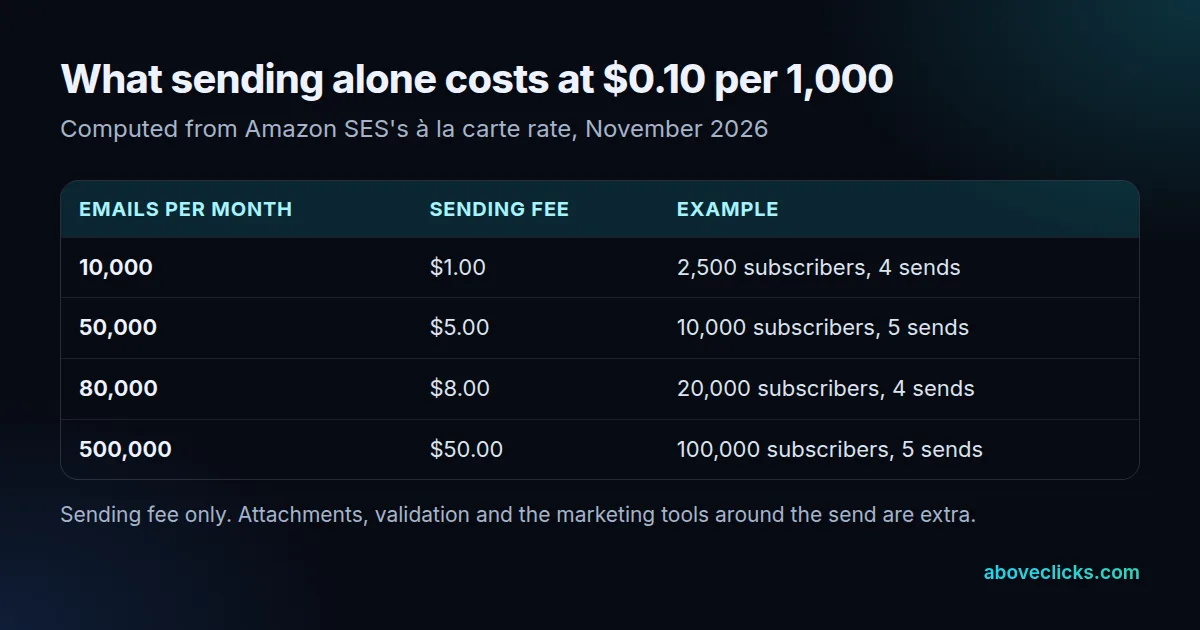
Use the SES rate of $0.0001 per email (as of November 2026) in this break-even formula: monthly plan fee ÷ rate per email = emails per month at which both cost the same. Take a hypothetical plan of $60 a month: $60 ÷ $0.0001 is 600,000 emails. That plan fee is a placeholder to show the arithmetic, not a quote. Fill in a real quote and your real volume before you decide.
Volume is the lever. A list of 2,500 subscribers that gets 4 sends a month produces 10,000 emails, while a list of 100,000 with 5 sends produces 500,000, so the volume grows 50 times over while the work of building the emails barely changes.
That is why pay as you go email marketing looks cheapest at the small end and why the comparison has to be redone each time your list or your send rhythm changes.
The table shows why sending fees are not the whole story. A store sending 80,000 emails a month pays $8.00 to send them, but the monthly plan it is compared with also builds the emails, stores the contacts and runs the flows. The two numbers do not measure the same thing.
What does a sending fee leave out?
In pay as you go email marketing, almost everything around the send: building the emails, keeping the list clean, running flows and fixing deliverability. A sending fee delivers messages; it does not decide what to send.
These are the 4 costly meter traps:
- Sandbox limits. New SES accounts start in a sandbox that allows 200 messages per 24 hours and 1 message per second until you request production access.
- No built-in flows. A welcome series or abandoned-cart email has to be built and triggered somewhere else.
- Unsubscribes are your job. The sender has to process opt-outs, even if the sending tool only carries the message.
- Credits that lapse. Mailchimp’s page says unused SMS credits expire each month and do not roll over; check whether email credits behave the same on the platform you pick.
Before we move a store to any sending tool, we check the sender domain’s authentication and how unsubscribes are handled. Those two decide whether the mail reaches the inbox, and a low per-email rate does not change them. Our email deliverability page covers that work.
Which rules apply when you send marketing email?
The same ones as on any plan: honor opt-outs quickly, make unsubscribing easy, and keep complaints low. How you are billed changes none of them.
- United States law: the FTC’s CAN-SPAM guide says an opt-out mechanism must work for at least 30 days after you send, and you must honor a request within 10 business days.
- Yahoo’s sender rules: its best practices tell bulk senders to keep the spam rate below 0.3%, support one-click unsubscribe and honor unsubscribes within 2 days.
- The header: one-click unsubscribe is signalled with the List-Unsubscribe-Post header defined in RFC 8058.
A platform that handles these for you is doing work that a bare sending service leaves to you. When you compare a pay as you go email service with a full platform, count that work as part of the price of the cheaper one. Pay as you go email marketing is only cheap when someone else is not quietly doing it for you, or when you have the time to do it well yourself.
When does pay as you go email marketing stop making sense?
When you send often, run automated flows, or spend more hours on the missing parts than the fee saves. Then a monthly plan or a managed setup is cheaper in total.
Klaviyo’s free plan stops at 500 emails a month, so any store that sends past that has already outgrown a free tier and should price both billing styles.
Pay as you go email marketing works best as a deliberate choice for a quiet sender, not as a default for a growing store, because the sends you add later are the ones that change the maths. A quick test:
- Do you send more than once a month, every month? If yes, compare a monthly plan.
- Do you need a welcome, abandoned-cart or winback flow? If yes, you need a platform with flows built in.
- Does anyone on your team have the hours to build emails and manage the list? If not, count that time as a cost.
Stores on Shopify that want flows, segments and revenue reporting usually land on a platform built for it, which is what our Klaviyo email marketing service sets up. How those plans compare on price is in our Klaviyo vs Mailchimp pricing guide, and marketing agency pricing models explains how agency fees are billed.
What should you check before you buy email credits?
What a credit buys, when it expires, and what is included. Get these in writing before you pay, because two credit plans with the same headline number can behave very differently.
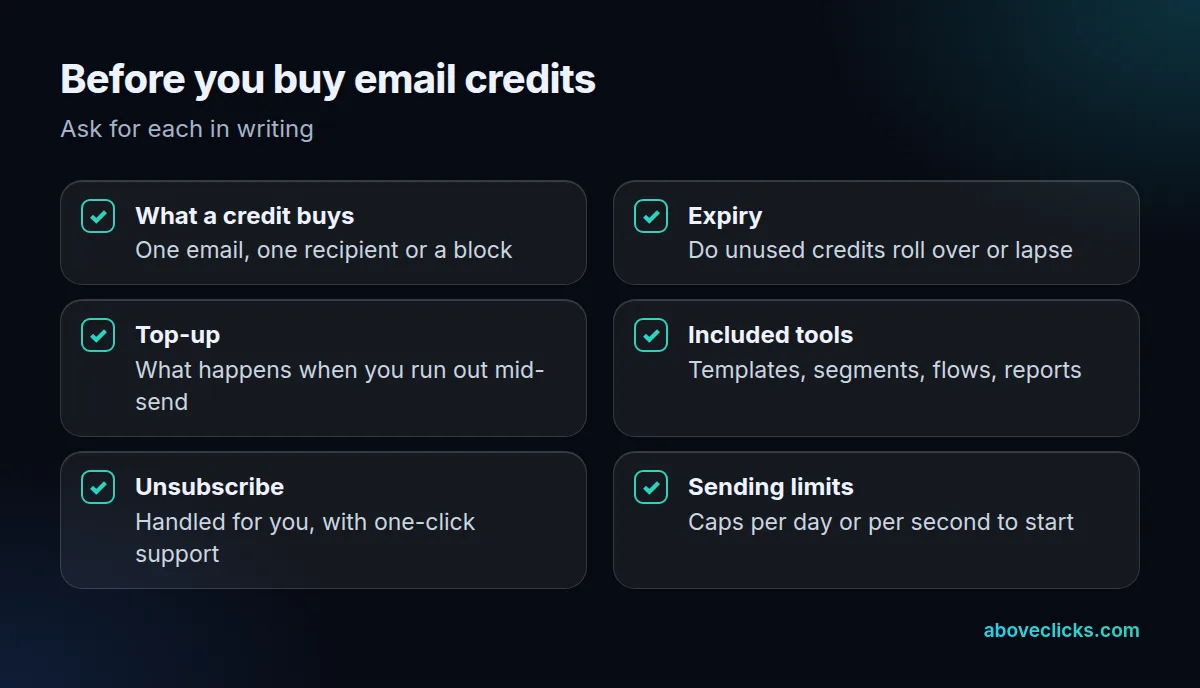
Also confirm how the tool handles opt-outs, since the law expects a request to be honored within 10 business days whichever billing style you pick. A short trial send helps too.
Send one real campaign to your own addresses, then read what the platform reports back about delivery, bounces and unsubscribes. If the report cannot show you those three, you will not be able to tell whether the send worked, and that matters more than the rate.
Add one more check: whether the tool lets you export your list. If you can leave with your contacts and your templates, trying pay as you go costs little. For a second opinion on your current setup, our free audit reads it with read-only access, and more guides are in buying guides.