Kmail email marketing is not a product you can buy: people use “Kmail” for Klaviyo, whose old kmail-lists.com address redirects to klaviyo.com, or for KDE’s KMail mail app. Work out which you mean, then act on what you can verify.
This guide sorts the three meanings of Kmail email marketing, says plainly what we could and couldn’t confirm, and gives a store owner the sender checks that matter.
What is Kmail email marketing?
A search label rather than a platform. Typing it into Google gets suggestions such as “what is kmail” and “what is kmail used for”, not a product page, because no single company markets email under that name.
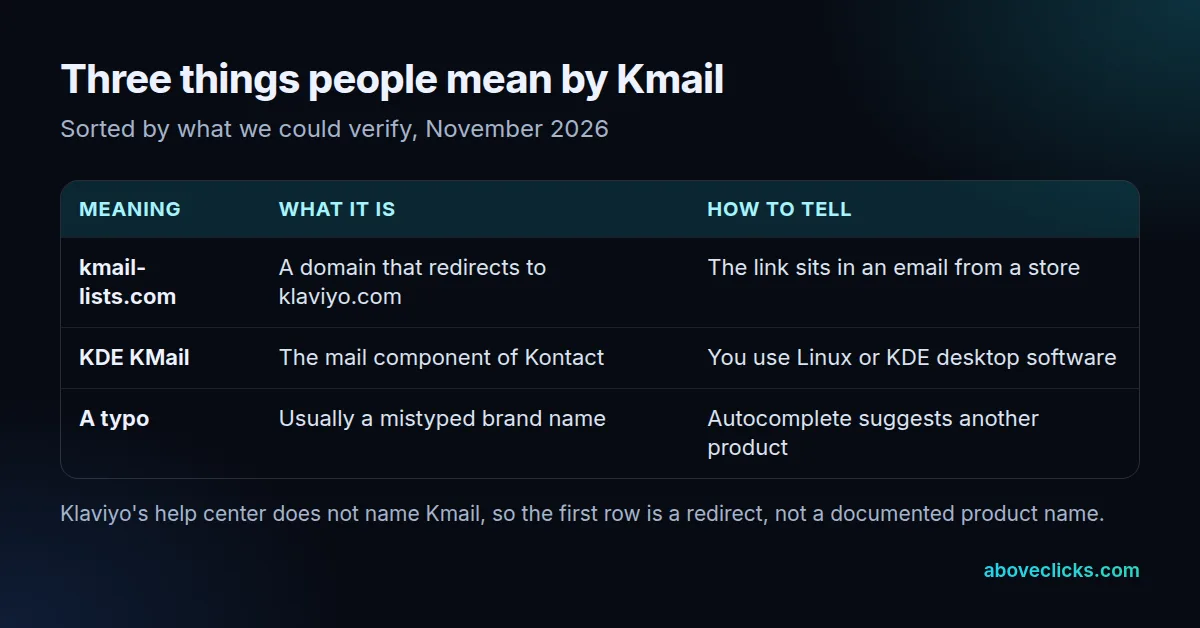
The table shows the three readings. We fetched kmail-lists.com on 11 November 2026 and it returned a permanent redirect to klaviyo.com, which is why Kmail email marketing is so often tied to Klaviyo. That is the only direct evidence we have. Klaviyo’s help center pages on sending domains and deliverability never use the word Kmail, so we won’t describe what the domain does inside an email.
Google’s autocomplete adds to the confusion. Typing the full phrase kmail email marketing returns just one other suggestion, “what is mailchimp email marketing” (checked November 2026),.
That shows how little search data sits behind the term: our plan data puts it at about 30 searches a month. People searching it are mostly trying to identify something they have seen, not shopping for a tool. So the useful answer to what is Kmail is a short sorting exercise, not a product comparison. That is why this page spends its time on how to tell the meanings apart, and on the one part that is in your hands if you send email yourself: how your own messages identify you to the people and mail systems that receive them.
Three questions sort most cases:
- Where did you see it? In a link or footer of a marketing email points to the Klaviyo reading; in a Linux or KDE menu points to the mail app.
- Did you sign up? If not, the sender is the thing to examine, not the word Kmail.
- Are you the sender? If you run a store and your own emails mention Kmail, check your sending setup rather than the label.
Is Kmail the same as Klaviyo?
Not by name, but the two are linked. What is Kmail in this sense? An address that sends visitors to Klaviyo’s site, so a kmail klaviyo search usually means someone met the domain in a message and wants to know who is behind it.
Klaviyo’s own homepage says the platform powers 200,000+ brands across 100 countries (as of November 2026), so many senders’ emails carry its infrastructure.
Google’s own suggestions show the same confusion: “is kmail lists klaviyo” appears when you type the question (checked November 2026). If you want to know what Klaviyo does for a store, our guide to what Klaviyo is used for covers it, including where it stops. If an agency or freelancer offers you Kmail email marketing, ask three things before you agree to anything.
First, which platform do they actually run? Second, whose name do the account and the sending domain sit under? Third, what do you receive if the work ends? A clear answer to the first question settles the naming problem at once. The other two decide whether you can leave without losing your list or your sender reputation.
The misspelling “Clavio” has its own guide.
Is Kmail the KDE email app?
Sometimes. KMail is the email component of Kontact, KDE’s personal information manager, according to the KDE project. It reads and sends mail on a desktop. It is not a tool for sending campaigns to a customer list.
The same page makes 3 points about it: built-in OpenPGP and S/MIME encryption, isolation of HTML content so external references can’t leak information, and phishing warnings for suspicious links. Those are the features of a privacy-minded personal mail client, which is the opposite of a bulk sender. Anyone offering you Kmail email marketing as a campaign service is using the name loosely, so ask which product they actually run.
If your search was “what is kmail on iphone” or “what is KDE kmail”, this is the thing you want: a free mail client, not a marketing service. Kmail email marketing in that sense does not exist, because the app has no flows, segments or sign-up forms.
How do you stop or manage emails from a Kmail link?
Use the unsubscribe link in the message, or your mail app’s own unsubscribe button. Both work the same way for any sender, whatever domain the link shows.
Mail apps can offer a button because of a published standard: RFC 8058 says a sender signals one-click unsubscribe with a List-Unsubscribe-Post header holding the single pair “List-Unsubscribe=One-Click”. Klaviyo says it provides that support for marketing emails automatically, per its deliverability guide.
If you never signed up, mark the message as spam instead and do not enter personal details on a page you reached from it. A domain redirecting to Klaviyo does not tell you the message is wanted or safe.
Four quick checks before you act on any message tied to a Kmail link:
- Does the sender name match a business you have dealt with?
- Does the footer show a postal address and an unsubscribe link?
- Does the link go to a page on the sender’s own site or on a domain you recognise?
- Did you ask for this email, and can you remember when?
If the answer to the last question is no, an unsubscribe request still tells the sender your address is live. Marking it as spam is the safer route.
What should a store set up so its email shows its own brand?
A branded sending domain, a DMARC policy and a from address on the same domain. These are what stop recipients seeing a third-party name next to your brand.
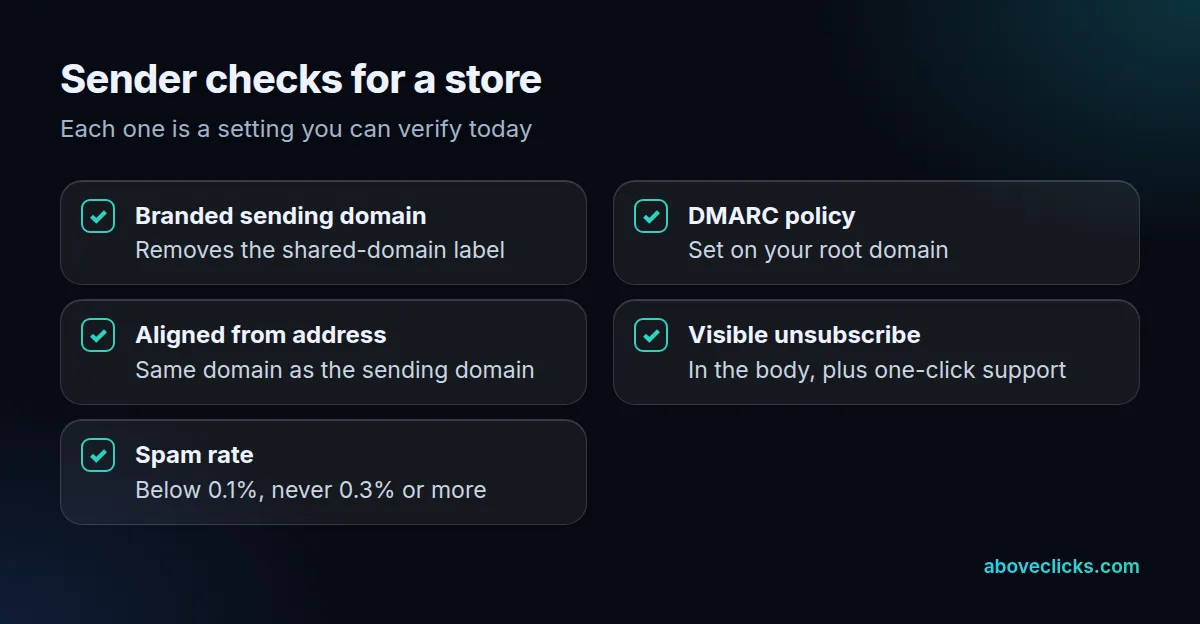
Klaviyo’s branded domain guide says most accounts start on a shared IP and shared domain, shown as “via klaviyomail.com”. A branded sending domain removes that label, and you can have 1 active domain per send type: marketing, transactional or service. The same page says Google counts anyone sending 5,000 or more emails a day to personal Gmail accounts as a bulk sender.
DMARC is the policy layer. RFC 7489 lists reducing the amount of delivered spoofed email among its goals. Klaviyo’s deliverability article adds that the from-address domain must align with the root domain of the branded sending domain, and that Google recommends a spam rate below 0.1% while avoiding 0.3% or higher. Klaviyo’s own benchmark is under 0.01%, with 0.05% needing attention.
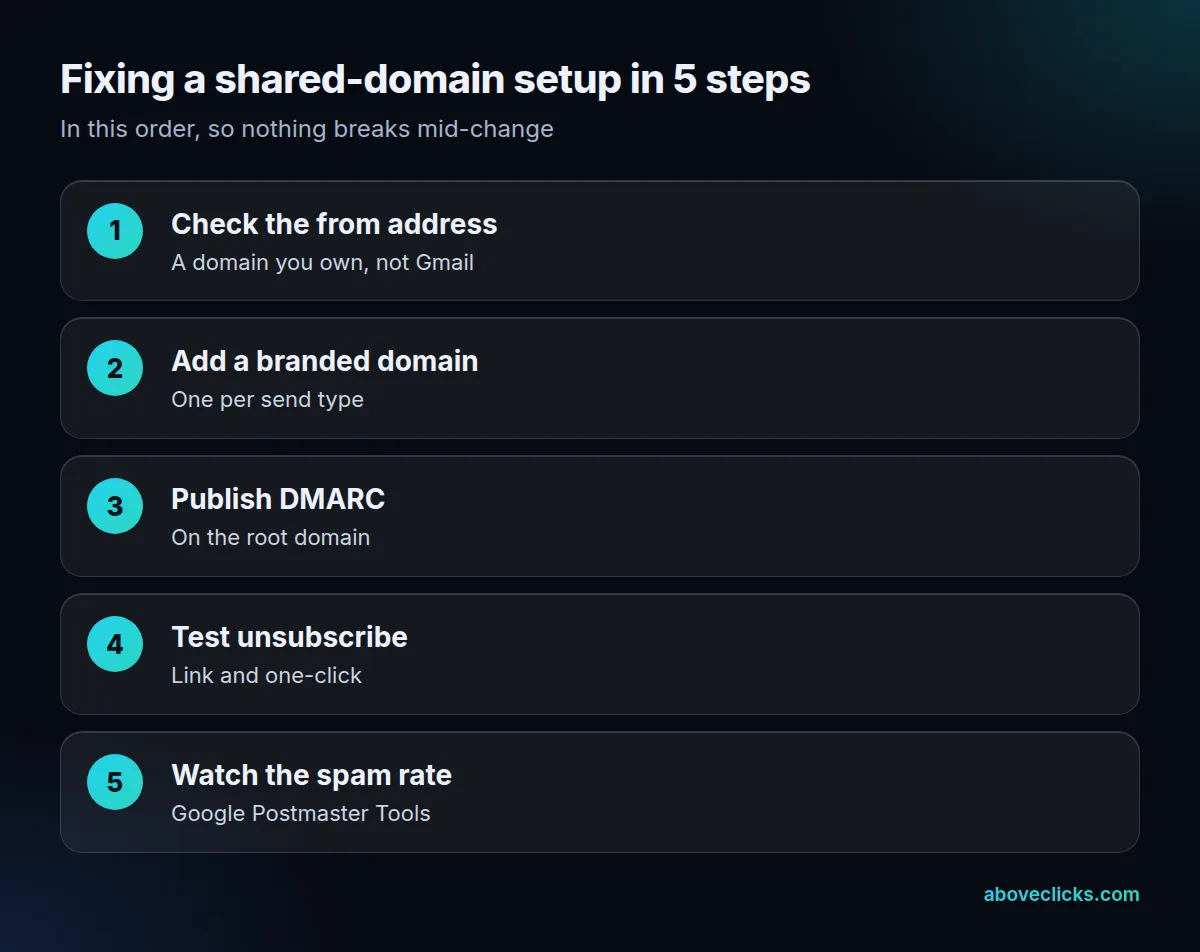
When we set up Klaviyo for stores, we check the from address first, because a Gmail or Yahoo address there breaks everything after it. Then comes the domain, then DMARC, then a test send to a Gmail and a Yahoo inbox to read the headers. Those 3 steps take an afternoon for most stores; the waiting is on DNS changes reaching your domain host. Our Klaviyo email marketing service and email deliverability work cover those steps.
The send type matters when you plan the domains. Per the same Klaviyo guide, marketing covers campaigns, flows and promotional messages and is the default, transactional covers order confirmations and password resets, and service covers support replies. Transactional domains can only be used by flows designated as transactional, and campaigns are not eligible for them. A store that mixes the two on one domain lets a marketing bounce spill onto its order confirmations, which is the main reason to split them once volume grows.
Which Kmail email marketing mistakes cost the most?
Three: treating Kmail as a product, trusting a domain redirect as proof of a sender, and leaving a store on a shared sending domain after it grows.
- Buying or installing the wrong thing. Kmail email marketing is a label. Confirm whether you mean Klaviyo or KDE’s app before you pay for a plan or install software.
- Reading the redirect as proof. kmail-lists.com sending visitors to klaviyo.com says where the domain points, not whether a message is legitimate or wanted.
- Staying on the shared domain. For a store sending close to 5,000 emails a day to Gmail users, the bulk-sender rules in Klaviyo’s guide apply to it. The label “via klaviyomail.com” stays until you set up a branded domain, and the longer you send without one, the longer your reputation is tied to shared traffic.
The common thread is ownership and verification, and it applies whether you send 200 emails a month or 200,000. Keep the account, the domain and the DNS records in your own name, write down who changed what and when, and check the settings yourself in the platform’s deliverability reports rather than relying on a label. A setup you can read and explain is easier to fix, and easier to hand to someone else, than one nobody can describe.
For a read-only look at your own setup, our free audit checks the sender settings listed above. For a wider view of the platform, see buying guides.