Magento to Shopify migration cost depends on three things: the data you move, the method you use and the hours it takes. Start with the scope list for your Magento to Shopify migration cost, because each line on it turns into hours.
This guide uses Shopify’s own migration guide and plan page as of October 2026, Google’s site-move advice, and a worked budget for an invented store. We state no market price ranges and none of our own rates, because no primary source publishes them.
How much does a Magento to Shopify migration cost?
The honest answer on Magento to Shopify migration cost is hours times rate, plus the Shopify plan, a theme and any apps. No source we trust publishes a single figure, so build yours from the scope list and ask each provider for hours per line.
Take an invented store with 800 products, 12,000 customers and 3,000 fulfilled orders. A plausible plan for that store comes to 130 hours: 12 hours to inventory and map the old site, 20 for the product import and fixes, 8 for customers and orders, 60 for the theme, 14 for redirects and 16 for launch checks.
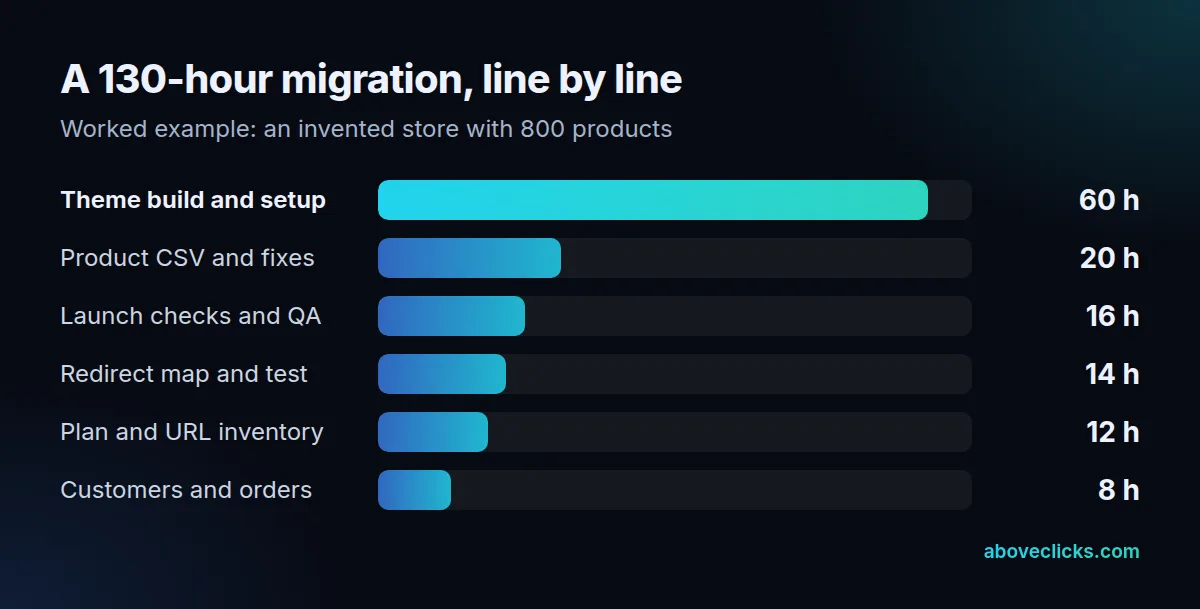
Multiply the 130 hours by the hourly rate in your quote and you have the labor line of your Magento to Shopify migration cost. Then add the Shopify plan, the theme if it is paid, and any apps. The hours are an illustration, not a benchmark: a store with fewer products and a stock theme could need far less, and one with custom B2B pricing could need far more.
What drives the cost of migrating from Magento to Shopify?
Five things move the Magento to Shopify migration cost: how much data you move, how clean it is, how much theme work you need, how many old URLs need redirects, and how much testing the launch gets. Each one maps to a line in the worked budget above.
- Data scope. Shopify’s migration guide lists products, customers, historical orders, gift cards and store credits, blogs and pages as the content to decide on. Every extra type adds mapping and checks.
- Data quality. Shopify warns that details such as price, weight and inventory can hurt the business when they are not imported correctly, and that a product missing a variant option will not import.
- Theme work. This was the largest line in our example at 60 of 130 hours. A paid theme or a custom build moves it a lot.
- Redirects. Every old URL that has traffic or links needs a destination.
- Testing. Checkout, taxes, shipping and email flows need a test order each.
Trimming scope is the cheapest way to cut Magento to Shopify migration cost, and a migration is also a chance to cut. Shopify suggests it can be a good time to purge old, low-performing content. Every product or page you do not move is a line you do not pay for.
Which migration method costs least?
The method with the fewest technical steps costs least, as long as it fits the data. Shopify’s guide ranks five options from least to most technically complex, and the order is a fair guide to the cost.
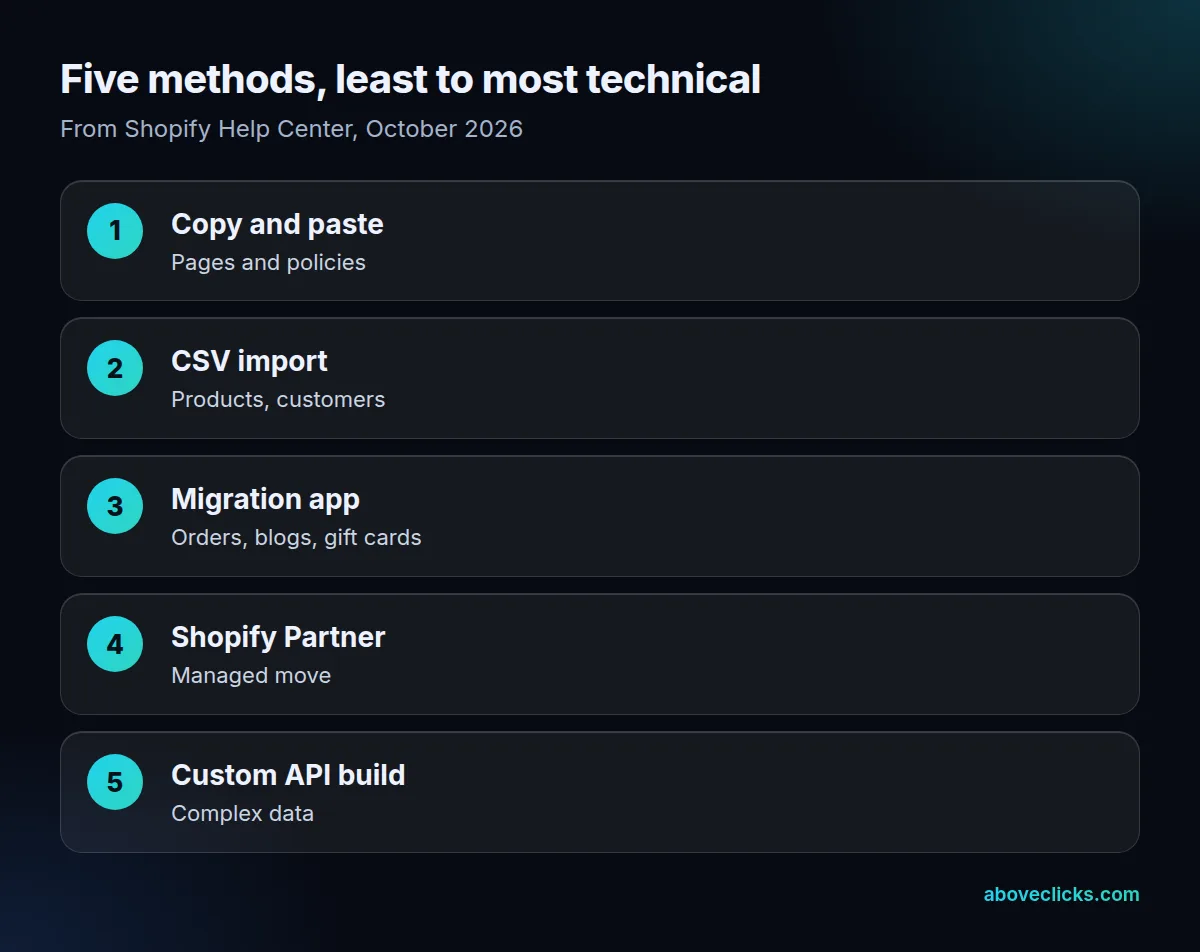
In Shopify’s list the options are: copy and paste, export and import by CSV, a migration app, a Shopify Partner, or a custom solution built on the Shopify API. Shopify says the best option depends on the amount and complexity of the data: individual pages can be copied and pasted, whereas a catalogue of 250 products likely needs a CSV file or an app.
Match each data type to a method instead of choosing one for the whole move. Per Shopify’s table, products and customers have CSV import (products, customers), while historical orders, gift cards, blogs and pages are handled with migration apps or APIs. That is why a Magento to Shopify migration cost estimate usually mixes methods: CSV for the catalogue, an app for orders, and hand work for policy pages.
Ask a provider which method each line of the Magento to Shopify migration cost uses. If a quote names one method for everything, check that it fits your orders and content.
What does Shopify cost after you migrate?
Shopify’s published plan cost starts at $39 a month for Basic on monthly billing and $29 on yearly billing, as of October 2026, according to its pricing page. Grow is $105 monthly and $89 yearly, and Advanced is $399 monthly and $359 yearly. Plus starts at $2,300 a month.
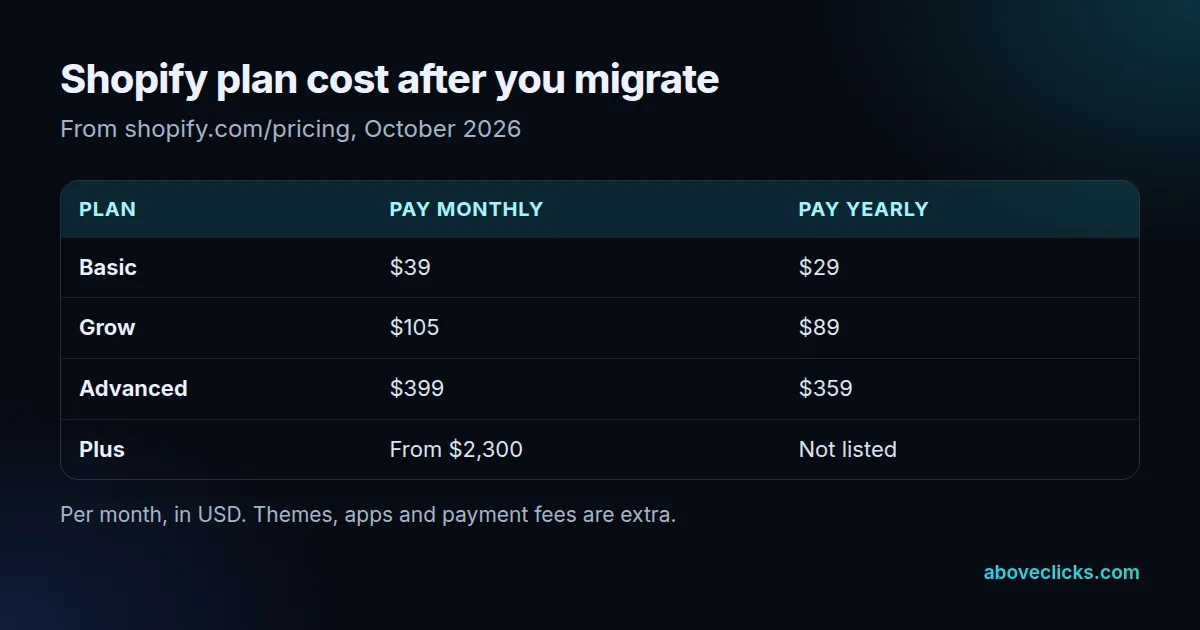
For the first year, that is 12 × $39 = $468 on Basic with monthly billing, 12 × $105 = $1,260 on Grow and 12 × $399 = $4,788 on Advanced. Plus is at least 12 × $2,300 = $27,600, and the page says it starts at that figure.
Put the platform line next to the Magento to Shopify migration cost line, because the move is a one-off and the plan is yearly. Themes, apps and payment fees come on top. Shopify says paid themes are non-refundable, though you can try one before buying, and its theme support page says help with a third-party theme comes from its designer.
For a side-by-side of the platforms themselves, see our Magento vs Shopify comparison.
How much do redirects and SEO checks add?
They add the hours for a redirect map and the checks after launch, which is a small share of the Magento to Shopify migration cost and a large share of the risk. In our worked example it was 14 hours of 130.
Google’s site move guide says to use server-side permanent redirects from old URLs to new ones, and, per its redirect guide, to use permanent redirects, and to keep them as long as possible, generally at least 1 year. It also says permanent redirects do not cause a loss in PageRank, and that for small to medium sites it can take a few weeks for most pages to move.
On Shopify, URL redirects have limits to plan for. You can create a maximum of 100,000 redirects, or 20,000,000 on Plus, and you can redirect only from broken URLs: if the old URL still loads a valid page, the redirect will not work. Some paths are reserved, such as those beginning with /apps, /cart or /orders.
Budget for these steps:
- Export the old site’s URLs, including those with traffic or links.
- Map each one to its closest new page.
- Load the redirects and test a sample of them.
- Watch crawl errors for the weeks after launch.
Our ecommerce SEO guide covers the wider checks.
Does the Magento to Shopify migration cost change with store size?
Yes, but not in a straight line. Product count drives the import and fix hours, while order history, custom pricing and the theme drive the rest. Two stores with the same catalogue can differ by a factor of two in Magento to Shopify migration cost because one needs a custom theme and the other uses a stock one.
Compare two invented stores. Store S has 250 products, 2,000 customers and no historical orders. By Shopify’s own guide, its catalogue likely needs a CSV file or an app and its pages can be copied by hand, so the data lines are small: perhaps 10 hours for the catalogue and 4 for customers. Store L has 20,000 products with variants, 150,000 customers and 80,000 orders, so it needs apps or the API and far more checking.
Three levers change the total most:
- Variants. A product missing a variant option will not import, so messy variant data can cost more than the count of products suggests.
- Order history. Historical orders move only with migration apps or the Order API, per Shopify’s table, so decide whether you need them in Shopify or can keep them in an archive.
- Custom features. Anything Magento did through extensions must be matched by an app or by custom work on Shopify, and each match is its own line.
Ask for the Magento to Shopify migration cost split into these three groups, so you can see what a leaner scope would save.
How do you budget a Magento to Shopify migration?
To budget the Magento to Shopify migration cost, write the scope list, pick a method per line, ask for hours per line, and add the platform. Then compare quotes for your Magento to Shopify migration cost line by line, not by total. Take three invented quotes for the 130-hour plan: one shows 130 hours in six lines, one shows 90 hours with no theme line, and one shows a single total. Only the first can be compared, and the second is missing the 60-hour theme line. A quote that does not show hours is a quote you cannot compare.
Four budget traps cause most of the overruns in Magento to Shopify migration cost:
- Leaving the theme until last. It was the largest line in the example. Decide stock or custom early.
- Moving everything. Purge low-performing content first, as Shopify suggests.
- No redirect budget. Unmapped URLs lose traffic and links.
- Forgetting year-two costs. The plan, apps and theme updates keep coming; the migration does not.
If you want a second opinion on a quote, our Shopify migration team can review it, and the free audit is a no-cost first look at your current store. More comparisons are in buying guides.