A Magento to Shopify migration moves your products, customers, orders and content from a Magento store to a new Shopify store and points every old URL at its new address. Plan it as seven steps, with the URL map first and the product import in the middle.
This guide to the Magento to Shopify migration process covers what moves, the limits that shape the plan, the five methods Shopify lists, the redirect rules that protect rankings and a launch checklist. Limits are as of November 2026.
What is a Magento to Shopify migration?
A Magento to Shopify migration is the move of a store’s data and URLs from Magento to Shopify, done so customers and search engines can still find every page that mattered. The platform change is the easy part; the old addresses are the hard part. Shopify publishes platform-specific guides for 10 other platforms, including WooCommerce and Wix, but not for Magento, so a Magento to Shopify migration is planned from the general guide.
Shopify’s migration guide starts with a decision, not an import: review your existing store and choose what to move. It lists 6 kinds of data: products, customers, historical orders, gift cards and store credits, blogs, and pages. It also notes that a migration is a good time to purge old, low-performing content.
Not sure you should move at all? Our Magento vs Shopify guide covers the stay, upgrade or move decision. If you stay, our Magento development page covers the upkeep. The rest of this guide assumes you have decided on a Magento to Shopify migration.
What data moves from Magento to Shopify, and what are the limits?
Products, customers, historical orders, gift cards, blogs and pages can all move, but each has its own method and limit. The table below shows the main ones.
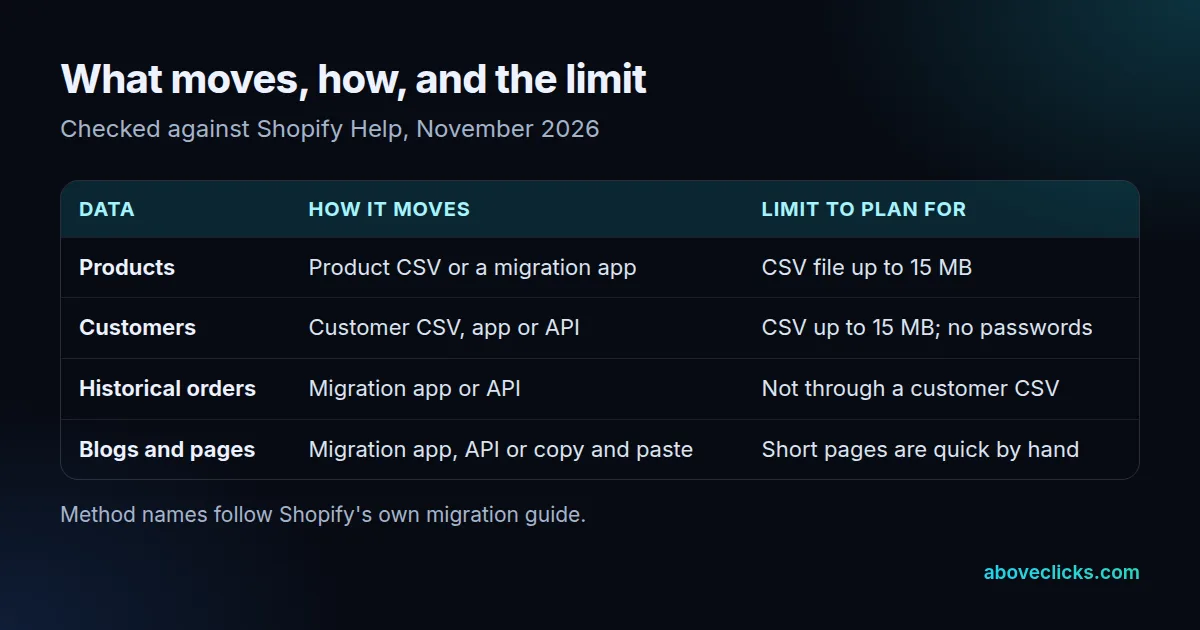
Three limits catch teams out during a Magento to Shopify migration. First, Shopify’s product import rejects a CSV file over 15 MB, so a large Magento catalog has to be split into several files. Second, the customer import has the same 15 MB limit, and passwords can’t be migrated because they’re encrypted outside Shopify. Customers must be invited to create new ones. Third, orders don’t come in through a customer CSV file; they need a migration app or the Order and Transaction APIs.
So decide early whether old orders must live inside Shopify or can stay in an archive that finance can still open. That choice can change the method, and with it the timeline.
What are the steps in a Magento to Shopify migration?
Seven steps, in this order: audit, URL map, build, import and test, redirects, launch and monitor. Putting the URL map before the build is what stops rework later.
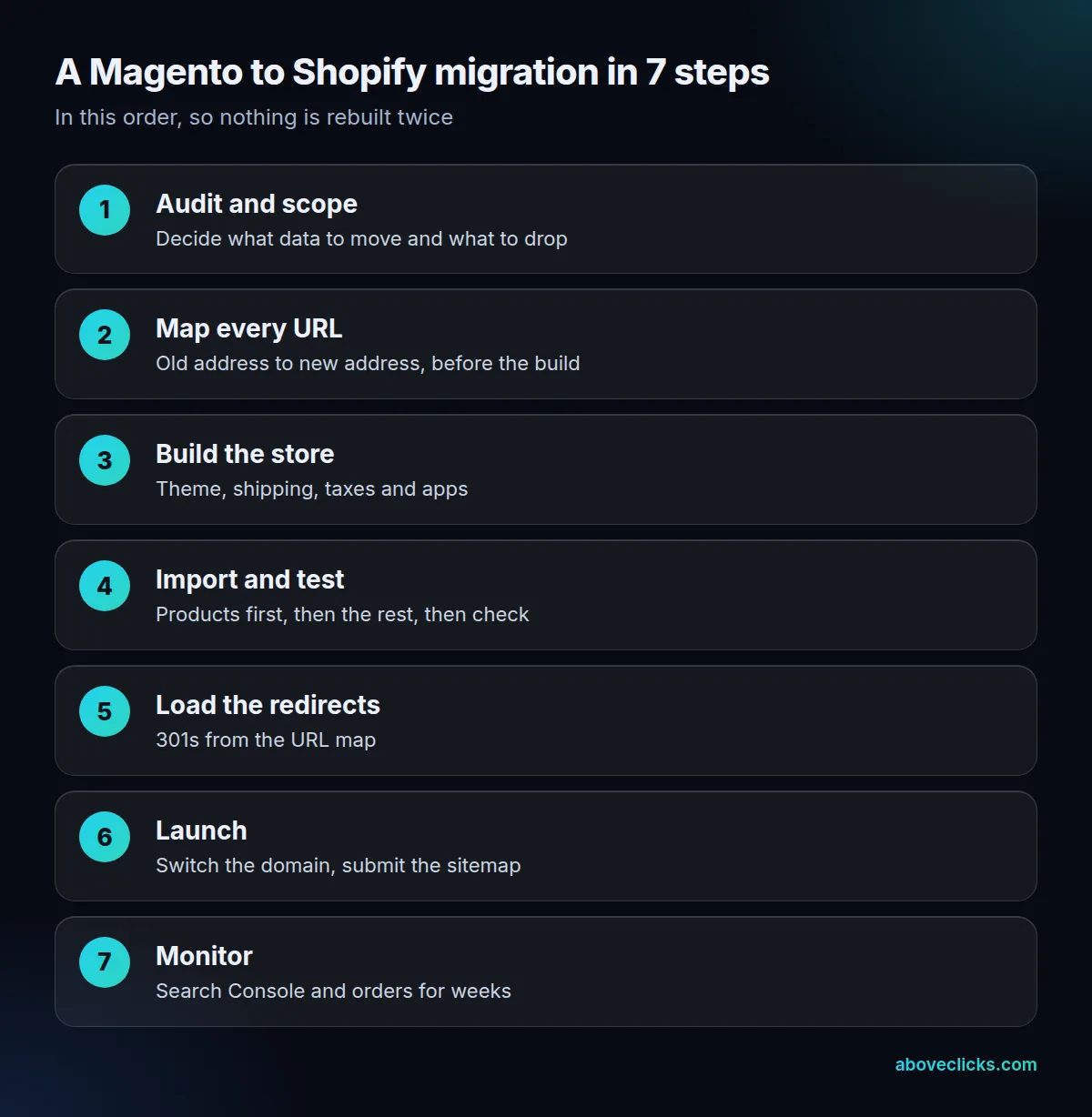
- Audit and scope. List what you’ll move and what you’ll drop, using the data types above. Thin or dead pages that earn nothing don’t need a redirect budget.
- Map every URL. Export the old URLs from Magento and your sitemap, then pair each with its new address. Google’s site move guide says to prepare the new site and test it thoroughly before moving.
- Build the store. Pick the theme, set up shipping zones, taxes and staff accounts, and install only the apps you need.
- Import and test. Import products first, then customers and the rest, splitting any file over 15 MB. Check price, weight and inventory, because Shopify warns these details affect your business when they’re imported wrongly.
- Load the redirects. Add the redirects from the URL map.
- Launch. Connect the domain, confirm canonicals and submit the sitemap.
- Monitor. Watch Search Console and orders for several weeks.
Every Magento to Shopify migration we plan follows the same order: we review the catalog, URLs and content, then send a migration plan within 2 workdays, as described on our Shopify migration page. Tracking is rebuilt before launch, and rankings are watched after it.
Four costly mistakes show up again and again in a Magento to Shopify migration:
- Mapping URLs after the build. The new store’s structure then ignores what already ranks.
- Importing products as hidden. Shopify notes that imported products marked as hidden aren’t published until you make them available to your sales channels.
- Assuming passwords and orders come across. Neither moves with a CSV file, as the limits above show.
- Leaving staging rules on. A noindex rule or an old canonical sends the wrong signal on launch day.
Each of the four costs more to fix after launch than to prevent before it, which is why the Magento to Shopify migration plan above puts mapping and testing ahead of the launch.
Which method should you use to move a Magento store?
The one that matches the size and complexity of each data type. Shopify lists 5 methods, from least to most technical, and you can mix them.
- Copy and paste the content from the old store into the new one.
- Export to CSV files and import them into Shopify; some data can’t move this way.
- Use a migration app from the Shopify App Store.
- Hire a Shopify Partner to manage the migration.
- Build a custom migration with the Shopify API, or hire a Partner to build it.
Shopify’s guide gives a rule of thumb: policy pages can be copied by hand, while a catalog of 250 products likely needs a CSV file or an app. Orders and gift cards point to apps or the API. If your Magento store has customized attributes, bundles or B2B rules, the custom route is more likely, and it’s the one where an experienced team saves the most time.
Most stores mix methods: a Magento to Shopify migration might copy 8 policy pages by hand, import products by CSV file and use an app for orders. A migration app handles the transfer, but not the thinking. You still need the URL map, the redirect load and the launch checks described below.
How do you protect SEO in a Magento to Shopify migration?
By mapping every old URL to a new one and loading permanent redirects before the domain goes live. A Magento to Shopify migration changes URLs even on the same domain, so redirects carry the rankings across.
Google’s site move guidance is specific. It recommends server-side permanent redirects such as 301s, and says they don’t cause a loss of PageRank. It advises against long chains: redirect straight to the final page, and keep any chain ideally to 3 hops or fewer. It also says to keep the redirects for as long as possible, generally at least 1 year, and that a small to medium site can take a few weeks for most pages to move.
Shopify’s URL redirect rules add the platform limits, as of November 2026:
- You can redirect only from URLs that are broken, meaning they show a 404 or “Page not found”.
- A store can hold up to 100,000 redirects.
- Redirects don’t apply across market subfolders automatically; each locale needs its own.
- Paths such as
/productsand/collectionsare fixed in Shopify, so product and collection addresses will change.
What does the URL map look like?
Here’s a worked example for an invented store (not a client): 1,800 products, 140 categories, 60 content pages and 90 blog posts make 2,090 old URLs. Each gets one of three outcomes: a redirect to its new match, a redirect to the nearest relevant page, or a deliberate 404 for pages with no equivalent. No blanket redirect to the homepage. Before launch, test the top 100 URLs by organic traffic from Search Console, and check the whole list again after the domain switches.
If this is the part you’d rather not do alone, our SEO migration service covers the URL map and redirects.
What goes on the launch checklist?
Import accuracy, redirects, canonicals, the sitemap, tracking and customer access. Each item is something a store owner can check in the browser or in Search Console.
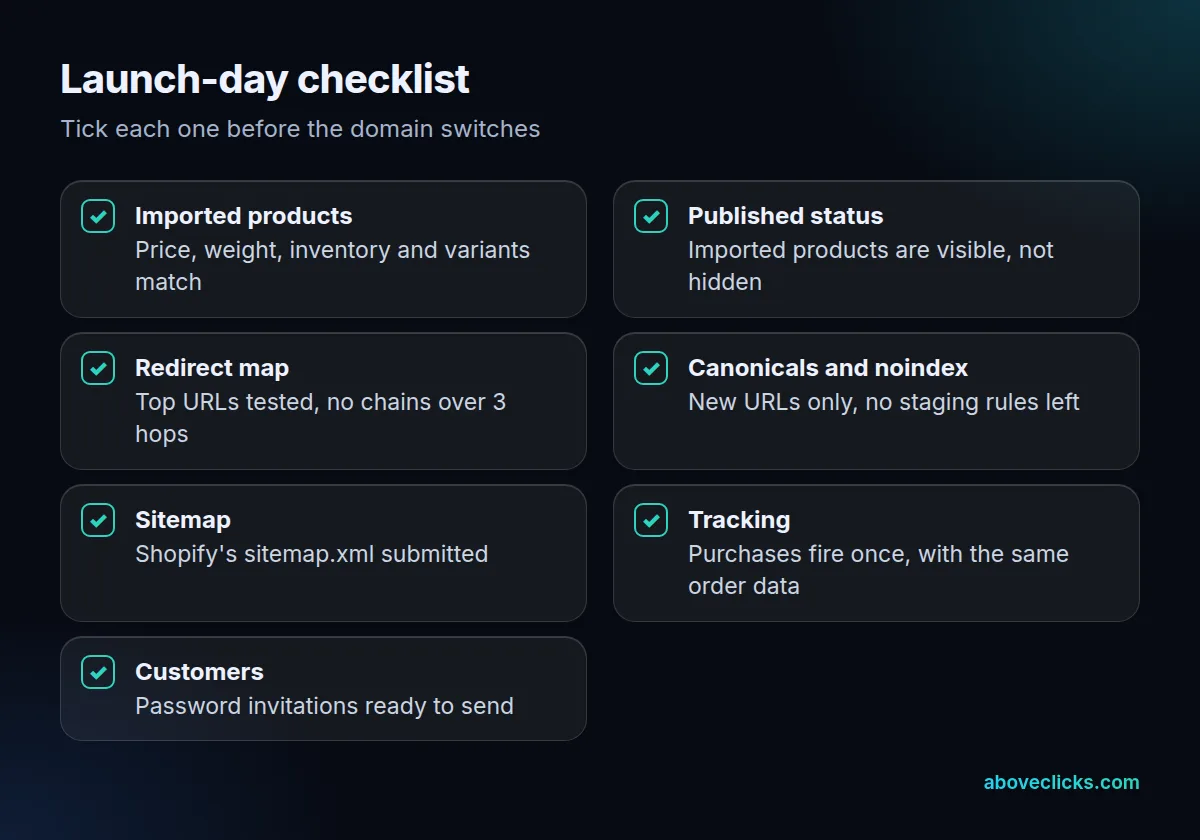
A Magento to Shopify migration fails quietly when one of these is skipped, so three items deserve a second look:
- Canonicals and noindex. After redirects are live, check that the canonical links on the new site use the new URLs, and that any noindex rule you added to keep the staging site out of search has been removed. Google’s site move steps list both.
- Redirect tests. Test single URLs with Search Console’s URL Inspection tool and large lists with a script, as Google suggests. Start with the top 100 URLs by organic traffic.
- Sitemap. Shopify generates a sitemap.xml automatically, and after launch it can take Google anywhere from a few days to a few weeks to index your site, according to Shopify’s migration guide. Submit the sitemap in Search Console on launch day instead of waiting, and keep the monitoring from step 7 running as the Magento to Shopify migration settles.
For tracking, place at least 1 test order on the new store and compare it with an old one: the same order ID, value and items should reach analytics and your ad platforms, once each. Fixing a double-counted purchase after launch means re-cleaning weeks of reports, so test it before the domain switches.
What changes in a Magento to Shopify Plus migration?
Mostly scale, not method. A Magento to Shopify Plus migration follows the same seven steps; what changes is the headroom, such as the redirect cap, which Shopify sets at 20,000,000 on Plus against 100,000 on the other plans.
That matters for very large catalogs, where years of filter and tag URLs add up. In a Magento to Shopify Plus migration, as in any other, redirect only the URLs that earned traffic or links, and retire the rest on purpose. A bigger limit doesn’t make a longer redirect list better; Google still advises keeping chains short and the map accurate.
Plan choice for a Magento to Shopify migration also depends on checkout, B2B and international needs, which this guide doesn’t cover. For help budgeting the build itself, see our guide to Shopify website development cost. If you want a second pair of eyes on your URL list before launch, our free audit is the place to start. More guides are in e-commerce SEO.