This ecommerce SEO guide puts the work into 8 steps and tells you which to do first. Most ecommerce SEO advice is a long list of tips. The order matters more than the tips, because a store with crawl problems gets nothing from a better product description.
The short version of a good ecommerce SEO strategy: make sure Google can crawl and index every page you care about, give each page one URL, link it from a clear structure, then improve collection and product pages one by one, in the order that earns the most money. Every rule below comes from Google’s or Shopify’s own documentation, linked where it’s used. In our client work, including technical and on-page SEO for a New York fashion e-commerce store, this is the order we typically follow too: sitewide crawling and duplicate fixes first, page-by-page work after.
What ecommerce SEO covers
Ecommerce SEO is the work of getting a store’s collection pages, product pages and guides to show up in organic Google results for the searches your customers make. It’s different from blog SEO in three ways:
- Most of the pages are templates. A change to the product template touches every product at once, for better or worse.
- Stores create duplicate URLs by design. Variants, filters, sort orders and tracking parameters can turn 500 products into thousands of crawlable URLs.
- Products come and go. Sold-out items, seasonal ranges and discontinued lines need a plan, or they turn into dead pages.
Ecommerce SEO isn’t only about the blue links. Google also shows product data in product snippets, Google Images, the Shopping tab and other places. Google’s best practices for ecommerce sites cover all of them, and step 7 below explains how to feed them.
How Google finds and ranks a store
Google works in three stages, and ecommerce SEO can fail at each one:
- Crawling. Googlebot follows links and reads your sitemap to find URLs. It generally doesn’t type into your search box, and it doesn’t click “load more” buttons.
- Indexing. Google reads each page, groups duplicates and picks one URL from each group (the canonical) to keep.
- Ranking. For each search, Google orders the indexed pages by how useful they look for that query.
Most ecommerce SEO problems are crawling and indexing problems in disguise. A collection page can’t rank if Google chose a filtered copy of it as the canonical, or never found half the products on it. That’s why the first three ecommerce SEO steps are sitewide.
How to use this ecommerce SEO guide: the 8 steps in order
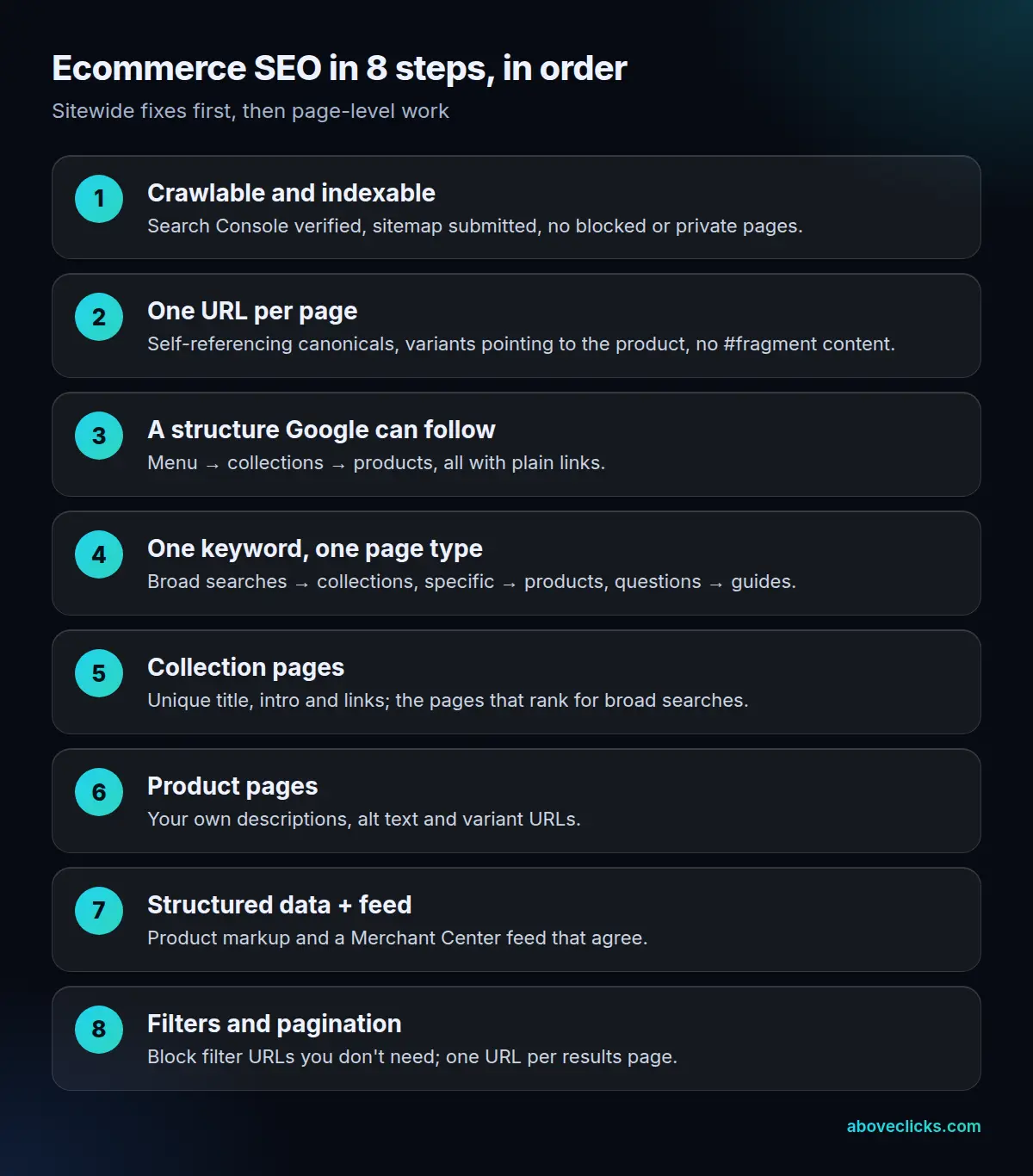
Steps 1 to 3 fix the whole site at once, so do them first, even though they’re the least visible. Steps 4 to 6 are page-level work, which you rank with the method in the worked example. Steps 7 and 8 add product data and keep filters under control.
If you run Shopify, our Shopify SEO checklist turns these steps into checks you can tick off in the Shopify admin. The rest of this ecommerce SEO guide explains why each step matters on any platform.
Step 1: make every important page crawlable and indexable
Every ecommerce SEO project starts in Google Search Console. Verify the domain, submit the sitemap and look at the page indexing report. It lists the URLs Google knows about and why some aren’t indexed.
On Shopify, the sitemap is built for you. Shopify generates sitemap.xml at the root of your domain with links to products, collections, pages and blog posts, and updates it when you add new ones. Google can’t read it while the store is in private (password) mode, so remove the password before launch.
Check these ecommerce SEO basics on any platform:
- Robots.txt doesn’t block pages you want in Search. It should block carts, checkout, account pages and filter URLs, nothing more.
- No stray
noindextags. A theme setting or an app can leave a whole template noindexed after a launch. - The pages you care about are in the sitemap, and the URLs in it return 200, not redirects or 404s.
- One domain. If you have several domains and don’t use them for international targeting, Shopify recommends redirecting them all to the primary domain.
Step 2: give each page one URL
Duplicate URLs are the most common technical ecommerce SEO problem, because stores create them on purpose. A product can appear at its own URL, inside a collection path, with a variant parameter and with a tracking code, all showing the same page.
Duplicate content isn’t a spam violation, Google says in its SEO starter guide. The cost is wasted crawling and split signals. You fix it with a canonical tag, plus consistent internal links.
Google’s rules from its guide to designing ecommerce URLs:
- Use a self-referencing canonical tag on every indexable page, and put those same URLs in the sitemap.
- Use the same URL everywhere: internal links, sitemap and canonical tag. Don’t link to one version and canonicalize to another.
- Give each variant its own URL with a path (
/t-shirt/green) or a parameter (/t-shirt?color=green). If the parameter is optional, the canonical is the URL without it. - Don’t use fragments for content. Google treats
/product/t-shirt#blackand/product/t-shirt#whiteas the same page. - Use
?key=valueparameters, not bare values like?green, and lowercase URLs if your server treats cases the same.
Google ranks its canonical signals by strength: redirects and canonical tags are strong signals, sitemap inclusion is weak. It also warns against using robots.txt or noindex to choose a canonical. Robots.txt can leave a blocked URL indexed without its content, and noindex removes the page from Search entirely.
When a URL changes for good, redirect it. Shopify’s redirects only work from URLs that are broken (they return a 404), and a store can have up to 100,000 of them, or 20,000,000 on Plus, according to Shopify’s Help Center.
Step 3: build a structure Google can follow
Google uses your links to understand which pages matter. In its guide to ecommerce site structure, Google says it can use the number of links to a page, and how many clicks it takes to reach it, to judge its relative importance. It also says it generally doesn’t work out site structure from the URLs themselves.
A structure that works for most stores:
- Menu → collections → subcollections → products. Every product you want indexed should be linked from at least one collection page. If you can’t link them all, list them in the sitemap or a Merchant Center feed.
- Plain
<a href>links. Google may miss navigation that only works through JavaScript click events. - Best sellers linked from the home page and from relevant guides. More internal links tell Google a page is more important.
- Descriptive link text, such as the product or collection name, not “shop now” on every link.
- Empty categories handled. Google suggests a
noindextag on a category with no items, or a 404 if your site removes the category from browsing.
Step 4: map each keyword to one page type
Keyword research for ecommerce SEO is mostly about matching. The same product line can attract a browsing search, a specific search and a question, and each one wants a different page. If two pages chase the same search, they compete with each other.
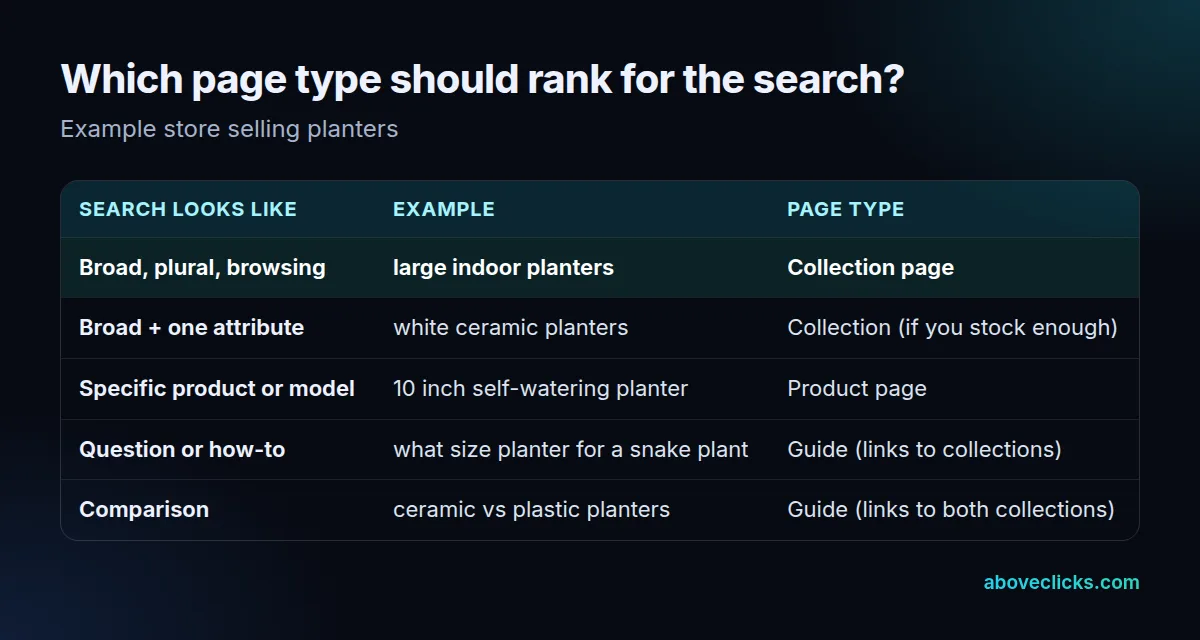
The table works as a rule of thumb:
- Broad, plural searches (“large indoor planters”) want a range to choose from. A collection page fits.
- Specific searches with a size, model or brand want one product.
- Questions and comparisons want an answer first. A guide fits, and it should link to the collections it mentions.
Write the map down: one row per page, with its primary keyword and up to three variants. Before you create a new page, check the map. If a page already targets the search, improve that page instead.
Shopify’s own ecommerce SEO advice on keywords is plain: use them in readable, natural phrases in the page title, meta description, alt text and body content. Shopify also builds the H1 from the title field of a product, collection or page, so the main keyword belongs there.
Step 5: make collection pages worth ranking
Collection pages (category pages on WooCommerce) are often the most valuable pages in ecommerce SEO, because they target the broadest searches. They’re also the pages stores neglect most: a theme’s default title, a product grid and nothing else.
What a collection page needs:
- A unique SEO title and meta description written for the collection’s main search. Shopify lets you enter up to 70 characters in the title field but suggests 60 or fewer, because search engines shorten longer titles.
- A short intro above the grid that says what’s in the range and who it’s for, and more detail below it: sizes, materials, care, how to choose.
- Links to subcollections and related collections, so Google and shoppers can move through the range.
- Enough products to be useful. A collection with two items rarely deserves its own page in Search.
Our guide to collection page SEO covers the template in detail, including how to handle collections that filters create.
Step 6: write product pages for people first
In ecommerce SEO, product pages win the specific searches and most of the shopping surfaces. The job is to answer what a shopper would ask in the store: what is it, what size, what’s it made of, will it fit my use, what does delivery cost, can I return it.
- Write your own descriptions. Shopify warns against copying the manufacturer’s text, because other sites may already use it.
- Give enough detail. Shopify’s Help Center suggests at least 250 words of descriptive text on each page. Treat that as a floor for useful detail, not a target to pad toward.
- Describe images in the alt text, using the words of the page, in readable phrases. Shopify lets you edit alt text on each product image.
- Keep variant URLs consistent with step 2, so each color or size has its own URL and the canonical points to the main product.
- Plan for sold-out and discontinued products. Keep a temporarily sold-out page live with its availability shown. When a product is gone for good, redirect it to the closest product or collection.
Step 7: add structured data and a Merchant Center feed
Structured data is the part of ecommerce SEO that tells Google what the page is about in a format it reads directly: name, price, availability, shipping, returns and reviews. Google offers two main types of Product markup. Merchant listings markup is for pages where customers can buy from you. Product snippets markup is for pages where they can’t, such as review pages.
Google also recommends sharing a feed through Merchant Center. In its guide to sharing product data, Google says providing both structured data and a Merchant Center feed maximizes your eligibility for its shopping experiences and helps it verify your data. Merchant Center is required to appear in the Shopping tab.
Three practical rules:
- Make the markup match the page. Price and availability in the markup must be what the shopper sees.
- Keep the feed and the site in agreement. Merchant Center can update its copy of your price and stock from your site when it finds a mismatch, which helps when you sell out between feed updates.
- Add product identifiers when the product has them, such as a GTIN (the barcode number).
Most themes print some markup already, often incomplete. Our guide to product schema markup has a complete JSON-LD example checked against Google’s documentation. For the feed side, see Google Shopping feed optimization.
Step 8: control filters, sorting and pagination
Filters are good for shoppers and a common ecommerce SEO problem, because they’re expensive for crawlers. Every combination of color, size, price and sort order can create a new URL. Google’s documentation on faceted navigation names two costs: overcrawling of useless URLs and slower discovery of new, useful ones.
Google’s recommendations:
- If you don’t need filter URLs in Search, block them in robots.txt, and let Google crawl the product pages and an unfiltered listing page instead.
- Canonical tags and
nofollowon filter links are weaker options. Google says they’re generally less effective in the long term. - If you do want some filter pages indexed, use the standard
&separator, keep filters in the same order every time and return a 404 when a combination has no products.
Shopify’s default robots.txt already disallows tag-filtered collection URLs (/collections/+) and sorted ones (/collections/sort_by). Shopify calls editing robots.txt.liquid an unsupported customization and warns that a mistake can lose all your traffic, so change it only with a clear reason (Shopify Help Center).
When a filter combination has real search demand, such as “white ceramic planters”, make it a proper collection with its own URL, title and copy rather than indexing the filter. More on that in our glossary entry on faceted navigation.
For long collections, Google’s pagination advice is short:
- Give each page its own URL, such as
?page=2. - Link the pages in sequence with normal links.
- Don’t canonicalize page 2 to page 1.
Google says it no longer uses rel="next" and rel="prev". A “load more” button or infinite scroll needs real paginated links behind it, because Google’s crawlers don’t click buttons.
Worked example: which page to fix first
Steps 1 to 3 come first because they affect every page. After that, most stores have more page-level ecommerce SEO fixes than time. Ranking ecommerce SEO work by traffic is a common mistake. Rank them by the revenue a fix could add per day of work.
Example: a hypothetical store selling planters, with a $72 average order value. The store’s own pages that rank in the top 3 get an average click-through rate of 8% in its Search Console data. That’s the store’s own number, and yours will differ. Over the last 90 days, four pages look promising:
| Page (90 days) | Impressions | Position | CTR now | Conversion rate | Days of work |
|---|---|---|---|---|---|
| Collection: large indoor planters | 21,000 | 11 | 0.9% | 1.5% | 3 |
| Product: 10 inch self-watering planter | 7,500 | 7 | 2.4% | 2.5% | 1 |
| Guide: choosing a planter size | 48,000 | 5 | 3.0% | 0.2% | 2 |
| Collection: terracotta pots | 3,000 | 18 | 0.2% | 1.5% | 3 |
The conversion rate for each page comes from the store’s analytics, for organic visits that land on that page. The formula for the upside:
Extra revenue = impressions × (target CTR − current CTR) × conversion rate × average order value
For the large-planters collection: 21,000 × (8% − 0.9%) = 1,491 extra clicks. Then 1,491 × 1.5% = 22.4 orders, and 22.4 × $72 = $1,610 over 90 days. At 3 days of work, that’s $537 per day.
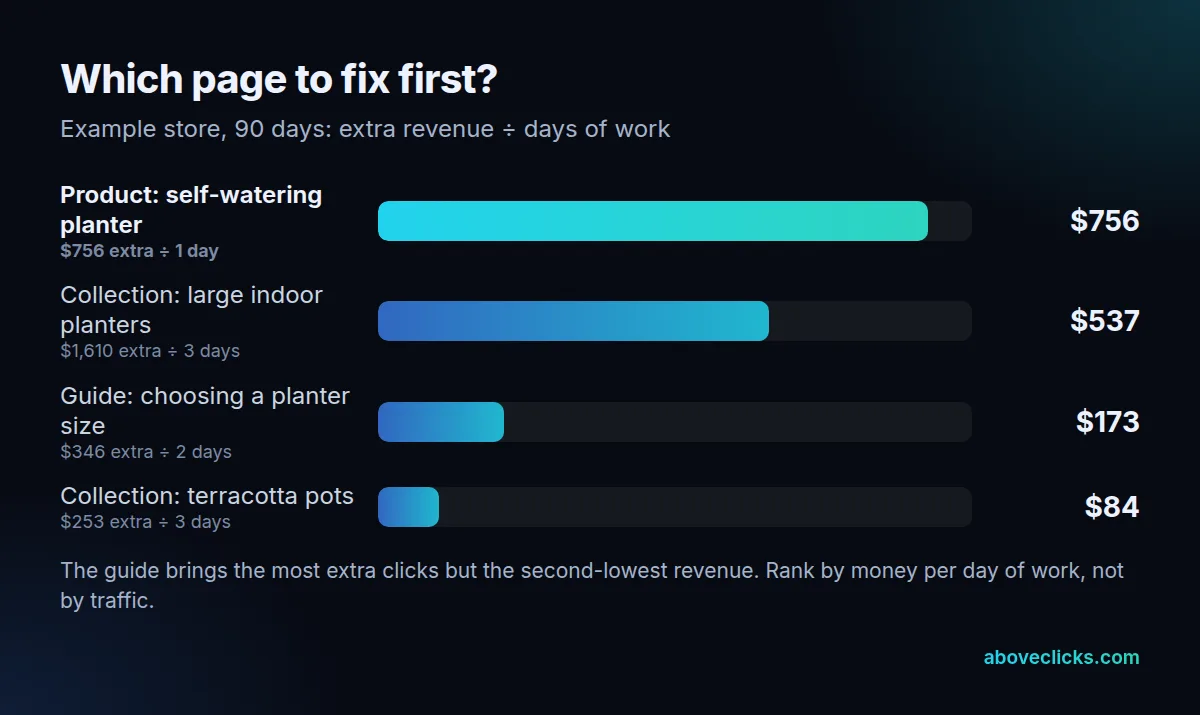
The other three, worked the same way:
- Self-watering planter: 7,500 × 5.6% = 420 clicks × 2.5% = 10.5 orders × $72 = $756. One day of work, so $756 per day.
- Planter size guide: 48,000 × 5.0% = 2,400 clicks × 0.2% = 4.8 orders × $72 = $346. Two days, so $173 per day.
- Terracotta pots: 3,000 × 7.8% = 234 clicks × 1.5% = 3.5 orders × $72 = $253. Three days, so $84 per day.
So the order is the product page, then the large-planters collection, then the guide, then the terracotta collection. Notice the guide: it would bring the most extra clicks (2,400) and the second-lowest revenue. It still earns its place by linking to the collections, but it isn’t the first fix.
Two cautions. This is the upside if a page reaches the top 3, not a forecast, and no ecommerce SEO work can promise a position. And the small collection may simply lack demand: 3,000 impressions in 90 days at position 18 means few people search for it. Redo the table every quarter with fresh numbers.
Ecommerce SEO content and links that support the store
In ecommerce SEO, guides earn their place when they answer questions your shoppers ask before they buy, then link to the right collection. A planter store’s guide to sizes, drainage or plant care answers real questions and passes visitors to products. A generic “top trends” post rarely does.
Google’s own message for ecommerce sites ends in the same place: useful, interesting content for shoppers. In practice:
- Write guides from the questions in your keyword map, not from a content calendar template.
- Link from each guide to 1–3 collections or products it mentions, with descriptive anchor text.
- Earn links with things worth citing: a size chart, a care guide, original photos, real data from your store. Avoid buying links.
How to measure ecommerce SEO
Measure ecommerce SEO step by step, because each step fails in its own way:
- Indexing (steps 1–3): the page indexing report in Search Console. Watch the number of indexed product and collection URLs against how many you actually have.
- Visibility (steps 4–6): impressions, clicks, CTR and average position per page in the Search Console performance report. Group pages by type: collections, products, guides.
- Revenue: organic revenue and orders by landing page in your analytics. This is the number the worked example uses.
- Product data (step 7): Merchant Center diagnostics for feed errors and mismatches with your site.
Ecommerce SEO changes take time to show. Shopify notes that title edits can take a couple of weeks to appear in search results while Google recrawls the page. Compare 28-day or 90-day periods, not days.
Common ecommerce SEO mistakes
These are the ecommerce SEO tips we’d give before any others, because they undo good work elsewhere:
- Indexing every filter and sort URL. It spends Google’s crawling on duplicates and can split signals across copies of the same collection.
- Linking to one URL and canonicalizing to another. Pick one URL for each page and use it in links, the sitemap and the canonical tag.
- Using robots.txt to remove duplicates that are already indexed. Google can keep a blocked URL in its index without its content. Use canonical tags or redirects.
- Copying manufacturer descriptions onto hundreds of products.
- Two pages chasing the same search. Check the keyword map before you create a page.
- Deleting old products without a redirect. Links and rankings to that URL are lost.
- Fixing pages by traffic instead of revenue. The worked example shows how far the two can differ.
Your ecommerce SEO strategy from here
This is the same order we’d follow on any store: crawl and index first, structure next, then pages ranked by what they can earn. The three guides in this series go deeper: the Shopify SEO checklist, collection page SEO and product schema markup.
If you’d rather have someone check the technical steps and build the priority list with your own Search Console numbers, our ecommerce SEO service starts with exactly that audit.