Amazon advertising cost per click is the average you pay for each click on your ads: total spend divided by total clicks. An auction sets every single click, so Amazon gives no fixed number.
This guide shows how Amazon advertising cost per click is built, why your average cost per click on Amazon ads can rise while your bids stay put, where to read it and what to check first when it climbs. For budgets, formats and billing, see our Amazon advertising cost guide.
What is Amazon advertising cost per click?
It is the average amount you paid for an ad click, which Amazon defines as total spend divided by the total number of clicks. You pay when a shopper clicks, not when the ad is shown.
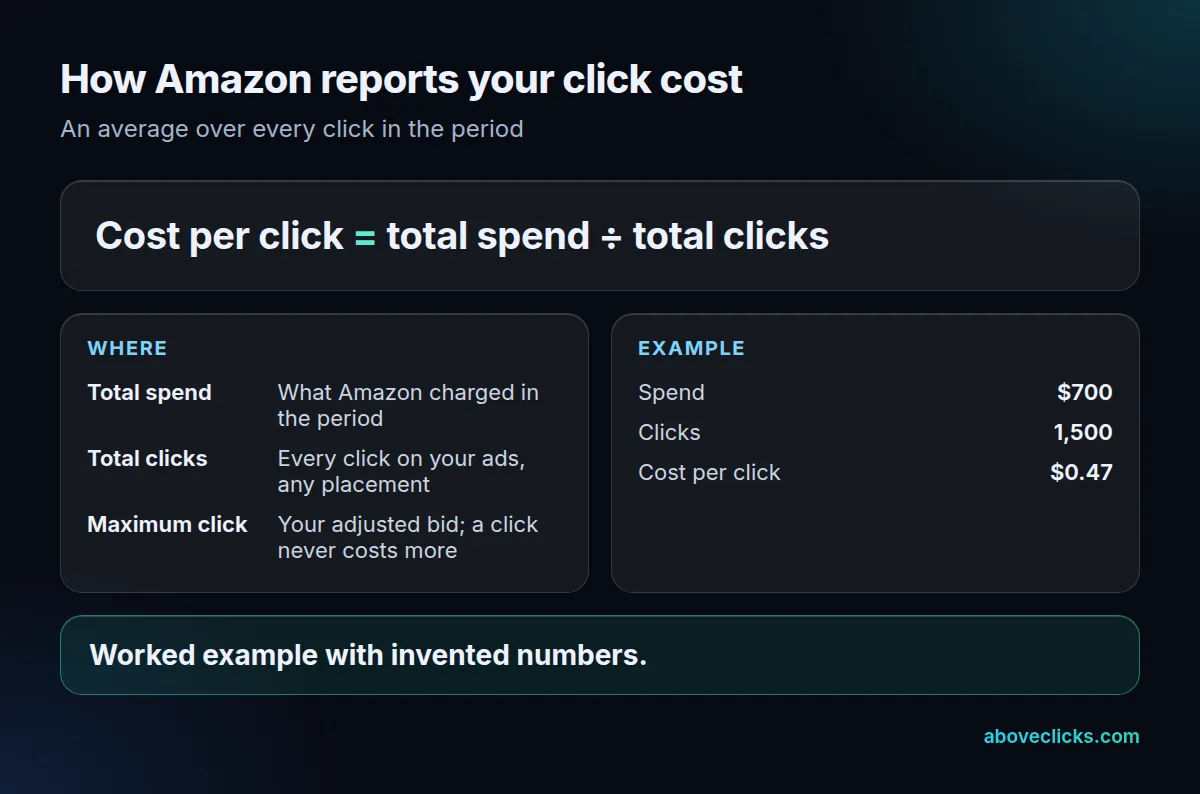
The Amazon ads cost per click you see is an average over the period you pick, so a day with 20 clicks and a month with 1,500 clicks give different numbers for the same campaign. Amazon Ads cost per click and Amazon PPC cost per click mean the same thing: PPC is the system of paying per click, and CPC is the metric that measures it, as Amazon’s CPC guide puts it.
How much does Amazon charge per click?
There is no set amount for Amazon advertising cost per click. Amazon’s guide says the rank of ads changes frequently, so there is no fixed cost per click for a brand’s ad. Your category, searches and listing all move it.
That is why we do not quote a market average for the Amazon PPC cost per click here. No primary source gives one, and a round-up figure with no method is not your number. What Amazon does publish is a cap on the total: Sponsored Products has no monthly or upfront fees, and a $100 daily budget can bring up to $3,000 of clicks in a 30-day month, as of November 2026.
Amazon’s FAQ describes Sponsored Products as cost-per-click and auction-based, and says the more competitive your bid, the more likely your ad is shown. So the click cost sets how many clicks a budget buys, and the budget sets the ceiling on the month. Amazon suggests starting a campaign at a daily budget of $10, which at a $0.50 click would buy about 20 clicks a day. For the other costs around the click, such as formats with minimums, read what Amazon advertising costs.
How does Amazon set the cost per click?
By auction. The final Amazon advertising cost per click is based on your adjusted bid plus other factors, and it never exceeds your maximum adjusted bid, according to Amazon’s best-practices guide (as of November 2026).
Three settings shape the maximum:
- Default bid: the most you will pay for a click on a keyword or target.
- Placement adjustments: you can raise bids for top of search, rest of search or product pages, up to 900%.
- Bidding strategy: “dynamic bids – up and down”, “dynamic bids – down only” or “fixed bids”.
Amazon’s CPC guide adds that the maximum Amazon ads cost per click includes the base bid plus adjustments from settings such as dynamic bidding. Here is a worked example with an invented bid: a $0.75 base bid with a 40% top-of-search adjustment allows up to $1.05 for a click in that placement ($0.75 × 1.40), while product pages stay at $0.75.
The same guide says that the more in-demand a keyword is, or the more visible the placement, the higher the cost. That is the reason the same bid can buy very different clicks.
What is the average cost per click on Amazon ads?
The average cost per click on Amazon ads is a blend of every placement you appear in, weighted by how many clicks each one brings. When the mix changes, the average changes, even if no placement gets more expensive.
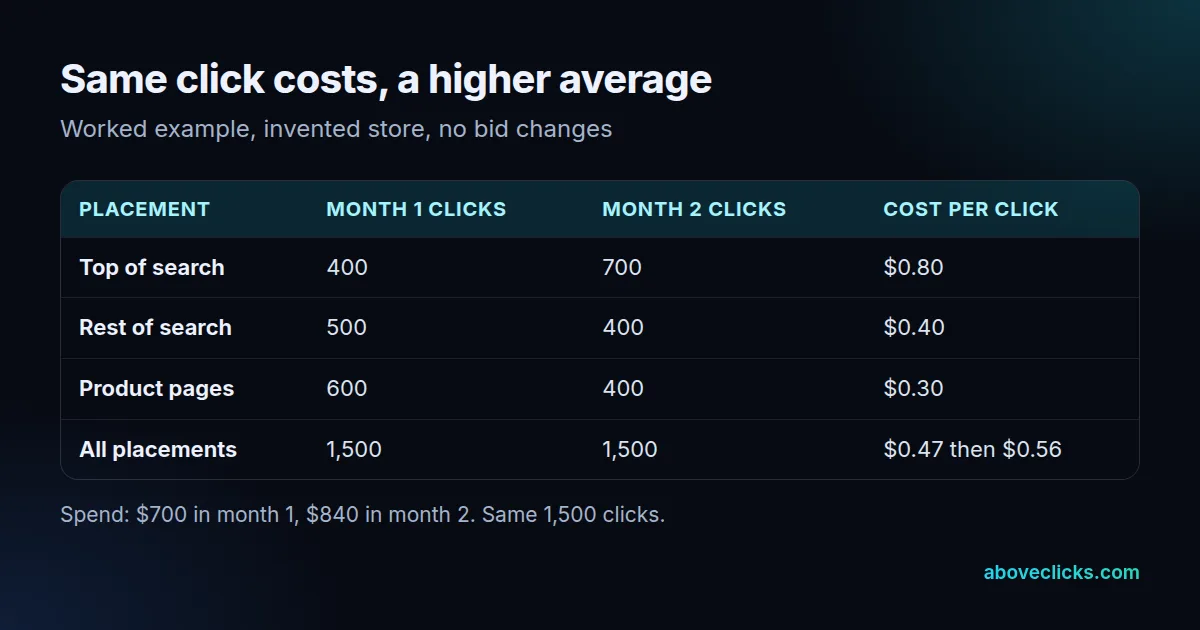
Here is a worked example with an invented store. In month 1 it gets 1,500 clicks for $700, an average of $0.47. In month 2 it gets the same 1,500 clicks, but 700 of them now come from top of search at $0.80 instead of 400. Spend rises to $840 and the average to $0.56, which is 20% higher. No bid changed, and every placement cost exactly what it did before.
You can redo the sum on your own account. Divide each placement’s spend by its clicks, then weight each result by its share of all clicks. Month 1: 27% of clicks at $0.80, 33% at $0.40 and 40% at $0.30 gives $0.22 + $0.13 + $0.12, about $0.47. Month 2: 47% at $0.80, 27% at $0.40 and 27% at $0.30 gives $0.37 + $0.11 + $0.08, about $0.56.
Amazon’s guide says ads on search pages typically cost more than ads on a brand’s own website, which is the same effect. A raised top-of-search adjustment, a new broad keyword or a seasonal search spike can all move clicks into the dearer placement.
The lesson: when someone quotes the average cost per click on Amazon ads for their account, ask for it by placement. A single blended number hides the cause, and it is also why an Amazon PPC cost per click quoted in a pitch deck tells you little about your own account.
Where do you find your Amazon ads cost per click?
In the Amazon Ads console, where the Amazon advertising cost per click appears as a column in every campaign view. Amazon lists five reports for Sponsored Products, and four of them help with click cost:
- Performance over time: clicks, spend and the average cost per click by day, week or month.
- Placement report: top of search compared with other placements.
- Search term report: the shopping terms that led to at least one click.
- Targeting report: sales metrics for keywords and products with at least one impression.
The fifth is the advertised product report, which shows how each product performs. Start with performance over time to see the trend, then the placement report to see why. Amazon’s CPC guide says a campaign running for about two weeks should have enough data for informed decisions, so do not read a 3-day window as a trend.
Keep a simple log: date, spend, clicks, average cost per click and the share of clicks from top of search. Five numbers a week, over the 14 days Amazon suggests, make the cause of a change visible. With a $10 daily budget, 14 days is $140 of spend and enough clicks to compare one week with the next.
What should you do when the cost per click rises?
When your Amazon advertising cost per click rises, work through the five checks below in order, before you touch a bid. Each one rules out a cause that a bid change would not fix.
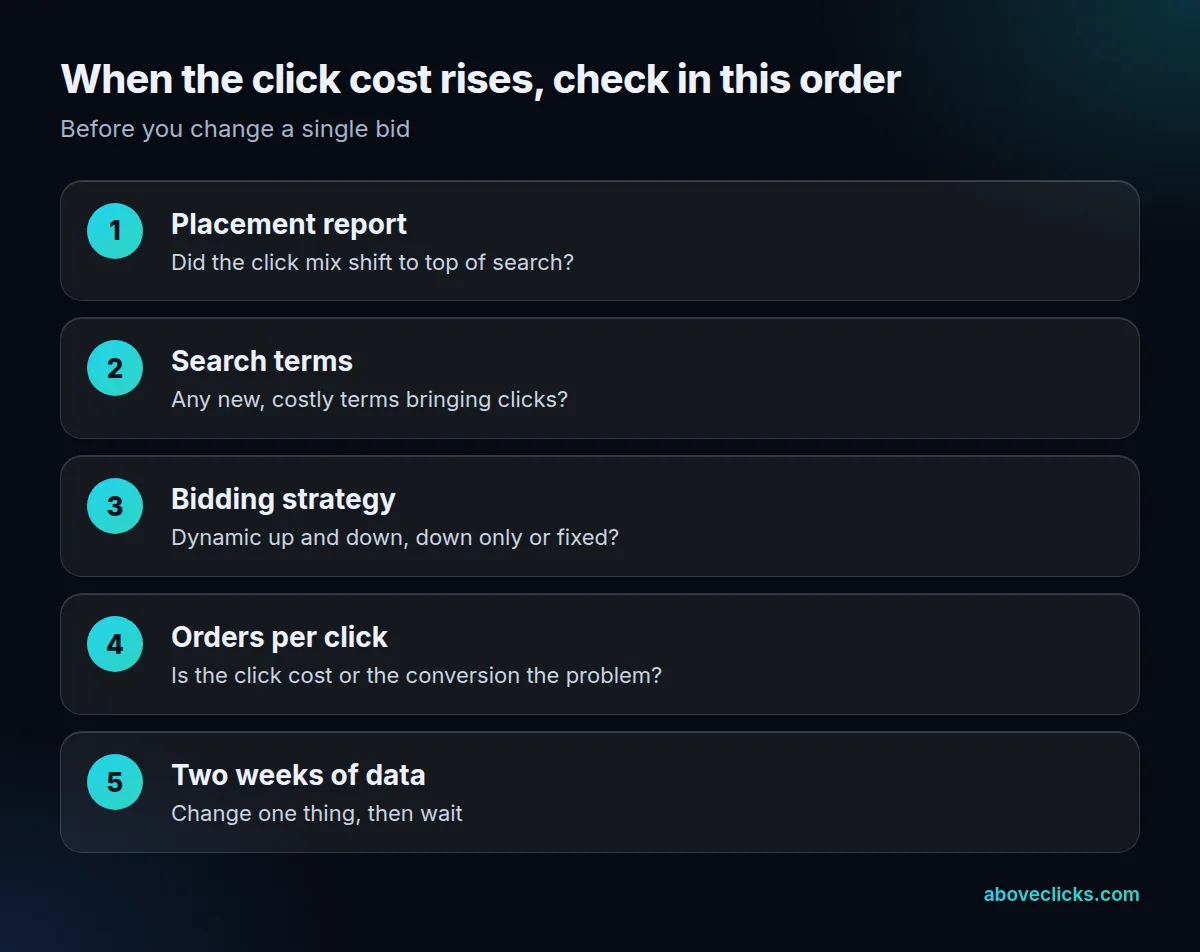
- Placement report: did the share of clicks from top of search grow? The worked example above shows a 20% rise from mix alone.
- Search terms: did new terms start bringing clicks? Add the ones that do not fit as negative keywords.
- Bidding strategy: with “dynamic bids – up and down”, Amazon adjusts your bid using real-time signals, so the maximum moves on its own. “Fixed bids” use the exact bid you entered.
- Orders per click: a higher click cost with a higher conversion rate can still be a good month. Check the cost per order before you cut bids.
- Two weeks of data: change one setting at a time and wait about two weeks, so you can tell which change did what.
Amazon’s best-practices guide gives a reason to use negative targets: they stop your ad appearing next to products or terms you do not want, so you save paying for placements that do not fit. In its example, a camera-lens ad appearing next to an incompatible camera is excluded by adding that camera as a negative ASIN. Review the search term report every week for the first month, since new terms are the quickest way for the Amazon PPC cost per click to drift, and add the clear misfits.
If the average cost per click rose and orders did not, the fix is usually targeting or the listing, not the bid. Our Amazon SEO work covers the listing side, and our Amazon Ads service covers the campaign side.
When is an Amazon cost per click too high?
When the cost of one order is more than the profit it earns. Amazon’s ACOS guide says ACOS has to stay below your profit margin, or you spend more on ads than you earn.
Here is a worked example with an invented $30 product at a 40% margin before ads. At an Amazon ads cost per click of $0.56 and a 6% conversion rate, one order costs $9.33 ($0.56 ÷ 0.06). That is an ACOS of about 31% ($9.33 ÷ $30), under the 40% limit. At $0.47 it would be about 26%.
The test for Amazon advertising cost per click, then, is not a number on a chart. It is the click cost divided by your conversion rate, set against your margin. The sponsored ads cost guide works through that break-even in detail, and the CPC formula guide covers the general maths.
If your Amazon advertising cost per click does not add up against your margin and you cannot see why, our free audit reads your account and tells you where the clicks go. More guides are in buying guides.