TikTok server side tracking means your server sends purchases and other events to TikTok through the TikTok Events API, instead of relying only on the visitor’s browser. TikTok recommends running it next to the TikTok Pixel, with one shared event ID so each sale counts once.
This guide covers what the TikTok Events API does, the six setup steps, where every field comes from on a real store, how deduplication works with a worked example, and a test-order checklist.
What is TikTok server side tracking?
It is TikTok’s Events API: a server-to-server connection that shares what customers do on your website, in your app or in offline systems directly with TikTok. Because your server sends the event, browser problems affect it less than they affect the Pixel.
TikTok’s About Events API page (updated April 2025) says connectivity issues and browser inconsistency can hide conversions from the Pixel, and that the TikTok Events API reports more of them for measurement, optimization and targeting. People also search for it as the TikTok conversions API, but TikTok’s own name is Events API.
The current version, Events API 2.0, uses a single /event/track/ endpoint for 4 event sources: web, app, offline and CRM. TikTok has retired the six older Events API 1.0 endpoints, so any guide that still shows /pixel/track/ is out of date.
One rule matters before you build anything: the same page says Pixel or Events API setup is a prerequisite for the Web Conversions objective in TikTok Ads Manager. Our TikTok Pixel glossary entry covers the browser half; this article covers the server half. For the general idea behind moving tags off the browser, see server side tagging.
Should you run the TikTok Pixel and Events API together?
Yes, for most web stores. TikTok recommends a Pixel and TikTok Events API connection together, with event deduplication, to maximize campaign performance.
TikTok’s setup guide for web gives a second reason: with two channels, event signals still arrive from one when the other fails. In Events Manager you choose between 3 manual connection types: Pixel only, Events API only, or Pixel plus Events API. Partner integrations are offered first. Running both is safe because TikTok matches the same event from the two channels within a 48-hour window, as the deduplication section below shows.
TikTok’s getting started page lists 3 routes to build the server side:
- A commerce partner integration, such as Shopify or WooCommerce.
- A data partner integration, such as a customer data platform, tag manager or CRM.
- A direct API integration, if you need more control over the data.
A store on a partner platform usually starts with the first route for its TikTok server side tracking. A direct TikTok Events API build only pays off when you need fields the partner does not send, such as your own customer ID.
How do you set up TikTok server side tracking?
TikTok server side tracking takes six steps, in a fixed order: plan the data, pick a route, create the Pixel and access token, turn on cookies and matching, send events with one event ID, then verify. Doing the plan first avoids rebuilding the payload later.
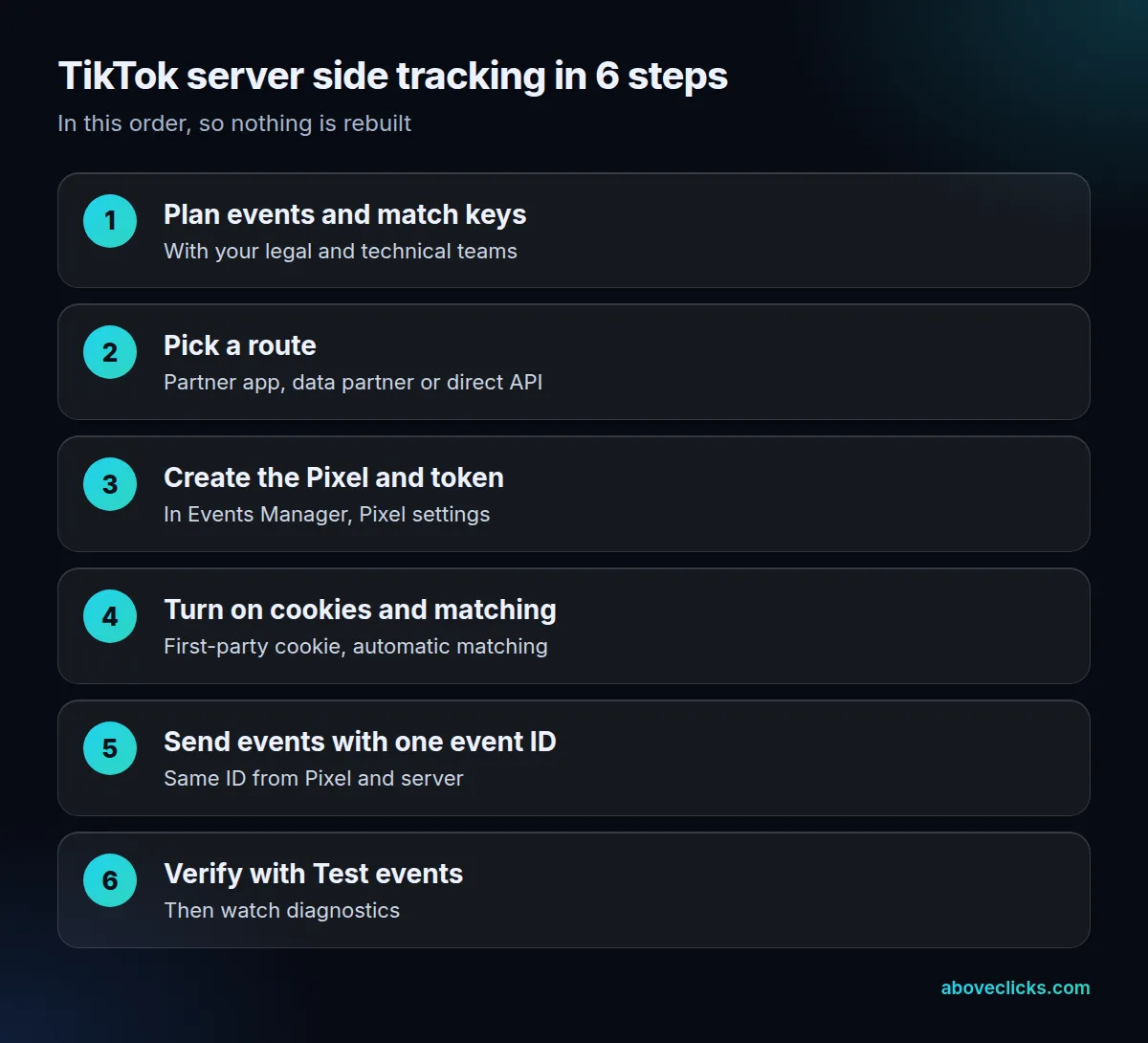
TikTok’s own guide has 8 steps and asks you to settle the events, parameters and match keys with your marketing, legal and technical teams before any code. It also asks legal to review TikTok’s privacy and data-usage terms. The access token comes from Events Manager, either from the data connection flow or from the Pixel’s settings.
For a direct build, your server posts JSON to https://business-api.tiktok.com/open_api/v1.3/event/track/ with an Access-Token header. Each web event needs event_source set to web, your Pixel code as event_source_id, an event name, an event_time in Unix seconds, a user object and a page object. A success returns HTTP 200 with code 0, which is how a developer confirms the TikTok Events API accepted the event.
Two limits shape the design of TikTok server side tracking. With the TikTok Events API a request can carry up to 1,000 events, and a request with more is rejected whole. The endpoint also allows 1,000 requests per second per account, and TikTok will raise that on request. Even so, TikTok says sending each event on its own, in real time, lets it use the event best.
Setting up TikTok server side tracking through Google Tag Manager
If you already run Google Tag Manager, TikTok’s GTM guide (updated April 2025) needs a GA4 account, a Google Cloud account with billing for the tagging server, a web container and a server container.
TikTok’s Events Manager flow for GTM sets up both the Pixel and the TikTok Events API by default and creates an event_id variable for you, so no extra deduplication work is needed. If you build the tags another way, you add a custom JavaScript variable for the event ID yourself. The generic container and server steps are in our GTM server side tracking guide.
Which events and match keys should the server send?
For TikTok server side tracking, send the same journey events as the Pixel, with the match keys that let TikTok connect each event to a person. TikTok advises sending events consistently across both channels.
Take an invented skincare store. A shopper views a product, adds it to the cart, starts checkout and pays. The server should send ViewContent, AddToCart, InitiateCheckout and Purchase, and the Purchase needs value as a plain decimal, such as 48.00, and currency as an ISO 4217 code, such as USD. Without a value, TikTok sees the sale but not what it was worth.
TikTok’s matching guide (updated February 2025) names 5 groups of match keys:
- The click ID, appended to the landing URL whenever someone clicks a TikTok ad.
- Email and phone, hashed.
- An external ID, hashed, such as a loyalty or customer ID.
- IP address and user agent.
- The first-party cookie,
_ttp, when you also use the Pixel.
The table shows where each one lives on a real store, and what to store before the shopper leaves the page.
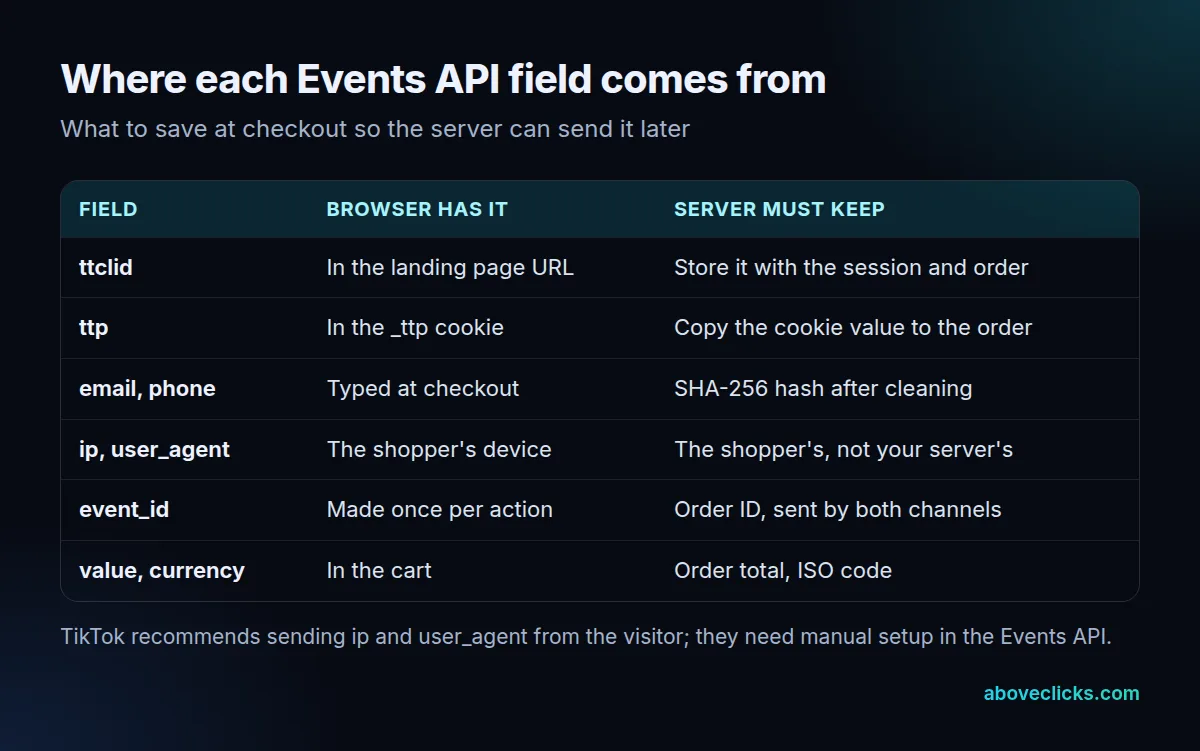
Hashing is where most direct builds go wrong. Per the setup guide, trim and lowercase an email before SHA-256, and put phone numbers in E.164 format, such as +12133734253, before hashing. Do not hash ip or user_agent.
The second trap is the IP address. The Pixel shares IP and user agent by default, but the TikTok Events API needs them set up manually, and they must be the shopper’s device values. If your server sends its own IP address, every event looks like it came from one place.
How does TikTok event deduplication work?
In TikTok server side tracking, you share the same event_id through the Pixel and the TikTok Events API, and TikTok keeps the first copy. Deduplication is required whenever both channels send the same event, for example Purchase.
TikTok’s deduplication page (updated May 2025) says identical event and event_id values that arrive within a 48-hour window from the first event are treated as one. It also says deduplication is not required if the channels send different events, such as AddToCart through the Pixel and Purchase through the TikTok Events API. Our event deduplication entry explains the idea in general.
Here is a worked example, for an invented store with 100 orders in a day:
| Setup | Pixel sends | Server sends | TikTok counts |
|---|---|---|---|
| Server only | 0 | 100 | 100 |
| Both, no shared event ID | 80 | 100 | 180 |
| Both, order ID as event ID | 80 | 100 | 100 |
With a shared ID, 80 browser events match their server copies and the other 20 orders arrive only from the server. Without it, TikTok sees 180 purchases for 100 orders.
The order ID is a good event ID because both channels can read it on the confirmation page. A random ID made separately in the browser and on the server never matches. The ID must be created once and passed to both.
How do you test TikTok server side tracking?
To test TikTok server side tracking, place a real test order and watch it arrive in Events Manager. Its Test events section shows instructions for testing both the browser Pixel and the TikTok Events API, and you can filter between the two.
TikTok’s Events Manager page (updated November 2025) lists the tools to use in order. Test events has a Payload Helper for checking a request body. Diagnostic cards then show the issue, how serious it is, which data sources and ads it affects, and how to fix it. The change log records what changed and when.
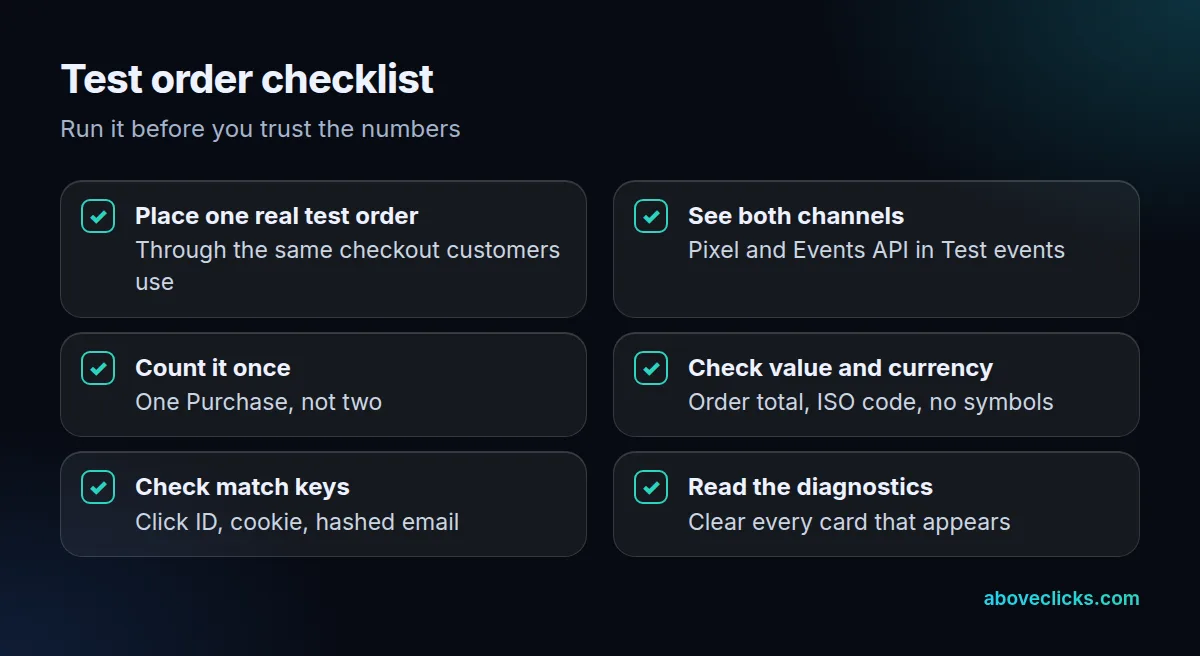
Run the checklist for your TikTok server side tracking after any change to the checkout, the tag setup or the access token. Then compare 7 days of orders in your store with the Purchase count in Events Manager. A small gap is normal because ad blockers, consent choices and refunds differ by channel, but a count above your order total means deduplication is failing.
A failed request returns a 4xx or 5xx status with an error code in the body, so log every response your server gets back. Our TikTok Pixel check list covers the browser-side checks.
When is the TikTok Events API worth the effort?
TikTok server side tracking is worth it when you run TikTok ads that optimize for website purchases or leads, because the algorithm learns from the events it receives. Missing conversions teach it less.
A quick decision test:
- Worth doing now: you run Website sales campaigns, your Pixel shows fewer purchases than your store, or you collect email at checkout.
- Can wait: you only post organic videos, or have fewer than 10 orders a week and no paid plan yet.
- Needs a developer: your store is custom-built and the checkout cannot store the click ID and cookie against the order.
Our own process for TikTok ads adds the TikTok Events API as a second channel with event IDs for deduplication, and sends purchase values. The audit takes place within 2 workdays and setup and fixes in about a week. If your account is run by our TikTok management service, the same tracking check comes first. We also build the server side tracking for other platforms. More measurement guides are in measurement.