A post purchase upsell Shopify stores can add is an extra product offer shown right after payment, before the Thank you page. It sells to a buyer who has already paid, so it can raise the order total without touching the checkout conversion rate.
This guide explains how the offer works, which orders never see it, what Shopify’s own rules say about design, how it differs from an offer made before payment, and how to count whether it paid back.
What is a post purchase upsell Shopify stores can run?
An extra offer on its own page after the order is confirmed. The buyer can add a product to the order they just placed, usually at a discount, or skip it.
Shopify’s documentation on product offers says the post-purchase page appears after the order is confirmed but before the Thank you page. It names three uses: upsell offers, donation requests and discounted product offers.
Strictly, an upsell sells something better or bigger, while a cross-sell sells something extra. Most merchants call both a post purchase upsell, and this guide does too. The offer adds to average order value without changing how many people check out.
To qualify, an order must total at least $0.50, a floor almost every real order clears, so the limits that matter are the ones further down. A Shopify post purchase upsell is also separate from the cart and checkout offers many themes already show, which is why it earns its own measurement.
How does a Shopify post purchase upsell work?
The checkout asks your app whether to show an offer, the buyer pays, and the offer page loads if the app said yes. The buyer then accepts, declines or goes straight to the order confirmation.
Shopify’s post-purchase guide describes two steps. A first step runs while the buyer is still on the payment page and decides whether to show an offer. A second step renders the page after checkout and must send the buyer on to the Order status page when it finishes.
Three rules shape how a post purchase upsell Shopify buyers see feels in practice:
- The extension is hosted and rendered by Shopify, so the page loads inside the checkout rather than on your theme.
- Shopify holds fulfillment on orders going through an offer. The hold is released when the buyer reaches the Order status page, or one hour after checkout if they close the browser.
- The buyer’s card must be vaulted before the offer is shown, so a buyer who accepts does not type payment details again.
If a buyer abandons the page, the hold ends 60 minutes after checkout and the order ships as normal. For store owners, that means a Shopify post purchase upsell is something an app delivers. You pick an app, choose the products and discounts, and the app does the rest.
Which orders never see a post purchase upsell?
Six kinds of order skip it, so the audience for a Shopify post purchase upsell is smaller than your total order count. Check these before you forecast anything.
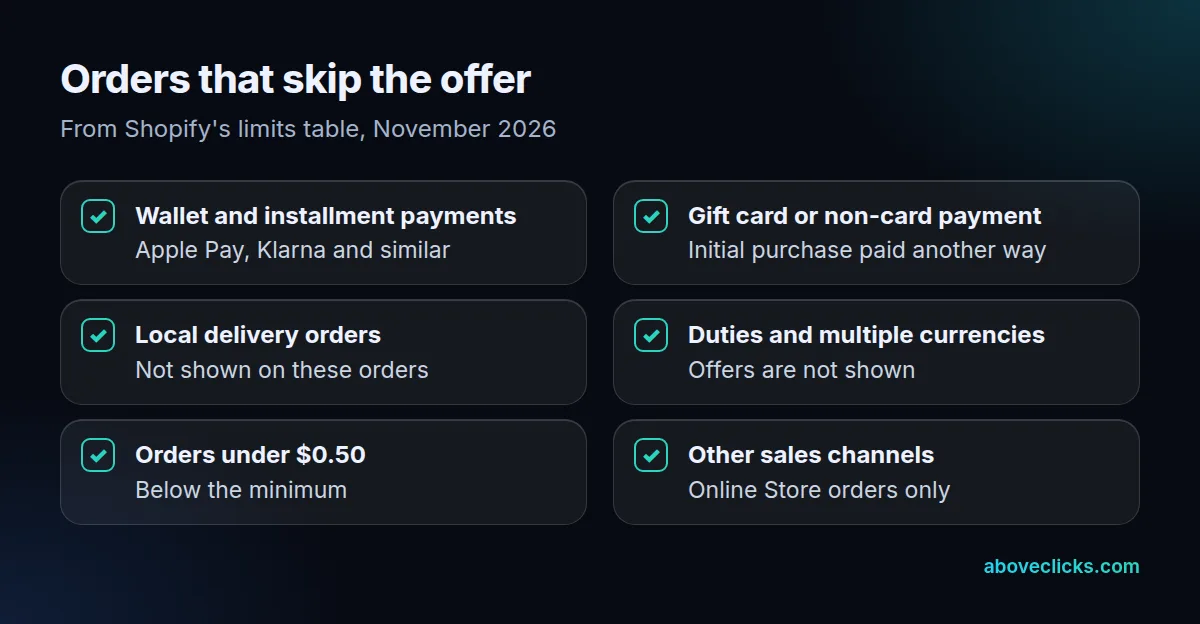
Shopify’s limits table lists the cases as of November 2026:
- Wallet and installment payments: the page does not appear for services such as Klarna, Affirm, Apple Pay or Google Pay.
- Gift card or any non-card first payment.
- Local delivery orders.
- Orders with duties and multiple currencies.
- Orders under $0.50.
- Orders from other sales channels: only Online Store orders qualify.
Two more limits matter for planning. A customer can accept a maximum of three post-purchase offers per checkout, and a store can use only one app for post-purchase offers at a time. If you install two, you choose which one appears.
If a third of your buyers pay with a wallet, a third of your orders never see the page. Pull your payment-method split from Shopify’s reports before you judge a take rate.
Do you need a post purchase upsell app?
Yes, in practice. The post-purchase page is built as a checkout extension, and Shopify’s documentation describes it as something an app provides.
Shopify’s build guide says post-purchase extensions were in beta in November 2026, usable without limits in a development store, while a live store needs access requested by the app developer. As a merchant you do not request that yourself. You choose a post purchase upsell app whose developer already has it.
Questions to ask any post purchase upsell app before you install it:
- Does it show the real product title and price from your store?
- Can you set a rule for which products it offers, and exclude low-margin ones?
- What does it cost per month, and does the fee change with order volume?
- How does it report accepted offers, so you can follow the sums below?
- Can you switch it off quickly, and does it leave your checkout untouched when you do?
Weigh it against your own numbers: on a $30 monthly plan, a post purchase upsell app has to earn more than $30 of extra gross profit before it helps. Install it on a test store or a quiet day first. Place a test order with a card, because wallet orders skip the page and will make the offer look broken.
How is a post-purchase offer different from a pre-purchase offer?
A pre-purchase offer is shown before the buyer pays, and a post-purchase offer after. That one difference changes the risk, the cost of getting it wrong and who can use it.
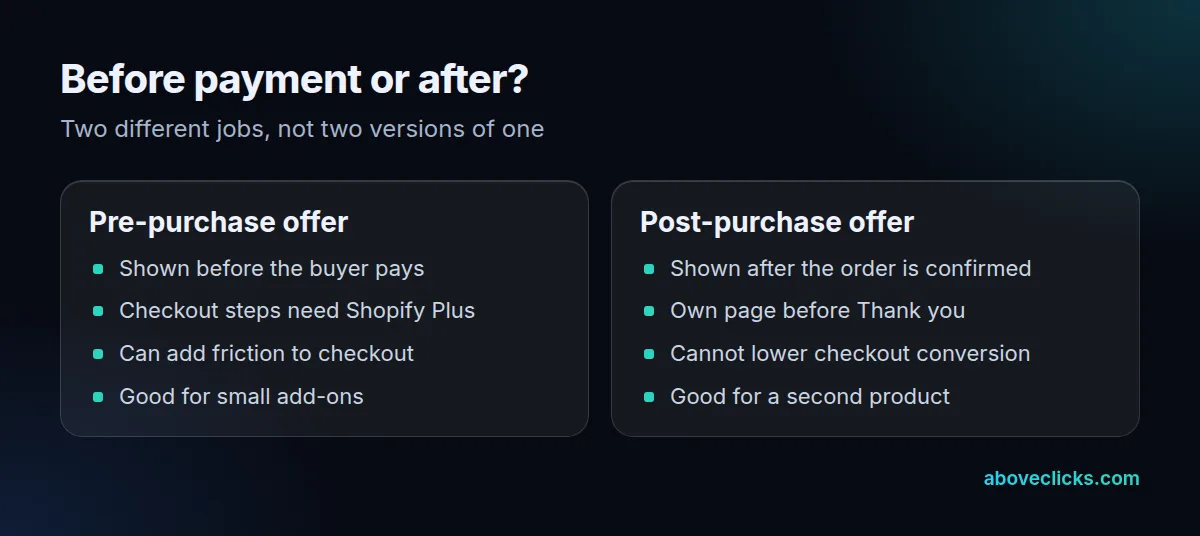
Shopify’s pre-purchase guide shows an offer inside checkout. In its product offers overview, checkout UI extensions on the information, shipping and payment steps are available only to stores on a Shopify Plus plan. The post-purchase page is a different feature with its own limits.
The sums differ too for a post purchase upsell. A $5 add-on on an $80 cart lifts that order by 6.25% if the buyer accepts it, but every extra line at checkout gives some buyers a reason to stop. A $24 second product after payment lifts the same order by 30%, and it cannot cost the sale because payment has already cleared.
The practical difference is risk. A pre-purchase offer sits in the buyer’s path and can add friction or doubt before payment. A post-purchase offer cannot cost you the sale it follows, because the order is already confirmed.
Many stores need a pre-purchase offer and a post purchase upsell at different times. Keep small add-ons, such as a warranty or a gift wrap, in the cart or checkout. Keep the second product, such as a refill or a matching item, for the page after payment. If checkout changes are in scope, our checkout extensions service covers what can be built there.
What makes a post purchase upsell offer work?
A relevant product, a clear price and a simple way to say no. Shopify’s own rules say as much, and breaking them risks trust you have just earned.
Shopify’s UX guidelines for post-purchase offers set out the principles:
- Be transparent about all costs involved in the purchase.
- Present clear options to accept or refuse, without pressure.
- Display a maximum of three consecutive upsell offers.
- Tailor offers to what the customer bought.
- Show the same title and price the product has in your store, with the original price struck out next to a discount.
The page also says what to avoid in the banner copy: exclamation points and misleading language that makes the offer feel compulsory or casts doubt on the order. “It’s not too late to add to your order” is Shopify’s own example of good copy.
For a post purchase upsell, relevance beats discount depth. A buyer of a coffee grinder is more likely to take a $12 pack of filters than a random bestseller at 30% off. Start with one offer per product, based on what people already buy together, and test it before adding rules.
How do you count whether a post purchase upsell paid back?
Multiply eligible orders by the take rate, the offer value and your margin, then subtract the app fee. Any number you can’t measure is an assumption, so say so.
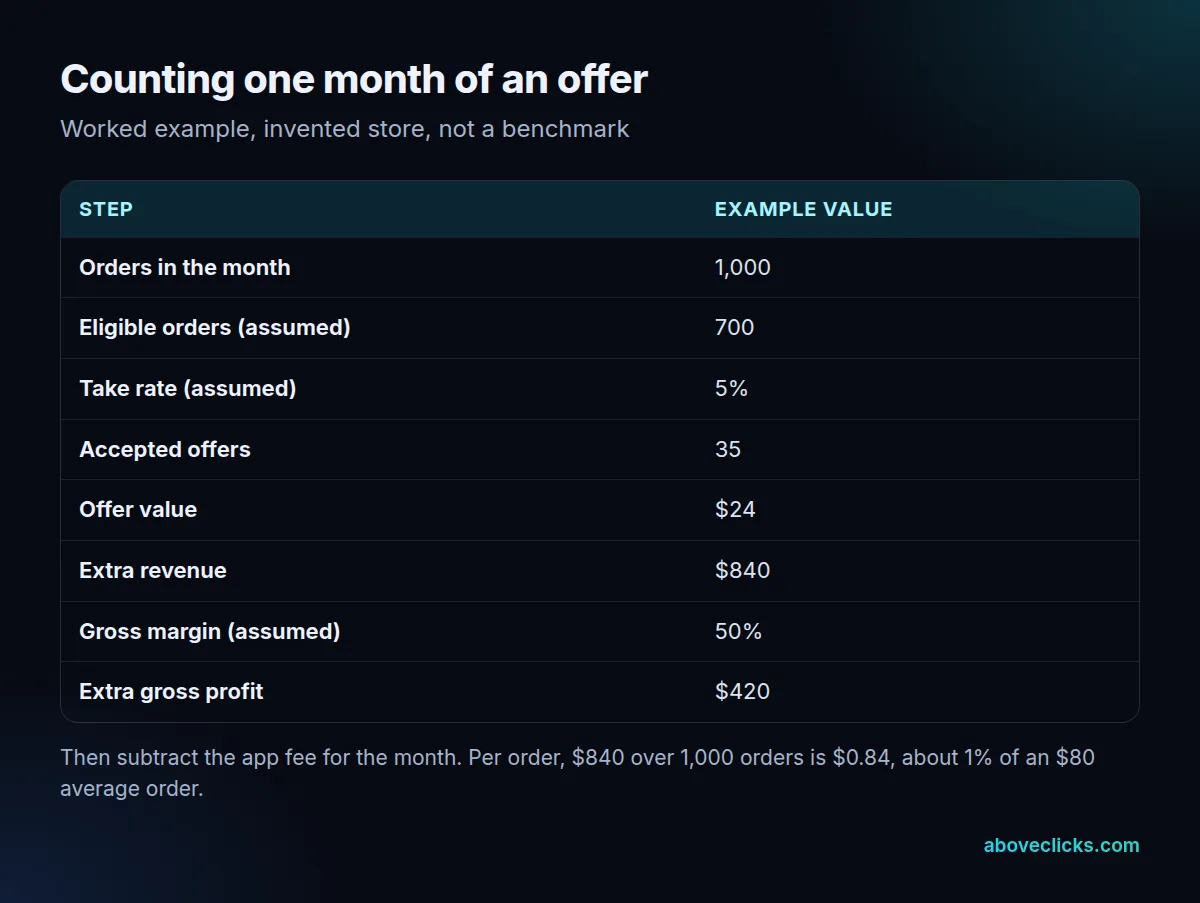
The example above is an invented store with an $80 average order and 1,000 orders a month. Assume 700 of them are eligible (the rest paid by wallet or gift card, or were local delivery). Assume 5% of eligible buyers accept a $24 offer. That is 35 accepted offers and $840 of extra revenue. At a 50% gross margin, that is $420 of extra gross profit before the app fee.
Spread across all 1,000 orders, that is $0.84 of extra revenue each, about 1% of an $80 order. The take rate and margin here are placeholders. Use your own, and treat any average quoted by an app vendor as marketing until you see it in your store.
Measurement has its own traps:
- Purchase tracking: Shopify notes that analytics services using the Pixel API report only the purchase event and value for the initial purchase. Accepted offers may be missing from your ad platforms.
- Older scripts: services that rely on additional scripts or script tags get incomplete conversion data. Shopify’s checkout docs say those were sunset for the Thank you and Order status pages for non-Plus stores on August 26, 2026.
- Net value: a buyer who accepts a discounted extra may have bought it later at full price. Compare weeks with the offer and without it, using the same days of the week.
If your reports and ad platforms disagree after you switch a post purchase upsell on, that is a tracking question before it is an offer question. Our checkout tracking page covers that side, and our conversion rate optimization service starts from the numbers above. For a wider view of where else to lift orders, read our guide to raising conversion rate on Shopify. Our Shopify CRO page lists how we test changes like this one, and more measurement guides are in measurement.