What is Triple Whale? It is an ecommerce analytics and AI platform that collects store, ad and email data in one place and tracks orders with its own pixel. This guide explains what it does and which checks to run before you rely on its numbers.
It answers what is Triple Whale in plain terms, the five parts it is built from, how an order becomes a credited channel, and what the free plan covers. For price and the other tools, see our guides to Triple Whale pricing, alternatives and Triple Whale vs Hyros. More background is in our measurement guides.
What is Triple Whale?
Triple Whale is software for online stores that brings sales, ad spend and customer data into one view and credits each order to a marketing channel. The vendor calls it the “AI operating system for modern commerce” on its home page.
So what is Triple Whale in practice? For a store owner it is a dashboard fed by a tracking pixel, plus an AI assistant called Moby that you can ask questions. The vendor’s pricing page says more than 60,000 brands use it, as of November 2026. That is a vendor figure, and we have not verified it. If you are weighing it against other tools, ask what is Triple Whale actually adding over what your store already reports, and write down the answer before you start a trial.
Most users arrive through Shopify. In one line, what is Triple Whale trying to solve? Ad platforms each report their own version of what happened, and a separate tool tries to give one answer. Whether that one answer is right for your store is what the last section helps you test.
It helps to know who the product is aimed at. The vendor lists roles on its home page, from founders and marketing leaders to performance marketers, data analysts and agencies. In plain terms, what is Triple Whale built for: a brand running several ad channels that wants one place to read orders, spend and customers, rather than five separate reports. A store with one channel and a handful of orders a day may find the free reports it already has are enough.
What does Triple Whale do?
It does five jobs: it tracks orders, credits channels, measures ad impact beyond clicks, answers questions with AI and sends data back to ad platforms. The table shows the five parts and where each starts, from the vendor’s home page and pricing page as of November 2026.
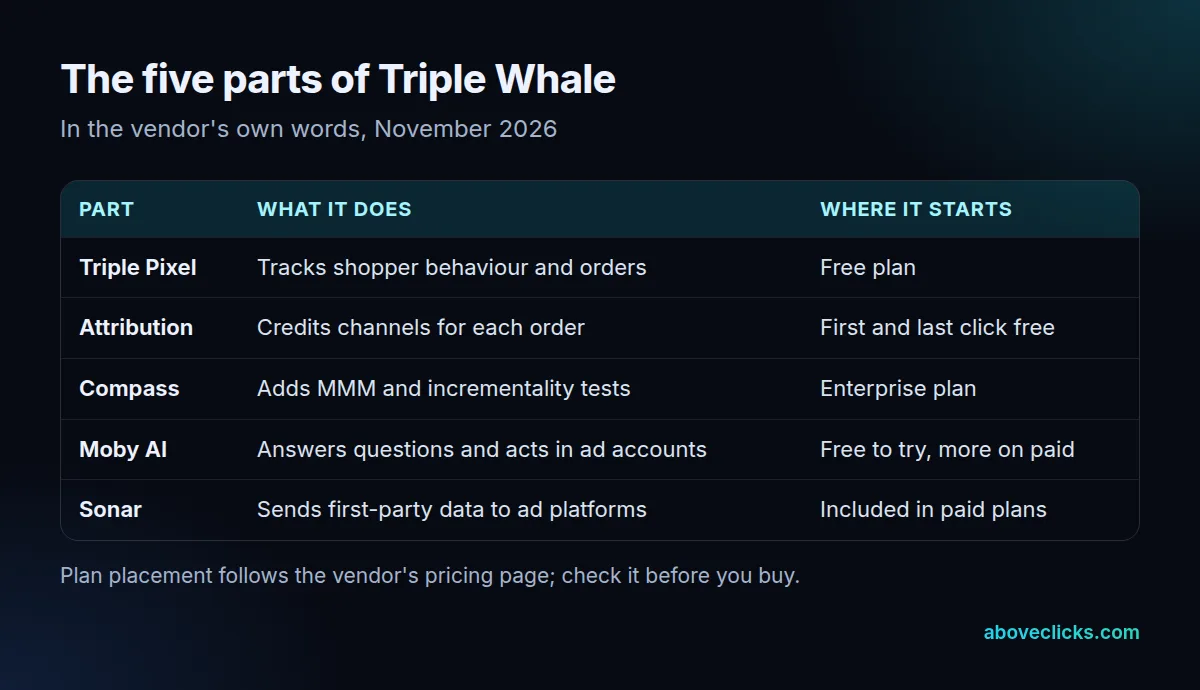
When someone asks what does Triple Whale do day to day, the answer is mostly reporting, across the 5 parts above. The vendor’s own list of Triple Whale features is long, but those 5 cover the core. The Foundation plan adds a dashboard builder, a SQL editor and customer segments. The Automate plan adds automations that run on a schedule, plus actions in your ad accounts such as pausing ads or changing budgets within approval settings the vendor describes.
The paid plans run for 12 months, and the vendor says the pixel and dashboards need about 15 minutes to connect. Compass is the measurement layer. The vendor says it combines attribution, marketing mix modelling (MMM) and incrementality tests, which try to show whether a channel created sales that would not have happened anyway. On the pricing page, MMM and incrementality sit in the Enterprise plan.
How does Triple Whale work?
You connect your store and ad accounts, its pixel records visits and orders, and an attribution rule decides which channel gets credit. You then read the report and change spend. The steps below show that path.
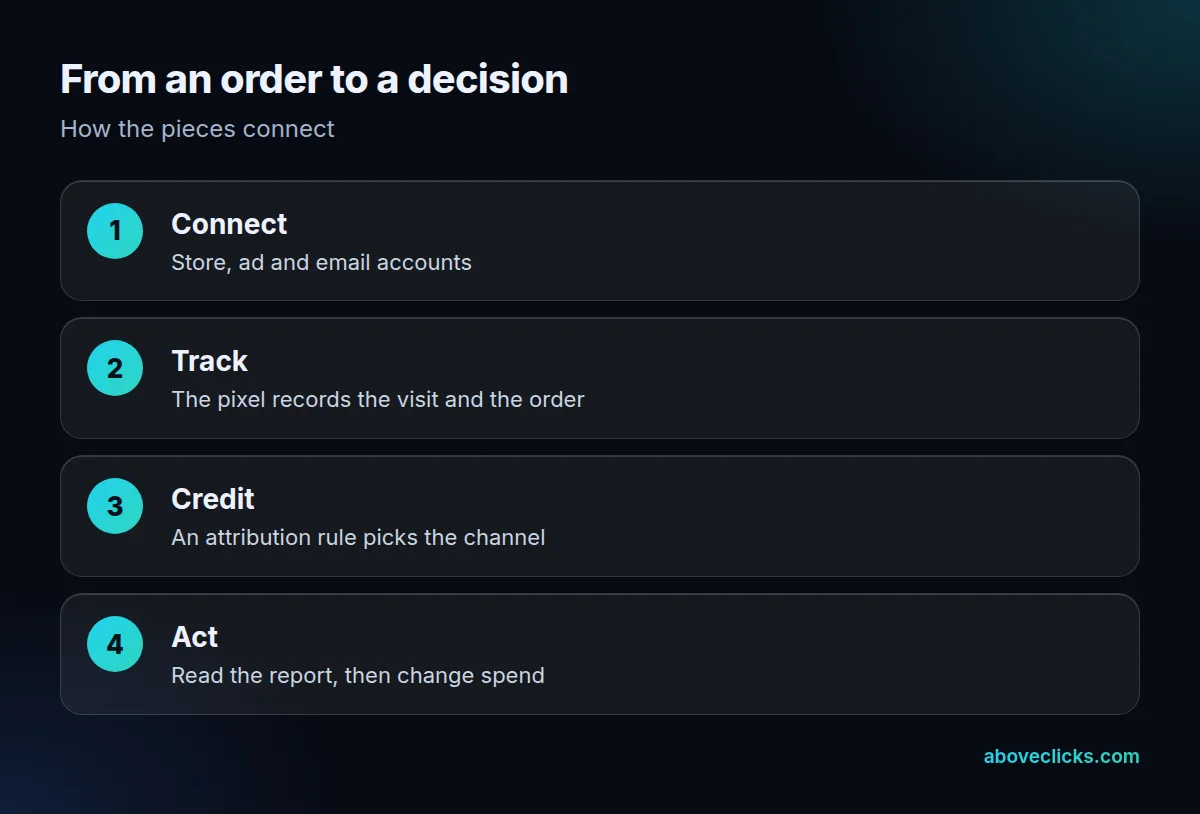
How does Triple Whale work at the pixel step? The vendor says the Triple Pixel tracks more shopper behaviour than standard pixels for accurate measurement. Treat that as a claim to test, not a fact: any pixel can miss visits from blocked scripts or cross-device journeys.
The credit step is where results differ. An attribution model is a rule for sharing credit among the touchpoints before a purchase. Google defines a touchpoint as an interaction with a channel before a key event, such as an ad click, a website visit or an email open. The free plan uses first and last click; multi-touch attribution starts at Foundation.
The vendor says most brands are running in 15 minutes with no engineer. Connecting takes minutes; deciding which rule your team trusts takes longer.
So how does Triple Whale work once the pixel is live? Every order arrives with whatever the pixel saw before it: the ad or email click, the landing page and the device. The report then groups orders by channel under the rule you chose. Change the rule from last click to first click and the same orders move between channels. That is not a bug; it is the main thing to understand before you move budget on a report.
Is Triple Whale free?
Partly. For anyone asking what is Triple Whale’s free tier, it is real but limited. The Free plan costs nothing and has no commitment, and it includes the Triple Pixel, a single view of your data and first and last click attribution, according to the pricing page as of November 2026.
If you are asking is Triple Whale free for a real store, the honest answer is that the data is free and the extras are not. Multi-touch attribution, the dashboard builder and the SQL editor start on Foundation. Foundation, Automate and Enterprise are 12-month subscriptions, billed monthly or annually with two months free, and every paid plan is priced by your annual GMV (gross merchandise value) with unlimited users.
As of November 2026 the pricing page publishes no dollar figures, so ask for a quote in writing. Our Triple Whale pricing guide shows how to work out the real 12-month cost.
How is Triple Whale different from Google Analytics?
Google Analytics measures site behaviour for free with 3 attribution models; Triple Whale adds its own pixel, store-wide ad and order reporting and AI. They use different rules, so their totals will not match exactly.
In GA4, the Attribution reports offer data-driven attribution, paid and organic last click and Google paid channels last click. Google adds that all models exclude direct visits from credit unless the whole path was direct. Shopify’s reports offer 5 models: last non-direct click, last click, first click, any click and linear.
Shopify warns that its any click model gives more credit than orders you received, because every clicked channel gets 100%. That is why three tools can disagree about one order and all be following their own rules.
| Tool | Rules available | Cost to start |
|---|---|---|
| Shopify reports | 5 models | Included with the store |
| Google Analytics 4 | 3 models | Free |
| Triple Whale Free | First and last click | Free |
Google’s wording matters here. It says an attribution model can be a rule, a set of rules or a data-driven algorithm that decides how credit is shared among touchpoints. So when you read what is Triple Whale reporting for a channel, ask which of those it is using for that report, and compare it with the same rule in GA4 before you call one of them wrong.
If your tracking is not yet reliable, fix that first: a paid tool built on broken events inherits the same gaps, which is what a tracking and analytics review looks for.
What should you check before you rely on Triple Whale?
Match a few real orders across your store, GA4 and the tool, and write down which attribution rule each report uses. If the totals are close and the differences are explained, the data is usable.
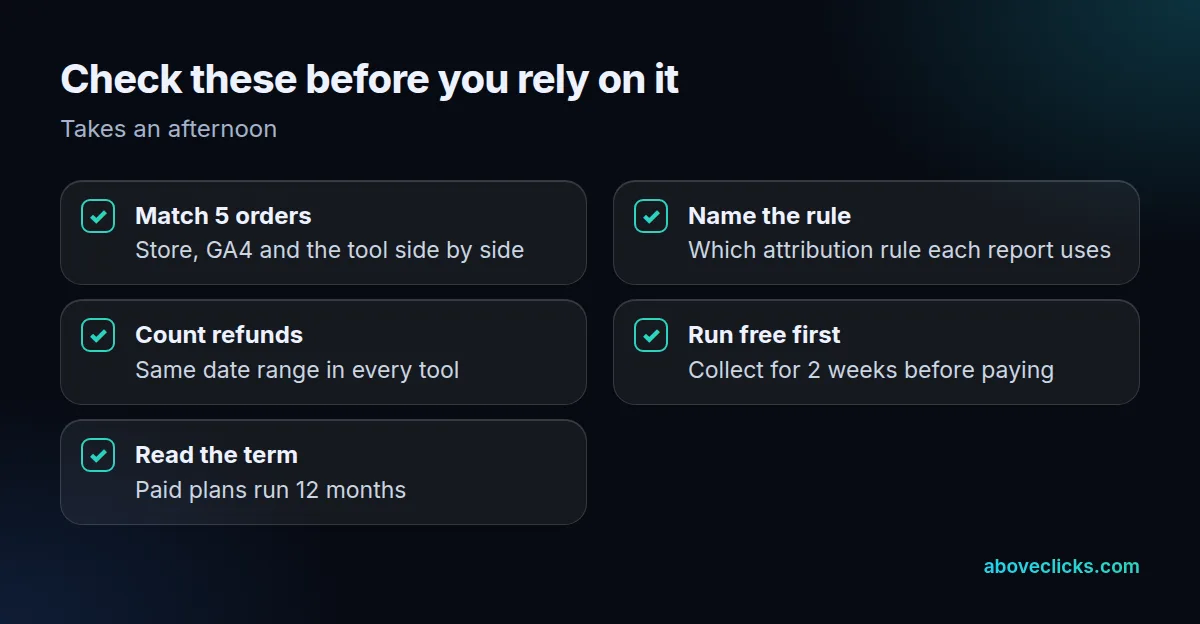
Here is the order test we use in tracking audits, in four steps:
- Pick 5 recent orders, ideally from different channels.
- Look each one up in your store, in GA4 and in Triple Whale.
- Record the channel each tool credits and the rule it used.
- Compare totals over the same dates, after refunds.
Take an invented example. A customer clicks a Meta ad, then a Google ad, then an email, and buys a $120 product. Last non-direct click gives the email all $120. First click gives it to the Meta ad. Linear gives each of the three clicks $40. None of the three is wrong; each follows a different rule.
The short answer to what is Triple Whale worth to you is whatever the matched orders show. Run the free plan for 2 weeks before you pay, then compare the order count and revenue with your store for the same 14 days. A gap of a few orders can come from refunds or timing. A gap of dozens points to a tracking problem that no plan will fix. Write the result in two lines, the count the tool reported and the count your store reported, and keep them with the date; if you later pay, you can repeat the test after 3 months and see whether the gap stays the same.
Two more habits help. First, always compare the same date range and the same time zone in every tool, because a report cut at midnight in one place and UTC in another moves orders between days. Second, decide in advance what a good result looks like, for example that the tool’s order count is within a small margin of the store’s. Without that line, any number can be explained away after the fact. If you want a second pair of eyes, our free audit reads your setup with read-only access.