What is Klaviyo used for? Online stores use it to send automated and one-off email and SMS, based on the store’s own customer and order data. Judge a setup by whether five jobs are working: sign-ups, flows, campaigns, targeting and measuring.
This guide answers what is Klaviyo used for in plain terms, shows which flows to build first, explains what the bill counts and gives four checks to run before you pay. We run Klaviyo for stores through our Klaviyo email marketing service, so we also say where it is not the right tool.
What is Klaviyo used for?
What is Klaviyo used for in most stores? Turning store data into messages: it collects sign-ups, sends automated flows and one-off campaigns, groups people into segments and ties sends to orders.
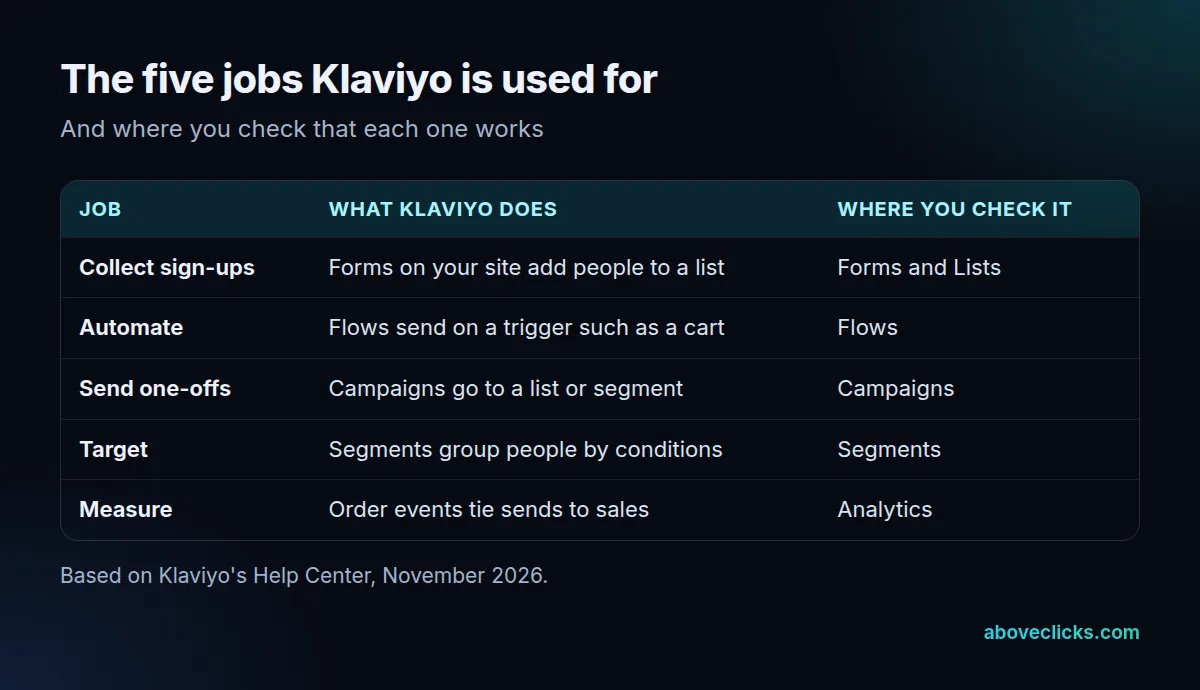
Each of the 5 jobs has its own page in the account, so you can check them one by one. If you are asking what is Klaviyo used for before you sign up, open those 5 pages in a demo or trial and see which ones your team would use weekly. Think of them as a loop. Forms add people, flows and campaigns message them, segments decide who gets what, and order events show which messages led to sales.
What Klaviyo is used for stops at that loop, and knowing that keeps you from buying it to solve a sales-pipeline problem. Deal tracking, sales pipelines and phone-call notes belong to a different kind of tool, and our guide on whether Klaviyo is a CRM covers that line in detail.
What does Klaviyo do with your store’s data?
It reads customer and order events from your store and uses them as triggers and filters. Without that connection, Klaviyo is a plain email sender; with it, what Klaviyo does becomes personal to each customer.
Klaviyo’s guide to connecting Shopify says the integration brings customer profile and order data into Klaviyo so you can send targeted messages. Its data reference lists 4 events that matter most here: Placed Order, Ordered Product, Fulfilled Order and Viewed Product.
Onsite tracking is a separate step. Klaviyo’s onsite tracking guide says enabling it is also what lets you use Klaviyo sign-up forms on your site. If forms never show, check that step first.
One more warning from the Shopify guide: when you move from another email provider, disconnect it from Shopify before you connect Klaviyo, or existing subscribers could receive double opt-in emails.
Check the sync before you build anything. Open a recent order in your store, find the same customer in Klaviyo, and confirm the order shows up on their profile. If it does not, flows that depend on orders, such as post-purchase and winback, will not trigger correctly.
In practice, this is why the same question, what is Klaviyo used for, gets different answers for different stores. A store whose data syncs can personalize a cart reminder with the exact item left behind. A store whose data does not sync gets a generic newsletter tool.
Which Klaviyo flows should a store build first?
When people ask what is Klaviyo used for first, the answer is four flows, in this order: welcome series, abandoned cart, post-purchase and winback. That is the sequence Klaviyo’s own flows guide recommends.
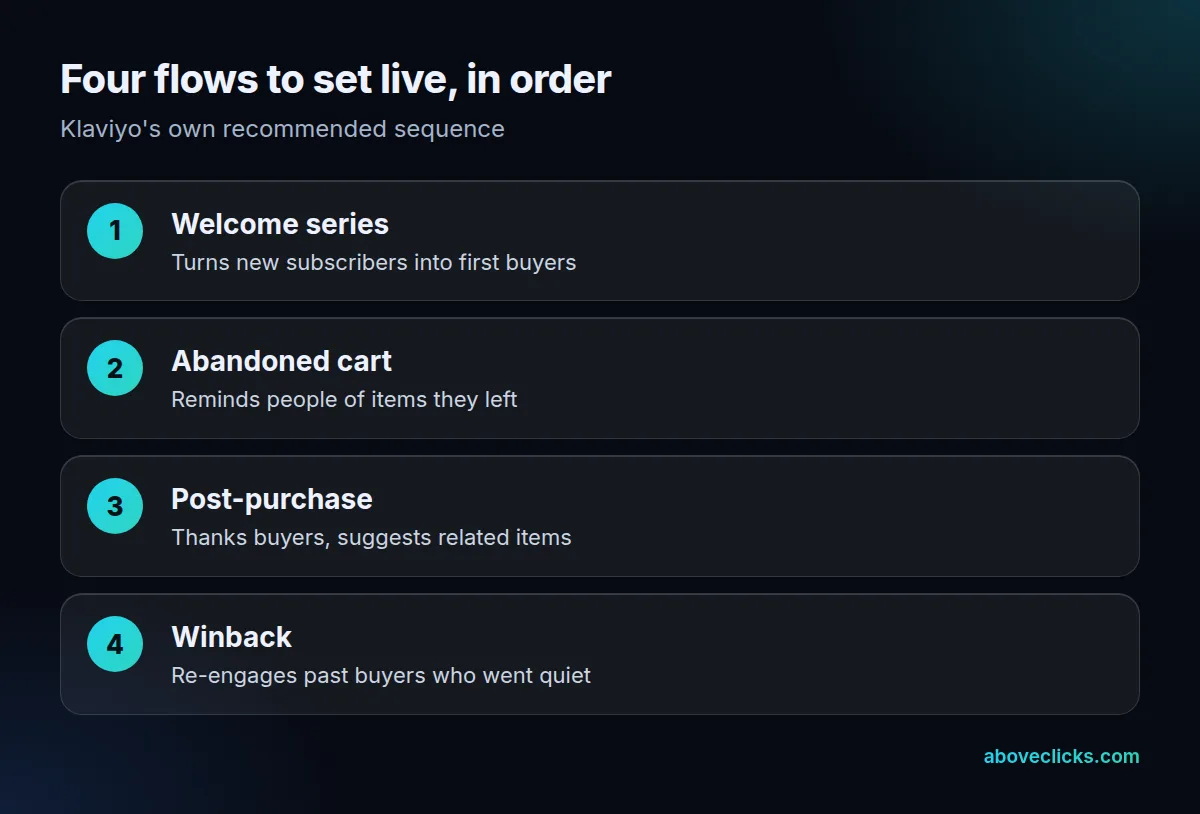
Klaviyo’s flows guide defines a flow as a sequence of automated actions triggered by a behavior or event, such as joining a list or starting checkout. It says the welcome series introduces subscribers to your brand and converts them into first-time customers, and that the abandoned cart flow can change with the items in the cart and whether the person already bought.
Start with the welcome series, because every new subscriber enters it. Then add the cart flow, which is the one most directly tied to lost orders. Our abandoned cart recovery page shows how we build and test that flow.
What is Klaviyo used for once the four flows run? Testing and refining them. Klaviyo’s flow email A/B test guide says a test starts with 2 variations, and you can change the subject line, preview text, sender name and content between them.
A practical way to begin: set 4 flows live and keep each to 1-3 emails at first. You can add branches and delays later, once you can see which email people open.
The same guide adds that you should keep the email and SMS welcome series as separate flows. People can opt in to each channel separately, and each welcome flow can only be entered once.
Is Klaviyo used for email marketing only?
No. Beyond email, what is Klaviyo used for? SMS and sign-up forms, so email is one of several channels. The rules differ by channel, and SMS is stricter.
For SMS, Klaviyo’s compliance basics say you need express consent before messaging anyone, and for US marketing messages that must be written consent, which can be an electronic SMS opt-in. Keep a record of when and how each person agreed.
Cart reminders by text have their own limits. Klaviyo’s US cart abandonment guidelines list these requirements:
- Double opt-in turned on.
- Only 1 SMS per recipient in the flow.
- The SMS sent within 48 hours of the triggering event.
- Express consent for SMS and for cart abandonment messages.
SMS also has a length limit that email does not. Klaviyo’s SMS best practices note that a single SMS segment holds up to 160 characters, or 70 with emojis or special characters, so long copy turns into several billable messages.
That page is general information, not legal advice, so check your own rules with counsel before you text. Where email is concerned, the usual advice still applies: send to people who asked to hear from you.
What is Klaviyo used for when it comes to targeting?
What Klaviyo is used for in targeting is segments. They are groups of contacts defined by conditions, and they let one campaign say different things to different people.
Klaviyo’s segments guide explains the difference from lists: a list is static and grows as people subscribe or are added, while a segment is dynamic, growing as people meet its conditions and shrinking as they stop. Segments update in close to real time.
Segments are where the answer to what is Klaviyo used for becomes practical: the same data that triggers a flow also decides who is in your next campaign.
Three segments worth building first:
- Repeat buyers: people who bought at least twice, for early access to new items.
- Lapsed subscribers: people on your list for 6 months or more who never opened or clicked, to test before you remove them.
- Recent first-time buyers: people who bought in the last 30 days, kept out of discount campaigns.
Klaviyo’s campaign tools also let you test subject lines, content and send times, so you can check a segment’s response before you roll a message out wider.
What does it cost to use Klaviyo?
What is Klaviyo used for if you pay for it by audience size? The bill follows active profiles and sends, and an active profile includes emailable people who never opted in. Count those before you pick a plan.
Klaviyo’s billing guide says any profile that can be emailed through Klaviyo counts as active regardless of consent status, including people who shared an email at checkout without opting in. Your plan must cover that count: with 7,000 active profiles, the plan must allow at least 7,000. As of November 2026, the page also says an account that exceeds its plan moves to a compliant plan at the end of the billing cycle.
We don’t quote plan amounts here, because they change. Instead, export your customer list and count three groups: subscribed, unsubscribed but emailable, and checkout-only contacts. In an account review, the billed count and whether the store data is syncing are the two things we look at first.
Example: a store with 4,000 buyers and 3,000 checkout-only contacts has 7,000 active profiles, even if only the buyers subscribed. The 3,000 checkout-only contacts are the part most owners forget when they ask what is Klaviyo used for and what it will cost.
Knowing what Klaviyo is used for helps you see why: its pricing follows the size of the audience you can message, not only the people who bought.
Is Klaviyo worth it for your store?
So, what is Klaviyo used for when it earns its fee? Repeat orders from flows and campaigns that read order data. It is worth it when the store has order data to use and someone to own the flows. It is not worth it as a bulk sender for a list that rarely buys.
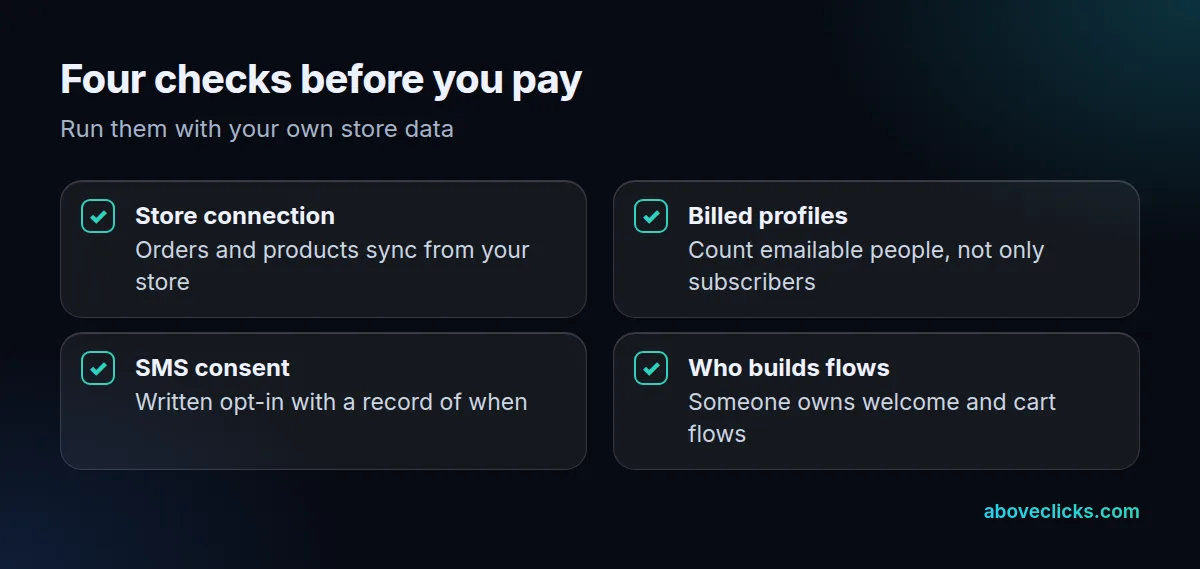
Use the four checks above with your own account to see what is Klaviyo used for in your store today. If the store connection works, the billed count is understood, SMS consent is recorded and someone owns the welcome and cart flows, Klaviyo is being used for the right jobs. If one fails, fix it before you add another tool, and review the setup every 6 months.
Three mix-ups cost money. First, treating Klaviyo as a CRM, then expecting deal tracking. Second, texting without written consent. Third, paying for contacts who were never subscribers.
If you are still choosing between platforms, our Klaviyo vs Omnisend comparison shows how each one counts contacts. For a second opinion on your own setup, our free audit reads your account with read-only access. More guides are in buying guides.