Shopify store development cost is the one-time price of building a store, on top of the plan Shopify bills every month. It is a developer’s quote, made of hours at a rate plus any fixed lines, so you read it line by line.
This guide shows what a build includes, how Shopify store development cost climbs from theme setup to custom code, how to work out a quote and the six traps to check before you sign. For the recurring lines, our guides on Shopify website development cost and how much a Shopify website costs cover the plan, theme, app and payment fees.
What is Shopify store development cost?
It is the build price: developer time to set up, customize and launch the store. Shopify’s plan, card rates and apps are billed separately, and Shopify publishes the plan prices.
As of November 2026, Shopify’s pricing page lists Basic from $29 a month and Plus from $2,300 a month. Those are published numbers. Shopify store development cost has no such list, because it depends on your catalog, theme, features and the people you hire.
That is why we do not publish a market range for Shopify development cost. A range mixes a one-hour fix with a custom app, and it dates quickly. Instead, we show how the quote is made so you can test any number you are given.
A useful habit is to split every Shopify store development cost into three questions. What is being built, how many hours does each part take, and what recurring charges does it create? A quote that answers all three is easy to compare; one that answers none is a guess.
What does a Shopify store build include?
Six jobs: set up the theme, load products, customize the layout, add tracking and SEO basics, configure checkout, then test and hand over. A quote that skips one of them shifts the work to you.
- Theme setup: install the theme and set brand colors, fonts, navigation and settings.
- Products and collections: import the catalog and group it into collections.
- Theme customization: arrange the pages with sections and blocks.
- Tracking and SEO setup: analytics, ad pixels, Search Console, redirects from any old domain.
- Checkout, shipping, tax and legal pages: payments, zones, rates and policies.
- Quality check and handover: test orders, mobile checks, access and a short training call.
Product import is often the quiet cost. Shopify’s CSV import guide says a CSV file lets you import a large number of products and their details at once, and each combination of option values, such as size and color, is a variant. A clean file takes minutes to load; a messy export from another platform takes hours to fix first. In our invented example store, 120 products with 3 sizes each make 360 variants to check, which is why the product line is the second largest in the quote below.
The same list sets your Shopify store setup cost, whoever does the work. Our own Shopify development work follows the same list: store build or rebuild, theme setup and customization, speed and SEO basics, and a handover video for your team.
How do build levels change Shopify store development cost?
The cost rises in five levels, from theme setup to checkout extensions. Each level includes the ones before it, and the step from one level to the next is where quotes diverge most.
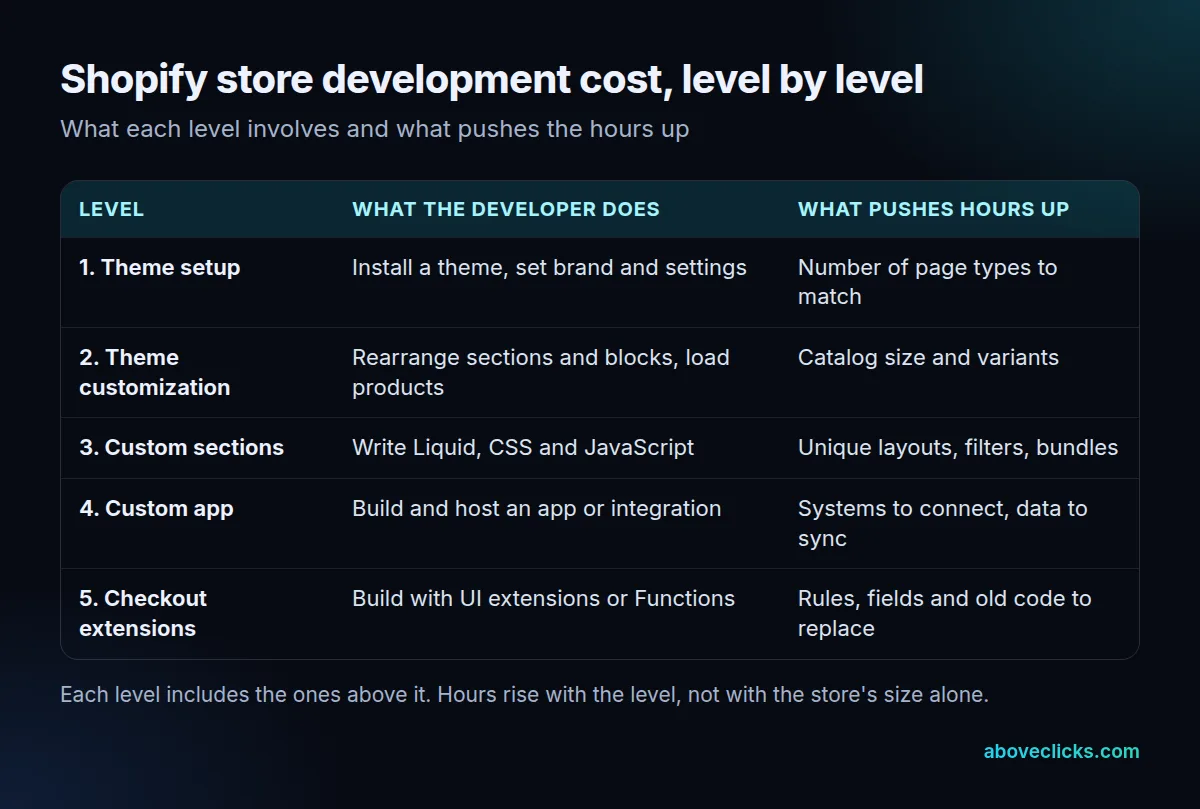
The first two levels need no code, so the Shopify store development cost at this point is mostly setup time. Per Shopify’s theme structure guide, a template holds up to 25 sections and up to 1,250 blocks, and you customize layout by adding, removing and rearranging them. Many stores finish their whole Shopify store build cost at level 2, with 0 lines of code written.
Level 3 starts when sections and blocks cannot reach the design. Shopify’s theme docs describe themes as built with Liquid, HTML, CSS, JavaScript and JSON, and that is the work a developer bills at this level: a filter, a bundle builder or a layout no theme offers.
Level 4 is a custom app, and Shopify store development cost jumps here because someone must also host and maintain it. Shopify’s help page on apps says creating a custom app requires development knowledge and can be challenging, and suggests hiring a Partner. Level 5 is checkout. Shopify’s checkout documentation lists 4 types of extension: UI extensions, Functions, web pixel extensions and payments extensions.
The Shopify Partner Directory describes the range the same way, from “basic theme setup to custom solutions”, and lets you filter partners by price, location and services. Use it to check that a quote matches the level you actually need.
How is a developer’s quote worked out?
Hours times a rate, plus any fixed lines. The total matters less than how many hours sit on each line and who owns the risk if a line runs over.
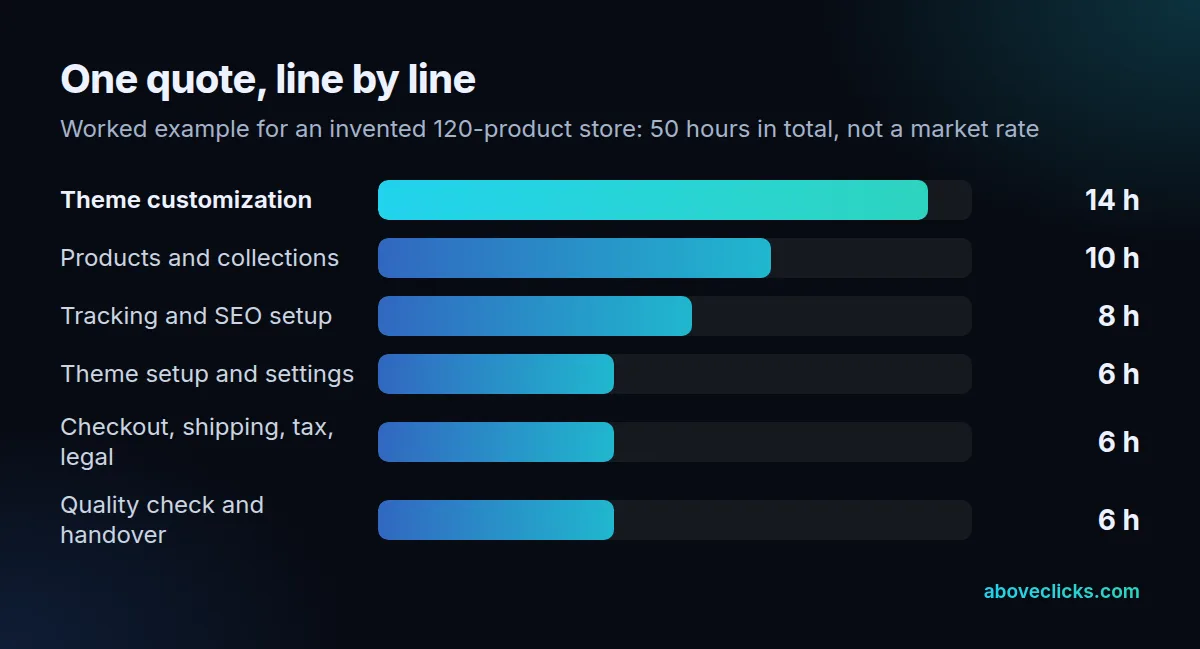
The example above is an invented store with 120 products, and every number in it is made up for the arithmetic. The lines add up to 6 + 10 + 14 + 8 + 6 + 6 = 50 hours. At a round $100 an hour, chosen only to make the sum easy and not a market rate, the quote would be 50 × $100 = $5,000. At 40 hours or 60 hours, the same formula gives $4,000 or $6,000.
Two details move the answer. First, the biggest line is theme customization, so a change of design can shift the Shopify store development cost more than catalog size does. Second, a fixed price is not automatically cheaper than hourly; it moves the risk of overruns from you to the developer, and the developer prices that risk in.
Ask for both views of the same scope: the hours per line and the fixed total, so the Shopify development cost can be checked two ways. If the two do not agree, the difference is the risk premium, and you can decide whether to pay it.
What adds to the cost after launch?
Apps, checkout code that stops working and every change you ask for later. These are not part of the build price, so a complete Shopify store setup cost includes a line for each.
Apps are the first, and they sit outside the Shopify store development cost of the build itself. Per Shopify’s app help page, most app charges appear on your Shopify bill, but some third-party apps charge you directly outside it, so keep your own list with each monthly price.
Old checkout code is the second. Shopify’s checkout documentation says checkout.liquid is unsupported for the Information, Shipping and Payment steps, and that it and additional scripts were sunset for the Thank you and Order status pages on August 28, 2025. Script tags there were sunset for non-Plus stores on August 26, 2026, and stores still relying on them must move to extensions.
A store that grew up on scripts can therefore need rebuild hours at level 5 that its original quote never showed. Our Shopify checkout extensions page explains that work. The third cost is plain: every new feature is a new quote.
How do you compare Shopify developer quotes?
Line against line, using the same six checks on each. A cheaper quote that leaves out tracking, redirects or checkout code is not cheaper; it moves those jobs to you and raises your real Shopify store development cost.
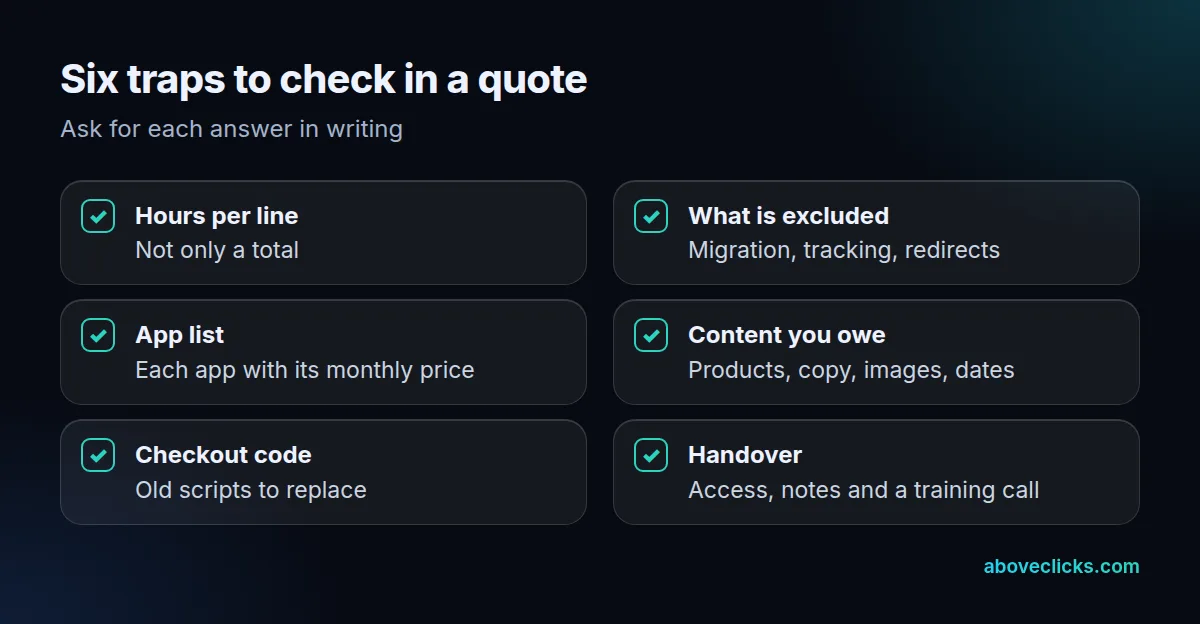
Here is how to use the six checks:
- Hours per line: if a quote gives only a total, ask for the split before comparing.
- What is excluded: migration, tracking and redirects are the usual omissions.
- App list: every app with its monthly price, and whether it bills through Shopify.
- Content you owe: products, copy and images, with dates; late content is what makes builds run over.
- Checkout code: any old script that needs replacing, as above.
- Handover: admin access in your name, notes on what was changed and a training call.
Example with invented numbers: quote A is 50 hours at $100, so $5,000. Quote B is 35 hours at $100, so $3,500, but it leaves out tracking (8 hours) and checkout rules (6 hours). Adding them makes 49 hours and $4,900, within $100 of quote A. The cheaper Shopify store build cost was the same job with two lines missing.
Put two quotes side by side in a table with the six checks as rows. Gaps show up in minutes, and the conversation with each developer becomes specific.
When is a developer worth hiring?
When the design needs level 3 or higher, when you are moving a large catalog, or when checkout code needs replacing. For a small catalog on a good theme, doing levels 1 and 2 yourself can be enough.
In the worked example, tracking, redirects and checkout rules take 14 of the 50 hours, or 28%, and they carry most of the risk. Doing it yourself costs time, not nothing. The theme editor needs no code, but tracking, redirects and checkout rules are easy to get wrong, and mistakes there cost sales quietly. A reasonable middle path is to build the store yourself and pay a developer for the three lines that carry the most risk. That keeps Shopify store development cost low without leaving the risky jobs to chance.
If you want a second pair of eyes first, our free audit reviews your store with read-only access and lists the top fixes in order. Then use the six checks above on every quote you receive. More buying advice is in our buying guides.