CRO, short for conversion rate optimization, is the practice of raising the share of visitors who take a chosen action, such as buying, by finding where they drop out and testing fixes. It treats your existing traffic as an asset to improve before you pay for more.
This guide explains what is CRO in plain terms, shows the arithmetic with an invented store, walks through the loop, and says when a small store should fix first and test later.
What is CRO?
It is a repeatable way to get more orders, leads or sign-ups from the visitors you already have. You measure a conversion rate, find the step that loses the most people, change it and check the result.
The core formula behind CRO in ecommerce is short:
- Conversion rate = conversions / sessions, where a conversion is the one action you chose, such as a purchase.
So if 500 of 25,000 sessions end in an order, the rate is 2.00%. The same formula works for leads: 50 form submissions from 2,500 sessions is also 2.00%.
In an online store the rate is usually measured on orders, which is why CRO marketing teams report it every month. In Google Analytics 4 the same idea is the session key event rate: sessions in which a key event happened, divided by total sessions. Google defines a key event as an event that measures an action particularly important to the success of your business.
CRO marketing sits between ads, SEO and design. Those bring people in; conversion rate optimization decides how many of them stay and buy.
If you searched what is CRO after a vendor used the term, ask which action they mean to improve and which number they will report. A clear answer sounds like “purchases per session on mobile”. A vague one sounds like “a better experience”.
What is CRO in ecommerce?
In an online store, CRO means improving the path from product page to paid order: product pages, cart, checkout, speed and trust signals. The aim is more orders from the same sessions.
Here is why that matters. Example: a store with 40,000 sessions a month, a 1.00% conversion rate and an $80 average order. That is 400 orders and $32,000 in revenue.
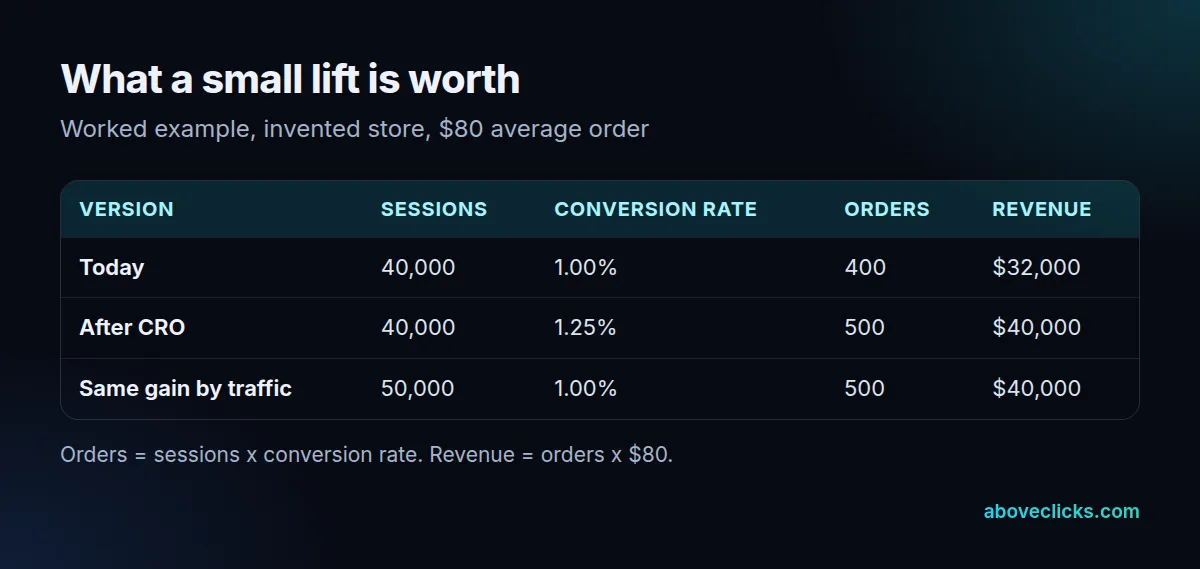
Lifting the rate to 1.25% gives 500 orders and $40,000, which is $8,000 more a month. To get the same 500 orders with no change in rate, the store would need 50,000 sessions, so 10,000 extra visits from ads or search. Those visits cost money; the lift does not.
This is an invented store with round numbers, not a result and not a forecast. A real lift can be zero, or negative. The example shows why a small change in rate can be worth more than it looks.
For a Shopify, WooCommerce or BigCommerce store, CRO in ecommerce usually starts at the product page, because that is where most visitors decide. Then it moves to the cart and checkout, where a single extra form field can lose people who already wanted to buy.
Our conversion rate optimization service and the Shopify-specific Shopify CRO page cover how we scope this work for stores.
How does CRO work?
CRO works as a loop of five steps: measure, find the drop-off, pick one fix, ship or test it, then record the result and start again.
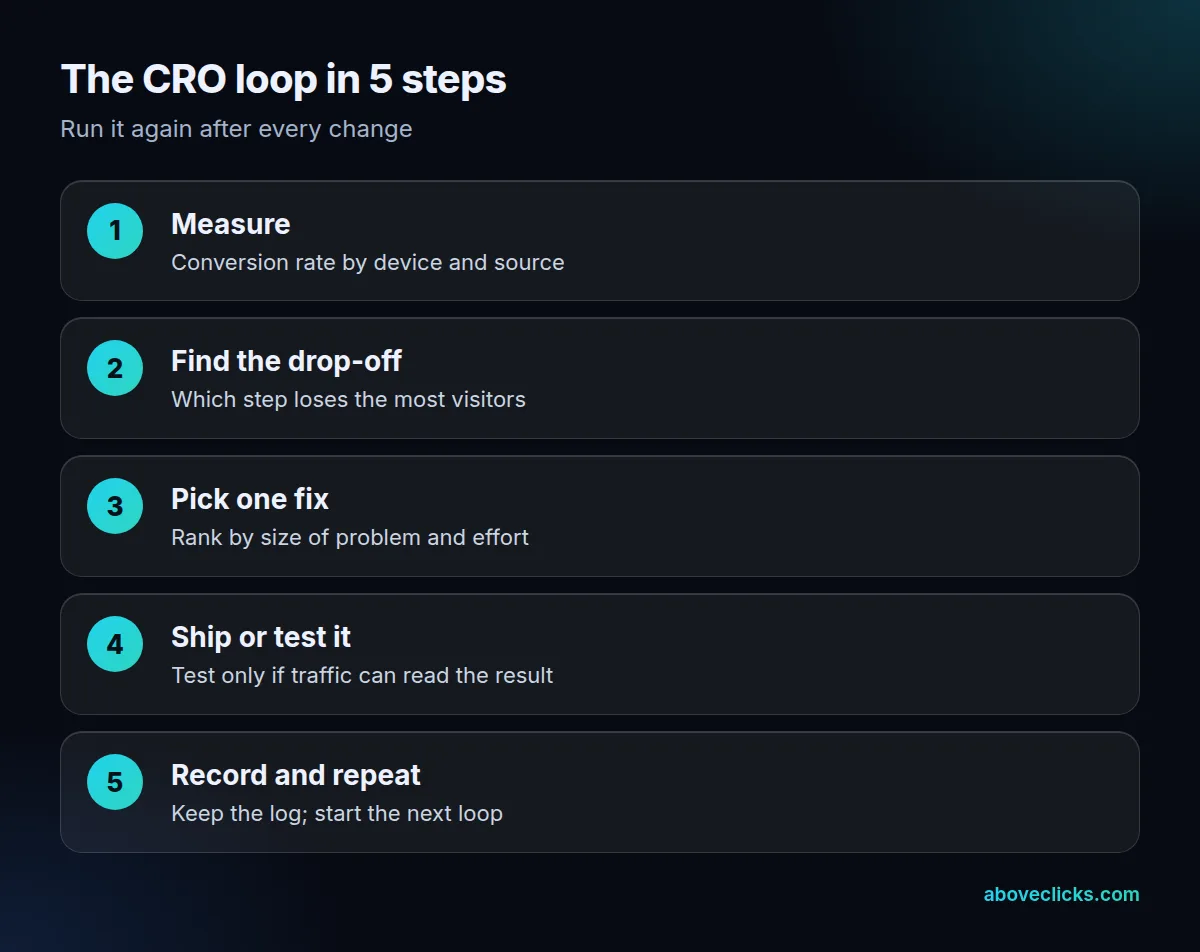
Most CRO marketing advice stops at “run more tests”. In practice the first two steps decide whether the rest is worth doing, because a test on the wrong page is wasted weeks. Each step has a job:
- Measure the conversion rate by device and by traffic source. A blended rate hides a weak mobile checkout.
- Find the drop-off. Compare how many visitors reach the product page, the cart and the payment step.
- Pick one fix. Rank candidates by the size of the problem and the effort to fix it.
- Ship or test it. Obvious faults, such as a broken button, need a fix and no test.
- Record the result. Write the date, the change and what happened, so nobody repeats a failed idea.
Speed belongs in step 3 more often than people expect. Google’s Core Web Vitals call a page good when its Largest Contentful Paint is within 2.5 seconds, Interaction to Next Paint is 200 milliseconds or less and Cumulative Layout Shift is 0.1 or less, measured at the 75th percentile. Our guide on how to improve conversion rate lists the common fixes in order.
How do you measure conversion rate in Google Analytics?
Mark your purchase as a key event, then read the session key event rate in your reports. Google lists it as the percentage of sessions in which a key event happened.
Two other measures help you read it:
- User key event rate: the share of users, not sessions, who performed a key event.
- Engagement rate: an engaged session lasts at least 10 seconds, has a key event, or has at least 2 page views, according to Google’s definition. Bounce rate is the opposite.
Check the metric against your store’s own order count before you trust it. If Analytics shows 380 orders and your store admin shows 400, find the gap first; any later test would be built on a wrong baseline. The session key event rate formula is in Google’s metrics reference, and our conversion rate entry covers the basics.
How is CRO different from SEO?
SEO brings more visitors from search; CRO turns more of the visitors you have into customers. They support each other, but they are measured by different numbers.
If you are weighing what is CRO against a search project, think of it as the other half of the same goal: SEO raises the number of visitors, and CRO marketing raises the value of each one. A store with strong rankings and a leaky checkout should usually start with conversion rate optimization.
SEO is judged on impressions, clicks and rankings. Conversion rate optimization is judged on the share of sessions that convert. A page can rank first and still convert poorly, and a page with a great conversion rate can have almost no traffic.
Testing does touch Search, so follow Google’s rules for A/B testing:
- Don’t show Googlebot a different page from the one users see (cloaking).
- Use
rel="canonical"on alternate test URLs, pointing at the original. - Use 302 redirects, not 301, when sending users to a variation.
- Run the test only as long as needed, then remove the test code.
The same page says small changes, such as button text or color, often have little or no effect on ranking. For how tests are run, see our A/B testing entry.
Is CRO worth it for a small store?
CRO in ecommerce pays off at any size, but the method changes. It depends on orders, not visitors. Fixing known problems pays at any size; formal A/B testing needs enough volume to read a result.
Our rule of thumb, not a sourced threshold, is by monthly orders:
- Under about 100 orders: fix obvious faults, tidy tracking and speed, and compare before and after. A test would take too long to finish.
- About 100 to 500 orders: test the larger changes, such as a new product page layout, one at a time.
- Over 500 orders: run a steady testing program with a results log.
Before you commit, put your own numbers into the A/B test significance calculator to see whether a test could finish in a few weeks. If it needs months, fix first.
What are the most common CRO mistakes?
These five misreads waste the most money, and each one comes from treating conversion rate optimization as something it is not:
- Treating it as a trick. A button color rarely fixes a weak offer or a slow page.
- Buying a tool first. A testing platform does not tell you what to test.
- Filing it under SEO. Rankings and conversion rate are different numbers with different owners.
- Equating it with A/B testing. Testing is one step of the loop; most early wins come from plain fixes.
- Expecting a promised lift. No honest agency can promise a specific percentage, and a test result can be flat or negative.
Keep a results log so that your CRO program learns from every change, and so that a failed idea teaches something. A flat result still tells you where not to spend the next month.
One more mistake is reading a test too early. A result after 3 days of traffic mostly reflects which weekdays were included, so wait for your tool to say the sample is large enough and for at least 14 days to pass. That way each version meets every weekday at least twice.
How do you start CRO?
Start with tracking and a baseline, then fix the biggest known problem. Do not buy a testing tool first.
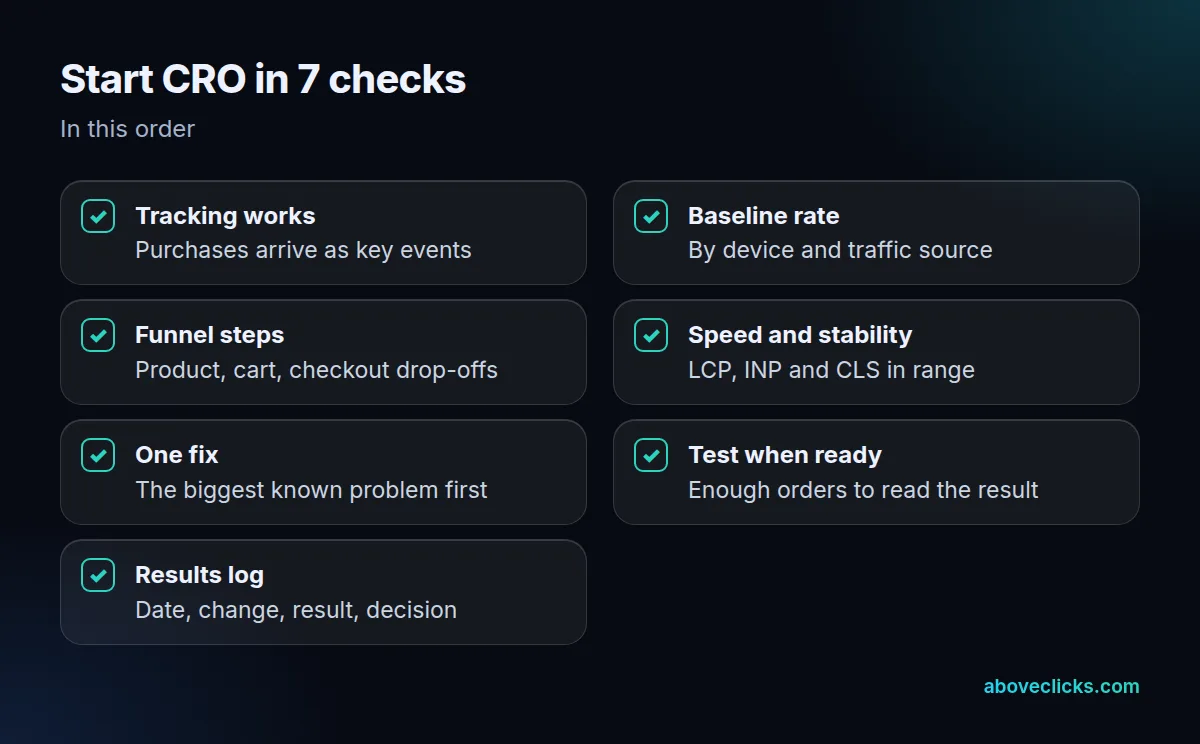
Work down the checklist above, and aim to ship the first fix within 30 days of your baseline reading. The first two items usually take the longest, because they decide whether every later number can be trusted. After that, one fix per loop keeps cause and effect clear. When the first fix is live, read the same metric over at least two full weeks of traffic before you judge it, so a weekend or a sale does not distort the comparison. Then write the result in your log and begin the next loop.
That is the practical answer to what is CRO: a habit of measuring, fixing and checking, repeated for as long as the store has a better next step to take.
If you would like a second pair of eyes on your store’s conversion path, our free audit reads your setup with read-only access and gives written findings. More guides on measuring results are in the measurement section.